Aside Browser 실전 자동화: 요금제 조사부터 청구서 수집과 미팅 준비까지
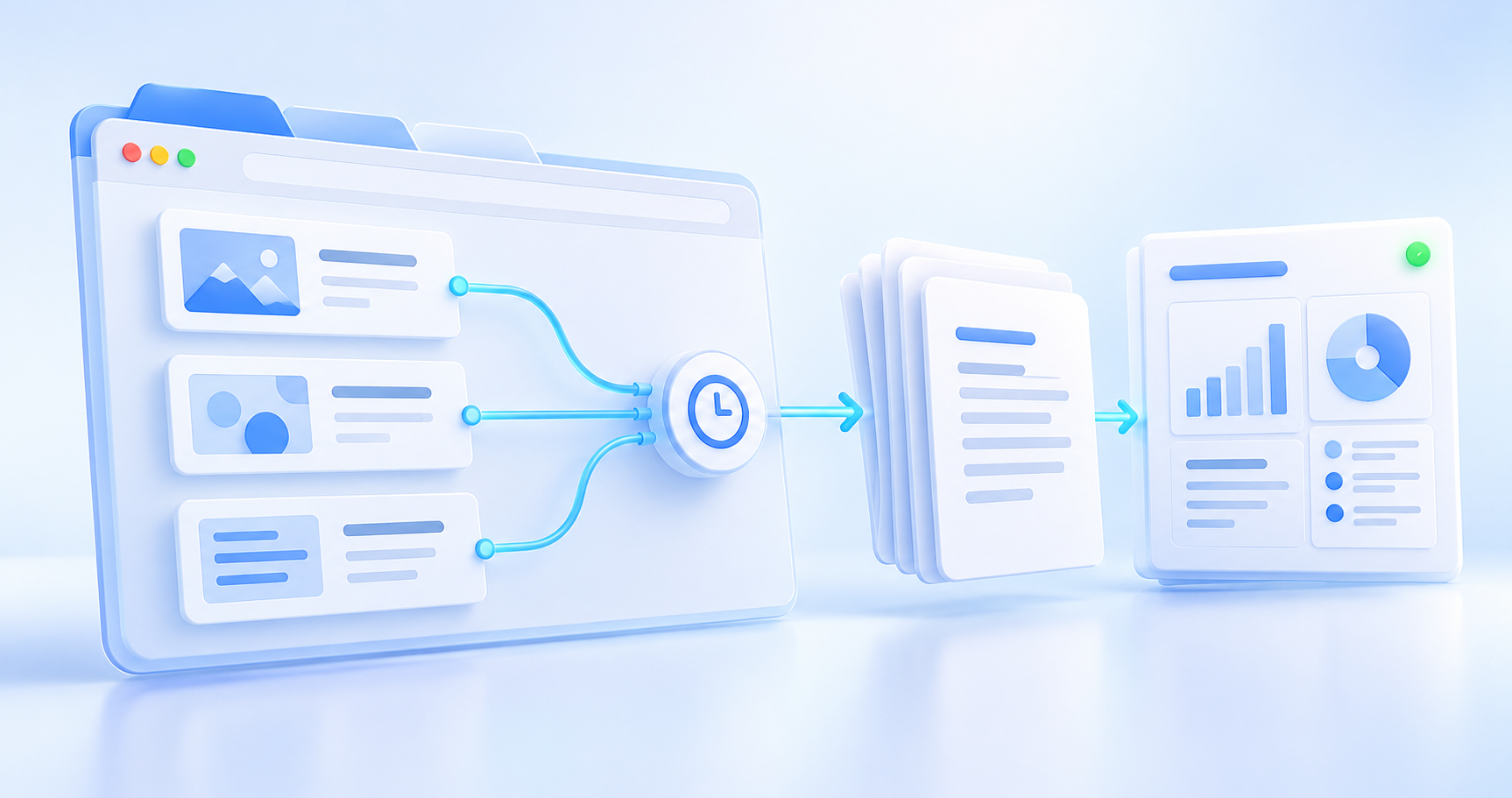
탭을 옮겨 다니며 요금제를 비교하고, 청구서를 내려받고, 미팅 자료를 정리하는 일은 많은 시간을 씁니다. Aside Browser는 이런 웹 작업을 자연어로 맡기는 AI 브라우저입니다. 중요한 것은 긴 요청 한 번보다 입력과 결과물을 정하고, 검증한 작업을 반복 실행하는 방식입니다.
Aside가 주목받을 만한 이유
Aside 공식 웹사이트는 로그인한 웹사이트 탐색과 파일 작업을 하나의 대화에서 연결하는 브라우저를 소개합니다. 모든 서비스에 별도 API 연동을 먼저 만드는 대신, 사람이 보는 페이지를 바탕으로 여러 단계를 이어 간다는 점이 매력적입니다. 다만 화면 변경, 로그인 만료, 사람의 인증은 여전히 작업을 끊을 수 있습니다.
공급사는 벤치마크 결과와 실행 기록을 공개합니다. 이는 살펴볼 근거이지 우리 회사 업무의 성공률이나 대규모 도입을 입증하는 자료는 아닙니다. 아래 세 실습도 공식 활용 제안에서 출발해 구성한 예제이며, 직접 측정한 고객 성과가 아닙니다. 개발자용 구조는 기존 Aside 입문 글에서 더 자세히 다룹니다.
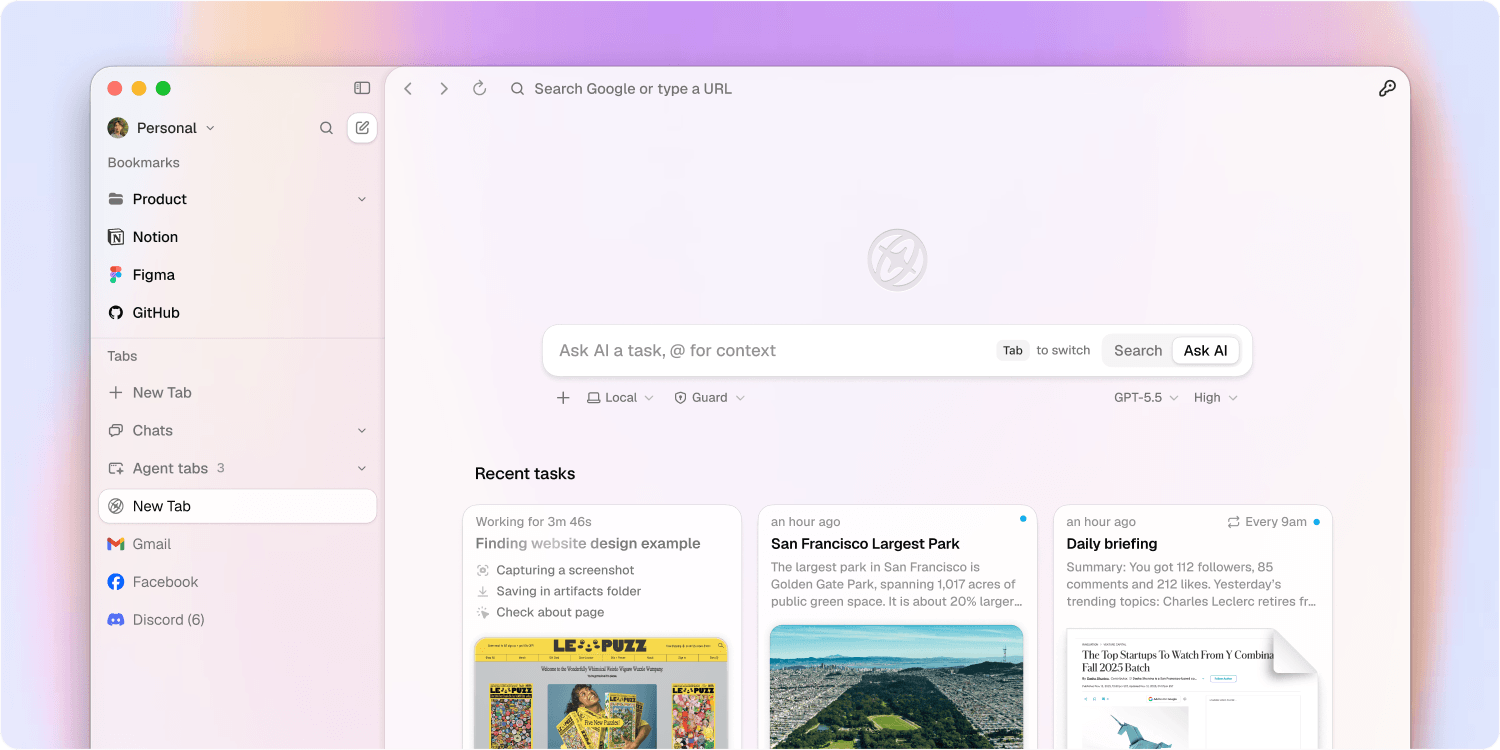 출처: Aside 공식 도움말의 제품 이미지. 실제 수행 결과가 아닌 공식 소개 화면이며 버전에 따라 달라질 수 있습니다. 이미지 크게 보기.
일반 작업, Ultrabrowse, Routine을 구분하기
| 방식 | 적합한 일 | 시작 기준 |
|---|---|---|
| 일반 작업 | 현재 페이지 확인, 몇 개 사이트에서 파일 수집 | 입력과 완료 조건이 명확한 일 |
| Ultrabrowse | 여러 출처 조사와 비교, 복잡한 계획 | 자료가 많고 교차 확인이 필요한 일 |
| Routine | 검증한 작업의 정기 실행이나 후속 확인 | 수동 실행이 먼저 성공한 일 |
Ultrabrowse 안내에 따르면 이용 가능한 계정에서 모델 선택기의 Reasoning으로 시작합니다. 단일 페이지 요약까지 항상 이 모드로 돌릴 이유는 없습니다. 정기 실행은 별도의 Routine 설정입니다. 더 깊게 조사하는 모드와 실행 시각을 정하는 기능을 구분해야 비용과 결과를 설명하기 쉽습니다.
첫 작업은 범위를 작게 잡는다
공식 다운로드는 macOS와 Windows를 안내합니다. 설치와 계정 준비는 시작 문서를 따르고, 첫 실습에 필요한 사이트만 로그인합니다. 여러 계정을 쓴다면 회사와 개인 프로필부터 구별합니다.
작업 문서에서 Default는 평소 프로필을 사용하고 Incognito는 그 상태를 사용하지 않습니다. 기존 로그인이 필요한 수집에는 올바른 Default 프로필을 확인합니다. 결과 폴더는 예를 들어 automation/pricing/처럼 한 곳으로 정합니다.
Read only는 문서상 파일을 변경하지 않고 맥락을 살피는 권한입니다. 이것만으로 모든 웹사이트 쓰기가 차단된다고 이해하면 안 됩니다. Guard에서는 허용된 폴더를 중심으로 작업하고 범위 밖 접근을 확인합니다. 웹 등록·전송 여부도 요청에 명시하고, 필요한 도구는 보안 설정의 Ask 또는 Deny로 조정합니다.
실습 1: 경쟁 서비스 요금제의 변경점 찾기
리서치 활용 안내는 출처와 근거를 남기는 반복 조사를 제안합니다. 처음에는 공개 요금제 세 곳만 선택합니다. 월 결제와 연 결제 환산액, 통화, 세금 포함 여부를 같은 열에 섞지 않는 것이 핵심입니다.
- 비교할 URL 세 개, 지역, 통화, 결제 주기를 지정합니다.
- 첫 실행은 기준 파일을 만듭니다. 다음 실행부터 이전 파일과 비교합니다.
- 가격뿐 아니라 좌석 수, 주요 제한, 관찰 날짜, 출처 URL을 남깁니다.
- 페이지를 읽지 못했거나 조건이 다르면 변경으로 단정하지 않고 확인 필요로 표시합니다.
지정한 공개 요금제 URL 세 개를 비교해 줘. 지역과 통화, 월 결제 기준을 먼저 확인하고 연간 약정 가격은 별도 열로 분리해. 관찰 시각, 요금제, 가격, 좌석 수, 주요 제한, 출처 URL을
pricing.csv로 저장해. 이전 파일이 있으면 변경 근거를changes.md에 정리하고, 불명확한 항목은 추측하지 말고 확인 필요로 남겨. 가입이나 결제는 진행하지 마.
완료 기준은 세 출처가 모두 기록되고, 확인 불가 항목도 빠짐없이 남는 것입니다. 첫 실행에는 비교할 과거 자료가 없으므로 변경 없음 대신 기준 수집이라고 적습니다. 예제 파일명은 운영 시 날짜별 폴더에 보관해 직전 결과를 덮어쓰지 않도록 합니다.
실습 2: 월별 청구서 수집과 누락 목록 만들기
운영 업무 안내는 청구서 수집과 예외 정리를 예로 듭니다. 자동화할 범위는 파일 내려받기와 목록 작성까지로 잡습니다. 결제나 비용 승인까지 한 요청에 섞으면 검증이 어려워집니다.
먼저 대상 업체 세 곳과 청구 월을 정하고, 수동으로 각 포털에 들어가 올바른 법인 계정인지 확인합니다. 이후 아래 요청으로 파일과 장부를 함께 만듭니다.
지정한 세 업체의
YYYY-MM청구서를 찾아automation/invoices/YYYY-MM/에 저장해. 파일명은vendor-YYYY-MM-invoice-id.pdf로 만들고, 업체·청구서 ID·발행일·통화·표시 금액·원본 URL·저장 경로를register.csv에 기록해. 같은 ID는 중복 저장하지 마. 미발행, 접근 실패, 인증 필요는exceptions.md에 이유와 함께 남겨. 결제, 계정 정보 수정, 외부 전송은 하지 마.
날짜가 다른 수정 청구서나 크레딧 문서를 임의로 삭제해서는 안 됩니다. 통화가 다른 금액도 바로 합산하지 않습니다. 검수할 때는 업체별 기대 문서 수와 저장된 문서·예외 수를 대조하고, PDF가 실제로 열리는지 표본 확인합니다. 여기까지 확인해야 단순한 다운로드 완료를 업무 완료로 볼 수 있습니다.
실습 3: 고객 미팅 준비 자료를 한 장으로 만들기
영업 활용 안내는 회사 웹사이트와 CRM, 기존 대화를 연결하는 준비 작업을 제안합니다. 회사 소개만 요약하기보다 이번 대화에서 확인할 질문을 만드는 편이 실용적입니다.
입력은 회사 공식 URL, 접근이 허용된 CRM 레코드 하나, 최근 미팅 노트로 제한합니다. 오래된 기록과 최신 웹사이트의 말이 다르면 어느 쪽이 사실인지 임의로 결정하지 않습니다.
지정한 회사와의 다음 미팅을 위해
meeting-brief.md를 작성해. 회사가 공개한 최근 사실, CRM에 기록된 요청, 이전 미팅의 미해결 질문을 출처와 날짜별로 정리해. 확인된 사실과 내 가설을 구분하고, 이번 미팅에서 확인할 질문 세 개를 제안해. 근거 없는 구매 의향이나 개인 평가를 만들지 마. CRM 수정이나 메시지 전송은 하지 말고 초안 파일만 저장해.
검수 기준은 사실마다 출처가 있는지, 내부 노트가 공개 정보처럼 쓰이지 않았는지, 질문이 실제로 답할 수 있는 형태인지입니다. 외부 공유본이 필요하면 내부 메모와 개인 정보를 뺀 별도 버전을 검토한 뒤 사용합니다.
성공한 작업을 Routine으로 바꾸기
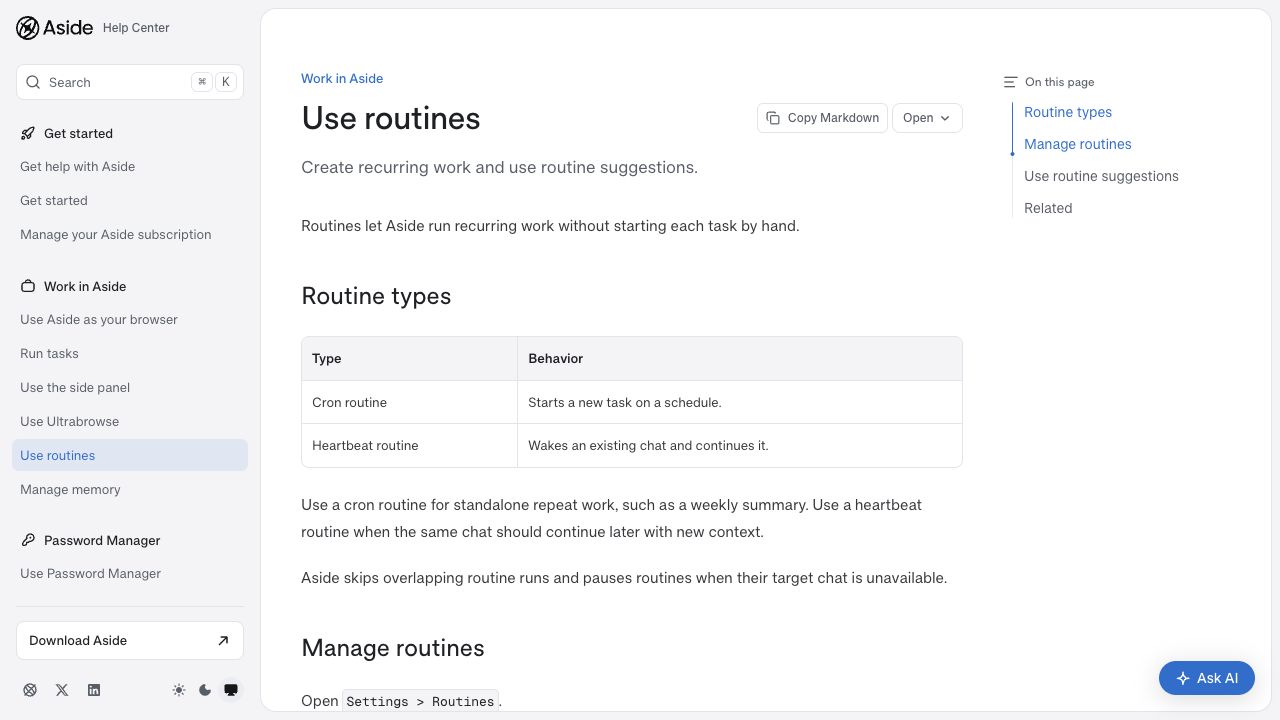 출처: Aside Routine 공식 문서 공개 페이지, 2026년 10월 22일 캡처. 이미지 크게 보기.
Routine 문서는 Cron을 일정에 따라 새 작업을 시작하는 방식, Heartbeat를 기존 대화를 깨워 이어 가는 방식으로 구분합니다. 매주 독립적인 요금제 보고서는 Cron, 진행 중인 대화의 후속 확인은 Heartbeat가 어울립니다.
Settings > Routines에서 지시문과 일정을 만들거나 편집합니다. 반복 요청에는 입력 URL, 결과 폴더, 완료 기준, 실패 시 남길 내용을 그대로 포함합니다. 예를 들어 월요일 오전 9시를 지정한 뒤 표시되는 시간대와 다음 실행 시각을 확인합니다. 초안 제안을 받았다면 검토 후 Activate해야 활성 루틴이 됩니다.
먼저 run now로 결과와 중복 처리를 확인하고 다음 예약 실행도 점검합니다. 첫 예약 시험은 앱을 열어 둔 상태에서 진행합니다. 절전·앱 종료 상황의 동작은 자신의 환경에서 확인하기 전까지 무인 실행의 전제로 삼지 않습니다. 공식 문서에는 실행 중복을 건너뛰고 대상 대화가 없으면 일시 중지하는 동작도 설명되어 있습니다.
멈춤과 비용을 운영의 일부로 다루기
문제 해결 문서를 기준으로 승인 대기, 답변 대기, 오류를 구분합니다. MFA나 사람의 인증이 필요하면 직접 처리한 뒤 이어 갑니다. 잘못된 계정이나 범위를 발견했을 때는 현재 작업에 반영되는 Steer와 실행 후 적용되는 Queue를 구별해 수정합니다.
요금제 안내에서 Free는 활성 Routine 세 개까지, Pro는 Ultrabrowse와 활성 Routine 수 제한 해제를 안내합니다. 루틴 수 제한 해제가 무제한 모델 사용량을 의미하지는 않습니다. Settings > Plan & Usage > Aside credits usage에서 작업별 소모를 보고 빈도와 조사 범위를 조정합니다.
또한 개인정보 처리방침의 로컬 우선 저장은 완전한 오프라인 처리를 뜻하지 않습니다. 호스팅 모델을 사용하면 요청에 필요한 프롬프트, 도구 결과, 페이지나 파일 내용 등이 모델 제공자에게 전달될 수 있습니다. 업무 자료를 넣기 전에 조직의 허용 범위를 확인합니다.
첫 주에는 작업 하나만 반복하면서 걸린 시간, 사람의 개입 횟수, 누락 수, 사용량을 기록해 보세요. 세 번 연속 검수 가능한 결과가 나오면 대상 사이트나 실행 빈도를 늘립니다. Aside의 가치는 요청 문장이 길어지는 데 있지 않고, 같은 기준으로 확인할 수 있는 결과물이 꾸준히 쌓이는 데 있습니다.
기능과 요금제 설명은 2026년 10월 22일 공개 문서를 기준으로 합니다. 예제 요청은 독자가 자신의 계정과 업무에 맞게 조정하는 실습용입니다.
Switching between tabs to compare plans, download invoices, and prepare meeting notes takes more time than it appears. Aside Browser lets you delegate these web tasks in natural language. The useful starting point is to define inputs and outputs, then repeat a workflow you have verified.
Why Aside deserves attention
The official Aside website presents a browser that connects navigation on signed-in websites with file work in one conversation. It can follow the pages people use without requiring a separate API integration for every service. Page changes, expired sessions, and human authentication can still interrupt a run.
The vendor publishes benchmark results and execution records. These are evidence to examine, not proof of success rates in your organization or widespread adoption. The three exercises below adapt official use-case suggestions; they are not customer outcomes we measured. For the developer architecture, see our earlier Aside introduction.
Source: product image from the official Aside help site. This is a vendor introduction screen, not the result of our own run; the interface may change. View full size.
Separate ordinary tasks, Ultrabrowse, and Routines
| Mode | Suitable work | Starting condition |
|---|---|---|
| Ordinary task | Inspect a page or gather files from a few sites | Clear inputs and completion criteria |
| Ultrabrowse | Research across sources, comparisons, complex planning | Many sources requiring cross-checks |
| Routine | Scheduled execution or follow-up of a verified workflow | A successful manual run first |
The Ultrabrowse guide says eligible accounts can start it through Reasoning in the model selector. A single-page summary does not always need this mode. Scheduling is a separate Routine setting. Distinguishing research depth from execution timing makes costs and results easier to explain.
Keep the first task small
The official download page offers macOS and Windows. Follow the getting-started guide for setup and sign in only to the sites needed for the first exercise. If you use several accounts, distinguish work and personal profiles first.
According to the task documentation, Default uses your normal profile while Incognito does not use that state. Confirm the right Default profile when collection depends on existing logins. Choose one output folder, such as automation/pricing/.
Read only is documented as inspecting context without changing files. Do not assume this blocks every website write. Guard works around approved folders and asks about access beyond that scope. State whether web submissions are permitted, and configure relevant tools as Ask or Deny in the security settings.
Exercise 1: Find changes in competing services' plans
The research use-case guide proposes repeatable research with sources and evidence. Start with three public pricing pages. Keep monthly billing, annual equivalents, currencies, and tax treatment in distinct fields.
- Specify three URLs, a region, a currency, and a billing interval.
- Create a baseline on the first run. Compare subsequent runs with the previous file.
- Record seats, key limits, observation date, and source URL as well as price.
- Mark unreadable pages or mismatched conditions for review instead of declaring a change.
Compare these three public pricing URLs. Check the region, currency, and monthly billing basis first, and put annual commitment prices in a separate column. Save the observation time, plan, price, seats, key limits, and source URL in
pricing.csv. If a previous file exists, document evidence of changes inchanges.md; mark unclear items for review instead of guessing. Do not sign up or make payments.
Completion means all three sources are accounted for, including unavailable fields. With no previous data, label the first run as baseline collection rather than no changes. In operation, keep the example filenames inside dated folders so they do not overwrite the previous results.
Exercise 2: Collect monthly invoices and list exceptions
The operations guide includes invoice collection and exception tracking. Limit the workflow to downloads and a register. Combining payment or expense approval with collection makes verification harder.
Choose three vendors and the billing month, then manually check that each portal uses the correct company account. Ask for both the files and their register.
Find invoices for
YYYY-MMfrom the three specified vendors and save them inautomation/invoices/YYYY-MM/. Usevendor-YYYY-MM-invoice-id.pdffor filenames. Record vendor, invoice ID, issue date, currency, displayed amount, original URL, and saved path inregister.csv. Do not save the same ID twice. Record unissued invoices, access failures, and authentication requests with reasons inexceptions.md. Do not pay, modify account details, or send anything externally.
Do not arbitrarily delete revised invoices or credit documents with different dates. Do not add amounts across currencies without conversion rules. Review expected document counts per vendor against saved documents and exceptions, and open a sample of PDFs. Only then does download completion become meaningful work completion.
Exercise 3: Prepare a one-page customer meeting brief
The sales guide suggests combining company websites, CRM records, and earlier conversations. Producing questions for the next meeting is more useful than merely summarizing a company profile.
Limit inputs to the official company URL, one authorized CRM record, and recent meeting notes. When old records conflict with the current website, do not arbitrarily choose which is true.
Write
meeting-brief.mdfor the next meeting with this company. Organize recent public facts, requests recorded in the CRM, and unresolved questions from earlier meetings by source and date. Separate confirmed facts from my hypotheses and suggest three questions to verify during the meeting. Do not invent buying intent or evaluations of individuals. Save a draft file only; do not edit the CRM or send messages.
Check that each fact has a source, internal notes are not presented as public information, and questions are answerable. If you need an external version, review a separate copy with internal notes and personal information removed.
Turn a successful task into a Routine
Source: public Aside Routine documentation, captured October 22, 2026. View full size.
The Routine documentation distinguishes Cron, which starts a new task on a schedule, from Heartbeat, which wakes an existing conversation. Cron fits independent weekly pricing reports; Heartbeat fits follow-up within an ongoing conversation.
Create or edit instructions and timing in Settings > Routines. Include the same input URLs, output folder, completion criteria, and failure reporting. For a Monday 9 a.m. schedule, check the displayed time zone and next run time. If you receive a draft suggestion, review it and choose Activate to make it active.
Use run now to check results and duplicate handling, then inspect the next scheduled execution. Keep the app open for the first scheduled trial. Do not assume unattended behavior during sleep or after quitting until you have checked your own environment. The documentation also describes skipping overlapping runs and pausing when the target conversation is unavailable.
Treat interruptions and cost as part of operating the workflow
Use the troubleshooting guide to distinguish approval waits, unanswered questions, and errors. Complete MFA or human authentication yourself before continuing. For a wrong account or scope, distinguish Steer, which corrects the current run, from Queue, which applies after the run.
The subscription guide lists up to three active Routines on Free, and Ultrabrowse plus unlimited active Routines on Pro. Unlimited routine count does not mean unlimited model usage. Review per-task consumption in Settings > Plan & Usage > Aside credits usage and adjust frequency and research scope.
Local-first storage in the privacy policy does not mean fully offline processing. Hosted models may receive prompts, tool results, page or file content, and other context needed for a request. Check your organization's permitted scope before providing work material.
During the first week, repeat one workflow and record time spent, human interventions, missing items, and usage. Expand sites or frequency after three consecutive reviewable runs. Aside becomes valuable when it consistently produces results you can check against the same criteria.
Features and plan descriptions reflect public documentation checked on October 22, 2026. The sample requests are exercises to adapt to your own accounts and work.
在标签页之间切换、比较套餐、下载账单和准备会议资料,往往比想象中更费时间。Aside Browser 让你用自然语言委派这些网页任务。实用的起点是明确输入与成果,再重复已经验证成功的流程。
Aside 为什么值得关注
Aside 官方网站介绍了一款能在同一段对话中连接已登录网站操作与文件工作的浏览器。它沿着人们使用的页面完成多步任务,不必先为每项服务建立单独的 API 集成。不过,页面变化、登录过期和人工身份验证仍可能中断执行。
供应商公开了基准测试结果与执行记录。这些值得研究,但不能证明它在你公司业务中的成功率或普及程度。以下三个练习依据官方场景建议设计,并非我们测得的客户成果。开发者架构可参阅之前的 Aside 入门文章。
来源:Aside 官方帮助网站的产品图片。这是官方介绍画面,并非我们执行任务的结果,界面可能随版本变化。查看大图。
区分普通任务、Ultrabrowse 与 Routine
| 方式 | 适合的工作 | 开始条件 |
|---|---|---|
| 普通任务 | 查看当前页面,从少数网站收集文件 | 输入和完成标准明确 |
| Ultrabrowse | 多来源调研、比较与复杂规划 | 资料较多,需要交叉核对 |
| Routine | 定期执行已验证流程或跟进 | 先成功手动执行一次 |
Ultrabrowse 指南说明,符合条件的账号可通过模型选择器中的 Reasoning 启动。单页摘要不一定需要这个模式。定时运行属于独立的 Routine 设置。把调研深度与运行时间分开,才能更清楚地说明成本与结果。
第一个任务应缩小范围
官方下载页面提供 macOS 和 Windows 版本。按照入门文档准备安装和账号,只登录第一个练习需要的网站。使用多个账号时,先分清工作与个人配置文件。
任务文档说明,Default 使用平常的配置文件,Incognito 不使用该状态。需要现有登录状态的收集任务,应确认正确的 Default 配置文件。把输出统一放在一个文件夹,例如 automation/pricing/。
文档中的 Read only 指在不修改文件的情况下查看上下文,不应理解为阻止一切网站写入。Guard 围绕批准的文件夹工作,并对范围外访问进行确认。请求中也应明确能否提交网页内容,并在安全设置中把相关工具设为 Ask 或 Deny。
练习一:发现竞争服务套餐的变化
调研场景指南建议开展保留来源与证据的重复调查。先选择三个公开价格页面,关键是不要把月付、年付折算、不同货币和含税条件混在同一字段里。
- 指定三个 URL、地区、货币和计费周期。
- 首次运行创建基线文件,后续运行再与上次结果比较。
- 除价格外,记录席位数、主要限制、观察日期与来源 URL。
- 无法读取或条件不同的项目标记为待核实,不直接认定发生变化。
比较指定的三个公开套餐 URL。先确认地区、货币和月付基准,把年度合约价格放在独立列中。将观察时间、套餐、价格、席位数、主要限制和来源 URL 保存为
pricing.csv。如有上次文件,在changes.md中记录变化证据;不明确的项目标记为待核实,不要猜测。不要注册或付款。
完成标准是三个来源都有记录,包括无法确认的字段。首次没有历史数据,应注明基线收集,而非没有变化。正式使用时,将示例文件名放在按日期命名的文件夹里,避免覆盖上次结果。
练习二:收集月度账单并列出缺项
运营指南把账单收集和异常整理作为应用示例。范围应先限定为下载文件和编制清单。把付款或费用审批混在一起,会增加核验难度。
先选定三个供应商与账单月份,再手动进入各门户,确认登录的是正确的公司账号。然后同时生成文件和登记表。
查找指定三个供应商的
YYYY-MM账单,保存到automation/invoices/YYYY-MM/。文件名使用vendor-YYYY-MM-invoice-id.pdf,并在register.csv中记录供应商、账单 ID、开具日期、货币、显示金额、原始 URL 和保存路径。不要重复保存相同 ID。尚未开具、访问失败、需要认证的情况及原因写入exceptions.md。不要付款、修改账号信息或对外发送。
不要擅自删除日期不同的修订账单或贷项文件,也不要直接加总不同货币的金额。检查时,按供应商对照预期文档数、已保存文档数与异常数,并抽样打开 PDF。经过这一步,下载完成才有资格被视为业务完成。
练习三:生成一页客户会议简报
销售指南建议将公司网站、CRM 和此前对话结合起来。相比只概括公司简介,为下一次会议准备核实问题更实用。
输入限定为公司官网 URL、一条获准访问的 CRM 记录和最近会议笔记。旧记录与当前网站矛盾时,不要自行决定哪一方为真。
为与指定公司的下一次会议编写
meeting-brief.md。按来源和日期整理公司近期公开事实、CRM 记录的需求、此前会议尚未解决的问题。区分已确认事实与我的假设,提出本次会议要核实的三个问题。不要编造购买意愿或个人评价。只保存草稿文件,不修改 CRM,也不发送消息。
核验重点是每条事实是否有来源、内部笔记是否被误写成公开信息、问题是否可以具体回答。需要对外版本时,先审查去除内部备忘和个人信息后的独立副本。
把成功任务转为 Routine
来源:Aside Routine 官方文档公开页面,截图日期为 2026 年 10 月 22 日。查看大图。
Routine 文档区分两种方式:Cron 按计划启动新任务,Heartbeat 唤醒已有对话并继续。独立的每周套餐报告适合 Cron,持续对话中的后续跟进适合 Heartbeat。
在 Settings > Routines 中创建或编辑指令与时间安排。保留输入 URL、结果文件夹、完成标准和失败报告要求。例如设置周一上午九点后,核对界面显示的时区和下一次执行时间。收到草稿建议时,审查后选择 Activate 才会成为活动例程。
先用 run now 检查结果与重复处理,再检查下一次预约执行。首次预约测试保持应用开启。在自己的环境中确认休眠和退出应用后的行为之前,不要据此假定可以无人值守。文档还说明,会跳过重叠运行,并在目标对话不可用时暂停。
将中断与成本纳入日常管理
依照故障排查文档区分等待批准、等待回答和错误。遇到 MFA 或人工验证,亲自完成后再继续。发现账号或范围错误时,要区分影响当前运行的 Steer 与运行后应用的 Queue。
订阅指南说明 Free 最多有三个活动 Routine,Pro 提供 Ultrabrowse 并取消活动 Routine 数量限制。数量不限不代表模型用量不限。在 Settings > Plan & Usage > Aside credits usage 查看每项任务消耗,再调整频率和调研范围。
隐私政策中的本地优先存储并不等于完全离线处理。使用托管模型时,请求所需的提示词、工具结果、页面或文件内容等可能传给模型供应商。输入工作资料前,应确认组织允许的范围。
第一周只重复一项流程,记录耗时、人工介入次数、缺项和用量。连续三次产出可检查的结果后,再增加网站或频率。Aside 的价值在于持续积累能用相同标准检验的成果。
功能与套餐说明以 2026 年 10 月 22 日的公开文档为准。示例请求用于练习,应根据自己的账号与工作调整。
タブを切り替えて料金を比較し、請求書をダウンロードし、会議資料をまとめる作業は意外に時間を使います。Aside Browserは、こうしたWeb作業を自然言語で任せるAIブラウザーです。まず入力と成果物を決め、確認できた手順を繰り返すことが実用化の出発点です。
Asideが注目に値する理由
Aside公式サイトは、ログイン済みのWebサイト操作とファイル作業を一つの会話でつなぐブラウザーを紹介しています。サービスごとにAPI連携を用意せず、人が見るページをたどって複数の手順を進められる点が魅力です。ただし、画面変更、ログイン切れ、人による認証で作業が止まることはあります。
提供元はベンチマーク結果と実行記録を公開しています。検討材料にはなりますが、自社業務の成功率や広範な導入を証明するものではありません。以下の三つの演習も公式の活用提案を基にした例で、実測した顧客成果ではありません。開発者向けの構造は以前のAside入門記事で説明しています。
出典:Aside公式ヘルプの製品画像。実行結果ではなく公式紹介画面で、バージョンによって変わる場合があります。拡大表示。
通常のタスク、Ultrabrowse、Routineを分ける
| 方法 | 適した作業 | 開始の条件 |
|---|---|---|
| 通常のタスク | ページ確認、少数サイトからのファイル収集 | 入力と完了条件が明確 |
| Ultrabrowse | 複数情報源の調査・比較、複雑な計画 | 資料が多く照合が必要 |
| Routine | 検証した手順の定期実行や継続確認 | 先に手動実行が成功している |
Ultrabrowseの案内では、利用可能なアカウントでモデル選択のReasoningから開始します。単一ページの要約まで常にこのモードを使う必要はありません。定期実行は別のRoutine設定です。調査の深さと実行時刻を区別すると、費用と結果を説明しやすくなります。
最初のタスクは小さく始める
公式ダウンロードはmacOSとWindowsを案内しています。開始ガイドに従って準備し、最初の演習に必要なサイトだけにログインします。複数アカウントがある場合は会社と個人のプロファイルを区別します。
タスク文書によると、Defaultは通常のプロファイルを使い、Incognitoはその状態を使いません。既存のログインが必要な収集では正しいDefaultプロファイルを確認します。出力先は automation/pricing/ など一つに決めます。
Read onlyは、ファイルを変更せずに文脈を調べる権限として説明されています。これだけですべてのWeb書き込みが禁止されるとは考えないでください。Guardは承認済みフォルダーを中心に動き、範囲外へのアクセスを確認します。Webでの登録・送信の可否も依頼に記し、必要なツールをセキュリティ設定でAskまたはDenyにします。
演習1:競合サービスの料金変更を見つける
調査の活用案内は、出典と根拠を残す継続調査を提案しています。最初は公開料金ページを三つ選びます。月払い、年払いの月額換算、通貨、税込み条件を同じ欄で混同しないことが重要です。
- 三つのURL、地域、通貨、請求周期を指定します。
- 初回は基準ファイルを作り、次回から前回の結果と比較します。
- 価格に加えて席数、主要な制限、観察日、出典URLを記録します。
- 読めないページや条件の違う項目は、変更と断定せず要確認にします。
指定した三つの公開料金URLを比較して。地域、通貨、月払いの基準を先に確認し、年間契約の価格は別の列に分けて。観察時刻、プラン、価格、席数、主要制限、出典URLを
pricing.csvに保存して。前回ファイルがあれば変更の根拠をchanges.mdにまとめ、不明な項目は推測せず要確認にして。登録や支払いは行わないで。
完了条件は、確認できなかった項目を含め三つの情報源がすべて記録されることです。初回には過去資料がないため、変更なしではなく基準収集と記します。運用時は例のファイル名を日付別フォルダーに保存し、直前の結果を上書きしないようにします。
演習2:月次請求書と不足一覧を集める
運営業務の案内では、請求書収集と例外整理を挙げています。まずダウンロードと一覧作成に範囲を絞ります。支払いや経費承認を同時に依頼すると検証が難しくなります。
対象の三社と請求月を決め、各ポータルで正しい法人アカウントか手動確認します。その後、ファイルと台帳を一緒に作成します。
指定した三社の
YYYY-MMの請求書を探し、automation/invoices/YYYY-MM/に保存して。ファイル名はvendor-YYYY-MM-invoice-id.pdfにし、会社、請求書ID、発行日、通貨、表示金額、元URL、保存先をregister.csvに記録して。同じIDは重複保存しないで。未発行、アクセス失敗、認証待ちは理由とともにexceptions.mdに残して。支払い、アカウント変更、外部送信はしないで。
日付の異なる修正請求書やクレジット文書を勝手に削除しないこと、異なる通貨の金額をそのまま合計しないことも大切です。会社ごとの予定件数を保存文書と例外の件数に照合し、PDFを抜き取りで開きます。ここまで確認して初めて、ダウンロード完了を業務完了として扱えます。
演習3:顧客との会議資料を一枚にまとめる
営業の活用案内は、会社サイト、CRM、過去の会話をつなぐ準備を提案しています。会社概要の要約だけより、次の会議で確認する質問を作る方が実用的です。
入力は公式URL、アクセスが許可されたCRMレコード一つ、最近の会議メモに限定します。古い記録と現在のサイトが食い違っても、どちらが正しいかを勝手に決めません。
指定した会社との次回会議に向けて
meeting-brief.mdを作成して。最近の公開事実、CRMに記録された要望、前回会議の未解決事項を出典と日付ごとに整理して。確認済みの事実と私の仮説を分け、会議で確認する質問を三つ提案して。根拠のない購入意向や個人評価は作らないで。CRMの編集やメッセージ送信はせず、草案ファイルだけ保存して。
各事実に出典があるか、内部メモを公開情報のように扱っていないか、具体的に答えられる質問かを確認します。外部共有する場合は、内部メモと個人情報を除いた別版を確認して使います。
成功したタスクをRoutineにする
出典:Aside Routine公式文書の公開ページ。2026年10月22日撮影。拡大表示。
Routine文書では、Cronは予定時刻に新しいタスクを始め、Heartbeatは既存の会話を起こして続けます。独立した週次料金レポートにはCron、進行中の会話の継続確認にはHeartbeatが適しています。
Settings > Routines で指示と予定を作成・編集します。入力URL、出力先、完了条件、失敗時の報告も引き継ぎます。月曜午前9時なら、表示されるタイムゾーンと次回実行時刻を確認します。提案された草案は確認してActivateを選ぶと有効になります。
まずrun nowで結果と重複処理を確認し、次の予約実行も点検します。初回の予約試験ではアプリを開いておきます。スリープや終了時の動作は自分の環境で確かめるまで無人運用の前提にしません。公式文書は実行の重複をスキップし、対象の会話が利用できない場合に一時停止する動作も説明しています。
中断と費用も運用に含める
トラブルシューティングを基に、承認待ち、回答待ち、エラーを区別します。MFAや人による認証は自分で処理して再開します。アカウントや範囲の誤りを修正する際は、実行中に反映するSteerと実行後に適用するQueueを区別します。
プラン案内では、Freeは有効なRoutineが三つまで、ProはUltrabrowseと有効Routine数の制限解除を提供します。数の制限解除はモデル使用量の無制限を意味しません。Settings > Plan & Usage > Aside credits usage でタスク別の消費を確認し、頻度と調査範囲を調整します。
プライバシーポリシーのローカル優先保存は、完全なオフライン処理を意味しません。ホスト型モデルには、依頼に必要なプロンプト、ツール結果、ページやファイルの内容などが渡る場合があります。業務資料を渡す前に組織の許容範囲を確認します。
最初の一週間は一つの作業だけを繰り返し、所要時間、人の介入回数、不足件数、使用量を記録します。三回続けて検証可能な成果が出たら、対象サイトや頻度を増やします。同じ基準で確認できる成果が安定して蓄積されることにAsideの価値があります。
機能とプランの説明は2026年10月22日時点の公開文書に基づきます。依頼例は各自のアカウントや業務に合わせて調整する演習用です。
Cambiar de pestaña para comparar planes, descargar facturas y preparar reuniones consume más tiempo del que parece. Aside Browser permite delegar estas tareas web mediante lenguaje natural. Conviene empezar por definir entradas y resultados, y después repetir un flujo que ya se haya verificado.
Por qué merece atención Aside
El sitio oficial de Aside presenta un navegador que conecta la navegación en sitios con sesión iniciada y el trabajo con archivos dentro de una conversación. Puede seguir las páginas que usan las personas sin preparar una integración API para cada servicio. Los cambios de interfaz, las sesiones caducadas y la autenticación humana todavía pueden interrumpirlo.
El proveedor publica resultados de pruebas y registros de ejecución. Sirven para evaluar el producto, pero no demuestran su tasa de éxito en tu empresa ni una adopción masiva. Los tres ejercicios siguientes adaptan propuestas oficiales; no son resultados de clientes medidos por nosotros. La arquitectura para desarrolladores se explica en la introducción anterior a Aside.
Fuente: imagen del producto en la ayuda oficial de Aside. Es una presentación del proveedor, no el resultado de una ejecución nuestra; la interfaz puede cambiar. Ver a tamaño completo.
Distinguir tareas normales, Ultrabrowse y Routines
| Modalidad | Trabajo adecuado | Condición inicial |
|---|---|---|
| Tarea normal | Consultar una página o reunir archivos de unos pocos sitios | Entradas y criterios de finalización claros |
| Ultrabrowse | Investigación con varias fuentes, comparación y planificación compleja | Muchas fuentes que requieren contraste |
| Routine | Ejecución periódica o seguimiento de un flujo verificado | Una ejecución manual correcta primero |
La guía de Ultrabrowse indica que las cuentas compatibles pueden iniciarlo mediante Reasoning en el selector de modelos. Resumir una sola página no siempre requiere este modo. La programación corresponde a una configuración independiente de Routine. Separar la profundidad de investigación del momento de ejecución facilita explicar los costes y resultados.
Empezar con un alcance reducido
La descarga oficial ofrece macOS y Windows. Sigue la guía de inicio para preparar la aplicación y la cuenta, e inicia sesión solo en los sitios del primer ejercicio. Si manejas varias cuentas, distingue primero los perfiles personal y laboral.
Según la documentación de tareas, Default utiliza tu perfil habitual e Incognito no utiliza ese estado. Comprueba el perfil Default correcto cuando necesites sesiones existentes. Elige una única carpeta de resultados, como automation/pricing/.
Read only se describe como inspección del contexto sin modificar archivos. No implica que bloquee cualquier escritura en sitios web. Guard trabaja con carpetas aprobadas y consulta los accesos fuera de ese alcance. Especifica también si se permiten envíos web y configura las herramientas pertinentes como Ask o Deny en los ajustes de seguridad.
Ejercicio 1: Detectar cambios en planes de servicios competidores
La guía de investigación propone investigaciones repetibles que conservan fuentes y pruebas. Empieza por tres páginas públicas de precios. Separa facturación mensual, equivalentes anuales, monedas e impuestos en campos distintos.
- Indica tres URL, una región, una moneda y un periodo de facturación.
- Crea una referencia en la primera ejecución y compara las posteriores con el archivo anterior.
- Registra puestos, límites principales, fecha de observación y URL, además del precio.
- Marca páginas inaccesibles o condiciones diferentes para revisión, sin afirmar que hubo un cambio.
Compara estas tres URL públicas de precios. Comprueba primero región, moneda y facturación mensual; separa los precios con compromiso anual en otra columna. Guarda hora de observación, plan, precio, puestos, límites principales y URL de origen en
pricing.csv. Si existe un archivo anterior, documenta las pruebas de cambios enchanges.md. Marca lo ambiguo para revisión, sin adivinar. No te registres ni realices pagos.
La tarea termina cuando figuran las tres fuentes, incluidos los campos que no se pudieron comprobar. Sin datos anteriores, identifica la primera ejecución como recopilación de referencia, no como ausencia de cambios. En uso real, conserva los nombres de ejemplo en carpetas fechadas para no sobrescribir los resultados previos.
Ejercicio 2: Recopilar facturas mensuales y registrar excepciones
La guía de operaciones incluye recopilación de facturas y seguimiento de excepciones. Limita el flujo a descargar archivos y elaborar un registro. Añadir pagos o aprobaciones de gastos dificulta la verificación.
Selecciona tres proveedores y el mes, y comprueba manualmente que cada portal utiliza la cuenta empresarial correcta. Después solicita los archivos y su registro juntos.
Busca las facturas de
YYYY-MMde los tres proveedores indicados y guárdalas enautomation/invoices/YYYY-MM/. Usa el nombrevendor-YYYY-MM-invoice-id.pdf. Registra proveedor, ID de factura, fecha de emisión, moneda, importe mostrado, URL original y ruta local enregister.csv. No guardes dos veces el mismo ID. Anota facturas pendientes de emisión, fallos de acceso y autenticación necesaria, con sus motivos, enexceptions.md. No pagues, modifiques cuentas ni envíes nada fuera.
No elimines arbitrariamente facturas rectificadas o documentos de abono con fechas diferentes. Tampoco sumes importes de monedas distintas sin reglas de conversión. Contrasta los documentos esperados por proveedor con los guardados y las excepciones, y abre una muestra de PDF. Solo entonces la descarga terminada equivale a trabajo comprobado.
Ejercicio 3: Preparar una ficha de reunión con un cliente
La guía de ventas propone combinar el sitio empresarial, el CRM y conversaciones anteriores. Preparar preguntas para la próxima reunión resulta más práctico que resumir únicamente la presentación de la empresa.
Limita las entradas al sitio oficial, un registro del CRM autorizado y notas recientes. Si un registro antiguo contradice la web actual, no elijas arbitrariamente cuál es cierto.
Redacta
meeting-brief.mdpara la próxima reunión con esta empresa. Organiza hechos públicos recientes, solicitudes registradas en el CRM y preguntas pendientes de reuniones anteriores por fuente y fecha. Distingue hechos confirmados de mis hipótesis y propón tres preguntas para verificar en la reunión. No inventes intención de compra ni valoraciones personales. Guarda solo un borrador; no edites el CRM ni envíes mensajes.
Comprueba que cada hecho tenga fuente, que las notas internas no aparezcan como información pública y que las preguntas puedan contestarse concretamente. Si necesitas compartirlo fuera, revisa otra versión sin notas internas ni datos personales.
Convertir una tarea correcta en Routine
Fuente: página pública de la documentación de Routines de Aside, capturada el 22 de octubre de 2026. Ver a tamaño completo.
La documentación de Routines distingue Cron, que inicia una tarea nueva según un horario, de Heartbeat, que reactiva una conversación existente. Cron encaja con informes semanales independientes; Heartbeat, con el seguimiento de una conversación en curso.
Crea o modifica instrucciones y horarios en Settings > Routines. Conserva URL de entrada, carpeta de salida, criterios de finalización y notificación de fallos. Si eliges el lunes a las nueve, verifica la zona horaria y la próxima ejecución mostradas. Las sugerencias en borrador requieren revisión y Activate para convertirse en rutinas activas.
Prueba run now para comprobar resultados y duplicados; después revisa la primera ejecución programada. Mantén la aplicación abierta durante esa prueba. No presupongas funcionamiento desatendido durante la suspensión o tras cerrar la aplicación sin comprobar tu entorno. La documentación también explica que se omiten ejecuciones solapadas y se pausa la rutina si la conversación objetivo no está disponible.
Incorporar interrupciones y costes a la operación
Utiliza la guía de solución de problemas para distinguir espera de aprobación, preguntas pendientes y errores. Completa personalmente el MFA o la autenticación humana antes de continuar. Si detectas una cuenta o un alcance incorrectos, distingue Steer, que corrige la ejecución actual, de Queue, que se aplica después.
La guía de suscripciones indica hasta tres Routines activas en Free, y Ultrabrowse más Routines activas ilimitadas en Pro. Un número ilimitado de rutinas no significa uso ilimitado del modelo. Revisa el consumo por tarea en Settings > Plan & Usage > Aside credits usage y ajusta frecuencia y alcance.
El almacenamiento local prioritario de la política de privacidad no implica procesamiento totalmente sin conexión. Los modelos alojados pueden recibir instrucciones, resultados de herramientas, contenido de páginas o archivos y otro contexto necesario. Comprueba las normas de tu organización antes de aportar material laboral.
Durante la primera semana, repite un solo flujo y registra tiempo, intervenciones humanas, elementos faltantes y consumo. Amplía sitios o frecuencia tras tres ejecuciones consecutivas verificables. Aside aporta valor cuando produce de forma constante resultados comprobables con los mismos criterios.
Las funciones y los planes se basan en documentación pública revisada el 22 de octubre de 2026. Las solicitudes de ejemplo son ejercicios que debes adaptar a tus cuentas y tareas.