직접 체험하는 인터랙티브 웹디자인 레퍼런스 6선
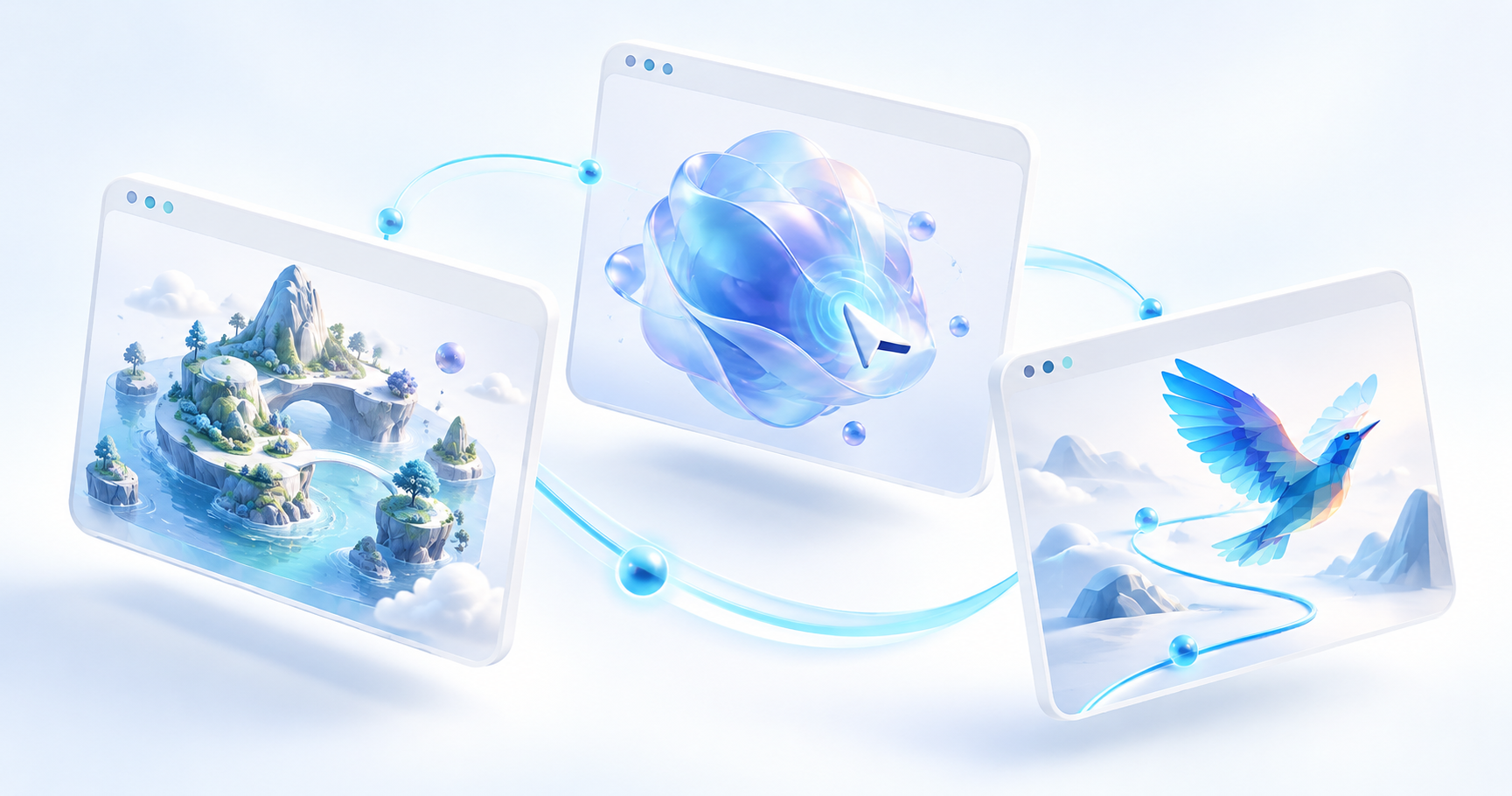
자동차를 몰아 포트폴리오를 탐색하고, 스크롤로 얼음집의 시점을 바꾸며, 작은 도형 조각으로 동물을 만나는 웹사이트가 있다. 시각 디자인과 인터랙션이 함께 기억에 남는 사이트 6곳을 골라, 직접 해 볼 조작과 내 프로젝트에 옮길 아이디어를 정리했다.
2026년 10월 29일 공개 사이트의 데스크톱 화면과 주요 조작을 확인해 선정했다. 최신 사이트와 오래된 명작을 함께 소개하는 디자인 레퍼런스 모음이다. 선정 기준은 시각적 개성, 입력에 대한 반응, 콘텐츠와 움직임의 연결, 다음 행동을 찾기 쉬운 정도다. 평가는 디자인 관찰이며 전환율·접근성·성능의 종합 순위는 아니다.
바이브코딩을 활용할 때도 이 사이트들의 구체적인 반응과 구성을 참고할 수 있다. 다만 확인한 공식 페이지와 제작 설명만으로는 각 사이트의 AI 코딩 활용 여부를 확정할 수 없어, 제작 방식은 미확인으로 둔다.
먼저 골라 보는 6가지 경험
| 사이트 | 눈에 띄는 디자인 | 먼저 해 볼 조작 |
|---|---|---|
| Bruno Simon | 자동차로 돌아다니는 3D 포트폴리오 | 시작 후 방향키로 이동 |
| Lusion | 푸른 3D 조형물과 큰 타이포그래피 | 첫 화면에서 아래로 스크롤 |
| Igloo Inc. | 설원과 얼음집으로 통일한 브랜드 장면 | 스크롤 전후 시점 비교 |
| Unseen Studio | 분홍빛 건축과 반사되는 수면 | 무음 입장 후 작업 보기 |
| In Pieces | 30개 조각으로 표현한 동물 전시 | 다음 동물로 전환 |
| The Boat | 먹빛 그림과 비·파도가 만드는 서사 | 시작 후 첫 장을 천천히 스크롤 |
큰 장면의 구성을 보려면 데스크톱에서 먼저 열어 보는 편이 좋다. 아래 캡처는 정지 화면이므로 움직임의 속도와 반응은 각 공식 사이트에서 직접 확인하자. 본문 이미지를 누르면 원본 크기로 볼 수 있다.
1. Bruno Simon — 포트폴리오를 운전하는 장소로 만들기
Bruno Simon의 포트폴리오는 작은 자동차를 직접 움직이며 탐색하는 3D 세계다. 보라색 조명, 나무, 건물, 입체 글자가 하나의 공간을 만든다. 개발자의 소개를 읽는 순간부터 그 개발자의 공간 구성과 인터랙션 실력을 체험하게 된다.
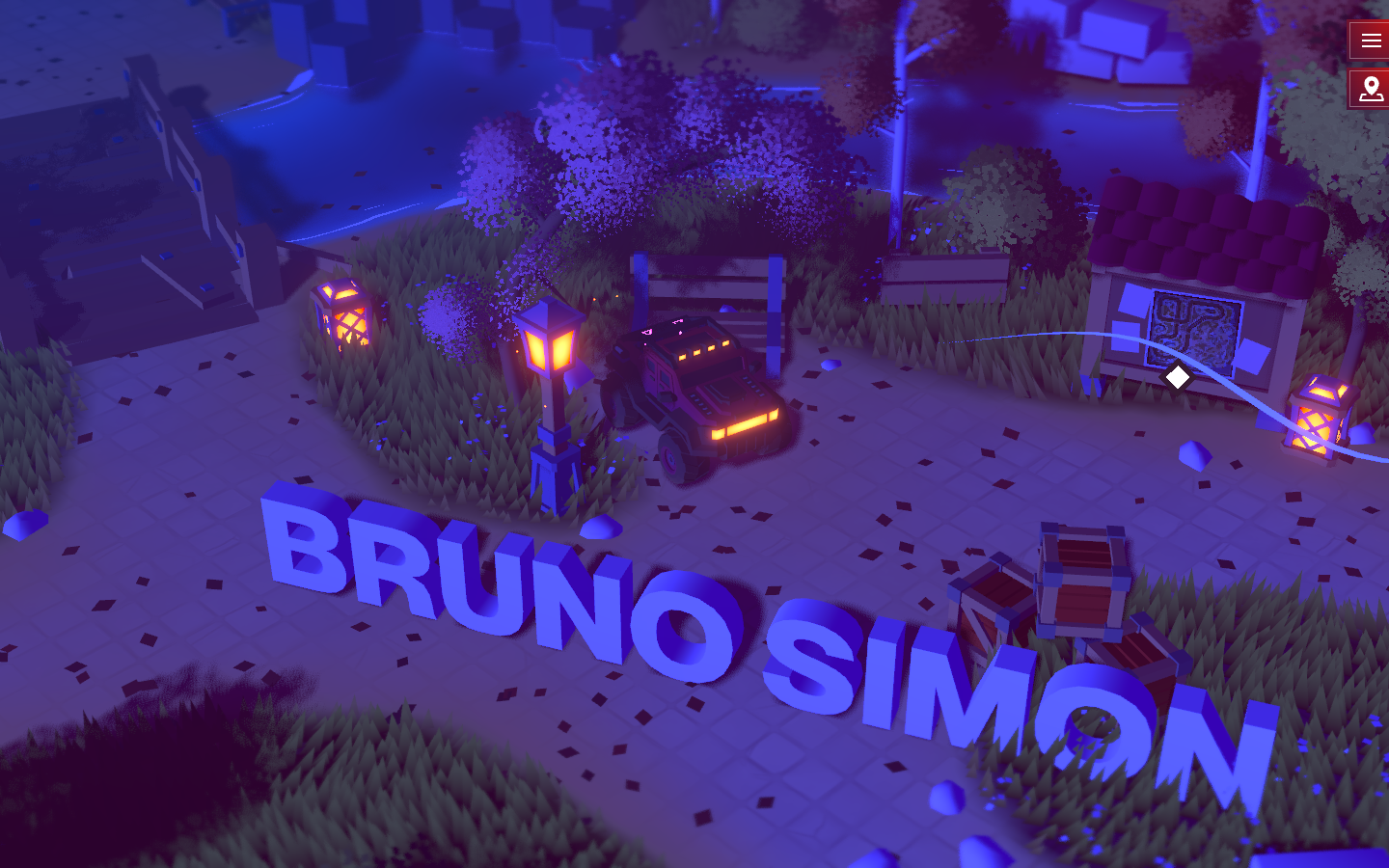
Bruno Simon 공식 포트폴리오에서 시작 후 이동해 본 공개 화면. (공식 사이트, 2026-10-29 캡처)
직접 해 보기: 시작 화면을 클릭하고 WASD 또는 방향키로 움직여 보자. 공식 조작 안내에는 M 지도, R 재배치도 나온다. 어디로 움직일 수 있는지, 차가 반응하는 방식과 길 안내가 어떻게 함께 작동하는지 관찰하면 좋다.
가져올 아이디어: 작품을 공간의 목적지로 배치하는 방식은 개발자 포트폴리오나 작은 온라인 전시에 잘 맞는다. 내 프로젝트에 적용한다면 작품 목록과 연락처로 바로 가는 경로도 함께 설계하자. 사이트 안 제작 노트는 Three.js 사용과 소스 공개를 안내하므로 구현 배경까지 살펴보기 좋다.
2. Lusion — 강한 첫 장면에서 실제 작업으로 이어지는 흐름
Lusion 공식 사이트의 현재 첫 화면에는 푸른색·검정·흰색의 입체 조형물이 크게 놓인다. 큰 소개 문장과 넓은 여백, 둥근 화면 영역이 복잡한 그래픽을 정돈한다. 스튜디오가 제공하는 시각적 경험을 입구에서 곧바로 보여 주는 구성이다.
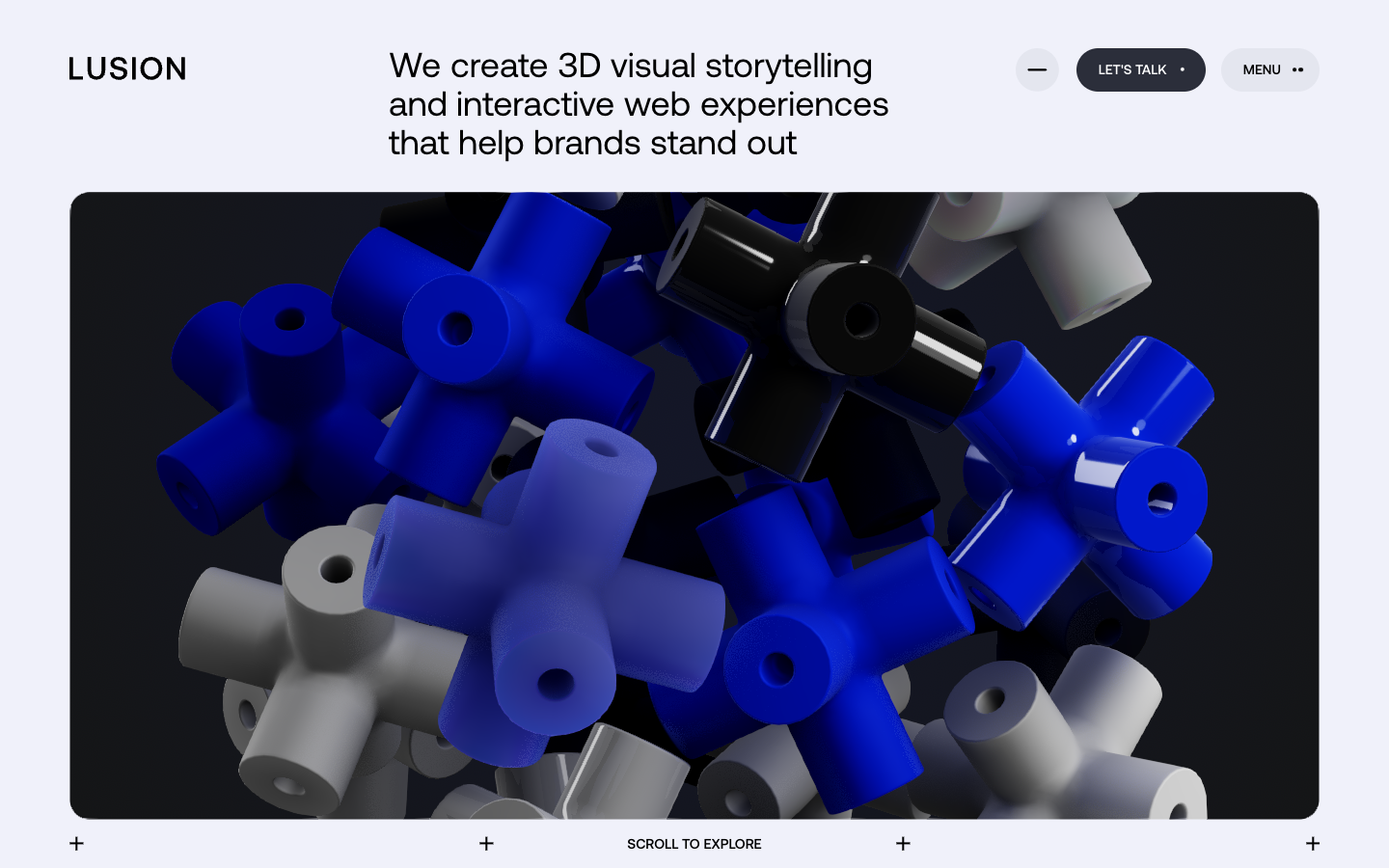
Lusion 공식 홈페이지의 공개 첫 화면. 큰 타이포그래피와 3D 장면의 비율을 볼 수 있다. (공식 사이트, 2026-10-29 캡처)
직접 해 보기: 아래로 스크롤하며 첫 장면에서 소개, 릴, 프로젝트 목록으로 시선이 넘어가는 순서를 보자. 상단의 메뉴와 문의 버튼이 강한 시각 요소 옆에서 얼마나 쉽게 발견되는지도 함께 살펴보면 좋다.
가져올 아이디어: 브랜드 랜딩 페이지에서 대표 장면 하나를 충분히 크게 쓰고, 바로 뒤에 실제 작업이나 제품 근거를 배치하는 방식이다. 화려한 장면과 설명의 밀도, 여백의 간격을 하나의 흐름으로 설계할 때 참고하기 좋다.
3. Igloo Inc. — 하나의 시각적 소재로 브랜드를 기억시키기
Igloo Inc. 공식 사이트는 회백색 설원 한가운데 놓인 얼음집으로 시작한다. 얼음 블록의 질감과 빛, 가느다란 선과 번호가 차갑고 실험적인 인상을 만든다. 화면 모서리의 짧은 문장과 중앙의 큰 조형물 사이에 분명한 크기 차이가 있다.
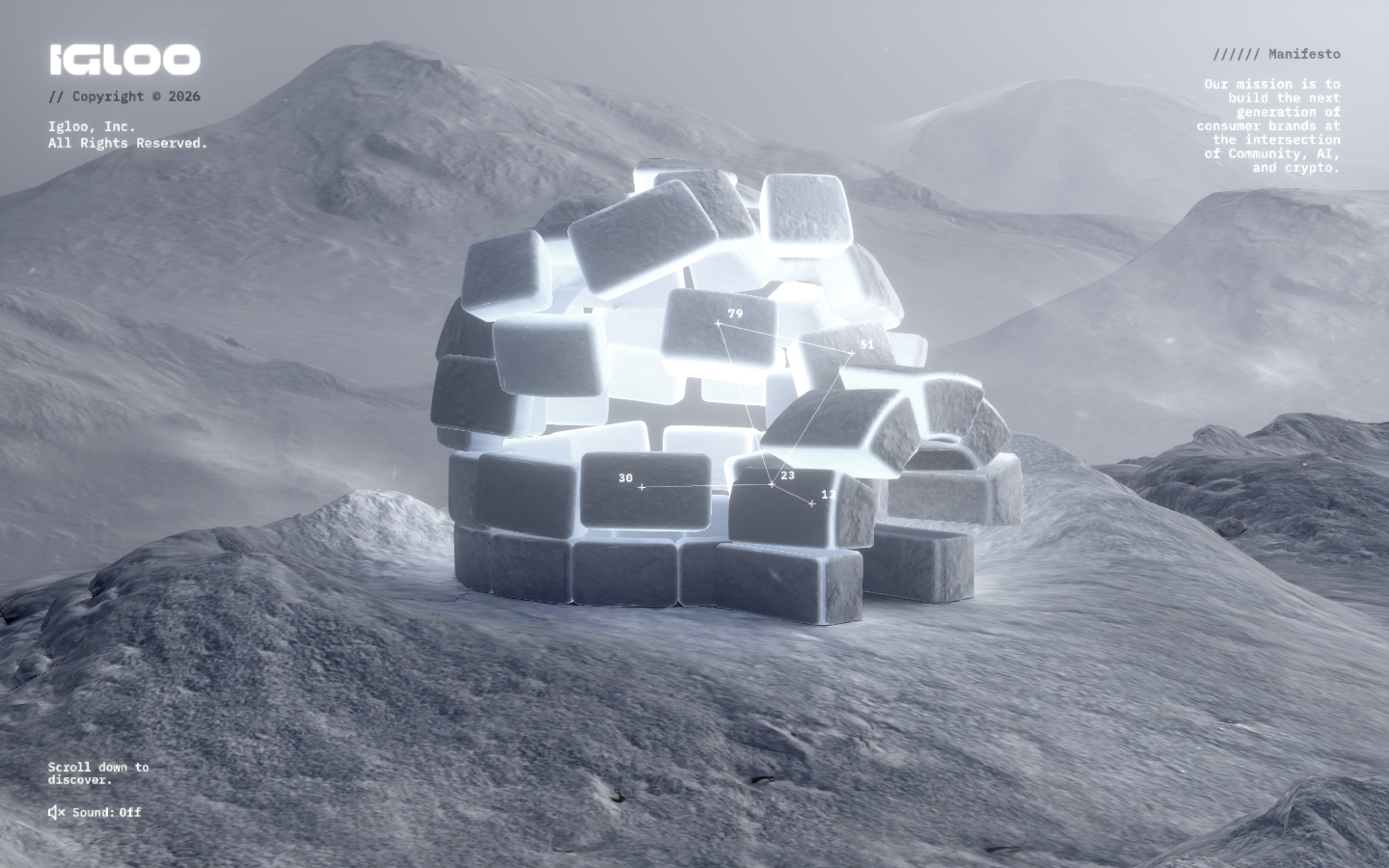
Igloo Inc. 공식 홈페이지의 공개 3D 장면. (공식 사이트, 2026-10-29 캡처)
직접 해 보기: 스크롤을 조금씩 내렸다가 되돌리며 얼음집을 바라보는 시점과 화면 구도가 어떻게 바뀌는지 비교하자. 먼저 중앙 조형물에 시선이 머무른 뒤 주변 문장으로 이동하는 순서도 관찰할 만하다.
가져올 아이디어: 브랜드를 대표하는 소재 하나와 제한된 색으로 전체 경험을 묶는 방식이다. 제품 공개나 브랜드 캠페인에 응용할 수 있다. 서비스 정보를 빨리 찾아야 하는 화면이라면, 이 장면과 함께 읽기 쉬운 정보 구역을 마련하는 편이 좋겠다.
4. Unseen Studio — 공간의 분위기와 명확한 다음 행동
Unseen Studio 공식 사이트의 현재 홈은 분홍빛 건축, 계단, 아치, 물에 비친 빛으로 구성된다. 세리프 글자와 굵은 산세리프 글자가 겹치며 부드러운 장면 안에 힘을 만든다. 중앙의 작업 보기 버튼과 상단 메뉴는 공간 속에서도 다음 행동을 알려 준다.
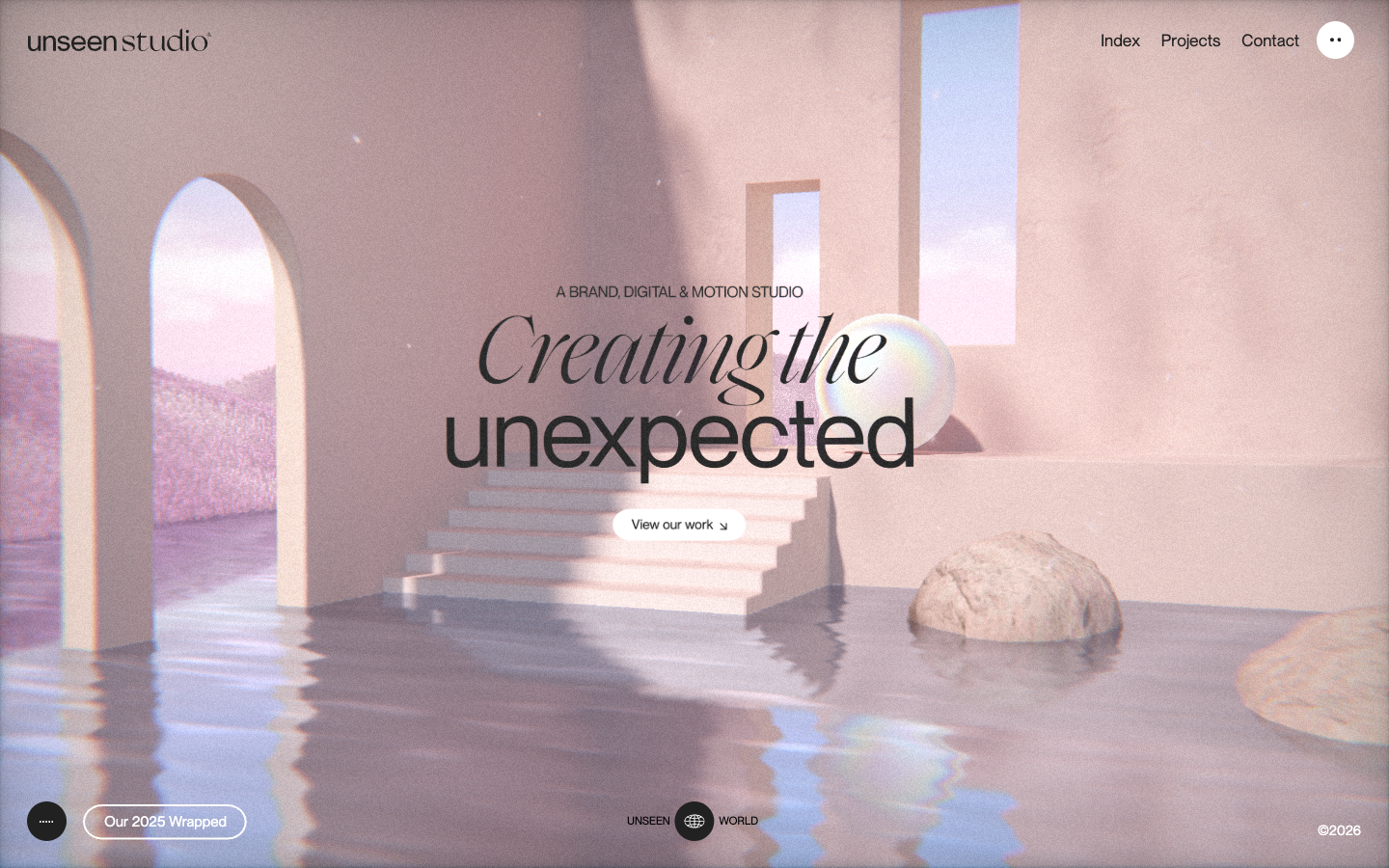
Unseen Studio 공식 홈페이지에서 무음 입장한 공개 화면. (공식 사이트, 2026-10-29 캡처)
직접 해 보기: 입구의 Enter without audio로 들어가 장면을 살펴보고 View our work로 이어지는 동선을 확인해 보자. 별도 Unseen World에는 드래그 탐색 안내가 있어 다른 표현 방식도 비교할 수 있다.
가져올 아이디어: 이미지의 분위기, 타이포그래피, 버튼의 위치를 함께 설계하는 방식이다. 공간의 인상이 중요한 디자인 스튜디오·건축·문화 브랜드에 잘 맞는다. 사운드를 선택할 수 있는 입장 방식도 참고할 만하다.
5. In Pieces — 반복되는 조각으로 만드는 강한 시각 언어
In Pieces 공식 사이트는 30개 종을 30개의 조각으로 표현한 CSS 기반 인터랙티브 전시다. 새에서 다른 동물로 넘어가며 도형의 배치와 배경색이 바뀐다. 화면의 규칙이 일정해 다른 대상을 탐색할 때도 하나의 전시를 보고 있다는 느낌이 이어진다.
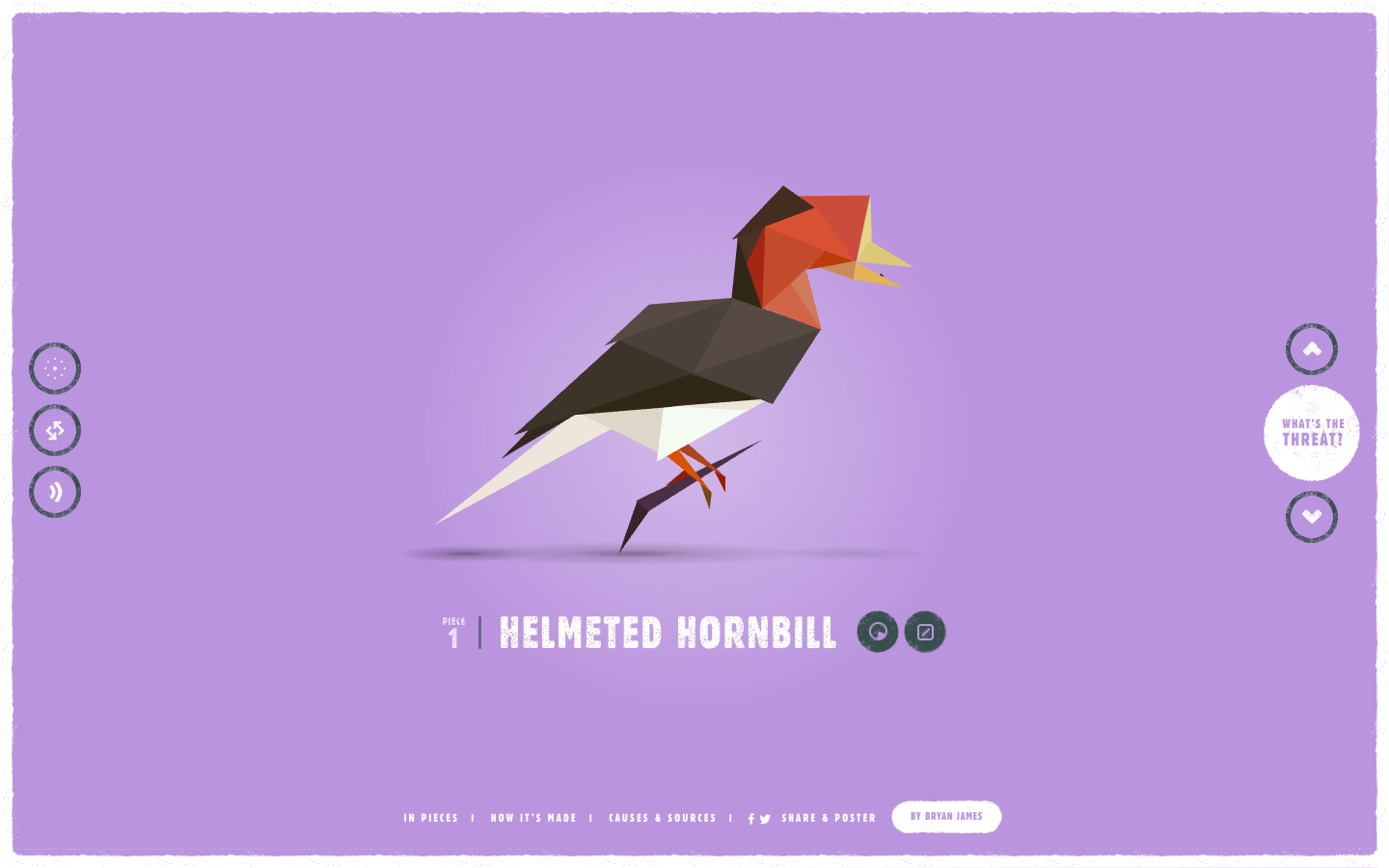
Bryan James의 In Pieces 공식 공개 전시에서 첫 동물을 본 화면. (공식 사이트, 2026-10-29 캡처)
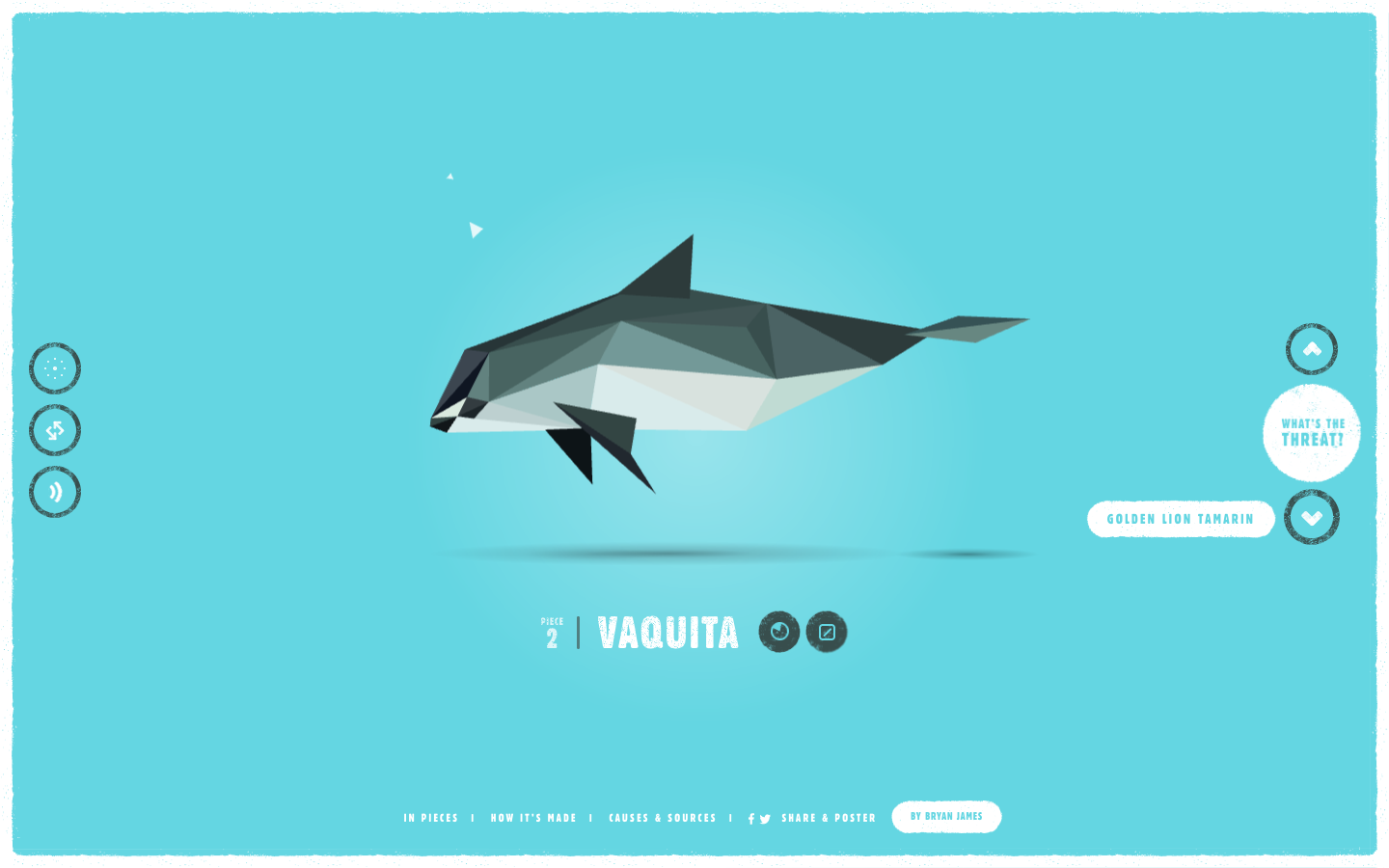
같은 공식 전시에서 다음 버튼을 누른 뒤의 화면. 도형 배치와 색 변화로 대상이 달라진다. (공식 사이트, 2026-10-29 캡처)
직접 해 보기: 인트로를 건너뛰고 전시로 들어가 다음 동물 버튼을 눌러 보자. 바뀌는 도형뿐 아니라 동물 이름, 정보 버튼, 배경색이 얼마나 일관되게 연결되는지 보는 것이 핵심이다.
가져올 아이디어: 한정된 형태를 반복하고 변형해 목록 전체의 정체성을 만드는 방식이다. 데이터 전시, 교육 콘텐츠, 제품 시리즈에 응용하기 좋다. EDGE의 당시 소개가 남아 있는 2015년 작품이며, 이번 확인에서는 HTTP 주소로 열렸다. 생물 보전 수치는 최신 자료와 별도로 확인하고, 여기서는 표현 방식에 주목하자.
6. The Boat — 스크롤에 이야기의 속도를 맡기기
SBS의 The Boat는 Nam Le의 단편을 Matt Huynh의 그림으로 옮긴 인터랙티브 그래픽 노블이다. 첫 장의 배, 거센 비, 기울어진 화면 구성은 읽기 시작하는 순간부터 긴장감을 만든다. 움직임과 음향을 결합한 제작 배경은 SBS의 공식 소개에서 확인할 수 있다.
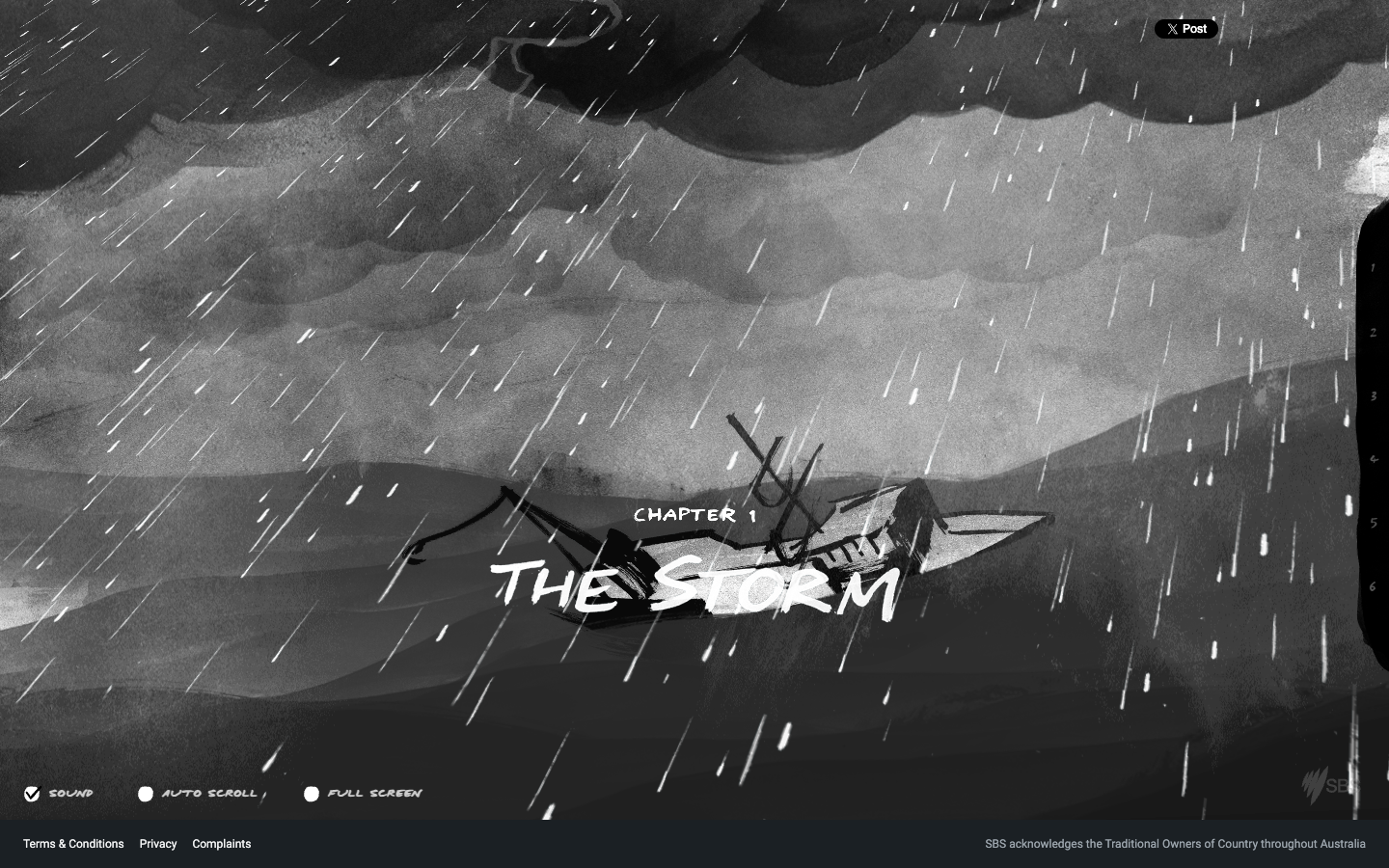
SBS 공식 The Boat 공개 페이지에서 시작 후 첫 장을 스크롤한 화면. (공식 사이트, 2026-10-29 캡처)
직접 해 보기: 시작 후 첫 장을 천천히 스크롤하자. 화면 아래의 사운드와 자동 스크롤 옵션도 확인해 보자. 그림이 먼저 보이는 순간과 글을 읽도록 머무는 순간 사이의 간격을 관찰하면 좋다.
가져올 아이디어: 웹 매거진, 전시 해설, 브랜드의 제작 이야기처럼 순서가 중요한 콘텐츠에 참고할 수 있다. 2015년 작품이지만, 장면의 강약과 읽는 리듬을 함께 설계하는 접근은 지금도 유용하다.
바이브코딩으로 옮길 때 구체화할 것
이 레퍼런스를 내 작업에 적용할 때는 입력 → 변화 → 도착 상태를 먼저 적어 보자. 예를 들어 스크롤이 시작되면 조형물이 회전하고, 소개 문장이 나타나면 회전을 멈추는 식이다. 이렇게 써 두면 구현 결과를 확인할 기준이 생긴다.
- 한 장면과 한 반응부터 정한다. 첫 화면의 역할, 사용자의 입력, 움직임이 끝난 상태를 기록한다.
- 내용과 길 찾기를 함께 만든다. 작품 목록, 설명, 문의 경로를 먼저 읽을 수 있게 구성하고 대표 인터랙션을 연결한다.
- 기기와 입력 방식을 바꿔 확인한다. 터치·키보드·작은 화면에서 같은 정보를 얻을 수 있는지, 모션 감소 설정에서 정지 화면이 성립하는지 살펴본다.
AI 코딩 도구에 전달할 초기 요청도 이런 식으로 구체화할 수 있다.
Create a portfolio with one memorable interactive hero.
Use a cobalt-and-ivory palette and original geometric forms.
Tie one transformation to scroll progress.
Keep the project list and contact link directly reachable.
Support touch and keyboard navigation.
For prefers-reduced-motion, show a static composition.
Define idle, active, and exit states before implementing the animation.
이 요청은 위 사이트들의 구조를 관찰해 작성한 연습용 예시다. 실제 작업에서는 자신의 콘텐츠와 시각 자산에 맞춰 한 장면씩 구현하고, 움직임이 정보를 이해하는 데 어떤 역할을 하는지 확인하자.
Some websites let you drive through a portfolio, change your view of an igloo by scrolling, or discover animals made from small geometric pieces. Here are six sites where visual design and interaction make a lasting impression, with actions to try and ideas to adapt to your own projects.
The selection follows checks of the public desktop sites and their main interactions on October 29, 2026. It combines current sites with older classics. The criteria are visual character, response to input, the connection between motion and content, and how easily visitors can find their next action. These are design observations, rather than a comprehensive ranking of conversion, accessibility, or performance.
Their specific responses and compositions can inform a vibe-coding workflow too. The official pages and production notes reviewed do not establish whether AI coding was used on each site, so that production detail remains unverified.
Six experiences to choose from
| Website | Distinctive design | First interaction to try |
|---|---|---|
| Bruno Simon | A 3D portfolio explored by car | Start and move with the arrow keys |
| Lusion | Blue 3D sculptures and large typography | Scroll down from the opening screen |
| Igloo Inc. | A brand scene built around snow and an igloo | Compare the view before and after scrolling |
| Unseen Studio | Pink architecture and reflective water | Enter without audio, then view the work |
| In Pieces | An animal exhibition made from 30 pieces | Switch to the next animal |
| The Boat | An illustrated narrative of ink, rain, and waves | Start and slowly scroll through the first chapter |
A desktop is a useful starting point for studying the large compositions. The captures below are still images; visit each official site to inspect timing and response. Select an article image to open it at full size.
1. Bruno Simon — Make a portfolio a place to drive through
Bruno Simon’s portfolio is a 3D world navigated in a small car. Purple lighting, trees, buildings, and dimensional lettering form a coherent space. Exploring the developer’s introduction also becomes a demonstration of his spatial and interaction design skills.
Public screen captured after starting and moving through Bruno Simon’s official portfolio. (Official website, captured 2026-10-29)
Try it: Select the start screen, then move with WASD or the arrow keys. The official controls also list M for the map and R to respawn. Observe how the routes, car feedback, and navigation cues work together.
What to adapt: Making projects destinations within a space suits a developer portfolio or small online exhibition. In your own project, also design a direct route to the project list and contact details. The site’s production notes identify Three.js and link to its source code, providing a way to investigate the implementation as well.
2. Lusion — Connect a striking opening to actual work
The current opening of Lusion’s official website features large blue, black, and white 3D forms. An oversized introduction, generous space, and a rounded visual area bring order to the complex graphics. The entrance immediately demonstrates the kind of visual experience the studio offers.
Public opening screen of Lusion’s official homepage, showing the proportions of the typography and 3D scene. (Official website, captured 2026-10-29)
Try it: Scroll down and follow the sequence from the opening to the introduction, reel, and project list. Consider how readily you can find the menu and contact button beside the strong visual elements.
What to adapt: Give one representative scene enough room on a brand landing page, then follow it with real projects or product evidence. This is a useful reference for designing visual intensity, explanatory density, and spacing as one continuous sequence.
3. Igloo Inc. — Make a brand memorable through one visual material
Igloo Inc.’s official website opens with an igloo in a gray-white snowscape. Ice-block textures, light, fine lines, and numbers create a cold, experimental character. Short statements at the edges contrast in scale with the large central sculpture.
Public 3D scene from Igloo Inc.’s official homepage. (Official website, captured 2026-10-29)
Try it: Scroll down in small increments, then reverse direction to compare changes in viewpoint and composition. Notice how your attention settles on the central form before moving toward the surrounding words.
What to adapt: Unify an experience with a representative material and a limited palette. This can suit a product reveal or brand campaign. For a screen where visitors need service information quickly, I would pair the scene with an easy-to-read information area.
4. Unseen Studio — Combine atmosphere with a clear next action
The current home of Unseen Studio’s official website combines pink architecture, steps, arches, and reflected light on water. Serif and bold sans-serif lettering overlap to give the soft scene a strong focal point. The central work button and top navigation indicate where to go next.
Public homepage of Unseen Studio, captured after entering without audio. (Official website, captured 2026-10-29)
Try it: Choose Enter without audio, inspect the scene, and trace the path through View our work. The separate Unseen World provides a drag-to-explore instruction for comparing another presentation mode.
What to adapt: Design atmosphere, typography, and button placement together. This suits design studios, architecture, and cultural brands where a sense of space matters. The option to enter without sound is useful to study too.
5. In Pieces — Build a strong visual language from repeated pieces
The official In Pieces website is a CSS-based interactive exhibition representing 30 species through 30 pieces. As you move from a bird to another animal, the shapes and background color change. A consistent framework makes the different subjects feel like parts of one exhibition.
First animal in Bryan James’s official public In Pieces exhibition. (Official website, captured 2026-10-29)
The same official exhibition after selecting the next button. The arrangement and color change to represent another subject. (Official website, captured 2026-10-29)
Try it: Skip the introduction, enter the exhibition, and select the next animal. Study the coordination of the changing shapes, animal name, information button, and background color.
What to adapt: Repeating and transforming a limited set of forms can give a whole collection an identity. It suits data exhibitions, educational content, and product series. This is a 2015 work, documented in EDGE’s contemporary introduction, and it opened over HTTP during this review. Verify conservation statistics against current sources separately; the focus here is its visual approach.
6. The Boat — Let scrolling set the pace of a story
SBS’s The Boat is an interactive graphic novel adapting Nam Le’s short story through Matt Huynh’s illustrations. The boat, heavy rain, and tilted composition of the first chapter create tension as reading begins. SBS’s official introduction describes the combination of motion and sound in its production.
Public page from SBS’s official The Boat, captured after starting and scrolling into the first chapter. (Official website, captured 2026-10-29)
Try it: Start and slowly scroll through the first chapter. Inspect the sound and automatic-scrolling options at the bottom. Watch the intervals between moments when an illustration appears and those that invite you to pause and read.
What to adapt: This is a reference for web magazines, exhibition interpretation, or brand-making stories where sequence matters. Although released in 2015, its approach to composing dramatic intensity and reading rhythm remains useful.
Make the interaction specific when vibe coding
Before applying these references, describe input → change → destination state. For example, a sculpture begins rotating as scrolling starts and stops when the introduction appears. This gives you a concrete basis for evaluating the implementation.
- Choose one scene and one response first. Record the opening’s purpose, the visitor’s input, and the state after movement ends.
- Build content and navigation together. Make the project list, explanation, and contact route readable, then connect the representative interaction.
- Change devices and input methods. Check whether touch, keyboard, and small-screen visitors receive the same information, and whether a static composition works with reduced motion.
An initial request to an AI coding tool could be this specific:
Create a portfolio with one memorable interactive hero.
Use a cobalt-and-ivory palette and original geometric forms.
Tie one transformation to scroll progress.
Keep the project list and contact link directly reachable.
Support touch and keyboard navigation.
For prefers-reduced-motion, show a static composition.
Define idle, active, and exit states before implementing the animation.
This practice prompt draws on observations of the sites’ structures. For real work, implement one scene at a time using your own content and visual assets, and check what the motion contributes to understanding the information.
有些网站让你开车探索作品集,通过滚动改变观察冰屋的视角,或认识由几何碎片组成的动物。这里精选了六个视觉设计与交互同样令人难忘的网站,并整理了值得亲手尝试的操作,以及可以用于自己项目的设计思路。
本次选择基于 2026 年 10 月 29 日对公开网站桌面版及主要交互的检查。 这份设计参考既包含当前网站,也包含较早的经典作品。筛选标准是视觉个性、输入反馈、动态与内容的联系,以及下一步操作是否容易找到。这些是设计观察,并非转化率、无障碍或性能的综合排名。
使用氛围编程时,也可以借鉴这些网站具体的反馈方式和构图。不过,查阅的官方页面与制作说明不足以确定各网站是否采用了 AI 编程,因此这一制作信息标记为未确认。
先选一种想体验的方式
| 网站 | 鲜明的设计 | 首先尝试的操作 |
|---|---|---|
| Bruno Simon | 开车探索的 3D 作品集 | 开始后用方向键移动 |
| Lusion | 蓝色 3D 雕塑与大字号排版 | 从首屏向下滚动 |
| Igloo Inc. | 以雪地和冰屋统一品牌场景 | 比较滚动前后的视角 |
| Unseen Studio | 粉色建筑与水面倒影 | 无声进入后查看作品 |
| In Pieces | 用 30 个碎片构成的动物展览 | 切换到下一种动物 |
| The Boat | 墨色插画、雨与海浪组成的叙事 | 开始后缓慢滚动第一章 |
想研究大场景的构图,可以先用桌面设备打开。下方截图为静态画面,动态的速度与反馈请到各官方网站亲自体验。点击文章中的图片可查看原始尺寸。
1. Bruno Simon:把作品集变成可以开车游览的地方
Bruno Simon 的作品集是一个由小汽车带你探索的 3D 世界。紫色灯光、树木、建筑与立体文字构成了统一空间。了解开发者的同时,也能直接体验他的空间组织与交互设计能力。
在 Bruno Simon 官方作品集中开始体验并移动后截取的公开画面。(官方网站,截图日期:2026-10-29)
亲手尝试: 点击开始画面,用 WASD 或方向键移动。官方操作说明还列出了 M 地图和 R 重生。观察可以行驶的路线、汽车反馈与导航提示如何配合。
可借鉴的思路: 把作品变成空间中的目的地,适合开发者作品集或小型线上展览。用于自己的项目时,也应设计直达作品列表与联系方式的路径。网站制作说明介绍了 Three.js 的使用并提供源码入口,便于进一步研究实现方式。
2. Lusion:从强烈的开场连接到真实作品
Lusion 官方网站目前的首屏放置了大幅蓝、黑、白色立体造型。大字号介绍、充足留白与圆角画面区域,让复杂图形保持秩序。入口本身就展示了工作室提供的视觉体验。
Lusion 官方首页的公开首屏,可观察文字与 3D 场景的比例。(官方网站,截图日期:2026-10-29)
亲手尝试: 向下滚动,关注视线如何从首屏转向介绍、作品集锦与项目列表。也可以留意,强烈视觉元素旁边的菜单和联系按钮是否容易发现。
可借鉴的思路: 在品牌落地页中为一个代表性场景留出足够空间,紧接着呈现真实项目或产品依据。它适合用来研究如何把视觉强度、说明密度与留白间隔组织成连续流程。
3. Igloo Inc.:用一种视觉材质建立品牌记忆
Igloo Inc. 官方网站以灰白雪地中央的冰屋开场。冰块纹理、光线、细线与数字营造出冷冽的实验感。角落里的简短文字,与中央巨大造型之间存在明确的尺寸差异。
Igloo Inc. 官方首页的公开 3D 场景。(官方网站,截图日期:2026-10-29)
亲手尝试: 小幅向下滚动,再反向滚动,比较观察冰屋的视角与构图变化。也值得留意,视线如何先停在中央造型,再移向四周的文字。
可借鉴的思路: 用代表品牌的一种材质与有限配色统一整个体验,适合产品揭晓或品牌活动。如果页面需要让访客快速查找服务信息,我会同时安排清晰易读的信息区域。
4. Unseen Studio:氛围鲜明,也让下一步清楚可见
Unseen Studio 官方网站当前的首页结合了粉色建筑、阶梯、拱门和水面反光。衬线字与粗体无衬线字叠放,在柔和场景中形成鲜明焦点。中央的作品按钮与顶部菜单指向下一步操作。
无声进入 Unseen Studio 官方首页后截取的公开画面。(官方网站,截图日期:2026-10-29)
亲手尝试: 选择 Enter without audio 进入,观察场景,再确认通向 View our work 的路径。独立的 Unseen World 提供拖拽探索提示,可以比较另一种呈现方式。
可借鉴的思路: 同时设计画面氛围、文字排版与按钮位置。它适合重视空间印象的设计工作室、建筑与文化品牌。允许用户选择无声进入的方式,也值得参考。
5. In Pieces:让重复的碎片形成鲜明视觉语言
In Pieces 官方网站是一个以 30 个碎片表现 30 个物种的 CSS 交互式展览。从鸟类切换到另一种动物时,形状布局与背景颜色随之变化。一致的画面规则,让不同对象始终属于同一场展览。
Bryan James 的 In Pieces 官方公开展览中的第一种动物。(官方网站,截图日期:2026-10-29)
在同一官方展览中点击下一步按钮后的画面,形状排列与颜色随对象改变。(官方网站,截图日期:2026-10-29)
亲手尝试: 跳过开场进入展览,点击下一种动物。除了形状变化,还应观察动物名称、信息按钮与背景颜色如何保持协调。
可借鉴的思路: 重复并变形一组有限形状,可以为整个集合建立身份,适合数据展览、教育内容与产品系列。这是 2015 年的作品,可参考 EDGE 当时的介绍。本次检查通过 HTTP 地址打开。物种保护数据需另行核对最新来源,这里主要关注视觉表达。
6. The Boat:让滚动决定故事节奏
SBS 的 The Boat是一部交互式图像小说,以 Matt Huynh 的插画改编 Nam Le 的短篇小说。第一章的船、暴雨与倾斜构图,在阅读开始时就制造了紧张感。SBS 官方介绍说明了制作中如何结合动态与声音。
在 SBS 官方 The Boat 公开页面开始体验并滚动到第一章后截取的画面。(官方网站,截图日期:2026-10-29)
亲手尝试: 开始后缓慢滚动第一章,也查看底部的声音与自动滚动选项。观察插画出现的时刻,与停下来阅读文字的时刻之间的间隔。
可借鉴的思路: 适合参考到网络杂志、展览解说和品牌制作故事等重视顺序的内容中。虽然作品发布于 2015 年,但同时设计场景强弱与阅读节奏的方法仍有价值。
用于氛围编程时,需要把什么说具体
把参考应用到自己的项目之前,先写出输入 → 变化 → 结束状态。例如,开始滚动时雕塑旋转,介绍文字出现后停止旋转。这样就有了检验实现结果的具体标准。
- 先确定一个场景与一种反馈。 记录首屏的作用、用户输入,以及运动结束后的状态。
- 同时搭建内容与导航。 先让作品列表、说明与联系路径清晰可读,再接入代表性交互。
- 切换设备与输入方式检查。 验证触摸、键盘与小屏幕访客能否得到相同信息,以及减少动态效果时静态构图是否成立。
给 AI 编程工具的初始请求,也可以写得这样具体:
Create a portfolio with one memorable interactive hero.
Use a cobalt-and-ivory palette and original geometric forms.
Tie one transformation to scroll progress.
Keep the project list and contact link directly reachable.
Support touch and keyboard navigation.
For prefers-reduced-motion, show a static composition.
Define idle, active, and exit states before implementing the animation.
这个练习提示来自对上述网站结构的观察。实际工作中,应结合自己的内容与视觉素材逐个实现场景,并检查动态在理解信息的过程中发挥了什么作用。
車を運転してポートフォリオを探索したり、スクロールでイグルーを見る角度を変えたり、小さな図形でできた動物に出会ったりするWebサイトがある。視覚表現と操作がともに印象に残る6サイトを選び、試したい操作と自分の制作に生かせるアイデアをまとめた。
2026年10月29日に公開サイトのデスクトップ画面と主な操作を確認して選定した。 現在のサイトと過去の名作を合わせたデザイン参考集である。選定基準は視覚的な個性、入力への反応、コンテンツと動きの関係、次の行動の見つけやすさ。デザイン上の観察であり、コンバージョン、アクセシビリティ、性能の総合ランキングではない。
バイブコーディングでも、これらのサイトの具体的な反応や構成を参考にできる。ただし、確認した公式ページや制作解説だけでは各サイトの AI コーディング利用を特定できないため、制作方法については未確認としている。
まず選びたい6つの体験
| サイト | 印象的なデザイン | 最初に試す操作 |
|---|---|---|
| Bruno Simon | 車で移動する3Dポートフォリオ | 開始後に矢印キーで移動 |
| Lusion | 青い3D造形と大きな文字 | 最初の画面から下へスクロール |
| Igloo Inc. | 雪原とイグルーで統一したブランド空間 | スクロール前後の視点を比較 |
| Unseen Studio | ピンクの建築と水面の反射 | 音声なしで入り、作品を見る |
| In Pieces | 30個のピースによる動物展示 | 次の動物に切り替える |
| The Boat | 墨色の絵と雨、波による物語 | 開始後に第1章をゆっくりスクロール |
大きな場面の構成を見るなら、まずデスクトップで開くとよい。以下は静止画なので、動きの速さや反応は各公式サイトで確かめよう。記事の画像を選ぶと原寸で表示できる。
1. Bruno Simon — ポートフォリオを運転できる場所にする
Bruno Simon のポートフォリオは、小さな車を操作して探索する3D世界だ。紫の照明、木々、建物、立体文字が一つの空間をつくる。開発者の紹介をたどること自体が、その人の空間構成やインタラクション設計の体験になる。
Bruno Simon 公式ポートフォリオで開始し、移動した後の公開画面。(公式サイト、2026-10-29 撮影)
試してみる: 開始画面をクリックし、WASD または矢印キーで移動する。公式の操作案内には M の地図、R の再配置もある。移動できる道、車の反応、案内の手がかりがどう連携するか見てみよう。
取り入れたい点: 作品を空間内の目的地にする手法は、開発者のポートフォリオや小さなオンライン展示に合う。自分の制作では、作品一覧や連絡先へ直接進める経路も設計したい。サイト内の制作ノートには Three.js の使用とソース公開の案内があり、実装の背景まで調べられる。
2. Lusion — 強い第一印象を実際の作品につなげる
Lusion 公式サイトの現在の最初の画面には、青、黒、白の立体造形が大きく置かれている。大きな紹介文、広い余白、角の丸い表示領域が複雑なグラフィックを整理する。入口から、そのスタジオが提供する視覚体験を見せる構成だ。
Lusion 公式ホームの公開画面。文字と3D場面の大きさの比率を確認できる。(公式サイト、2026-10-29 撮影)
試してみる: 下へスクロールし、最初の場面から紹介、リール、作品一覧へと視線が進む順番を見る。強い視覚要素の横にあるメニューや問い合わせボタンの見つけやすさも確認するとよい。
取り入れたい点: ブランドのランディングページで、代表する一場面を十分に大きく使い、その直後に実際の仕事や製品の根拠を置く手法だ。視覚的な強さ、説明の密度、余白の間隔を一続きに設計するときに参考になる。
3. Igloo Inc. — 一つの素材でブランドを記憶に残す
Igloo Inc. 公式サイトは、灰白色の雪原にあるイグルーから始まる。氷のブロックの質感や光、細い線と数字が冷たく実験的な印象をつくる。画面の隅にある短い文章と中央の大きな造形には、明確なサイズ差がある。
Igloo Inc. 公式ホームの公開3D場面。(公式サイト、2026-10-29 撮影)
試してみる: 少しずつスクロールして戻し、イグルーを見る視点や画面構成の変化を比べよう。まず中央の造形に目が留まり、次に周辺の文章へ移る順番にも注目したい。
取り入れたい点: ブランドを象徴する一つの素材と限られた色で体験全体を統一する手法。製品発表やブランドキャンペーンに応用できる。サービス情報を素早く探す必要がある画面では、読みやすい情報領域も組み合わせるとよさそうだ。
4. Unseen Studio — 空間の雰囲気と明確な次の行動
Unseen Studio 公式サイトの現在のホームは、ピンクの建築、階段、アーチ、水面に反射する光で構成される。セリフ体と太いサンセリフ体が重なり、柔らかな場面に強い焦点をつくる。中央の作品ボタンと上部のメニューは、次の行動を示している。
Unseen Studio 公式ホームへ音声なしで入った後の公開画面。(公式サイト、2026-10-29 撮影)
試してみる: Enter without audio を選んで入り、場面を見た後、View our work へ進む経路を確認しよう。別の Unseen World にはドラッグ探索の案内があり、異なる表現も比べられる。
取り入れたい点: 画像の雰囲気、文字組み、ボタン位置を一緒に設計する手法だ。空間の印象が重要なデザインスタジオ、建築、文化ブランドに合う。音声を選べる入場方法も参考になる。
5. In Pieces — 繰り返すピースで強い視覚言語をつくる
In Pieces 公式サイトは、30種を30個のピースで表現した CSS ベースのインタラクティブ展示だ。鳥から別の動物へ進むと、図形の配置と背景色が変わる。画面の規則が一定なので、異なる対象を探索しても一つの展示としてまとまって見える。
Bryan James による In Pieces 公式公開展示の最初の動物。(公式サイト、2026-10-29 撮影)
同じ公式展示で次へ進むボタンを選んだ後の画面。図形の配置と色が変わり、別の対象になる。(公式サイト、2026-10-29 撮影)
試してみる: イントロを飛ばして展示に入り、次の動物へ進む。変化する図形だけでなく、動物名、情報ボタン、背景色が一貫して連動する様子を見たい。
取り入れたい点: 限られた形を反復・変形して、コレクション全体の個性をつくる手法。データ展示、教育コンテンツ、製品シリーズに向いている。EDGE の当時の紹介が残る2015年の作品で、今回の確認では HTTP アドレスで開いた。生物保全の数値は最新情報で別途確認し、ここでは表現方法に注目しよう。
6. The Boat — スクロールに物語の速度を委ねる
SBS の The Boatは、Nam Le の短編を Matt Huynh の絵で翻案したインタラクティブなグラフィックノベルだ。第1章の船、激しい雨、傾いた構図が、読み始めから緊張感をつくる。動きと音響を組み合わせた制作背景は SBS の公式紹介で確認できる。
SBS 公式 The Boat の公開ページで、開始後に第1章へスクロールした画面。(公式サイト、2026-10-29 撮影)
試してみる: 開始後、第1章をゆっくりスクロールしよう。画面下の音声と自動スクロールの設定も見ておきたい。絵が先に見える瞬間と、文字を読むために留まる瞬間の間隔を観察するとよい。
取り入れたい点: Webマガジン、展示解説、ブランドの制作物語など、順番が重要な内容に参考になる。2015年の作品だが、場面の強弱と読むリズムを一緒に設計する考え方は今も役立つ。
バイブコーディングで具体化したいこと
自分の制作に取り入れる前に、入力 → 変化 → 到達状態を書いてみよう。たとえばスクロール開始で造形が回転し、紹介文が現れたら回転を止める。このように記録すれば、実装結果を確かめる基準ができる。
- 一場面と一反応から決める。 最初の画面の役割、ユーザーの入力、動きが終わった状態を書く。
- 内容と案内を一緒につくる。 作品一覧、説明、問い合わせ経路を読める構成にし、代表するインタラクションをつなぐ。
- 端末と入力方法を変えて確認する。 タッチ、キーボード、小さな画面でも同じ情報を得られるか、動きを減らす設定で静止画の構成が成立するかを確かめる。
AI コーディングツールへの最初の依頼も、次のように具体化できる。
Create a portfolio with one memorable interactive hero.
Use a cobalt-and-ivory palette and original geometric forms.
Tie one transformation to scroll progress.
Keep the project list and contact link directly reachable.
Support touch and keyboard navigation.
For prefers-reduced-motion, show a static composition.
Define idle, active, and exit states before implementing the animation.
これは各サイトの構造を観察して書いた練習用の依頼例だ。実際の制作では自分の内容とビジュアル素材に合わせて一場面ずつ実装し、動きが情報の理解にどんな役割を果たしているかを確認しよう。
Hay webs que permiten conducir por un portafolio, cambiar la vista de un iglú al desplazarse o descubrir animales hechos de pequeñas piezas geométricas. Seleccionamos seis sitios donde el diseño visual y la interacción dejan huella, con acciones para probar e ideas que puedes adaptar a tus proyectos.
La selección se basa en una revisión de las webs públicas de escritorio y sus principales interacciones el 29 de octubre de 2026. Reúne sitios actuales y clásicos anteriores. Los criterios son la personalidad visual, la respuesta a las acciones, la relación entre movimiento y contenido y la facilidad para encontrar el siguiente paso. Son observaciones de diseño, no una clasificación integral de conversión, accesibilidad o rendimiento.
Sus respuestas y composiciones concretas también pueden servir en un proceso de vibe coding. Las páginas oficiales y notas de producción revisadas no permiten determinar si cada sitio utilizó programación con IA, por lo que ese detalle queda sin verificar.
Seis experiencias entre las que elegir
| Sitio | Diseño distintivo | Primera interacción que probar |
|---|---|---|
| Bruno Simon | Portafolio 3D que se recorre en coche | Empezar y moverse con las flechas |
| Lusion | Esculturas 3D azules y tipografía grande | Desplazarse desde la pantalla inicial |
| Igloo Inc. | Escena de marca basada en nieve y un iglú | Comparar la vista antes y después de desplazarse |
| Unseen Studio | Arquitectura rosa y agua con reflejos | Entrar sin audio y ver los trabajos |
| In Pieces | Exposición de animales hechos con 30 piezas | Cambiar al siguiente animal |
| The Boat | Narrativa ilustrada de tinta, lluvia y olas | Empezar y recorrer despacio el primer capítulo |
Un ordenador de escritorio es un buen punto de partida para estudiar las composiciones grandes. Las capturas son estáticas; visita cada web oficial para observar los tiempos y las respuestas. Selecciona una imagen del artículo para abrirla a tamaño original.
1. Bruno Simon: convertir un portafolio en un lugar que recorrer en coche
El portafolio de Bruno Simon es un mundo 3D que se explora conduciendo un pequeño coche. Luces violetas, árboles, edificios y letras tridimensionales forman un espacio coherente. Conocer al desarrollador se convierte, al mismo tiempo, en una demostración de su capacidad para diseñar espacios e interacciones.
Pantalla pública del portafolio oficial de Bruno Simon, capturada tras iniciar la experiencia y moverse. (Web oficial, capturada el 2026-10-29)
Pruébalo: Selecciona la pantalla inicial y muévete con WASD o las flechas. Los controles oficiales también indican M para el mapa y R para reaparecer. Observa cómo se coordinan las rutas, la respuesta del coche y las indicaciones.
Qué adaptar: Convertir los proyectos en destinos de un espacio encaja con portafolios de desarrollo o pequeñas exposiciones digitales. En tu proyecto, diseña también una ruta directa a la lista de trabajos y al contacto. Las notas de producción identifican Three.js y enlazan al código fuente, por lo que permiten investigar la implementación.
2. Lusion: conectar una entrada impactante con trabajos reales
La apertura actual de la web oficial de Lusion presenta grandes formas 3D azules, negras y blancas. La introducción de gran tamaño, el espacio generoso y el área visual redondeada ordenan los gráficos complejos. La entrada demuestra de inmediato el tipo de experiencia visual que ofrece el estudio.
Pantalla inicial pública de Lusion, que permite observar la proporción entre tipografía y escena 3D. (Web oficial, capturada el 2026-10-29)
Pruébalo: Desplázate hacia abajo y sigue la secuencia desde la apertura hasta la presentación, el reel y la lista de proyectos. Observa también lo fácil que resulta encontrar el menú y el botón de contacto junto a los elementos visuales intensos.
Qué adaptar: Dar espacio suficiente a una escena representativa en una landing de marca y continuar con trabajos reales o pruebas del producto. Es una referencia útil para diseñar la intensidad visual, la densidad de explicación y el espaciado como una secuencia continua.
3. Igloo Inc.: hacer memorable una marca con un solo material visual
La web oficial de Igloo Inc. comienza con un iglú en un paisaje nevado gris y blanco. Las texturas de los bloques de hielo, la luz, las líneas finas y los números crean un carácter frío y experimental. Los textos breves de los bordes contrastan en tamaño con la gran forma central.
Escena 3D pública de la página oficial de Igloo Inc. (Web oficial, capturada el 2026-10-29)
Pruébalo: Desplázate en pequeños incrementos y vuelve atrás para comparar el punto de vista y la composición. Fíjate en cómo la atención se detiene primero en la forma central y después pasa a las palabras que la rodean.
Qué adaptar: Unificar una experiencia con un material representativo y una paleta limitada. Puede funcionar en el lanzamiento de un producto o una campaña de marca. En una pantalla donde haya que encontrar información del servicio con rapidez, combinaría la escena con un área informativa fácil de leer.
4. Unseen Studio: combinar atmósfera con un siguiente paso claro
La página de inicio actual de Unseen Studio combina arquitectura rosa, escalones, arcos y luz reflejada sobre el agua. Las letras con serifa y sans serif en negrita se superponen y crean un foco fuerte dentro de una escena suave. El botón central de trabajos y la navegación superior indican el siguiente paso.
Página pública oficial de Unseen Studio, capturada después de entrar sin audio. (Web oficial, capturada el 2026-10-29)
Pruébalo: Elige Enter without audio, examina la escena y sigue el recorrido hacia View our work. La sección independiente Unseen World ofrece una indicación para explorar arrastrando y permite comparar otra forma de presentación.
Qué adaptar: Diseñar juntos la atmósfera, la tipografía y la posición de los botones. Encaja con estudios de diseño, arquitectura y marcas culturales donde importa la impresión espacial. La opción de entrar sin sonido también merece atención.
5. In Pieces: crear un lenguaje visual fuerte con piezas repetidas
La web oficial de In Pieces es una exposición interactiva basada en CSS que representa 30 especies mediante 30 piezas. Al pasar de un ave a otro animal, cambian las formas y el color de fondo. Un marco constante hace que los distintos sujetos se perciban como parte de una misma exposición.
Primer animal de la exposición pública oficial In Pieces, de Bryan James. (Web oficial, capturada el 2026-10-29)
La misma exposición oficial después de seleccionar el botón siguiente. La disposición y el color cambian para representar otro sujeto. (Web oficial, capturada el 2026-10-29)
Pruébalo: Omite la introducción, entra en la exposición y selecciona el siguiente animal. Estudia la coordinación entre las formas, el nombre del animal, el botón informativo y el fondo.
Qué adaptar: Repetir y transformar un conjunto limitado de formas puede dar identidad a una colección completa. Es útil para exposiciones de datos, contenido educativo y series de productos. Es una obra de 2015, documentada en la presentación de EDGE de aquella época, y durante esta revisión se abrió mediante HTTP. Contrasta las cifras de conservación con fuentes actuales por separado; aquí interesa su expresión visual.
6. The Boat: dejar que el desplazamiento marque el ritmo de la historia
The Boat, de SBS, es una novela gráfica interactiva que adapta un relato de Nam Le mediante ilustraciones de Matt Huynh. El barco, la lluvia intensa y la composición inclinada del primer capítulo generan tensión desde el comienzo. La presentación oficial de SBS explica la combinación de movimiento y sonido en la producción.
Página pública oficial de The Boat en SBS, capturada tras empezar y desplazarse al primer capítulo. (Web oficial, capturada el 2026-10-29)
Pruébalo: Empieza y recorre despacio el primer capítulo. Examina las opciones de sonido y desplazamiento automático de la parte inferior. Observa los intervalos entre los momentos en que aparece una ilustración y aquellos que invitan a detenerse a leer.
Qué adaptar: Es una referencia para revistas digitales, explicaciones de exposiciones o historias de creación de marcas donde importa la secuencia. Aunque se publicó en 2015, sigue siendo útil su forma de diseñar conjuntamente la intensidad de las escenas y el ritmo de lectura.
Concretar la interacción al usar vibe coding
Antes de aplicar estas referencias, describe acción → cambio → estado final. Por ejemplo, una escultura empieza a girar al desplazarse y se detiene cuando aparece la introducción. Así tendrás una base concreta para evaluar la implementación.
- Elige primero una escena y una respuesta. Anota la función de la apertura, la acción del visitante y el estado al terminar el movimiento.
- Construye juntos contenido y navegación. Haz legibles la lista de proyectos, la explicación y la ruta de contacto, y después conecta la interacción representativa.
- Cambia de dispositivo y método de entrada. Comprueba si quienes usan pantalla táctil, teclado o una pantalla pequeña reciben la misma información y si la composición estática funciona al reducir el movimiento.
Una petición inicial a una herramienta de programación con IA podría ser así de concreta:
Create a portfolio with one memorable interactive hero.
Use a cobalt-and-ivory palette and original geometric forms.
Tie one transformation to scroll progress.
Keep the project list and contact link directly reachable.
Support touch and keyboard navigation.
For prefers-reduced-motion, show a static composition.
Define idle, active, and exit states before implementing the animation.
Este prompt de práctica parte de la observación de las estructuras de estos sitios. En un proyecto real, implementa una escena cada vez con tu propio contenido y recursos visuales, y comprueba qué aporta el movimiento a la comprensión de la información.