Hermes Agent Memory: Built-in Notes, Plugins, and Reliable Recall
Learn how Hermes Agent stores useful facts, retrieves past work, and connects memory plugins. Compare nine options and test recall across fresh sessions.
Hermes Agent can carry preferences and working knowledge between conversations. The useful question is where each kind of information belongs, and how to check that it was actually saved.
This guide was checked against public documentation on October 29, 2026, with the Hermes repository at commit 780d5a3. Commands below are documented setup examples; this is not a hands-on benchmark of the services.
1. Separate the five kinds of memory
| Layer | What belongs here? |
|---|---|
| Current conversation | The task you are working through now |
MEMORY.md and USER.md | Short, durable facts and user preferences |
| Session history | Earlier messages that can be searched when needed |
| Context files and Skills | Project rules and reusable procedures |
| External memory provider | A larger store with provider-specific retrieval |
The built-in files live under the active Hermes home’s memories/ directory. Default limits are 2,200 characters for MEMORY.md and 1,375 for USER.md. They enter the system prompt as a snapshot at session start. A successful write persists immediately, while that prompt snapshot stays unchanged until a new session. A write that exceeds capacity fails; the agent must shorten or remove entries. Persistent memory documentation
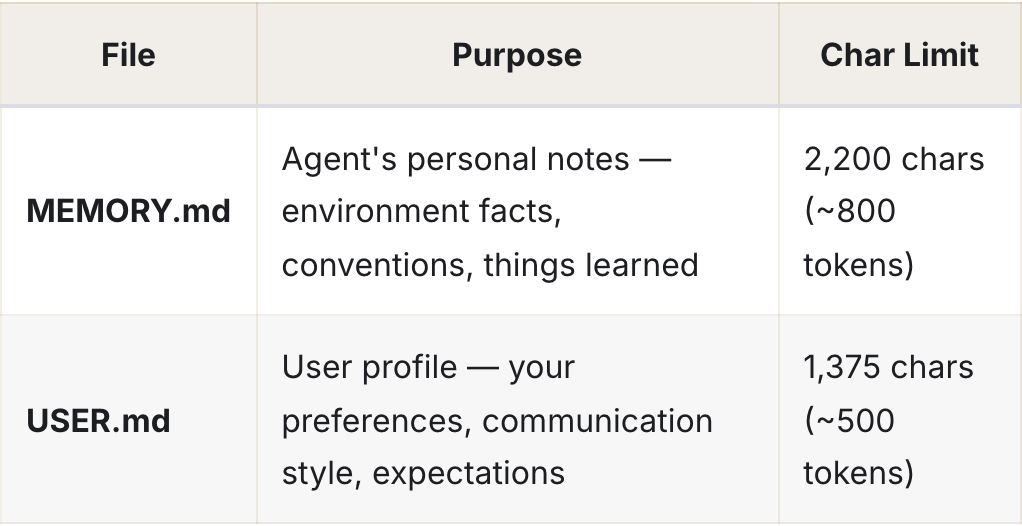
Captured public Hermes documentation: the two core stores and their default limits. (Source: Hermes, captured 2026-10-29. Open the image to enlarge.)
Past conversations are stored in SQLite, normally ~/.hermes/state.db, with FTS5 text search. session_search retrieves history on demand. /compress reduces active context; /new starts a fresh conversation. Neither operation is a request to erase stored history. Session documentation
2. Keep durable facts small and procedures reusable
For example, save “Use concise Korean answers and show the decision first” as a user preference. Keep a monthly report’s full source data in its source document, and turn its repeatable preparation steps into a Skill. Hermes loads Skills when relevant; project instructions belong in the supported context files. Skills documentation, Context files
A useful memory entry has a clear subject, an actionable fact, and enough context to avoid applying it everywhere. “Project Atlas uses the staging endpoint” is more useful than “use staging.” Add a date when the fact can expire.
If automatic writes produce assumptions you would rather review, the built-in gate can help:
memory:
  memory_enabled: true
  user_profile_enabled: true
  memory_char_limit: 2200
  user_char_limit: 1375
  write_approval: true
Merge this into the active profile’s existing configuration. With approval enabled, interactive foreground writes ask for approval; other writes can wait in /memory pending. Review them with /memory approve <id> or /memory reject <id>. This gate concerns built-in memory writes; check each external plugin’s capture settings separately. Memory write controls
3. What an external plugin adds
Hermes selects one external memory provider at a time, normally alongside its built-in stores. Providers can supply recalled context and memory tools. The integration supports lifecycle callbacks for turns, session boundaries, pre-compression extraction, and built-in writes; the plugin decides which to implement. An arbitrary search tool does not automatically gain those lifecycle behaviors. Provider guide, Provider developer contract

Captured public Hermes documentation: setup, status, and off manage the external provider. (Source: Hermes, captured 2026-10-29.)
The documentation is in transition. Honcho, OpenViking, Mem0, Hindsight, Holographic, and Supermemory have catalog installation commands. RetainDB and ByteRover are still described as bundled in the introduction, while the migration section says they leave core on October 15, 2026 and need maintainers. Check your installed version and current catalog rather than relying on a fixed plugin count. Memori has a separate external installation contract. Current installation and migration notes
4. Nine providers worth understanding
The following describes design differences, not a ranking of measured recall quality. Official links lead to the product or its maintained project.
| Provider | Focus and deployment |
|---|---|
| Honcho | User modeling and reasoned cross-session context; cloud or self-hosted |
| Mem0 | Fact extraction and semantic recall; cloud, self-hosted HTTP server, or in-process OSS |
| Hindsight | Entity-aware memory and retain/recall/reflect operations; cloud or local configurations |
| OpenViking | Filesystem-style context hierarchy and tiered retrieval; self-hosted server |
| Supermemory | Profile and semantic recall, with session capture; cloud or self-hosted |
| Holographic | Local SQLite facts, trust feedback, and compositional retrieval |
| RetainDB | Managed agent memory with hybrid retrieval; verify Hermes plugin maintenance |
| ByteRover | CLI-based project knowledge with optional cloud sharing; verify Hermes plugin maintenance |
| Memori | Tool-aware, structured cloud memory through the external hermes-memori integration |
Mem0’s three modes differ operationally: its OSS mode still needs an extraction model, an embedder, and storage. A local database alone does not make those model calls local. Mem0’s Hermes integration
Holographic is useful to investigate when you want inspectable local facts. Its current README defaults auto_extract and mirror_memory_writes to false; installing it does not mean every conversation will be extracted automatically. Maintainer’s settings
For structured resources, inspect OpenViking’s architecture. For session ingestion and configurable memory containers, see Supermemory’s Hermes plugin. Select a candidate by the work you need it to perform, then test that work with your own material.
5. Configure one provider in one profile
Profiles have separate Hermes homes, configurations, memories, and sessions. Give independent agents their own profiles instead of sharing a writable home. Remote storage also needs the correct bank, workspace, user, or container identifiers; a local profile name alone is not proof of cloud isolation. Profile documentation
For an existing profile named work, a documented Hindsight setup looks like this:
hermes --version
hermes profile list
hermes -p work plugins install hindsight
hermes -p work memory setup
hermes -p work memory status
hermes -p work plugins list
Choose Hindsight and its deployment mode in the wizard. Configure the required service credentials there. Restart the running Hermes process when dependency or configuration changes require it, then start a fresh chat. The active provider is selected by memory.provider; installation and a generic plugin enable action are not sufficient evidence that it is active. Hindsight setup instructions
For another provider, use its actual catalog identifier and upstream instructions. OpenViking needs a running server; ByteRover needs its CLI. Memori requires its publisher’s external integration, with dependencies admitted through Hermes’ supported installation path. Do not substitute a guessed catalog command. Provider-specific prerequisites
hermes -p work memory off switches off the external provider. Treat deletion as a separate operation and verify it in each store that retained the information.
6. Verify recall across a real session boundary
Use a harmless, invented fact so the expected answer is unambiguous. This is a proposed acceptance test, not a reported benchmark:
- In session A, ask Hermes to store “Demo project Cedar uses release channel amber” through the provider’s explicit storage tool. Inspect the tool result and stored record.
- End the session and wait for any asynchronous ingestion to finish. Start session B in the same profile without resuming A.
- Ask “Which release channel does Cedar use?” without including the answer. Inspect the retrieved evidence as well as the response.
- Change the channel to violet. In another fresh session, check that the current decision wins and the earlier value is identifiable as superseded.
- Ask the same question in a separate test profile with a separate remote namespace. It should not retrieve Cedar.
- Delete the test record using the provider’s documented method and verify deletion. Check built-in notes and retained transcripts separately.
Test an unrelated question too. Excessive irrelevant recall can be just as disruptive as a missing fact. Record answer correctness, retrieved sources, time to first useful response, and cost across several runs.
7. Control retrieval size and operating cost
External memory creates a retrieval budget as well as a storage budget. Hindsight exposes recall_budget and recall_max_tokens; its documentation also distinguishes raw recall from LLM-based reflection. These are useful controls when a small question retrieves a large block of context. Hindsight recall configuration
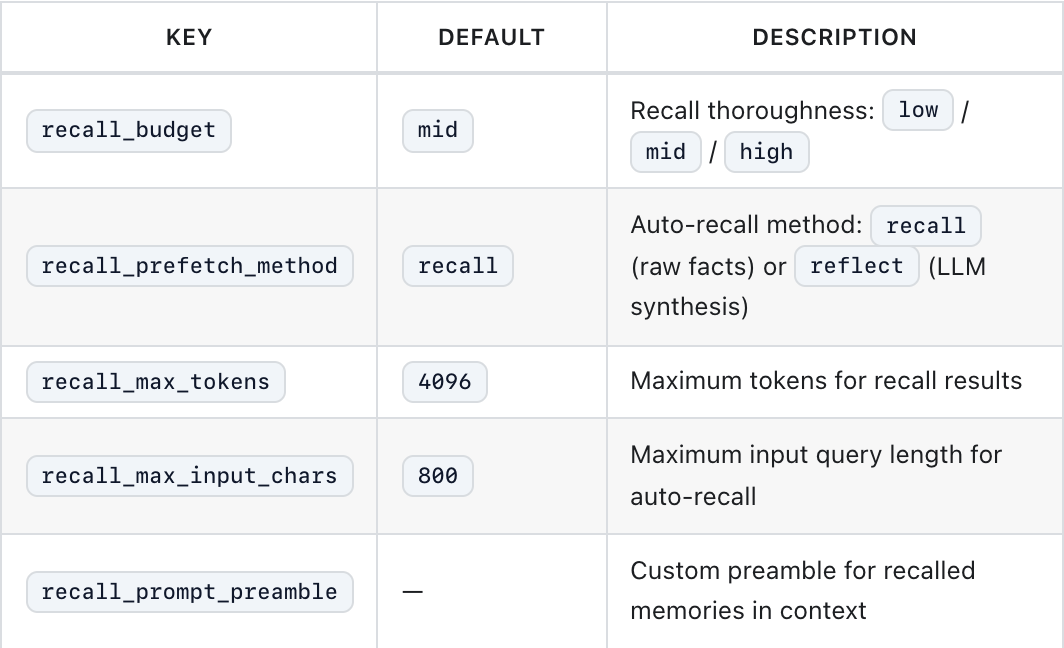
Captured public Hindsight integration documentation, cropped to the recall-budget settings. (Source: Hindsight, captured 2026-10-29. Open the image to enlarge.)
My starting recommendation is a modest recall budget and a small set of representative questions. Increase it only when inspecting missed evidence shows that the limit is the problem. More retrieved text does not establish that the answer is better.
When comparing costs, account for the memory service, extraction and embedding calls, any reflection model, added chat input, and hosting. Check current official pricing rather than treating an open-source license as a zero-cost deployment. For Mem0, the memory models are configured separately from Hermes’ main chat model. Mem0 deployment configuration
8. Diagnose missing or incorrect memories
| Symptom | First check |
|---|---|
| “Saved” but nothing persists | Actual tool result and stored entry, not the assistant’s wording |
| CLI remembers, messaging does not | Active profile and remote namespace |
| Old preference still appears | Existing prompt snapshot, then stale copies in other stores |
| Installed plugin has no recall | Active provider, credentials, service availability, capture settings |
| Incorrect assumption keeps returning | Correct the source record and inspect competing copies |
Use the fresh-session test to narrow the failure to writing, ingestion, retrieval, or answer generation. For built-in notes, inspect the active home’s memories/MEMORY.md and memories/USER.md, and check pending approvals. Official troubleshooting
9. Back up the stores you actually use
A sensible recovery plan includes the active profile’s notes, Skills, configuration, session database, and any local provider store, plus an independent export or backup of remote memory. Use the database’s supported backup method, or stop writers before a filesystem copy. Keep credentials protected and out of source control. Test restoration into an isolated environment before trusting the backup.
Also define what “forget this” means in your workflow: stop future recall, delete one provider record, remove a built-in note, delete conversation history, or expire backups. These are different recovery and retention decisions. Session compression is specifically not a privacy deletion. Session storage behavior
10. When to extend beyond memory plugins
A context engine changes how active conversation context is compressed. A memory provider manages knowledge across sessions. Hermes has separate plugin interfaces for the two, so check which problem an extension actually addresses. Context engine documentation
If your organization needs a custom backend, Hermes exposes the MemoryProvider interface. Implement only the lifecycle behaviors you need, with clear namespace rules, bounded recall, and a deletion path. Build a memory provider
For a personal assistant, I would start with concise built-in notes, searchable history, and reusable Skills. Add one external provider when a concrete recall test exposes a gap. For the surrounding setup, see Hermes CLI profiles and workflows.
Hermes Agent의 기본 기억, 과거 대화 검색, Skills와 외부 메모리의 역할을 구분합니다. Honcho·Mem0·Hindsight 등 아홉 가지 선택지, 프로필별 설정, 비용 관리와 새 세션에서의 기억 검증 방법을 살펴봅니다.
Hermes Agent 공식 웹사이트의 Hermes는 대화가 바뀌어도 선호와 작업 지식을 이어 갈 수 있습니다. 중요한 것은 정보를 어디에 남길지, 실제로 저장되었는지 어떻게 확인할지입니다.
이 글은 2026년 10월 29일 공개 문서와 Hermes 저장소의 커밋 780d5a3을 기준으로 확인했습니다. 아래 명령은 문서에 근거한 설정 예제이며, 각 서비스를 직접 비교 측정한 벤치마크는 아닙니다.
1. 다섯 가지 기억의 역할을 구분하기
| 계층 | 무엇을 두는 곳인가 |
|---|---|
| 현재 대화 | 지금 해결 중인 작업의 맥락 |
MEMORY.md와 USER.md |
짧고 오래 쓸 사실과 사용자 선호 |
| 세션 기록 | 필요할 때 검색할 과거 메시지 |
| 컨텍스트 파일과 Skills | 프로젝트 규칙과 재사용할 작업 절차 |
| 외부 메모리 공급자 | 공급자별 검색 기능을 갖춘 더 큰 저장소 |
기본 파일은 현재 Hermes 홈의 memories/ 아래에 있습니다. 기본 한도는 MEMORY.md 2,200자, USER.md 1,375자입니다. 세션 시작 시 스냅샷으로 시스템 프롬프트에 들어갑니다. 쓰기에 성공하면 디스크에는 바로 저장되지만, 프롬프트의 스냅샷은 새 세션이 시작될 때까지 유지됩니다. 용량을 넘는 쓰기는 실패하므로 기존 항목을 줄이거나 지워야 합니다. 공식 영구 메모리 문서
두 기본 저장소와 기본 한도를 보여 주는 공식 공개 문서 캡처. (출처: Hermes, 2026-10-29 캡처. 이미지를 누르면 확대할 수 있습니다.)
과거 대화는 보통 ~/.hermes/state.db의 SQLite에 저장되며 FTS5 텍스트 검색을 지원합니다. session_search로 필요할 때 찾아옵니다. /compress는 활성 컨텍스트를 줄이고, /new는 새 대화를 시작합니다. 두 작업 모두 저장된 기록을 삭제하라는 요청은 아닙니다. 공식 세션 문서
2. 오래 쓸 사실은 짧게, 절차는 재사용 가능하게
예를 들어 “한국어로 간결하게 답하고 결정을 먼저 보여 주세요”는 사용자 선호로 저장합니다. 월간 보고서의 원본 데이터는 원문 문서에 두고, 매번 반복할 작성 순서는 Skill로 만듭니다. Hermes는 관련된 Skills를 불러오며, 프로젝트 지침은 지원하는 컨텍스트 파일에 둡니다. Skills 문서, 컨텍스트 파일
좋은 기억에는 분명한 대상, 행동에 도움이 되는 사실, 적용 범위를 제한할 맥락이 있습니다. “스테이징 사용”보다 “Atlas 프로젝트는 스테이징 엔드포인트를 사용”이 유용합니다. 유효기간이 있는 사실에는 날짜를 붙이세요.
자동 저장된 추정을 먼저 검토하고 싶다면 기본 메모리의 승인 설정을 사용할 수 있습니다.
memory:
  memory_enabled: true
  user_profile_enabled: true
  memory_char_limit: 2200
  user_char_limit: 1375
  write_approval: true
현재 프로필의 기존 설정에 병합합니다. 승인을 켜면 대화형 CLI의 전경 쓰기는 승인을 묻고, 나머지 쓰기는 /memory pending에서 기다릴 수 있습니다. /memory approve <id> 또는 /memory reject <id>로 검토합니다. 이 설정은 기본 메모리 쓰기에 관한 것이므로 외부 플러그인의 수집 설정은 별도로 확인하세요. 메모리 쓰기 제어
3. 외부 플러그인이 더하는 기능
Hermes는 한 번에 하나의 외부 메모리 공급자를 선택하며, 일반적으로 기본 저장소와 함께 사용합니다. 공급자는 검색한 맥락과 메모리 도구를 제공할 수 있습니다. 연동 인터페이스는 대화 턴, 세션 경계, 압축 전 추출, 기본 메모리 쓰기에 대한 생명주기 콜백을 지원하며, 무엇을 구현할지는 플러그인에 달려 있습니다. 검색 도구 하나를 연결했다고 이 동작들이 자동으로 생기지는 않습니다. 공급자 안내, 공급자 개발 계약
setup, status, off로 외부 공급자를 관리하는 공식 공개 문서 캡처. (출처: Hermes, 2026-10-29 캡처.)
현재 문서는 전환 중입니다. Honcho, OpenViking, Mem0, Hindsight, Holographic, Supermemory에는 카탈로그 설치 명령이 있습니다. 도입부는 RetainDB와 ByteRover를 여전히 번들로 설명하지만, 이전 안내에는 2026년 10월 15일 코어에서 분리되며 유지보수자를 구한다고 적혀 있습니다. 고정된 플러그인 개수보다 설치 버전과 현재 카탈로그를 확인하세요. Memori는 별도의 외부 설치 계약을 따릅니다. 현재 설치·이전 안내
4. 알아 둘 만한 아홉 가지 공급자
아래는 설계의 차이를 정리한 표이며, 측정한 기억 정확도의 순위가 아닙니다. 공식 링크는 제품 웹사이트나 유지보수 중인 프로젝트로 연결됩니다.
| 공급자 | 주요 용도와 배포 방식 |
|---|---|
| Honcho 공식 웹사이트 | 사용자 모델링과 추론을 통한 세션 간 맥락 구성. 클라우드 또는 자체 호스팅 |
| Mem0 공식 웹사이트 | 사실 추출과 의미 기반 검색. 클라우드, 자체 HTTP 서버, 프로세스 내부 OSS |
| Hindsight 공식 웹사이트 | 개체 관계를 반영한 메모리와 retain/recall/reflect. 클라우드 또는 로컬 구성 |
| OpenViking 공식 웹사이트 | 파일시스템 형태의 컨텍스트 계층과 단계별 검색. 자체 호스팅 서버 |
| Supermemory 공식 웹사이트 | 프로필·의미 기반 검색과 세션 수집. 클라우드 또는 자체 호스팅 |
| Holographic 공식 저장소 | 로컬 SQLite 사실 저장, 신뢰도 피드백, 조합 검색 |
| RetainDB 공식 웹사이트 | 하이브리드 검색을 갖춘 관리형 메모리. Hermes 플러그인 유지보수 확인 필요 |
| ByteRover 공식 웹사이트 | CLI 기반 프로젝트 지식과 선택적 클라우드 공유. Hermes 플러그인 유지보수 확인 필요 |
| Memori 공식 웹사이트 | 외부 hermes-memori 연동을 통한 도구 맥락 기반 구조화 클라우드 메모리 |
Mem0의 세 가지 모드는 운영 방식이 다릅니다. OSS 모드에도 추출 모델, 임베딩 모델, 저장소가 필요합니다. 데이터베이스가 로컬에 있다고 모델 호출까지 로컬인 것은 아닙니다. Mem0의 Hermes 연동
검사하기 쉬운 로컬 사실 저장소가 필요하다면 Holographic을 살펴볼 만합니다. 현재 README에서 auto_extract와 mirror_memory_writes의 기본값은 false입니다. 설치만으로 모든 대화가 자동 추출되지는 않습니다. 유지보수자의 설정 안내
구조화된 자료를 다룬다면 OpenViking 구조를, 세션 수집과 메모리 컨테이너 설정이 필요하다면 Supermemory의 Hermes 플러그인을 확인하세요. 필요한 작업으로 후보를 좁힌 뒤 자신의 자료로 검증하는 편이 좋습니다.
5. 프로필 하나에 공급자 하나 설정하기
프로필마다 Hermes 홈, 설정, 기억, 세션이 구분됩니다. 독립 에이전트에는 같은 쓰기 가능한 홈을 공유시키지 말고 별도 프로필을 주세요. 원격 저장소의 bank, workspace, user, container 식별자도 확인해야 합니다. 로컬 프로필 이름이 다르다는 사실만으로 클라우드 데이터 분리가 보장되지는 않습니다. 프로필 문서
work라는 기존 프로필이 있다면 문서에 근거한 Hindsight 설정 흐름은 다음과 같습니다.
hermes --version
hermes profile list
hermes -p work plugins install hindsight
hermes -p work memory setup
hermes -p work memory status
hermes -p work plugins list
마법사에서 Hindsight와 배포 모드를 선택하고 필요한 서비스 인증을 설정합니다. 의존성이나 설정 변경으로 재시작이 필요하면 실행 중인 Hermes 프로세스를 재시작한 뒤 새 대화를 시작하세요. 활성 공급자는 memory.provider로 선택합니다. 설치 성공이나 일반 플러그인 활성화 동작만으로 실제 메모리 공급자가 활성화되었다고 판단하면 안 됩니다. Hindsight 설정 안내
다른 공급자는 실제 카탈로그 식별자와 원본 안내를 따릅니다. OpenViking에는 실행 중인 서버, ByteRover에는 CLI가 필요합니다. Memori는 배포자의 외부 연동이 필요하며 Hermes가 지원하는 경로로 의존성을 등록해야 합니다. 카탈로그 명령을 추측해 대체하지 마세요. 공급자별 사전 조건
hermes -p work memory off는 외부 공급자를 끕니다. 삭제는 별도 작업으로 다루고, 정보를 보관했던 저장소마다 결과를 확인하세요.
6. 실제 세션 경계를 넘어 기억 검증하기
정답이 분명한 무해한 가상 사실을 사용합니다. 다음은 권장 검증 절차이며 실제 측정 결과가 아닙니다.
- 세션 A에서 공급자의 명시적 저장 도구로 “데모 프로젝트 Cedar는 amber 배포 채널을 사용한다”를 저장하게 합니다. 도구 결과와 저장 항목을 확인합니다.
- 세션을 끝내고 비동기 수집이 완료될 때까지 기다립니다. 같은 프로필에서 A를 재개하지 않고 세션 B를 시작합니다.
- 답을 포함하지 않고 “Cedar의 배포 채널은 무엇인가요?”라고 묻습니다. 응답과 함께 검색된 근거를 확인합니다.
- 채널을 violet으로 변경합니다. 또 다른 새 세션에서 현재 결정이 우선되는지, 과거 값은 대체된 정보로 구분되는지 확인합니다.
- 원격 네임스페이스도 분리한 별도 테스트 프로필에서 같은 질문을 합니다. Cedar를 검색해 오면 안 됩니다.
- 공급자가 안내하는 방법으로 테스트 항목을 삭제하고 확인합니다. 기본 메모와 보관된 대화 기록은 별도로 확인합니다.
관련 없는 질문도 해 보세요. 불필요한 기억이 과하게 검색되는 문제도 기억 누락만큼 작업을 방해할 수 있습니다. 여러 번 실행하며 정답 여부, 검색 출처, 유용한 첫 응답까지의 시간, 비용을 기록합니다.
7. 검색량과 운영 비용 조절하기
외부 메모리는 저장 예산뿐 아니라 검색 예산도 만듭니다. Hindsight에는 recall_budget, recall_max_tokens가 있으며, 문서는 원시 사실 검색과 LLM 기반 종합 추론을 구분합니다. 간단한 질문에 너무 많은 맥락이 붙는다면 살펴볼 설정입니다. Hindsight 검색 설정
검색 예산 설정 부분을 발췌한 Hindsight 공식 공개 연동 문서 캡처. (출처: Hindsight, 2026-10-29 캡처. 이미지를 누르면 확대할 수 있습니다.)
처음에는 적당히 작은 검색 예산과 대표 질문 몇 개로 시작하는 것을 권합니다. 누락된 근거를 살펴봤을 때 한도가 원인일 경우에만 늘리세요. 더 많은 텍스트를 가져왔다고 답이 더 좋다는 뜻은 아닙니다.
비용을 비교할 때는 메모리 서비스, 추출·임베딩 호출, 종합 추론 모델, 추가되는 대화 입력, 호스팅을 함께 계산하세요. 오픈소스 라이선스를 운영비 0원으로 해석하지 말고 현재 공식 요금을 확인합니다. Mem0의 메모리 모델 설정은 Hermes의 주 대화 모델과 별개입니다. Mem0 배포 설정
8. 기억 누락과 잘못된 기억 진단하기
| 증상 | 먼저 확인할 것 |
|---|---|
| 저장했다고 하지만 남아 있지 않음 | 응답 문구보다 실제 도구 결과와 저장 항목 |
| CLI는 기억하지만 메신저는 모름 | 현재 프로필과 원격 네임스페이스 |
| 이전 선호가 계속 나옴 | 기존 프롬프트 스냅샷, 다른 저장소의 오래된 복사본 |
| 설치했는데 검색되지 않음 | 활성 공급자, 인증, 서비스 상태, 수집 설정 |
| 잘못된 추정이 반복됨 | 원본 항목 수정과 충돌하는 복사본 확인 |
새 세션 검증으로 쓰기, 수집, 검색, 답변 생성 중 어느 단계에서 실패했는지 좁힙니다. 기본 메모는 현재 홈의 memories/MEMORY.md, memories/USER.md를 열어 보고 승인 대기도 확인하세요. 공식 문제 해결 안내
9. 실제 사용하는 저장소 백업하기
복구 계획에는 현재 프로필의 메모, Skills, 설정, 세션 데이터베이스, 로컬 공급자 저장소와 원격 메모리의 별도 내보내기 또는 백업을 포함하는 것이 좋습니다. 데이터베이스가 지원하는 백업 방법을 사용하거나 쓰기 프로세스를 멈춘 뒤 파일을 복사하세요. 인증 정보는 보호하고 소스 관리에 넣지 않습니다. 분리된 환경에서 복원을 시험한 후 백업을 신뢰하세요.
또한 업무에서 “잊어 주세요”가 무엇을 뜻하는지 정하세요. 앞으로 검색하지 않기, 공급자 항목 하나 삭제하기, 기본 메모 지우기, 대화 기록 삭제하기, 백업 만료시키기는 서로 다른 복구·보존 결정입니다. 세션 압축은 개인정보 삭제가 아닙니다. 세션 저장 동작
10. 메모리 플러그인 외의 확장이 필요한 경우
컨텍스트 엔진은 활성 대화 맥락을 압축하는 방식을 바꿉니다. 메모리 공급자는 세션을 넘는 지식을 관리합니다. Hermes는 두 기능에 별도의 플러그인 인터페이스를 제공하므로 확장이 어떤 문제를 해결하는지 확인하세요. 컨텍스트 엔진 문서
조직에 맞는 저장소가 필요하다면 Hermes의 MemoryProvider 인터페이스를 사용할 수 있습니다. 명확한 네임스페이스 규칙, 제한된 검색량, 삭제 경로를 갖추고 필요한 생명주기 동작만 구현합니다. 메모리 공급자 만들기
개인 비서 용도라면 간결한 기본 메모, 검색 가능한 기록, 재사용할 Skills부터 시작하겠습니다. 구체적인 검증에서 부족한 점이 드러나면 외부 공급자 하나를 추가하세요. 주변 설정은 Hermes CLI 프로필과 업무 흐름 안내에서 이어서 볼 수 있습니다.
了解 Hermes Agent 如何保存有用事实、检索过去的工作并连接记忆插件。比较九种选择,在新会话中验证记忆召回。
Hermes Agent 官方网站介绍的 Hermes 能在不同对话之间保留偏好与工作知识。关键是确定每类信息应存放在哪里,以及如何确认它确实保存成功。
本文依据 2026 年 10 月 29 日的公开文档与 Hermes 仓库提交 780d5a3核对。以下命令是有文档依据的配置示例,并非各服务的实测性能评比。
1. 区分五种记忆层次
| 层次 | 应放什么? |
|---|---|
| 当前对话 | 目前正在处理的任务上下文 |
MEMORY.md 与 USER.md |
简短、持久的事实与用户偏好 |
| 会话历史 | 需要时可搜索的旧消息 |
| 上下文文件与 Skills | 项目规则与可复用流程 |
| 外部记忆提供方 | 具备专属检索功能的更大存储空间 |
内置文件位于当前 Hermes 主目录的 memories/ 下。默认上限为 MEMORY.md 2,200 个字符、USER.md 1,375 个字符。会话开始时,它们以快照形式进入系统提示词。写入成功后会立即持久化,但提示词中的快照直到新会话才会更新。超出容量的写入会失败,代理需要缩短或删除已有条目。持久记忆文档
Hermes 官方公开文档截图:两个核心存储及其默认上限。(来源:Hermes,截取于 2026-10-29。点击可放大。)
过去的对话保存在 SQLite 中,通常是 ~/.hermes/state.db,支持 FTS5 文本检索。session_search 可按需查询历史。/compress 缩减当前上下文,/new 开始新对话。这两项操作都不等于删除已保存的历史。会话文档
2. 持久事实保持简短,流程保持可复用
例如,将“用简洁韩语回答,先给出决定”保存为用户偏好。月报的完整原始数据保留在源文档中,重复的编写步骤则做成 Skill。Hermes 会在相关时加载 Skills;项目指令应放在支持的上下文文件中。Skills 文档、上下文文件
有用的记忆条目应包含明确对象、可操作的事实,以及限制适用范围的上下文。“Atlas 项目使用预发布端点”比“使用预发布”更有用。可能过期的事实应注明日期。
如果你希望先审核自动保存的推断,可以使用内置写入审批开关:
memory:
  memory_enabled: true
  user_profile_enabled: true
  memory_char_limit: 2200
  user_char_limit: 1375
  write_approval: true
将它合并进当前 profile 的现有配置。启用审批后,交互式 CLI 的前台写入会请求批准,其他写入可能暂存在 /memory pending 中。用 /memory approve <id> 或 /memory reject <id> 审核。该开关控制内置记忆写入,外部插件的采集设置仍需分别确认。记忆写入控制
3. 外部插件增加了什么
Hermes 一次只选择一个外部记忆提供方,通常与内置存储并行使用。提供方可注入召回的上下文并提供记忆工具。集成接口支持对话轮次、会话边界、压缩前提取及内置记忆写入等生命周期回调,具体实现由插件决定。接入任意搜索工具并不会自动获得这些行为。提供方指南、开发接口约定
Hermes 官方公开文档截图:通过 setup、status、off 管理外部提供方。(来源:Hermes,截取于 2026-10-29。)
文档目前处于迁移阶段。Honcho、OpenViking、Mem0、Hindsight、Holographic、Supermemory 都有插件目录安装命令。引言仍将 RetainDB 和 ByteRover 描述为捆绑插件,但迁移说明称它们于 2026 年 10 月 15 日移出核心,并正在寻找维护者。请核对安装版本和当前目录,不要依赖固定的插件数量。 Memori 则有单独的外部安装约定。当前安装与迁移说明
4. 值得了解的九种提供方
下面比较设计差异,并非实测召回质量排名。官方链接指向产品网站或其维护项目。
| 提供方 | 重点与部署方式 |
|---|---|
| Honcho 官网 | 用户建模与推理式跨会话上下文;云端或自托管 |
| Mem0 官网 | 事实提取与语义召回;云端、自托管 HTTP 服务或进程内 OSS |
| Hindsight 官网 | 识别实体关系的记忆与 retain/recall/reflect;云端或本地配置 |
| OpenViking 官网 | 文件系统式上下文层次与分层检索;自托管服务 |
| Supermemory 官网 | 用户画像、语义召回及会话采集;云端或自托管 |
| Holographic 官方仓库 | 本地 SQLite 事实、信任反馈与组合检索 |
| RetainDB 官网 | 带混合检索的托管代理记忆;需核实 Hermes 插件维护状态 |
| ByteRover 官网 | 基于 CLI 的项目知识与可选云端共享;需核实 Hermes 插件维护状态 |
| Memori 官网 | 通过外部 hermes-memori 集成提供工具感知的结构化云端记忆 |
Mem0 的三种模式在运维上并不相同。OSS 模式仍需要提取模型、嵌入模型和存储。数据库位于本地,并不代表模型调用也在本地。Mem0 的 Hermes 集成
如果需要可检查的本地事实存储,可以研究 Holographic。当前 README 中 auto_extract 与 mirror_memory_writes 默认均为 false;安装并不意味着每段对话都会被自动提取。维护者的配置说明
处理结构化资源时可查看 OpenViking 架构。需要会话采集和可配置记忆容器时,可查看 Supermemory 的 Hermes 插件。先依据实际工作选择候选,再用自己的材料验证。
5. 在一个 profile 中配置一个提供方
不同 profile 有独立的 Hermes 主目录、配置、记忆和会话。独立代理应使用各自的 profile,不要共享可写主目录。远端存储也必须使用正确的 bank、workspace、user 或 container 标识;本地 profile 名称不同并不能证明云端数据已经隔离。Profile 文档
对于已有的 work profile,有文档依据的 Hindsight 配置流程如下:
hermes --version
hermes profile list
hermes -p work plugins install hindsight
hermes -p work memory setup
hermes -p work memory status
hermes -p work plugins list
在向导中选择 Hindsight 及其部署模式,并配置所需服务凭证。依赖或配置变更要求重启时,请重启运行中的 Hermes 进程,再开始新对话。活动提供方由 memory.provider 选择;安装成功或执行普通插件启用操作,并不足以证明它已成为活动记忆提供方。Hindsight 配置说明
其他提供方应使用真实的目录标识与上游说明。OpenViking 需要运行中的服务,ByteRover 需要 CLI。Memori 需要发布方的外部集成,并通过 Hermes 支持的安装路径准备依赖。不要用猜测的目录命令代替。提供方先决条件
hermes -p work memory off 会停用外部提供方。删除应视为独立操作,并在每个曾保存该信息的存储中验证结果。
6. 跨越真正的会话边界验证召回
使用无害的虚构事实,让预期答案明确。以下是建议的验收测试,并非已完成的基准测试:
- 在会话 A 中,让 Hermes 使用提供方的明确存储工具保存“演示项目 Cedar 使用 amber 发布通道”。检查工具结果及存储记录。
- 结束会话,等待异步摄取完成。在同一 profile 中开始会话 B,不恢复 A。
- 询问“Cedar 使用哪个发布通道?”,不要把答案写在问题里。同时检查检索证据与回答。
- 将通道改为 violet。在另一个新会话中确认当前决定优先,旧值可被识别为已被替代的信息。
- 在使用独立远端命名空间的另一个测试 profile 中提出同样问题。它不应检索到 Cedar。
- 用提供方记录的方法删除测试条目并核实。内置笔记与留存对话需分别检查。
也要测试无关问题。过多无关记忆可能和漏记一样干扰工作。多运行几次,记录答案正确性、检索来源、首个有效响应时间及费用。
7. 控制检索规模与运行成本
外部记忆既带来存储预算,也带来检索预算。Hindsight 提供 recall_budget 和 recall_max_tokens;其文档也区分原始事实召回与基于 LLM 的综合推理。当简单问题带回大量上下文时,这些设置值得检查。Hindsight 召回配置
Hindsight 官方公开集成文档截图,仅截取召回预算设置部分。(来源:Hindsight,截取于 2026-10-29。点击可放大。)
我的起步建议是适度的召回预算与少量代表性问题。只有检查遗漏证据后确认上限是原因,才增加预算。检索文字更多并不能证明答案更好。
比较费用时,应计算记忆服务、提取与嵌入调用、综合推理模型、增加的对话输入以及托管成本。查看当前官方定价,不要将开源许可理解为零运行成本。Mem0 的记忆模型与 Hermes 主聊天模型分开配置。Mem0 部署配置
8. 排查漏记或错误记忆
| 现象 | 优先检查 |
|---|---|
| 声称保存,但没有持久化 | 实际工具结果与记录,不只是助手的措辞 |
| CLI 记得,消息平台却不记得 | 当前 profile 与远端命名空间 |
| 旧偏好仍出现 | 已有提示词快照,以及其他存储中的旧副本 |
| 插件已安装却没有召回 | 活动提供方、凭证、服务可用性及采集设置 |
| 错误推断反复出现 | 更正源记录,检查相互竞争的副本 |
通过新会话测试,将故障缩小到写入、摄取、检索或回答生成阶段。对于内置笔记,检查当前主目录的 memories/MEMORY.md、memories/USER.md,以及待审批写入。官方故障排查
9. 备份实际使用的存储
合理的恢复计划应包括当前 profile 的笔记、Skills、配置、会话数据库和本地提供方存储,以及远端记忆的独立导出或备份。使用数据库支持的备份方法,或先停止写入再复制文件。保护凭证,不要提交到源码仓库。在隔离环境中测试恢复后,再信任备份。
同时定义工作流程中“忘记这件事”的含义:停止今后的召回、删除一条提供方记录、移除内置笔记、删除对话历史,还是让备份过期。这些是不同的恢复与保留决策。会话压缩明确不等于隐私删除。会话存储行为
10. 何时需要记忆插件之外的扩展
上下文引擎改变当前对话上下文的压缩方式,记忆提供方管理跨会话知识。Hermes 为两者提供独立插件接口,因此需要确认扩展真正解决的是什么问题。上下文引擎文档
如果组织需要自定义后端,可以使用 Hermes 的 MemoryProvider 接口。只实现需要的生命周期行为,并制定明确的命名空间规则、受限召回和删除路径。构建记忆提供方
对于个人助手,我会从精简的内置笔记、可搜索历史和可复用 Skills 开始。当具体的召回测试暴露不足时,再增加一个外部提供方。周边配置可参考 Hermes CLI profile 与工作流程指南。
Hermes Agent が有用な事実を保存し、過去の作業を検索し、メモリプラグインと連携する仕組みを紹介します。9つの選択肢を比較し、新しいセッションで記憶を検証します。
Hermes Agent 公式サイトの Hermes は、会話をまたいで好みや作業知識を引き継げます。考えるべきなのは、情報ごとの保存先と、実際に保存できたかを確認する方法です。
この記事は 2026年10月29日の公開ドキュメントと、Hermes リポジトリのコミット 780d5a3を確認して作成しました。以下のコマンドは文書に基づく設定例であり、各サービスを実測したベンチマークではありません。
1. 5つのメモリの役割を分ける
| 層 | 保存するもの |
|---|---|
| 現在の会話 | 今取り組んでいるタスクの文脈 |
MEMORY.md と USER.md |
短く長期的に使う事実やユーザーの好み |
| セッション履歴 | 必要なときに検索する過去のメッセージ |
| コンテキストファイルと Skills | プロジェクトの規則と再利用する手順 |
| 外部メモリプロバイダー | 独自の検索機能を持つ、より大きな保存領域 |
標準ファイルは、使用中の Hermes ホームにある memories/ に保存されます。既定の上限は MEMORY.md が2,200文字、USER.md が1,375文字です。セッション開始時のスナップショットがシステムプロンプトに入ります。書き込みに成功すると直ちに永続化されますが、プロンプトのスナップショットは次のセッションまで変わりません。上限を超える書き込みは失敗するため、既存項目を短くするか削除する必要があります。永続メモリの文書
2つの標準保存先と既定の上限を示す公式公開文書のキャプチャ。(出典:Hermes、2026-10-29撮影。クリックで拡大できます。)
過去の会話は通常 ~/.hermes/state.db の SQLite に保存され、FTS5 テキスト検索に対応します。session_search で必要に応じて履歴を取得します。/compress は使用中のコンテキストを縮小し、/new は新しい会話を始めます。どちらも保存済み履歴の削除を意味しません。セッションの文書
2. 長く使う事実は短く、手順は再利用可能にする
例えば「簡潔な韓国語で答え、最初に決定を示す」はユーザーの好みとして保存します。月次レポートの元データ全体は元の文書に置き、繰り返す作成手順を Skill にします。Hermes は関連する Skills を読み込み、プロジェクトの指示には対応するコンテキストファイルを使います。Skills の文書、コンテキストファイル
有用な記憶には、明確な対象、行動につながる事実、適用範囲を絞る文脈があります。「ステージングを使う」より「Atlas プロジェクトはステージングのエンドポイントを使う」が役立ちます。古くなる情報には日付を付けましょう。
自動保存される推測を先に確認したい場合は、標準メモリの書き込み承認を使えます。
memory:
  memory_enabled: true
  user_profile_enabled: true
  memory_char_limit: 2200
  user_char_limit: 1375
  write_approval: true
使用中のプロファイルの既存設定へ統合します。承認を有効にすると、対話型 CLI のフォアグラウンド書き込みは承認を求め、それ以外は /memory pending で保留されることがあります。/memory approve <id> または /memory reject <id> で確認します。この設定は標準メモリへの書き込み用なので、外部プラグインの収集設定は別に確認してください。メモリ書き込みの制御
3. 外部プラグインが追加するもの
Hermes で同時に選べる外部メモリプロバイダーは1つで、通常は標準の保存先と併用します。プロバイダーは検索した文脈やメモリ用ツールを提供できます。連携インターフェースは、ターン、セッション境界、圧縮前の抽出、標準メモリ書き込みのライフサイクルコールバックに対応し、実装するものはプラグインが決めます。任意の検索ツールを接続するだけで、これらが自動で動くわけではありません。プロバイダーガイド、開発用インターフェース
setup、status、off で外部プロバイダーを管理する公式公開文書のキャプチャ。(出典:Hermes、2026-10-29撮影。)
現在、文書は移行の途中です。Honcho、OpenViking、Mem0、Hindsight、Holographic、Supermemory にはカタログからのインストールコマンドがあります。冒頭では RetainDB と ByteRover を同梱と説明していますが、移行案内では2026年10月15日にコアから分離し、保守担当者を募集するとしています。固定のプラグイン数に頼らず、インストール済みバージョンと現在のカタログを確認してください。 Memori は別の外部インストール規約に従います。現在のインストールと移行案内
4. 知っておきたい9つのプロバイダー
次の表は設計の違いであり、実測した記憶精度の順位ではありません。公式リンクは製品サイトまたは保守中のプロジェクトに移動します。
| プロバイダー | 主な機能と配置方法 |
|---|---|
| Honcho 公式サイト | ユーザーモデリングと推論による会話間の文脈。クラウドまたはセルフホスト |
| Mem0 公式サイト | 事実抽出と意味検索。クラウド、自前の HTTP サーバー、プロセス内 OSS |
| Hindsight 公式サイト | エンティティ関係を扱うメモリと retain/recall/reflect。クラウドまたはローカル構成 |
| OpenViking 公式サイト | ファイルシステム型のコンテキスト階層と段階的検索。セルフホストサーバー |
| Supermemory 公式サイト | プロファイル・意味検索とセッション収集。クラウドまたはセルフホスト |
| Holographic 公式リポジトリ | ローカル SQLite の事実、信頼度のフィードバック、組み合わせ検索 |
| RetainDB 公式サイト | ハイブリッド検索を持つ管理型メモリ。Hermes プラグインの保守状況を要確認 |
| ByteRover 公式サイト | CLI ベースのプロジェクト知識と任意のクラウド共有。Hermes プラグインの保守状況を要確認 |
| Memori 公式サイト | 外部の hermes-memori 連携による、ツールの文脈を含む構造化クラウドメモリ |
Mem0 の3つのモードは運用方法が異なります。OSS モードにも抽出モデル、埋め込みモデル、保存先が必要です。データベースがローカルでも、モデル呼び出しがローカルとは限りません。Mem0 の Hermes 連携
内容を確認しやすいローカルの事実保存が必要なら、Holographic を調べる価値があります。現在の README では auto_extract と mirror_memory_writes の既定値は false です。インストールしただけで全会話が自動抽出されるわけではありません。保守担当者の設定案内
構造化された資料には OpenViking の構成、セッション収集やメモリコンテナの設定には Supermemory の Hermes プラグインを確認してください。必要な作業から候補を選び、自分の資料で検証しましょう。
5. 1つのプロファイルに1つのプロバイダーを設定する
各プロファイルは Hermes ホーム、設定、メモリ、セッションが独立しています。独立したエージェントには別々のプロファイルを与え、書き込み可能なホームを共有させないでください。リモート側でも bank、workspace、user、container の識別子を確認します。ローカルのプロファイル名が違うだけでは、クラウド側の分離の証明にはなりません。プロファイルの文書
work という既存プロファイルの場合、文書に基づく Hindsight の設定例は次のとおりです。
hermes --version
hermes profile list
hermes -p work plugins install hindsight
hermes -p work memory setup
hermes -p work memory status
hermes -p work plugins list
ウィザードで Hindsight と配置モードを選び、必要なサービス認証を設定します。依存関係や設定変更によって再起動が必要な場合は、実行中の Hermes プロセスを再起動して新しい会話を始めます。有効なプロバイダーは memory.provider で選びます。インストールや一般的なプラグイン有効化だけで、メモリプロバイダーが有効になったとは判断できません。Hindsight の設定案内
他のプロバイダーには、実在するカタログ識別子と上流の案内を使います。OpenViking は稼働中のサーバー、ByteRover は CLI が必要です。Memori は配布元の外部連携が必要で、Hermes が対応するインストール経路で依存関係を準備します。推測したカタログコマンドで代用しないでください。プロバイダー別の前提条件
hermes -p work memory off は外部プロバイダーを無効にします。削除は別の操作として扱い、情報を保存したそれぞれの場所で確認してください。
6. 実際にセッションをまたいで記憶を検証する
期待する答えが明確になるよう、無害な架空の事実を使います。以下は提案する受け入れテストであり、測定結果ではありません。
- セッション A で、プロバイダーの明示的な保存ツールを使い「デモプロジェクト Cedar のリリースチャネルは amber」と保存させます。ツールの結果と保存項目を確認します。
- セッションを終了し、非同期の取り込み完了を待ちます。同じプロファイルで A を再開せず、セッション B を始めます。
- 答えを含めず「Cedar のリリースチャネルは?」と質問します。回答と検索された根拠を確認します。
- チャネルを violet に変更します。さらに新しいセッションで、最新の決定が優先され、以前の値が置き換え済みと分かるか確認します。
- リモートの名前空間も分けた別のテストプロファイルで同じ質問をします。Cedar が検索されないことを確認します。
- プロバイダーが指定する方法でテスト項目を削除し、結果を確認します。標準メモリと保存済み会話は別に調べます。
無関係な質問も試してください。不必要な記憶を大量に取得する問題は、記憶の欠落と同じくらい作業を妨げます。複数回実行し、回答の正しさ、検索元、最初の有用な回答までの時間、費用を記録します。
7. 検索量と運用費を調整する
外部メモリには保存予算に加え、検索予算が生まれます。Hindsight には recall_budget と recall_max_tokens があり、文書では生の事実検索と LLM による総合的な推論も区別しています。短い質問に大量の文脈が付く場合に確認したい設定です。Hindsight の検索設定
検索予算の設定部分を切り出した Hindsight 公式公開文書のキャプチャ。(出典:Hindsight、2026-10-29撮影。クリックで拡大できます。)
私なら、控えめな検索予算と少数の代表的な質問から始めます。取得できなかった根拠を調べ、上限が原因だと分かった場合に増やします。取得文字数が多いだけで回答が良くなるとはいえません。
費用を比較する際は、メモリサービス、抽出と埋め込み、追加の推論モデル、チャット入力の増加、ホスティングを計算します。オープンソースのライセンスを運用費ゼロと捉えず、現在の公式料金を確認してください。Mem0 のメモリモデルは Hermes のメインチャットモデルと別に設定します。Mem0 の配置設定
8. 記憶の欠落や誤りを調べる
| 症状 | 最初に確認するもの |
|---|---|
| 保存したと言うが残っていない | 回答文より実際のツール結果と保存項目 |
| CLI は覚えているがメッセージでは忘れる | 使用中のプロファイルとリモート名前空間 |
| 古い好みが出てくる | 既存プロンプトのスナップショット、別の保存先の古いコピー |
| インストールしたのに検索されない | 有効なプロバイダー、認証、サービス状態、収集設定 |
| 誤った推測が繰り返される | 元の記録を修正し、競合するコピーを確認 |
新しいセッションでのテストにより、書き込み、取り込み、検索、回答生成のどこで失敗したかを絞れます。標準メモリでは使用中のホームの memories/MEMORY.md、memories/USER.md と承認待ちを確認します。公式トラブルシューティング
9. 実際に使う保存先をバックアップする
復旧計画には、使用中のプロファイルのメモ、Skills、設定、セッション DB、ローカルプロバイダーの保存領域に加え、リモートメモリの独立したエクスポートやバックアップを含めるとよいでしょう。DB の対応するバックアップ方法を使うか、書き込みを止めてからファイルをコピーします。認証情報を保護し、ソース管理には入れません。隔離環境で復元を試してからバックアップを信頼してください。
また、作業で「忘れて」が意味する操作を決めましょう。今後の検索を止める、プロバイダーの1項目を削除する、標準メモリを消す、会話履歴を削除する、バックアップを期限切れにすることは別の復旧・保持判断です。セッション圧縮はプライバシー上の削除ではありません。セッション保存の動作
10. メモリプラグイン以外の拡張が必要なとき
コンテキストエンジンは、使用中の会話の圧縮方法を変えます。メモリプロバイダーは、セッションをまたぐ知識を管理します。Hermes には別々のプラグインインターフェースがあるため、その拡張がどの問題を扱うのか確認してください。コンテキストエンジンの文書
組織独自のバックエンドが必要なら、Hermes の MemoryProvider インターフェースを利用できます。名前空間の規則、検索量の上限、削除方法を明確にし、必要なライフサイクル処理だけを実装します。メモリプロバイダーを作る
個人アシスタントなら、簡潔な標準メモリ、検索できる履歴、再利用可能な Skills から始めます。具体的な記憶テストで不足が分かったら、外部プロバイダーを1つ追加します。周辺の設定は Hermes CLI のプロファイルとワークフローも参照してください。
Aprende cómo Hermes Agent guarda hechos útiles, consulta trabajos anteriores y conecta plugins de memoria. Compara nueve opciones y verifica la recuperación en sesiones nuevas.
Hermes Agent puede conservar preferencias y conocimientos de trabajo entre conversaciones. Lo importante es decidir dónde guardar cada tipo de información y comprobar que se haya guardado de verdad.
Esta guía se contrastó con la documentación pública del 29 de octubre de 2026 y el repositorio de Hermes en el commit 780d5a3. Los comandos son ejemplos de configuración documentados; no se trata de una comparativa práctica del rendimiento de los servicios.
1. Distingue cinco capas de memoria
| Capa | ¿Qué debe contener? |
|---|---|
| Conversación actual | El contexto de la tarea que estás resolviendo |
MEMORY.md y USER.md |
Hechos breves y duraderos, y preferencias del usuario |
| Historial de sesiones | Mensajes anteriores que se consultan cuando hacen falta |
| Archivos de contexto y Skills | Reglas del proyecto y procedimientos reutilizables |
| Proveedor externo de memoria | Un almacén mayor con recuperación específica del proveedor |
Los archivos integrados se encuentran en memories/, dentro del directorio de Hermes activo. Los límites predeterminados son 2.200 caracteres para MEMORY.md y 1.375 para USER.md. Al comenzar una sesión se incorporan como una instantánea al prompt del sistema. Una escritura correcta se guarda inmediatamente, pero la instantánea del prompt permanece igual hasta la siguiente sesión. Si una escritura supera el límite, falla; el agente debe acortar o eliminar entradas. Documentación de memoria persistente
Captura de la documentación pública oficial de Hermes: los dos almacenes básicos y sus límites predeterminados. (Fuente: Hermes, capturada el 2026-10-29. Abre la imagen para ampliarla.)
Las conversaciones anteriores se guardan en SQLite, normalmente en ~/.hermes/state.db, con búsqueda textual FTS5. session_search consulta el historial bajo demanda. /compress reduce el contexto activo y /new inicia una conversación nueva. Ninguna de estas operaciones solicita borrar el historial almacenado. Documentación de sesiones
2. Guarda hechos breves y procedimientos reutilizables
Por ejemplo, guarda «Responde en coreano de forma concisa y muestra primero la decisión» como preferencia del usuario. Conserva los datos originales completos de un informe mensual en su documento de origen y convierte los pasos repetitivos en una Skill. Hermes carga las Skills cuando son relevantes; las instrucciones del proyecto pertenecen a los archivos de contexto admitidos. Documentación de Skills, Archivos de contexto
Una entrada útil tiene un sujeto claro, un hecho aplicable y contexto suficiente para limitar su alcance. «El proyecto Atlas utiliza el endpoint de pruebas» resulta más útil que «usa pruebas». Añade una fecha cuando la información pueda caducar.
Si prefieres revisar las suposiciones guardadas automáticamente, puedes activar la aprobación de escrituras de la memoria integrada:
memory:
  memory_enabled: true
  user_profile_enabled: true
  memory_char_limit: 2200
  user_char_limit: 1375
  write_approval: true
Combínalo con la configuración existente del perfil activo. Con la aprobación habilitada, las escrituras en primer plano de la CLI interactiva solicitan permiso; otras pueden quedar pendientes en /memory pending. Revísalas con /memory approve <id> o /memory reject <id>. Este control corresponde a la memoria integrada; comprueba por separado la captura de cada plugin externo. Controles de escritura
3. Qué aporta un plugin externo
Hermes selecciona un solo proveedor externo de memoria a la vez, normalmente junto a los almacenes integrados. Los proveedores pueden aportar contexto recuperado y herramientas de memoria. La integración admite callbacks del ciclo de vida para turnos, límites de sesión, extracción previa a la compresión y escrituras integradas; cada plugin decide cuáles implementar. Conectar una herramienta de búsqueda cualquiera no añade automáticamente estos comportamientos. Guía de proveedores, Contrato de desarrollo
Captura de la documentación pública oficial: setup, status y off gestionan el proveedor externo. (Fuente: Hermes, capturada el 2026-10-29.)
La documentación está en transición. Honcho, OpenViking, Mem0, Hindsight, Holographic y Supermemory tienen comandos de instalación desde el catálogo. La introducción todavía describe RetainDB y ByteRover como incluidos, mientras la nota de migración indica que salen del núcleo el 15 de octubre de 2026 y buscan responsables de mantenimiento. Comprueba tu versión instalada y el catálogo actual en lugar de depender de un número fijo de plugins. Memori sigue un contrato de instalación externo distinto. Instalación y migración actuales
4. Nueve proveedores que conviene conocer
La tabla describe diferencias de diseño, no una clasificación de calidad medida. Los enlaces oficiales llevan al producto o a su proyecto mantenido.
| Proveedor | Enfoque y despliegue |
|---|---|
| Honcho | Modelado del usuario y contexto razonado entre sesiones; nube o alojamiento propio |
| Mem0 | Extracción de hechos y recuperación semántica; nube, servidor HTTP propio u OSS dentro del proceso |
| Hindsight | Memoria con relaciones entre entidades y operaciones retain/recall/reflect; nube o configuración local |
| OpenViking | Jerarquía de contexto tipo sistema de archivos y recuperación por niveles; servidor propio |
| Supermemory | Recuperación semántica y de perfiles, con captura de sesiones; nube o alojamiento propio |
| Holographic | Hechos en SQLite local, valoración de confianza y recuperación composicional |
| RetainDB | Memoria gestionada con recuperación híbrida; verifica el mantenimiento del plugin de Hermes |
| ByteRover | Conocimiento de proyectos mediante CLI y sincronización opcional; verifica el mantenimiento del plugin de Hermes |
| Memori | Memoria estructurada en la nube con contexto de herramientas, mediante la integración externa hermes-memori |
Los tres modos de Mem0 implican operaciones distintas. Su modo OSS también necesita un modelo de extracción, un modelo de embeddings y almacenamiento. Que la base de datos sea local no convierte las llamadas a los modelos en locales. Integración de Mem0 con Hermes
Holographic merece atención si necesitas hechos locales fáciles de inspeccionar. Su README actual fija auto_extract y mirror_memory_writes en false de forma predeterminada; instalarlo no significa que se extraerán todas las conversaciones automáticamente. Configuración del mantenedor
Para recursos estructurados, consulta la arquitectura de OpenViking. Para capturar sesiones y configurar contenedores de memoria, revisa el plugin de Supermemory para Hermes. Elige según el trabajo necesario y compruébalo con tus propios materiales.
5. Configura un proveedor en un perfil
Cada perfil tiene su propio directorio de Hermes, configuración, memoria y sesiones. Utiliza perfiles separados para agentes independientes en lugar de compartir un directorio con permiso de escritura. El almacenamiento remoto también necesita identificadores correctos de bank, workspace, user o container; un nombre de perfil local diferente no demuestra aislamiento en la nube. Documentación de perfiles
Para un perfil existente llamado work, la configuración documentada de Hindsight sigue este flujo:
hermes --version
hermes profile list
hermes -p work plugins install hindsight
hermes -p work memory setup
hermes -p work memory status
hermes -p work plugins list
Selecciona Hindsight y su modo de despliegue en el asistente, y configura las credenciales del servicio. Reinicia el proceso de Hermes cuando los cambios de dependencias o configuración lo requieran y abre una conversación nueva. El proveedor activo se selecciona mediante memory.provider; la instalación y la activación genérica de un plugin no bastan para demostrar que está activo como proveedor de memoria. Instrucciones de Hindsight
Para otros proveedores, utiliza el identificador real del catálogo y las instrucciones originales. OpenViking necesita un servidor en ejecución y ByteRover su CLI. Memori requiere la integración externa de su editor, con las dependencias preparadas por una vía de instalación admitida por Hermes. No sustituyas esto por un comando de catálogo inventado. Requisitos de cada proveedor
hermes -p work memory off desactiva el proveedor externo. Trata el borrado como otra operación y compruébalo en cada almacén que haya conservado la información.
6. Verifica la recuperación en una sesión realmente nueva
Utiliza un hecho inventado e inofensivo para que la respuesta esperada sea inequívoca. Esta es una propuesta de prueba de aceptación, no un resultado medido:
- En la sesión A, pide que se guarde «El proyecto de demostración Cedar utiliza el canal de publicación amber» mediante la herramienta explícita de almacenamiento del proveedor. Inspecciona el resultado y el registro.
- Termina la sesión y espera a que finalice cualquier ingestión asíncrona. Abre la sesión B en el mismo perfil sin reanudar A.
- Pregunta «¿Qué canal de publicación utiliza Cedar?» sin incluir la respuesta. Examina tanto la evidencia recuperada como la contestación.
- Cambia el canal a violet. En otra sesión nueva, comprueba que prevalezca la decisión actual y que el valor anterior se identifique como sustituido.
- Haz la misma pregunta en otro perfil de prueba con un espacio de nombres remoto independiente. No debería recuperar Cedar.
- Elimina el registro de prueba mediante el método documentado y verifica el resultado. Revisa por separado las notas integradas y las conversaciones conservadas.
Prueba también una pregunta ajena al tema. Recuperar demasiados recuerdos irrelevantes puede perjudicar tanto como no encontrar un hecho. Repite varias veces y registra exactitud, fuentes, tiempo hasta la primera respuesta útil y coste.
7. Controla el volumen recuperado y los costes
La memoria externa añade un presupuesto de recuperación además del de almacenamiento. Hindsight expone recall_budget y recall_max_tokens; su documentación distingue la recuperación de hechos de la síntesis mediante LLM. Son controles útiles cuando una pregunta breve recupera un bloque enorme de contexto. Configuración de recuperación de Hindsight
Captura de la documentación pública oficial de Hindsight, limitada a los ajustes del presupuesto de recuperación. (Fuente: Hindsight, capturada el 2026-10-29. Abre la imagen para ampliarla.)
Mi recomendación inicial es un presupuesto moderado y unas pocas preguntas representativas. Auméntalo solo cuando inspeccionar la evidencia ausente indique que el límite es el problema. Recuperar más texto no demuestra que la respuesta sea mejor.
Al comparar costes, suma el servicio de memoria, extracción, embeddings, modelos de reflexión, entrada adicional del chat y alojamiento. Consulta los precios oficiales actuales y no interpretes una licencia de código abierto como un despliegue sin gastos. Los modelos de memoria de Mem0 se configuran por separado del modelo principal de Hermes. Configuración de despliegue de Mem0
8. Diagnostica recuerdos ausentes o incorrectos
| Síntoma | Primera comprobación |
|---|---|
| Dice «guardado», pero no persiste | Resultado real de la herramienta y registro, no solo el texto del asistente |
| La CLI recuerda, pero la mensajería no | Perfil activo y espacio de nombres remoto |
| Sigue apareciendo una preferencia antigua | Instantánea actual del prompt y copias obsoletas en otros almacenes |
| Plugin instalado sin recuperación | Proveedor activo, credenciales, disponibilidad y captura |
| Se repite una suposición incorrecta | Corregir el registro de origen y revisar copias en conflicto |
La prueba en sesiones nuevas permite localizar el fallo en la escritura, ingestión, búsqueda o generación de la respuesta. Para las notas integradas, inspecciona memories/MEMORY.md y memories/USER.md en el directorio activo, además de las aprobaciones pendientes. Solución de problemas oficial
9. Respalda los almacenes que realmente utilizas
Un plan de recuperación razonable incluye notas, Skills, configuración, base de sesiones y almacén local del proveedor del perfil activo, además de una exportación o copia independiente de la memoria remota. Utiliza el método de respaldo admitido por la base de datos o detén las escrituras antes de copiar archivos. Protege las credenciales y mantenlas fuera del control de versiones. Prueba la restauración en un entorno aislado antes de confiar en la copia.
Define también qué significa «olvida esto» en tu flujo: detener futuras recuperaciones, borrar un registro del proveedor, quitar una nota integrada, eliminar el historial o hacer caducar las copias. Son decisiones de recuperación y conservación diferentes. La compresión de sesiones no es un borrado por motivos de privacidad. Comportamiento del almacenamiento de sesiones
10. Cuándo ampliar más allá de los plugins de memoria
Un motor de contexto cambia cómo se comprime la conversación activa. Un proveedor de memoria gestiona conocimiento entre sesiones. Hermes ofrece interfaces independientes para ambos; comprueba qué problema resuelve cada extensión. Documentación de motores de contexto
Si tu organización necesita un backend propio, Hermes expone la interfaz MemoryProvider. Implementa únicamente los comportamientos necesarios, con reglas claras de espacios de nombres, recuperación limitada y una vía de borrado. Crear un proveedor de memoria
Para un asistente personal, empezaría por notas integradas concisas, historial consultable y Skills reutilizables. Añadiría un proveedor externo cuando una prueba concreta exponga una carencia. Para la configuración general, consulta los perfiles y flujos de trabajo de Hermes CLI.