Claude Code: Start a Fresh Session for Each Task
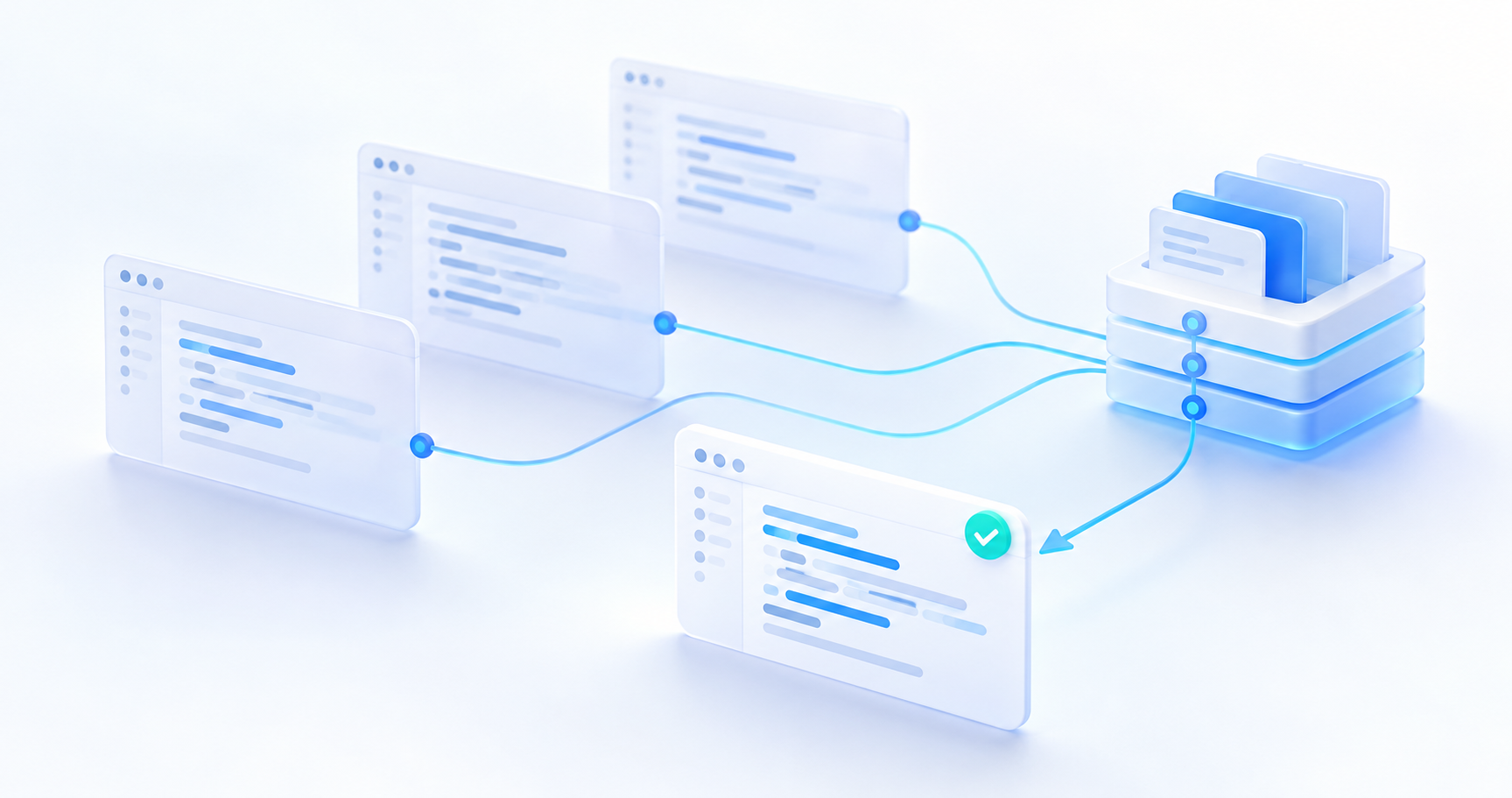
Start a fresh Claude Code session for each distinct task. Keep lasting knowledge in repository files so the next session can begin with focused context.
In Claude Code, a session works well as a disposable, single-task scratchpad. Finish a feature or bug fix, verify the result, save the changes, and begin the next task with a new session or /clear. Anthropic’s best practices still recommend clearing between tasks, even as automatic compaction supports long-running work.
This is a workflow recommendation, not a benchmark showing that fresh sessions are always faster or that each compaction causes a fixed accuracy loss. It can reduce stale assumptions and unnecessary context; results depend on the task, model, and information you carry forward.
Why an endless session becomes harder to trust
A summary cannot preserve every detail
Compaction replaces conversation history with a shorter summary. Exact function signatures, exceptions, and the reasons behind a rejected approach may need to be recovered from the files or transcript. Summarizing repeatedly can carry forward an earlier omission, but the “photocopy of a photocopy” metaphor is a risk model, not a measured degradation curve. The architecture documentation explicitly warns that early detailed instructions can be lost.
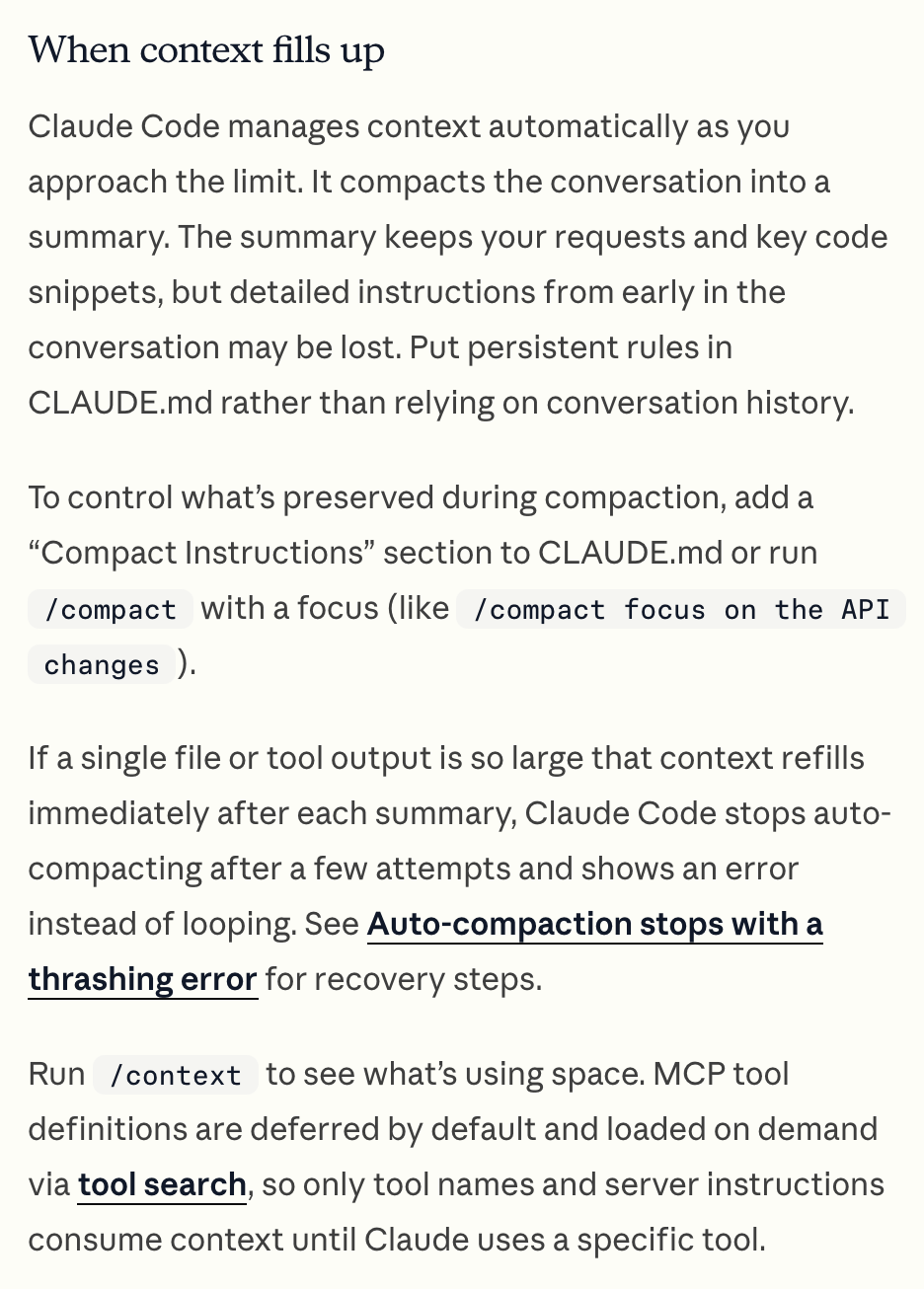
Captured public page from Anthropic’s Claude Code architecture documentation, showing compaction and focused instructions. Captured 2026-10-29.
Old assumptions compete with the current task
A long conversation can mix abandoned debugging paths, superseded code, and constraints from another feature. That creates opportunities for Claude to reuse an outdated assumption or propose a fix for an issue that is already resolved. Before making another change, ask it to read the current files and diff. When the task itself changes, clearing the conversation is a useful boundary.
Less context does not guarantee a faster next turn
Unnecessary history adds input context, but latency and cost also depend on prompt caching, output length, and tool work. A fresh session may need to read files again; compaction also requires a summarization request. The prompt caching documentation explains these tradeoffs. Evaluate the whole task rather than assuming that every shorter prompt is cheaper.
Choose /clear, /compact, or /rewind
| Situation | Preferred action | Reason |
|---|---|---|
| Moving to a different feature, bug, or PR | New session or /clear | Give the new task its own relevant context. |
| Continuing one large feature | /compact with a focus | Preserve the same task’s decisions while shortening history. |
| Recovering from a failed detour | /rewind | Return to an earlier conversation point; choose whether to restore code too. |
| Task verified and committed | New session or /clear | Use the saved code and a short handoff as the next starting point. |
The command reference describes these commands. /clear starts a new conversation without reverting working files. Earlier sessions remain resumable; see session management.
For /rewind, inspect the restore options. Restoring conversation, restoring code, and restoring both have different effects. Checkpoints do not cover every shell-only file change and do not replace version control. See the checkpointing documentation.
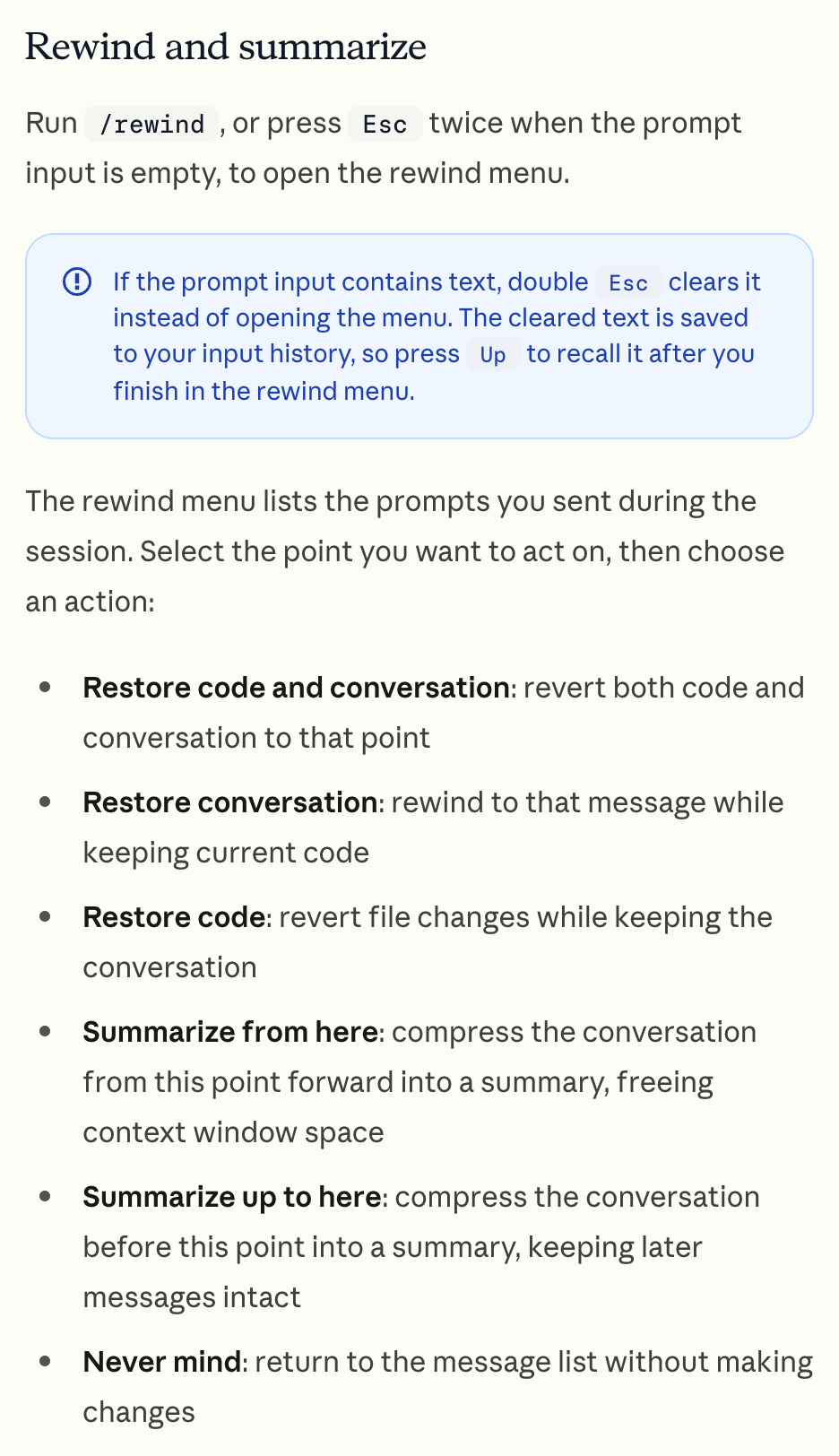
Captured public page from Anthropic’s checkpointing documentation. The restore choices distinguish conversation state from file state. Captured 2026-10-29.
A practical session workflow
- Keep stable rules in
CLAUDE.md. Record actual build and test commands, repository conventions, and architectural boundaries. Keep it short; link to detailed documents rather than pasting old conversations. Claude Code loads applicable instruction files when a normal session starts. See project memory. For a starting structure, use the project setup guide. - Use Git for durable code history. Complete one scoped task, run the relevant checks, review the diff, and commit the intended files with Git. Record unfinished work and important decisions in a task document or issue: a commit alone does not explain every decision. Then run
/clearor start a new session. - Compact when the same task still needs continuity. Tell Claude what must survive, then have it verify current files before editing again.
For example, run this inside Claude Code:
/compact focus on the schema migration and updated route handlers; preserve decisions, changed file paths, test results, and remaining workBefore resetting an unfinished task, ask for a brief handoff:
Record the current goal, decisions, changed files, checks actually run,
known failures, and the next step in docs/task-handoff.md.
Treat that path as an example and adapt it to the repository. In the next session, provide the goal and handoff path, then ask Claude to inspect the current code and Git diff. This gives the session a clear starting point while keeping the durable record reviewable outside the conversation.
서로 다른 작업은 새 Claude Code 세션에서 시작하자. 오래 유지할 지식은 저장소 파일에 남기면 다음 세션이 필요한 맥락에 집중하며 출발할 수 있다.
Claude Code의 세션은 한 가지 작업에 쓰는 임시 작업장으로 다루기 좋다. 기능 개발이나 버그 수정을 마치고 결과를 검증해 변경 사항을 저장했다면, 다음 작업은 새 세션이나 /clear로 시작한다. Anthropic의 모범 사례도 자동 압축으로 긴 작업을 이어갈 수 있는 환경에서 여전히 작업 사이의 초기화를 권한다.
이는 실무 운영 기준이다. 새 세션이 언제나 더 빠르다거나 압축할 때마다 정확도가 일정하게 떨어진다는 벤치마크 결과는 아니다. 오래된 가정과 불필요한 맥락을 줄일 수 있지만, 효과는 작업과 모델, 다음 세션으로 전달하는 정보에 따라 달라진다.
끝없이 이어지는 세션을 신뢰하기 어려워지는 이유
요약이 모든 세부 사항을 보존하지는 않는다
압축은 대화 이력을 더 짧은 요약으로 바꾼다. 정확한 함수 시그니처, 예외 조건, 특정 접근을 포기한 이유는 파일이나 대화 기록에서 다시 확인해야 할 수 있다. 반복 요약 과정에서는 앞서 빠뜨린 정보가 계속 누락될 수 있다. 다만 복사본을 다시 복사한다는 비유는 위험을 설명하는 모델이지, 측정된 성능 저하 곡선이 아니다. 동작 구조 공식 문서도 대화 초반의 상세 지침이 유실될 수 있다고 설명한다.
Anthropic의 Claude Code 동작 구조 공식 문서 공개 페이지 캡처. 자동 압축과 요약의 초점을 지정하는 방법을 보여 준다. 2026-10-29 캡처.
이전 작업의 가정이 현재 작업과 섞인다
긴 대화에는 포기한 디버깅 경로, 수정 전 코드, 다른 기능의 제약 조건이 함께 남을 수 있다. Claude가 오래된 가정을 재사용하거나 이미 해결한 문제를 다시 고치려는 제안을 할 여지가 생긴다. 다음 수정 전에 현재 파일과 diff를 읽도록 요청하자. 작업 자체가 달라질 때는 대화를 초기화하는 것이 유용한 경계가 된다.
맥락이 짧다고 다음 응답이 반드시 빨라지지는 않는다
불필요한 이력은 입력 맥락을 늘린다. 다만 응답 시간과 비용은 프롬프트 캐시, 출력 길이, 도구 실행에도 영향을 받는다. 새 세션은 파일을 다시 읽어야 할 수 있고, 압축에도 별도의 요약 요청이 필요하다. 프롬프트 캐시 공식 문서는 이런 비용 관계를 설명한다. 짧은 프롬프트 하나가 무조건 저렴하다고 가정하기보다 작업 전체를 기준으로 평가하자.
/clear, /compact, /rewind를 고르는 기준
| 상황 | 권장 행동 | 이유 |
|---|---|---|
| 다른 기능, 버그, PR로 이동 | 새 세션 또는 /clear |
새 작업에 필요한 맥락을 따로 구성한다. |
| 하나의 큰 기능을 계속 구현 | 보존할 내용을 지정해 /compact |
같은 작업의 결정을 유지하며 이력을 줄인다. |
| 실패한 시도에서 돌아오기 | /rewind |
이전 대화 지점으로 돌아가고 코드 복원 여부도 선택한다. |
| 작업 검증과 커밋 완료 | 새 세션 또는 /clear |
저장된 코드와 짧은 인계 기록에서 다음 작업을 시작한다. |
각 명령은 공식 명령 레퍼런스에서 확인할 수 있다. /clear는 작업 파일을 되돌리지 않고 새 대화를 시작한다. 이전 세션은 다시 이어갈 수 있다. 자세한 내용은 세션 관리 문서를 참고하자.
/rewind에서는 복원 옵션을 확인해야 한다. 대화 복원, 코드 복원, 둘 다 복원은 결과가 다르다. 체크포인트가 셸로만 변경한 모든 파일까지 복원하는 것은 아니며 버전 관리를 대신하지도 않는다. 체크포인트 공식 문서에 범위가 설명되어 있다.
Anthropic의 체크포인트 공식 문서 공개 페이지 캡처. 대화 상태와 파일 상태를 구분하는 복원 옵션을 보여 준다. 2026-10-29 캡처.
실무에 적용하는 세션 흐름
- 오래 유지할 규칙은
CLAUDE.md에 둔다. 실제 빌드·테스트 명령, 저장소 관례, 아키텍처 경계를 기록한다. 짧게 유지하고 오래된 대화를 붙이는 대신 상세 문서의 경로를 안내한다. Claude Code는 일반적인 세션을 시작할 때 적용 대상 지침 파일을 읽는다. 프로젝트 기억 공식 문서를 참고하자. 초기 구성은 프로젝트 시작 가이드에서 확인할 수 있다. - 코드의 지속적인 이력은 Git에 남긴다. 범위가 명확한 작업 하나를 마치고 관련 검사를 실행한 뒤 diff를 검토해 의도한 파일만 Git으로 커밋한다. 미완료 작업과 중요한 결정은 작업 문서나 이슈에도 기록한다. 커밋 하나가 모든 결정의 이유를 설명해 주지는 않는다. 이후
/clear를 실행하거나 새 세션을 시작한다. - 같은 작업을 이어가야 할 때 압축한다. 반드시 보존할 내용을 지정하고, 다음 수정 전에 현재 파일을 다시 확인하도록 한다.
예를 들어 Claude Code 안에서 다음과 같이 실행한다.
/compact focus on the schema migration and updated route handlers; preserve decisions, changed file paths, test results, and remaining work
끝나지 않은 작업을 초기화하기 전에는 짧은 인계 기록을 요청한다.
Record the current goal, decisions, changed files, checks actually run,
known failures, and the next step in docs/task-handoff.md.
이 경로는 예시이므로 저장소에 맞게 바꾼다. 다음 세션에는 목표와 인계 문서 경로를 전달한 뒤 현재 코드와 Git diff를 확인하도록 요청한다. 대화 밖에서도 검토할 수 있는 기록을 유지하면서 새 세션의 출발점을 명확하게 만들 수 있다.
每项独立任务都从新的 Claude Code 会话开始。把长期知识保存在仓库文件中,让下一个会话围绕相关上下文展开。
在 Claude Code 中,可以把会话当作只服务于一项任务的临时工作区。完成功能或缺陷修复、验证结果并保存更改后,通过新会话或 /clear 开始下一项任务。即使自动压缩已经能够支持长时间工作,Anthropic 的最佳实践仍建议在任务之间清空上下文。
这是一条工作流程建议,并非证明新会话总是更快、每次压缩都会造成固定准确率损失的基准测试结论。它有助于减少过时假设和无关上下文,但实际效果取决于任务、模型以及传递给下一会话的信息。
为什么无休止的会话更难令人信赖
摘要无法保留每个细节
压缩会用较短的摘要替换对话历史。精确的函数签名、例外条件,以及放弃某种方案的原因,可能需要从文件或对话记录中重新获取。反复总结可能延续此前的遗漏,但“复印件再复印”的比喻描述的是风险,而不是经过测量的性能下降曲线。架构官方文档明确说明,早期对话中的详细指令可能丢失。
截取自 Anthropic 的 Claude Code 架构官方文档公开页面,展示压缩及指定摘要重点的方法。截图日期:2026-10-29。
旧假设会与当前任务混杂
长对话可能混入已放弃的调试路径、已被替换的代码,以及其他功能的限制条件。这增加了 Claude 沿用过时假设,或建议修复已经解决的问题的机会。再次修改前,请它读取当前文件和 diff。当任务本身改变时,清空对话是一个有用的分界点。
上下文更少,不代表下一次响应一定更快
不必要的历史会增加输入上下文,但延迟和成本还取决于提示词缓存、输出长度和工具操作。新会话可能需要重新读取文件,压缩也需要一次独立的摘要请求。提示词缓存官方文档解释了这些取舍。应评估整个任务,而不是假定每条更短的提示词都更便宜。
如何选择 /clear、/compact 或 /rewind
| 场景 | 建议操作 | 原因 |
|---|---|---|
| 转向不同的功能、缺陷或 PR | 新会话或 /clear |
为新任务建立相关上下文。 |
| 继续同一项大型功能 | 指定重点后使用 /compact |
缩短历史,同时保留同一任务的决策。 |
| 从失败的尝试中返回 | /rewind |
回到之前的对话节点,并选择是否同时恢复代码。 |
| 任务已验证并提交 | 新会话或 /clear |
以保存的代码和简短交接记录为起点。 |
官方命令参考介绍了这些命令。/clear 会开始新对话,不会还原工作文件。之前的会话仍可恢复,详见会话管理文档。
使用 /rewind 时,应查看恢复选项。恢复对话、恢复代码以及同时恢复两者,效果各不相同。检查点并不覆盖所有仅由 shell 修改的文件,也不能替代版本控制。详见检查点官方文档。
截取自 Anthropic 的检查点官方文档公开页面。这些恢复选项区分了对话状态与文件状态。截图日期:2026-10-29。
可实际采用的会话流程
- 把稳定规则放进
CLAUDE.md。 记录真实的构建和测试命令、仓库约定与架构边界。保持简短,通过路径指向详细文档,不要粘贴旧对话。Claude Code 启动普通会话时会加载适用的指令文件。参见项目记忆文档。初始结构可参考项目设置指南。 - 用 Git 保存持久的代码历史。 完成范围明确的一项任务,运行相关检查,审查 diff,再通过 Git 提交预期文件。把未完成的工作和重要决策写入任务文档或 issue;一次提交并不能解释所有决策。然后运行
/clear或启动新会话。 - 同一任务仍需连贯性时再压缩。 告诉 Claude 哪些内容必须保留,并要求它在继续修改前核实当前文件。
例如,在 Claude Code 中运行:
/compact focus on the schema migration and updated route handlers; preserve decisions, changed file paths, test results, and remaining work
重置尚未完成的任务前,请它写一份简短交接记录:
Record the current goal, decisions, changed files, checks actually run,
known failures, and the next step in docs/task-handoff.md.
该路径仅为示例,请按仓库实际情况调整。在下一会话中提供目标和交接文件路径,然后要求 Claude 检查当前代码与 Git diff。这样既能明确会话的起点,也能让持久记录在对话之外接受审查。
別のタスクは新しい Claude Code セッションで始めよう。継続して使う知識をリポジトリのファイルに残せば、次のセッションは必要な文脈に集中して始められる。
Claude Code のセッションは、1つのタスクに使う一時的な作業場所として扱うとよい。機能開発やバグ修正を終え、結果を検証して変更を保存したら、新しいセッションか /clear で次のタスクを始める。自動圧縮で長時間の作業を続けられるようになった現在も、Anthropic のベストプラクティスはタスク間での初期化を勧めている。
これは実務上の運用指針であり、新しいセッションが常に速いことや、圧縮のたびに精度が一定量落ちることを示すベンチマーク結果ではない。古い前提や不要な文脈を減らせるが、効果はタスク、モデル、次のセッションに渡す情報によって変わる。
終わりのないセッションを信頼しにくくなる理由
要約ですべての詳細は残せない
圧縮は会話履歴を短い要約に置き換える。正確な関数シグネチャ、例外条件、ある方法を断念した理由は、ファイルや会話記録から確認し直す必要があるかもしれない。要約を繰り返すと以前の欠落が引き継がれる可能性がある。ただし、コピーをさらにコピーするという比喩はリスクの説明であり、測定された性能低下の曲線ではない。仕組みの公式ドキュメントも、会話初期の詳細な指示が失われる場合があると説明している。
Anthropic の Claude Code の仕組みに関する公式ドキュメントの公開ページをキャプチャ。圧縮と要約の重点を指定する方法を示している。2026-10-29 撮影。
古い前提が現在のタスクと混ざる
長い会話には、断念したデバッグ方針、更新前のコード、別の機能の制約が混在しやすい。Claude が古い前提を再利用したり、すでに解決した問題を再修正しようとしたりする余地が生まれる。次の変更前に、現在のファイルと diff を読むよう依頼しよう。タスク自体が変わるときは、会話の初期化が有用な区切りになる。
文脈が短くても次の応答が必ず速くなるとは限らない
不要な履歴は入力文脈を増やすが、応答時間やコストにはプロンプトキャッシュ、出力の長さ、ツール処理も影響する。新しいセッションではファイルを読み直す必要があり、圧縮にも別途要約リクエストが必要になる。プロンプトキャッシュの公式ドキュメントは、このトレードオフを説明している。短いプロンプトほど必ず安いと考えるより、タスク全体で評価しよう。
/clear、/compact、/rewind の選び方
| 状況 | 推奨する操作 | 理由 |
|---|---|---|
| 別の機能、バグ、PR に移る | 新しいセッションか /clear |
新しいタスクに必要な文脈を用意する。 |
| 1つの大きな機能を続ける | 重点を指定して /compact |
同じタスクの判断を残しつつ履歴を短くする。 |
| 失敗した試みから戻る | /rewind |
前の会話地点に戻り、コードも復元するか選ぶ。 |
| 検証とコミットが完了した | 新しいセッションか /clear |
保存したコードと短い引き継ぎを次の出発点にする。 |
各コマンドは公式コマンドリファレンスに説明がある。/clear は作業ファイルを元に戻さず、新しい会話を始める。以前のセッションは再開できる。詳しくはセッション管理ドキュメントを参照しよう。
/rewind では復元オプションを確認する。会話の復元、コードの復元、両方の復元は、それぞれ結果が異なる。チェックポイントはシェルだけで変更したすべてのファイルを対象にするものではなく、バージョン管理の代わりにもならない。チェックポイントの公式ドキュメントで範囲を確認できる。
Anthropic のチェックポイント公式ドキュメントの公開ページをキャプチャ。会話の状態とファイルの状態を区別する復元オプションを示している。2026-10-29 撮影。
実務で使うセッションの流れ
- 継続して使うルールは
CLAUDE.mdに置く。 実際のビルド・テストコマンド、リポジトリの慣例、アーキテクチャの境界を記録する。短く保ち、古い会話を貼る代わりに詳細文書へのパスを案内する。Claude Code は通常のセッション開始時に適用対象の指示ファイルを読み込む。プロジェクトの記憶に関するドキュメントを参照しよう。初期構成はプロジェクト設定ガイドで確認できる。 - 永続的なコード履歴は Git に残す。 範囲を絞ったタスクを1つ終え、関連する検査を実行して diff を確認し、意図したファイルを Git でコミットする。未完了の作業と重要な判断はタスク文書や issue にも記録する。コミットだけですべての判断理由を説明できるわけではない。その後
/clearを実行するか、新しいセッションを始める。 - 同じタスクを続ける必要があるときに圧縮する。 必ず残す内容を指定し、次の編集前に現在のファイルを確認してもらう。
たとえば Claude Code 内で次のように実行する。
/compact focus on the schema migration and updated route handlers; preserve decisions, changed file paths, test results, and remaining work
未完了のタスクを初期化する前には、短い引き継ぎ記録を依頼する。
Record the current goal, decisions, changed files, checks actually run,
known failures, and the next step in docs/task-handoff.md.
このパスは例なので、リポジトリに合わせて変更する。次のセッションには目標と引き継ぎ文書のパスを渡し、現在のコードと Git diff を確認するよう依頼する。会話の外でもレビューできる記録を残しながら、新しいセッションの出発点を明確にできる。
Empieza una sesión nueva de Claude Code para cada tarea distinta. Guarda el conocimiento duradero en archivos del repositorio para que la siguiente sesión parta del contexto pertinente.
En Claude Code, una sesión funciona bien como espacio de trabajo temporal para una sola tarea. Termina una función o una corrección, verifica el resultado, guarda los cambios e inicia la siguiente tarea en una sesión nueva o con /clear. Las buenas prácticas de Anthropic siguen recomendando limpiar el contexto entre tareas, aunque la compactación automática permita continuar trabajos largos.
Es una recomendación de trabajo, no un resultado de pruebas que demuestre que las sesiones nuevas siempre son más rápidas o que cada compactación causa una pérdida fija de precisión. Puede reducir las suposiciones obsoletas y el contexto innecesario; el efecto depende de la tarea, el modelo y la información que se conserve.
Por qué cuesta más confiar en una sesión interminable
Un resumen no conserva todos los detalles
La compactación sustituye el historial de conversación por un resumen más breve. Puede hacer falta recuperar de los archivos o del registro las firmas exactas de funciones, las excepciones y las razones para descartar una solución. Resumir repetidamente puede perpetuar una omisión anterior, pero la metáfora de una fotocopia de otra fotocopia describe un riesgo, no una curva de degradación medida. La documentación de arquitectura advierte que pueden perderse instrucciones detalladas del principio de la conversación.
Captura de una página pública de la documentación oficial de arquitectura de Claude Code, de Anthropic. Muestra la compactación y las instrucciones para orientar el resumen. Capturada el 2026-10-29.
Las suposiciones antiguas se mezclan con la tarea actual
Una conversación larga puede reunir intentos de depuración abandonados, código sustituido y restricciones de otra función. Esto crea oportunidades para que Claude reutilice una suposición obsoleta o proponga corregir un problema ya resuelto. Antes de otro cambio, pídele que lea los archivos actuales y el diff. Cuando cambia la tarea, limpiar la conversación establece un límite útil.
Menos contexto no garantiza una respuesta más rápida
El historial innecesario aumenta el contexto de entrada, pero la latencia y el coste también dependen de la caché de prompts, la longitud de la respuesta y las herramientas. Una sesión nueva quizá tenga que volver a leer archivos; compactar también requiere una petición de resumen. La documentación de la caché de prompts explica estos costes. Evalúa la tarea completa en lugar de asumir que cada prompt más corto resulta más barato.
Elegir entre /clear, /compact y /rewind
| Situación | Acción recomendada | Motivo |
|---|---|---|
| Pasar a otra función, error o PR | Nueva sesión o /clear |
Dar a la nueva tarea su contexto pertinente. |
| Continuar una misma función grande | /compact indicando el enfoque |
Conservar las decisiones de la tarea mientras se acorta el historial. |
| Volver de un intento fallido | /rewind |
Regresar a un punto anterior y elegir si también se restaura el código. |
| Tarea verificada y guardada en un commit | Nueva sesión o /clear |
Partir del código guardado y de una breve nota de continuidad. |
La referencia oficial de comandos describe estas opciones. /clear inicia una conversación nueva sin revertir los archivos de trabajo. Las sesiones anteriores se pueden reanudar; consulta la gestión de sesiones.
Con /rewind, revisa las opciones de restauración. Restaurar la conversación, el código o ambos tiene efectos diferentes. Los puntos de control no cubren todos los archivos modificados únicamente desde el shell ni sustituyen el control de versiones. Consulta la documentación de puntos de control.
Captura de una página pública de la documentación oficial de puntos de control, de Anthropic. Las opciones distinguen el estado de la conversación del estado de los archivos. Capturada el 2026-10-29.
Un flujo práctico para las sesiones
- Guarda las reglas estables en
CLAUDE.md. Anota los comandos reales de compilación y pruebas, las convenciones del repositorio y los límites de la arquitectura. Sé breve y remite a documentos detallados en lugar de pegar conversaciones antiguas. Claude Code carga los archivos de instrucciones aplicables al iniciar una sesión normal. Consulta la memoria del proyecto. Para una estructura inicial, utiliza la guía de configuración del proyecto. - Usa Git para conservar el historial del código. Completa una tarea acotada, ejecuta las comprobaciones pertinentes, revisa el diff y haz un commit de los archivos previstos con Git. Registra el trabajo pendiente y las decisiones importantes en un documento o una incidencia: un commit no explica todas las decisiones. Después, ejecuta
/clearo inicia otra sesión. - Compacta cuando la misma tarea necesite continuidad. Indica qué debe conservarse y pide a Claude que verifique los archivos actuales antes de seguir editando.
Por ejemplo, ejecuta esto dentro de Claude Code:
/compact focus on the schema migration and updated route handlers; preserve decisions, changed file paths, test results, and remaining work
Antes de reiniciar una tarea incompleta, solicita una nota breve de continuidad:
Record the current goal, decisions, changed files, checks actually run,
known failures, and the next step in docs/task-handoff.md.
La ruta es un ejemplo: adáptala al repositorio. En la siguiente sesión, proporciona el objetivo y la ruta de la nota, y pide a Claude que inspeccione el código actual y el diff de Git. Así la sesión tiene un punto de partida claro y el registro duradero sigue siendo revisable fuera de la conversación.