Jev란 무엇인가: 개발 워크플로에 판단 모델을 붙이는 설치·활용 가이드
개발자가 AI를 서비스에 넣을 때 항상 필요한 것은 ‘답변을 써 주는 모델’이 아닙니다. 문의를 어느 팀에 보낼지, 검색 결과가 질문과 관련 있는지, 자동 처리 전에 사람이 검토해야 할지처럼 정해진 선택지 안에서 판단해야 하는 일이 많습니다. Jev의 공식 제품 사이트와 소개 문서에 따르면 Jev는 TypeSafe AI가 이런 작업을 위해 제공하는 System One 판단 모델입니다. 이 글에서 Jev는 이름이 비슷한 다른 CLI나 라이브러리가 아니라 이 모델을 뜻합니다.
Jev는 무엇을 입력받고 무엇을 돌려주나
Jev에 보내는 요청은 크게 state와 questions로 나뉩니다. state는 판단할 메시지·문서·객체이고, questions는 그 상태에 대해 답해야 할 이름 붙은 질문입니다. 응답은 자유로운 문장이 아니라 코드가 바로 읽을 수 있는 구조화된 값입니다. 공식 소개는 질문을 다음 세 종류로 설명합니다.
| 질문 | 반환값 | 실무 예 |
|---|---|---|
Choice | 정해진 옵션 중 하나, 옵션별 확률, confidence | 버그·문서·기타 중 담당 큐 선택 |
Score | 순서 있는 기준표의 점수, 수준별 확률, confidence | 이슈 심각도를 낮음·보통·높음으로 평가 |
Noul | 진술이 참일 확률 noul(0~1) | “운영 장애를 보고하는가?” 확인 |
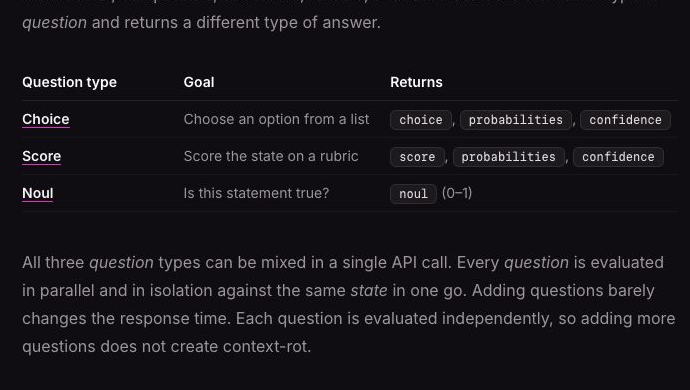
TypeSafe AI 공식 소개 문서의 세 질문 유형. Noul에는 별도의 confidence 필드가 없다는 차이도 보인다. (출처: TypeSafe AI Introduction, 2026-10-13 캡처)
한 요청에 여러 질문을 함께 담을 수 있지만, 각 질문은 한 가지 판단에만 집중시키는 편이 좋습니다. “이 이슈가 심각하고 보안 문제이며 긴급한가?”를 한 번에 묻기보다 심각도·보안 관련성·긴급도를 각각 묻고 최종 정책은 코드에서 합칩니다. 이는 공식 설계 지침의 핵심이기도 합니다.
코딩 에이전트나 일반 LLM과의 차이
Jev는 대화를 이어가거나 코드를 작성하는 모델이 아닙니다. Claude Code·Cursor·Codex 뒤의 생성형 모델을 jev-latest로 바꾸어 쓰는 방식도 아닙니다. 오히려 그런 도구로 Jev를 호출하는 프로그램을 만들 수 있습니다. 예를 들어 생성형 모델이 고객에게 답변을 쓰고, Jev가 그 앞뒤에서 의도 분류나 검토 필요 여부를 판단하도록 역할을 나눕니다. (TypeSafe AI: Jev with coding agents)
| 필요한 일 | 적합한 수단 |
|---|---|
| 새 코드·설명문·고객 답변 생성 | 생성형 LLM 또는 코딩 에이전트 |
| 고정된 팀·도구·정책 중 선택 | Jev Choice |
| 정의된 기준표로 정도 평가 | Jev Score |
| 특정 조건의 존재 가능성 판단 | Jev Noul |
| 정확한 계산·날짜 비교·권한 검사 | 일반 프로그램 코드 |
여기서 ‘타입이 정해진 출력’은 형식이 안정적이라는 뜻이지 답이 반드시 맞다는 뜻은 아닙니다. 잘못 분류할 수 있으므로 실제 데이터로 검증하고, 위험한 후속 작업은 코드와 사람의 승인으로 제한해야 합니다.
어디에 쓰면 유용할까
가장 먼저 시도할 만한 곳은 결과를 사람이 확인할 수 있는 낮은 위험의 분류 작업입니다. 공식 활용 사례와 RAG 예제를 개발 작업으로 옮기면 다음과 같습니다.
| 개발·운영 장면 | Jev에 맡길 판단 | 코드가 맡을 일 |
|---|---|---|
| 이슈·지원 티켓 분류 | 버그/문서/기능 요청 선택, 긴급성 판단 | 큐 이동, 낮은 확신의 수동 검토 |
| PR·CI 보조 검사 | 팀 규약과 의미상 어긋나는 변경인지 표시 | 테스트·정적 분석 실행, 최종 머지 권한 유지 |
| RAG 검색 품질 | 검색된 문단의 관련성·지시문 오염 여부 판단 | 후보 검색, 통과 문단만 생성 모델에 전달 |
| 에이전트 도구 라우팅 | 허용된 도구 중 의도에 맞는 경로 선택 | 인자 검증, 권한 확인, 실행 및 로그 |
| 생성형 앱 가드레일 | 입력·출력의 지정 위험 신호 평가 | 정책 임계값 적용, 보류·차단·사람에게 전달 |
특히 CI에서는 Jev의 결과를 바로 ‘실패’나 ‘머지 금지’로 만들기보다 검토용 신호로 시작하세요. 보안 취약점 판정이나 배포 승인처럼 결과의 비용이 큰 곳에는 정적 도구, 명시적 규칙, 사람 검토를 함께 둬야 합니다. 공식 가드레일 예제 역시 모델 판단 뒤에 코드의 정책 분기를 둡니다.
설치 전에: Playground에서 먼저 시험하기
가장 빠른 출발점은 공식 Playground입니다. 로그인 후 이슈 문장을 state로 붙이고 Choice 질문 하나를 추가해 보세요. 같은 입력으로 옵션 설명을 바꿔 보면서 결과가 어떻게 달라지는지 확인하면 코드 작성 전에 분류 기준을 다듬을 수 있습니다. Playground 사용과 API 키 발급 절차는 공식 Quick start에 있습니다.
여기서 ‘설치’는 Jev 모델 가중치를 노트북에 내려받는다는 뜻이 아닙니다. 공식 시작 절차는 호스팅된 API를 호출하거나 SDK를 프로젝트에 설치하는 방식입니다. 계정과 API 키가 필요하며, 비밀 키는 브라우저 클라이언트나 저장소에 넣지 말고 서버 환경 변수로 관리하세요.
JavaScript·TypeScript에서 설치하고 호출하기
공식 JavaScript SDK는 Node.js 20 이상에서 다음처럼 설치합니다.
npm install @typesafe-ai/sdkTYPESAFE_API_KEY를 실행 환경에 설정한 뒤, 서버 코드에서 한 건의 이슈를 분류해 봅니다. 다음 코드는 설명용 예시이며 실제 API 응답값은 입력에 따라 달라집니다.
import { choice, noul, TypeSafeClient } from "@typesafe-ai/sdk";

const client = new TypeSafeClient();
const response = await client.systemOne({
  state: {
    issue: "로그인 후 저장 버튼을 누르면 500 오류가 납니다."
  },
  questions: {
    route: choice("Which queue should handle this issue?", {
      bug: "A reproducible product malfunction",
      docs: "Missing or incorrect documentation",
      other: "Neither bug nor documentation issue"
    }),
    activeIncident: noul("Does this report an active production outage?")
  }
});

const route = response.answers.route;
if (route.confidence < 0.65 || route.choice === "other") {
  console.log("manual-review", route.choice);
} else {
  console.log("send-to-queue", route.choice);
}
console.log("incident probability", response.answers.activeIncident.noul);0.65는 제품의 권장 기본값이 아니라 설명용 임계값입니다. 라벨이 붙은 실제 이슈로 오분류율을 측정하고, 자동 라우팅이 허용되는 수준을 팀이 정해야 합니다. Choice의 confidence는 선택 옵션의 확률 분포를 요약한 값으로, 선택 옵션의 확률 자체와 동일하지 않습니다. Noul은 별도 confidence 없이 noul 확률을 반환하며 0.5 근처는 불확실한 경우로 봅니다. (공식 Confidence 문서)
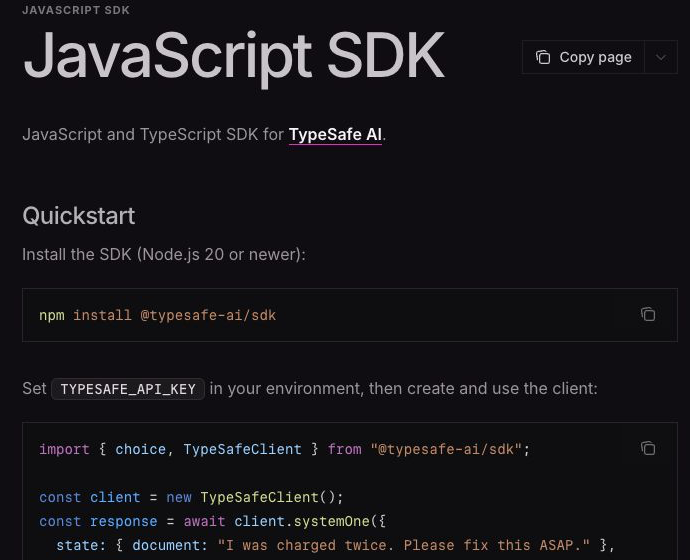
TypeSafe AI JavaScript SDK 공식 문서. 설치 패키지명과 API 키 환경 변수, 클라이언트 호출 형태를 확인할 수 있다. (출처: TypeSafe AI JavaScript SDK, 2026-10-13 캡처)
SDK 없이 HTTP로 직접 호출하려면 POST https://api.typesafe.ai/v1/systemone에 Bearer API 키와 JSON 본문을 보냅니다. model은 문서의 예시처럼 jev-latest를 사용할 수 있고, 요청에는 state와 이름 붙은 questions를 넣습니다. 아래 공식 화면을 보면 요청 경로와 인증 헤더를 한눈에 확인할 수 있습니다. (API 참조)
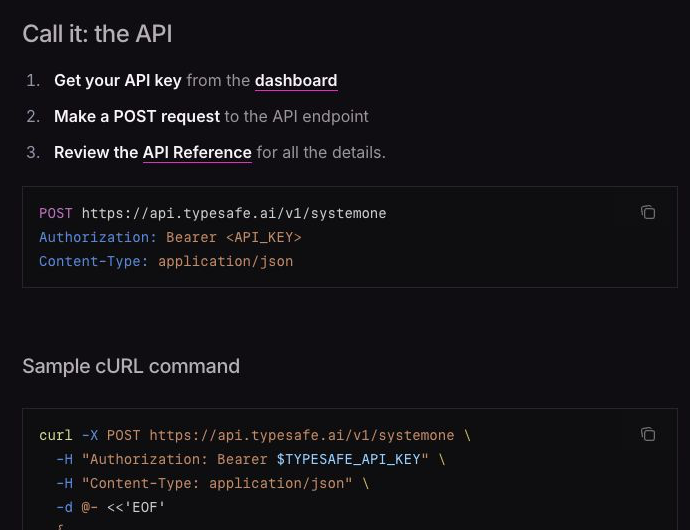
TypeSafe AI 공식 Quick start의 API 호출 안내. API 키는 화면의 자리표시자가 아니라 개인 환경 변수로 전달해야 한다. (출처: TypeSafe AI Quick start, 2026-10-13 캡처)
Python 프로젝트라면 Python 3.10 이상에서 pip install typesafe-sdk 또는 uv add typesafe-sdk를 사용합니다. TypeSafeClient().system_one(state=..., questions=...) 형태와 Choice, Score, Noul 클래스는 공식 Python 예제에 나와 있습니다. 별도로 npx skills add typesafe-ai/skills --skill typesafe-ai는 코딩 에이전트가 Jev API 사용법을 이해하도록 돕는 스킬 설치이지, Jev 모델이나 SDK 설치가 아닙니다. (공식 Agent skill 안내)
운영 전에 반드시 점검할 것
- 질문과 기준을 작게 만든다. 복합 판단을 분리하고
other처럼 해당 없음 경로를 마련합니다. - 실제 샘플로 평가한다. 정답이 알려진 이슈를 모아 클래스별 오분류와 수동 검토 비율을 확인합니다. 선택지의 순서도 바꿔 재검사합니다.
- 확신과 위험을 함께 본다. 정보성 라우팅과 삭제·결제·배포 같은 행동은 같은 임계값을 쓰지 않습니다. 낮은 확신 또는 고위험 작업은 사람에게 넘깁니다.
- 결정론적 일은 코드로 처리한다. 숫자 계산, 정확한 개수, 날짜 비교, 권한·보안 규칙은 모델의 몫이 아닙니다.
- 입력을 최소화하고 적대적 문장을 시험한다. 관련 없는 긴
state와 입력 속 명령문은 판단을 흔들 수 있습니다. 민감한 데이터도 전달 전에 별도 검토가 필요합니다.
이 항목은 Jev 1.13의 공식 한계 문서에 직접 열거된 실패 유형을 실무 점검표로 옮긴 것입니다. 특히 문서가 설명하는 선택지 순서 영향, 숫자·날짜의 취약성, 적대적 입력 문제는 “구조화된 결과니까 안전하다”는 오해를 경계하게 합니다. 문서의 한계 설명은 jev-1.13 기준이며 이후 버전에서는 달라질 수 있습니다.
어떤 프로젝트부터 시작할까
첫 프로젝트로는 내부 이슈 라우터가 좋습니다. 기존 이슈 50~100건에서 팀이 이미 내린 분류를 모으고, Choice로 담당 큐를 추천하되 처음에는 자동 이동하지 않습니다. 결과와 정답을 비교해 옵션 설명을 고치고, 낮은 확신 사례를 살펴본 뒤 제한적으로 자동화합니다. 이때 Jev는 의미를 판단하고, 코드는 권한·임계값·감사 로그·최종 실행을 책임집니다. 그렇게 역할을 분리할 때 Jev의 장점도 한계도 선명해집니다.
When developers add AI to a product, they do not always need a model that writes an answer. Often the task is to make a decision among known options: which team gets a ticket, whether a retrieved passage is relevant, or whether a person should review a case before automation proceeds. According to the official Jev site and introduction, Jev is TypeSafe AI's System One model for these judgments. Here, “Jev” means that model, not an unrelated CLI or library with a similar name.
What goes in, and what comes back?
A request has two main parts: state, the message, document, or object to evaluate; and questions, named questions about that state. The response consists of structured values your code can consume rather than free-form prose. The official introduction describes three question types.
| Question | Returns | Practical example |
|---|---|---|
Choice |
One predefined option, probabilities for each option, and confidence |
Route to bug, documentation, or another queue |
Score |
A score on an ordered rubric, level probabilities, and confidence |
Rate issue severity as low, medium, or high |
Noul |
Probability noul (0–1) that a statement is true |
“Does this report a production outage?” |
The three question types in TypeSafe AI's official introduction. Notice that Noul has no separate confidence field. (Source: TypeSafe AI Introduction, captured 2026-10-13)
You can ask several questions in one request, but keep each question focused on one judgment. Instead of asking whether an issue is simultaneously severe, security-related, and urgent, ask those separately and combine the resulting policy in code. That is also the official design guidance.
How it differs from a coding agent or an LLM
Jev does not maintain a conversation or write code. You cannot swap it in as the generative model behind Claude Code, Cursor, or Codex by setting jev-latest. You can use those tools to build software that calls Jev. For example, a generative model writes a customer reply while Jev judges intent or review needs before and after that step. (TypeSafe AI: Jev with coding agents)
| Need | Suitable tool |
|---|---|
| Generate new code, explanations, or customer replies | Generative LLM or coding agent |
| Choose among fixed teams, tools, or policies | Jev Choice |
| Assess degree on a defined rubric | Jev Score |
| Estimate whether a condition is present | Jev Noul |
| Exact arithmetic, date comparison, or permission checks | Ordinary program code |
Typed output means a stable format, not a guarantee of a correct decision. Jev can misclassify. Validate it on your own data and keep risky follow-up actions behind code-level checks and human approval.
Where is it useful?
Start with low-risk classification whose result a person can verify. Translating the official use-case map and RAG example into development workflows gives these possibilities.
| Development or operations task | Jev's judgment | Your code's responsibility |
|---|---|---|
| Issue and support-ticket triage | Choose bug/docs/feature queue and assess urgency | Move the ticket; review low-confidence cases |
| PR or CI assistive check | Flag changes that semantically conflict with team conventions | Run tests and static analysis; retain merge authority |
| RAG retrieval quality | Assess passage relevance or instruction contamination | Retrieve candidates; pass approved passages to the generator |
| Agent tool routing | Choose an appropriate allowed tool | Validate arguments and permissions; execute and log |
| Generative-app guardrails | Evaluate specified risk signals in inputs and outputs | Apply thresholds; hold, block, or escalate |
Especially in CI, begin with a review signal rather than turning a Jev result directly into “fail” or “cannot merge.” For security findings or deployment approval, pair it with static tools, explicit rules, and human review. The official guardrails example likewise places policy branching in code after the model's judgment.
Before installing: try the Playground
The quickest start is the official Playground. Log in, paste an issue as state, and add a Choice question. Try changing option descriptions on the same input to refine your criteria before writing code. The official Quick start covers the Playground and API-key setup.
Here, “installation” does not mean downloading Jev model weights to your laptop. The official getting-started path calls the hosted API or installs an SDK in your project. You need an account and API key. Keep that secret in a server-side environment variable, never in browser client code or a repository.
Install and call from JavaScript or TypeScript
The official JavaScript SDK supports Node.js 20 or newer:
npm install @typesafe-ai/sdk
Set TYPESAFE_API_KEY in your runtime environment, then classify one issue from server-side code. This is an illustrative example; actual values depend on the input.
import { choice, noul, TypeSafeClient } from "@typesafe-ai/sdk";

const client = new TypeSafeClient();
const response = await client.systemOne({
  state: {
    issue: "로그인 후 저장 버튼을 누르면 500 오류가 납니다."
  },
  questions: {
    route: choice("Which queue should handle this issue?", {
      bug: "A reproducible product malfunction",
      docs: "Missing or incorrect documentation",
      other: "Neither bug nor documentation issue"
    }),
    activeIncident: noul("Does this report an active production outage?")
  }
});

const route = response.answers.route;
if (route.confidence < 0.65 || route.choice === "other") {
  console.log("manual-review", route.choice);
} else {
  console.log("send-to-queue", route.choice);
}
console.log("incident probability", response.answers.activeIncident.noul);
0.65 is an example threshold, not a recommended product default. Measure misclassification on labeled real issues and set the allowed level of automatic routing for your team. Choice's confidence summarizes the option-probability distribution; it is not identical to the selected option's probability. Noul returns only its noul probability, with values near 0.5 indicating uncertainty. (Official Confidence guide)
The official TypeSafe AI JavaScript SDK guide shows the package name, API-key environment variable, and client call. (Source: TypeSafe AI JavaScript SDK, captured 2026-10-13)
For plain HTTP, send a Bearer API key and JSON body to POST https://api.typesafe.ai/v1/systemone. As in the docs, model can be jev-latest; include state and named questions. The official page below shows the endpoint and authorization header. (API reference)
The official TypeSafe AI Quick start API instructions. Supply your key through a private environment variable rather than treating the placeholder as a key. (Source: TypeSafe AI Quick start, captured 2026-10-13)
For Python, use pip install typesafe-sdk or uv add typesafe-sdk with Python 3.10 or newer. The official Python example shows TypeSafeClient().system_one(state=..., questions=...) and the Choice, Score, and Noul classes. Separately, npx skills add typesafe-ai/skills --skill typesafe-ai installs a coding-agent skill that teaches an agent the Jev API; it does not install the Jev model or SDK. (Official Agent skill guide)
What to check before production
- Keep questions and criteria small. Split compound judgments and provide a route such as
otherfor no match. - Evaluate on real examples. Compare results with labeled issues, inspect errors by class and review rate, and retest after changing option order.
- Gate by confidence and risk. Informational routing should not share a threshold with deletion, payment, or deployment. Escalate uncertain or high-risk cases.
- Keep deterministic tasks in code. Exact arithmetic, counting, date comparison, and permission or security rules are not model tasks.
- Minimize input and test adversarial text. Long irrelevant
stateand instructions embedded in input can shift judgments. Review sensitive data before sending it.
These checks translate failure modes directly listed in the official Jev 1.13 limitations into an operational checklist. Option-order sensitivity, weak numeric/date handling, and adversarial input are reminders that structured output alone is not safety. That page describes jev-1.13; later versions may differ.
What should your first project be?
An internal issue router is a sensible first experiment. Gather 50–100 issues with team-approved labels. Let Choice recommend a queue without automatically moving anything at first. Compare recommendations with the labels, refine the option descriptions, examine low-confidence cases, and only then automate a narrow subset. Jev handles semantic judgment; your code owns permissions, thresholds, audit logs, and final execution. That division makes both its strengths and limitations clear.
开发者在产品中加入 AI 时,并不总需要一个“写答案”的模型。把工单交给哪个团队、检索段落是否相关、自动处理前是否需要人工复核,往往是在已知选项中作判断。根据 Jev 官方网站和介绍文档,Jev 是 TypeSafe AI 为这类任务提供的 System One 判断模型。本文的 Jev 指这一模型,而非名称相近的其他 CLI 或库。
Jev 接收什么,返回什么?
请求主要包含两部分:state 是待判断的消息、文档或对象;questions 是针对该状态、带名称的问题。响应不是自由生成的文字,而是程序可以直接读取的结构化值。官方介绍列出三种问题类型。
| 问题 | 返回值 | 实际例子 |
|---|---|---|
Choice |
一个预设选项、各选项概率、confidence |
在缺陷、文档和其他队列中选择 |
Score |
有顺序的评分标准上的分值、各等级概率、confidence |
按低、中、高评估问题严重度 |
Noul |
某个陈述为真的概率 noul(0~1) |
“这是否报告了生产环境故障?” |
TypeSafe AI 官方介绍中的三种问题类型。注意 Noul 没有单独的 confidence 字段。(来源:TypeSafe AI Introduction,2026-10-13 截图)
一次请求可以包含多个问题,但每个问题最好只针对一个判断。与其一次询问某个问题是否既严重、又涉及安全、还很紧急,不如分别询问,再由代码组合最终政策。这也是官方设计建议。
与编程代理和普通 LLM 有何不同
Jev 不会持续对话或编写代码,也不能通过设置 jev-latest 来替换 Claude Code、Cursor 或 Codex 背后的生成模型。相反,可以用这些工具编写调用 Jev 的软件。例如,生成模型撰写客户回复,Jev 在前后判断意图或是否需要复核。(TypeSafe AI:Jev with coding agents)
| 需求 | 适合的工具 |
|---|---|
| 生成新代码、说明或客户回复 | 生成式 LLM 或编程代理 |
| 在固定团队、工具或政策中选择 | Jev Choice |
| 按既定标准评估程度 | Jev Score |
| 估计某条件是否成立 | Jev Noul |
| 精确计算、日期比较、权限检查 | 普通程序代码 |
类型化输出意味着格式稳定,不意味着判断必然正确。模型仍可能误分类。应使用自身数据验证,并以代码检查和人工批准约束高风险后续操作。
可以用于哪些场景?
最好从可由人复核结果的低风险分类任务入手。把官方用例地图和 RAG 示例应用到开发工作流,可以得到以下方向。
| 开发或运维场景 | 交给 Jev 的判断 | 由代码负责 |
|---|---|---|
| 问题与客服工单分流 | 选择缺陷/文档/功能队列,判断紧急程度 | 移动工单,人工复核低置信度案例 |
| PR、CI 辅助检查 | 标记语义上可能违反团队约定的改动 | 执行测试与静态分析,保留合并权限 |
| RAG 检索质量 | 判断段落相关性及是否夹带指令 | 检索候选,仅把合格段落送给生成模型 |
| 代理工具路由 | 在允许的工具中选择合适路径 | 验证参数和权限,执行并记录日志 |
| 生成式应用防护 | 评估输入输出中的指定风险信号 | 应用阈值,暂缓、阻止或升级处理 |
尤其在 CI 中,先把 Jev 的结果当作复核提示,不要立即变成“失败”或“禁止合并”。安全问题或部署批准还需要静态工具、明确规则和人工复核。官方防护示例同样让代码在模型判断之后执行政策分支。
安装前:先试 Playground
最快的起点是官方 Playground。登录后把问题描述粘贴为 state,加入一个 Choice 问题。对同一输入修改选项描述,观察结果变化,在写代码前完善分类标准。官方 Quick start说明了 Playground 和 API 密钥的获取步骤。
这里的“安装”不表示将 Jev 模型权重下载到笔记本电脑。官方入门方式是调用托管 API,或者在项目中安装 SDK。需要账号和 API 密钥;密钥应放在服务器环境变量里,切勿写入浏览器客户端代码或代码仓库。
在 JavaScript、TypeScript 中安装和调用
官方 JavaScript SDK要求 Node.js 20 或更新版本:
npm install @typesafe-ai/sdk
在运行环境中设置 TYPESAFE_API_KEY,然后从服务器端代码分类一条问题。以下是说明性示例,实际响应值随输入而变化。
import { choice, noul, TypeSafeClient } from "@typesafe-ai/sdk";

const client = new TypeSafeClient();
const response = await client.systemOne({
  state: {
    issue: "로그인 후 저장 버튼을 누르면 500 오류가 납니다."
  },
  questions: {
    route: choice("Which queue should handle this issue?", {
      bug: "A reproducible product malfunction",
      docs: "Missing or incorrect documentation",
      other: "Neither bug nor documentation issue"
    }),
    activeIncident: noul("Does this report an active production outage?")
  }
});

const route = response.answers.route;
if (route.confidence < 0.65 || route.choice === "other") {
  console.log("manual-review", route.choice);
} else {
  console.log("send-to-queue", route.choice);
}
console.log("incident probability", response.answers.activeIncident.noul);
0.65只是示例阈值,不是产品推荐默认值。请用有标签的真实问题测量误分类率,由团队确定自动分流的容许范围。Choice 的 confidence 是对选项概率分布的概括,不等于被选中选项的概率。Noul 不返回单独的 confidence,只返回 noul 概率;接近 0.5 意味着不确定。(官方 Confidence 文档)
TypeSafe AI JavaScript SDK 官方指南展示了包名、API 密钥环境变量和客户端调用方式。(来源:TypeSafe AI JavaScript SDK,2026-10-13 截图)
如需直接使用 HTTP,应向 POST https://api.typesafe.ai/v1/systemone 发送 Bearer API 密钥和 JSON 请求体。可按文档使用 jev-latest 作为 model,并提供 state 与带名称的 questions。下方官方页面展示了请求地址和认证头。(API 参考)
TypeSafe AI 官方 Quick start 的 API 调用说明。密钥应通过私有环境变量提供,不能把占位符当成真实密钥。(来源:TypeSafe AI Quick start,2026-10-13 截图)
Python 项目需要 Python 3.10 或更新版本,运行 pip install typesafe-sdk 或 uv add typesafe-sdk。官方 Python 示例展示了 TypeSafeClient().system_one(state=..., questions=...) 以及 Choice、Score、Noul 类。另一个命令 npx skills add typesafe-ai/skills --skill typesafe-ai 安装的是帮助编程代理理解 Jev API 的技能,并非 Jev 模型或 SDK。(官方 Agent skill 指南)
投入生产前必须检查
- 问题与标准尽量小。 拆分复合判断,并提供
other等“不符合”出口。 - 用真实样本评估。 对比已有标签,检查各类别的误分类与人工复核比例;改变选项顺序后重新测试。
- 同时考虑置信度和风险。 信息性分流不应与删除、支付或部署共用阈值。不确定或高风险的案例应升级到人工处理。
- 确定性任务交给代码。 精确计算、计数、日期比较和权限、安全规则不应交给模型。
- 精简输入并测试对抗文本。 冗长无关的
state和藏在输入中的指令可能改变判断;发送敏感数据前也需单独审查。
以上把 Jev 1.13 官方局限文档直接列出的失败模式转成了上线检查表。选项顺序影响、数字和日期处理弱点以及对抗输入提醒我们:仅有结构化输出并不等于安全。该文档针对 jev-1.13,之后的版本可能不同。
从哪个项目开始?
内部问题路由器是合适的第一项实验。收集 50~100 条已有团队确认标签的问题,让 Choice 推荐队列,但最初不要自动移动。将结果与标签对比,修改选项描述,检查低置信度案例,再对一小部分情形实施自动化。Jev 负责语义判断;代码负责权限、阈值、审计日志和最终执行。这样的分工能清楚呈现它的优势和局限。
開発者が製品にAIを組み込むとき、必ずしも「文章を書くモデル」が必要とは限りません。問い合わせをどのチームへ送るか、検索結果が質問に関連するか、自動処理の前に人が確認すべきかといった、決まった選択肢の中での判断が必要な場面も多くあります。Jevの公式サイトと紹介ドキュメントによると、JevはTypeSafe AIがこうした用途に提供するSystem One判断モデルです。本記事のJevは、同名に近い別のCLIやライブラリではなく、このモデルを指します。
入力と出力の仕組み
リクエストは主に、判断対象のメッセージ・文書・オブジェクトであるstateと、その状態についての名前付き質問questionsで構成されます。応答は自由な文章ではなく、コードが直接扱える構造化された値です。公式紹介では、質問を次の3種類に分けています。
| 質問 | 返る値 | 実務例 |
|---|---|---|
Choice |
定義済みの選択肢1つ、各選択肢の確率、confidence |
バグ・文書・その他の担当キューを選ぶ |
Score |
順序のある評価基準の点数、各段階の確率、confidence |
課題の重大度を低・中・高で評価する |
Noul |
命題が真である確率noul(0~1) |
「本番環境の障害報告か」を確認する |
TypeSafe AIの公式紹介に掲載された3種類の質問。Noulには独立したconfidenceフィールドがない点にも注目。(出典:TypeSafe AI Introduction、2026-10-13撮影)
1回のリクエストに複数の質問を含められますが、各質問は1つの判断に絞るのが適切です。「重大で、セキュリティに関係し、緊急か」を一度に問うより、それぞれを問い、最終的な方針をコードで組み合わせます。これは公式の設計指針でもあります。
コーディングエージェントや一般的なLLMとの違い
Jevは対話を続けたり、コードを書いたりしません。jev-latestを設定してClaude Code、Cursor、Codexの生成モデルを置き換えることもできません。一方、そうしたツールを使ってJevを呼び出すプログラムを作ることはできます。たとえば生成モデルが顧客への回答を書き、Jevが前後で意図やレビュー要否を判断するという分担です。(TypeSafe AI: Jev with coding agents)
| 必要な処理 | 適した手段 |
|---|---|
| 新しいコード、説明文、顧客回答の生成 | 生成AIまたはコーディングエージェント |
| 固定されたチーム・ツール・方針から選択 | Jev Choice |
| 定義済みの基準で程度を評価 | Jev Score |
| 特定条件が存在する可能性を判断 | Jev Noul |
| 正確な計算、日付比較、権限確認 | 通常のプログラムコード |
型付きの出力は形式が安定するという意味であり、判断の正しさを保証しません。誤分類は起こり得ます。自分たちのデータで検証し、危険な後続操作にはコード上のチェックと人の承認を残してください。
どこで役立つか
まずは人が結果を確認できる、低リスクの分類作業から始めるとよいでしょう。公式ユースケース一覧とRAGの例を開発作業に当てはめると、次のようになります。
| 開発・運用の場面 | Jevに任せる判断 | コードが担うこと |
|---|---|---|
| 課題・サポートチケットの分類 | バグ/文書/機能のキュー選択と緊急度の判断 | キューへの移動、低確信度の人手確認 |
| PR・CIの補助チェック | チーム規約に意味上反する変更のフラグ付け | テスト・静的解析の実行、マージ権限の維持 |
| RAG検索の品質管理 | 段落の関連性や指示文混入の判断 | 候補検索、通過した段落のみ生成モデルへ送る |
| エージェントのツール振り分け | 許可されたツールから適切な経路を選ぶ | 引数・権限の検証、実行、ログ記録 |
| 生成AIアプリのガードレール | 入出力にある指定のリスク信号を評価 | 閾値の適用、保留・遮断・人への引き継ぎ |
特にCIでは、Jevの結果をいきなり「失敗」や「マージ禁止」にせず、レビューのためのシグナルとして使い始めましょう。セキュリティ判定やデプロイ承認には、静的ツール、明示的な規則、人による確認も必要です。公式ガードレール例でも、モデルの判断後にコードで方針を分岐させています。
インストール前にPlaygroundで試す
最も手早い入口は公式Playgroundです。ログイン後、課題の文章をstateとして貼り、Choiceの質問を1つ追加します。同じ入力で選択肢の説明を変えて結果を比べれば、コーディング前に分類基準を整えられます。PlaygroundとAPIキーの取得手順は公式Quick startにあります。
ここでの「インストール」は、Jevのモデル重みをPCにダウンロードする意味ではありません。公式の入門手順ではホストされたAPIを呼ぶか、SDKをプロジェクトに導入します。アカウントとAPIキーが必要です。秘密鍵はブラウザー側のコードやリポジトリに置かず、サーバーの環境変数で管理してください。
JavaScript・TypeScriptでの導入と呼び出し
公式JavaScript SDKはNode.js 20以降で利用できます。
npm install @typesafe-ai/sdk
実行環境にTYPESAFE_API_KEYを設定し、サーバー側のコードで課題を1件分類します。以下は説明用の例であり、実際の応答値は入力によって変わります。
import { choice, noul, TypeSafeClient } from "@typesafe-ai/sdk";

const client = new TypeSafeClient();
const response = await client.systemOne({
  state: {
    issue: "로그인 후 저장 버튼을 누르면 500 오류가 납니다."
  },
  questions: {
    route: choice("Which queue should handle this issue?", {
      bug: "A reproducible product malfunction",
      docs: "Missing or incorrect documentation",
      other: "Neither bug nor documentation issue"
    }),
    activeIncident: noul("Does this report an active production outage?")
  }
});

const route = response.answers.route;
if (route.confidence < 0.65 || route.choice === "other") {
  console.log("manual-review", route.choice);
} else {
  console.log("send-to-queue", route.choice);
}
console.log("incident probability", response.answers.activeIncident.noul);
0.65は説明用の閾値で、製品の推奨初期値ではありません。ラベル付きの実際の課題で誤分類率を測り、許容できる自動振り分けの範囲をチームで決めます。Choiceのconfidenceは選択肢の確率分布を要約した値で、選ばれた選択肢の確率そのものではありません。Noulは別のconfidenceを持たず、noulの確率だけを返します。0.5付近は不確実な状態です。(公式Confidence文書)
TypeSafe AI JavaScript SDKの公式ガイド。パッケージ名、APIキーの環境変数、クライアントの呼び出し方を確認できる。(出典:TypeSafe AI JavaScript SDK、2026-10-13撮影)
HTTPを直接使う場合は、POST https://api.typesafe.ai/v1/systemoneへBearer APIキーとJSON本文を送ります。文書どおりmodelにjev-latestを指定でき、stateと名前付きquestionsを含めます。下の公式画面にはエンドポイントと認証ヘッダーが示されています。(APIリファレンス)
TypeSafe AI公式Quick startのAPI案内。画面のプレースホルダーをキーと見なさず、秘密の環境変数から渡す。(出典:TypeSafe AI Quick start、2026-10-13撮影)
Pythonでは3.10以降を使い、pip install typesafe-sdkまたはuv add typesafe-sdkを実行します。公式Python例にはTypeSafeClient().system_one(state=..., questions=...)とChoice、Score、Noulクラスが載っています。別のコマンドnpx skills add typesafe-ai/skills --skill typesafe-aiはコーディングエージェントにJev APIの使い方を教えるスキルを導入するもので、JevモデルやSDKのインストールではありません。(公式Agent skill案内)
本番投入前に確認すること
- 質問と基準を小さくする。 複合的な判断を分け、該当なしを示す
otherなどの経路を用意します。 - 実例で評価する。 正解ラベル付き課題と照合し、分類ごとの誤りと人手確認率を調べます。選択肢の順序を変えても再テストします。
- 確信度とリスクを合わせて見る。 情報の振り分けと、削除・決済・デプロイを同じ閾値にしません。不確実または高リスクの案件は人に引き継ぎます。
- 決定的な処理はコードへ。 正確な計算、件数、日付比較、権限・セキュリティ規則はモデルの役割ではありません。
- 入力を絞り、敵対的な文を試す。 無関係な長い
stateや入力内の指示が判断を揺らす可能性があります。機密データの送信も事前に確認が必要です。
この一覧は公式Jev 1.13の制約文書に挙がる失敗パターンを運用チェックに置き換えたものです。選択肢の順序、数値・日付の弱さ、敵対的入力は、「構造化出力なら安全」という誤解への注意点です。文書の対象はjev-1.13であり、後のバージョンでは変わる可能性があります。
最初に取り組むなら
社内の課題ルーターがよい実験になります。チームがすでに分類した50~100件の課題を集め、最初はChoiceにキューを推薦させるだけで自動移動はしません。正解と比べて選択肢の説明を直し、低確信度の例を調べてから、限定された範囲を自動化します。Jevは意味の判断を、コードは権限・閾値・監査ログ・最終実行を担当します。この分担なら利点と限界の両方が明確になります。
Al incorporar IA a un producto, no siempre hace falta un modelo que redacte respuestas. A menudo hay que decidir entre opciones conocidas: a qué equipo enviar un ticket, si un fragmento recuperado es pertinente o si una persona debe revisar un caso antes de automatizarlo. Según el sitio oficial de Jev y su introducción, Jev es el modelo System One de TypeSafe AI para este tipo de juicios. Aquí “Jev” se refiere a ese modelo, no a otras herramientas de nombre parecido.
¿Qué recibe y qué devuelve Jev?
La solicitud tiene dos partes principales: state, el mensaje, documento u objeto que se evalúa, y questions, preguntas con nombre sobre ese estado. La respuesta contiene valores estructurados que el código puede consumir directamente, no prosa libre. La introducción oficial describe tres tipos de preguntas.
| Pregunta | Devuelve | Ejemplo práctico |
|---|---|---|
Choice |
Una opción predefinida, probabilidades por opción y confidence |
Elegir la cola de errores, documentación u otros |
Score |
Puntuación en una escala ordenada, probabilidades por nivel y confidence |
Valorar la gravedad como baja, media o alta |
Noul |
Probabilidad noul (0–1) de que una afirmación sea cierta |
«¿Se informa de una caída en producción?» |
Los tres tipos de preguntas en la introducción oficial de TypeSafe AI. Noul no tiene un campo confidence independiente. (Fuente: TypeSafe AI Introduction, captura del 2026-10-13)
Una petición puede incluir varias preguntas, pero cada una debe centrarse en un solo juicio. En vez de preguntar a la vez si un problema es grave, está relacionado con seguridad y es urgente, plantea tres preguntas y combina la política final en código. Es también la recomendación oficial de diseño.
Diferencia frente a un agente de programación o un LLM
Jev no mantiene conversaciones ni escribe código. Tampoco se puede poner jev-latest como sustituto del modelo generativo de Claude Code, Cursor o Codex. Sí se pueden usar esas herramientas para crear software que llame a Jev. Por ejemplo, un modelo generativo redacta la respuesta al cliente y Jev evalúa la intención o la necesidad de revisión antes y después. (TypeSafe AI: Jev with coding agents)
| Necesidad | Herramienta adecuada |
|---|---|
| Generar código, explicaciones o respuestas al cliente | LLM generativo o agente de programación |
| Elegir entre equipos, herramientas o políticas fijos | Jev Choice |
| Valorar un grado según una escala definida | Jev Score |
| Estimar si se cumple una condición | Jev Noul |
| Cálculos exactos, fechas o permisos | Código convencional |
Una salida tipada significa formato estable, no decisión infalible. Puede haber clasificaciones erróneas. Valida el sistema con tus datos y limita las acciones posteriores de alto riesgo mediante comprobaciones de código y aprobación humana.
¿Dónde resulta útil?
Conviene empezar por clasificaciones de bajo riesgo cuyo resultado pueda comprobar una persona. Si trasladamos el mapa oficial de casos de uso y el ejemplo de RAG a un flujo de desarrollo, aparecen estas posibilidades.
| Escenario de desarrollo u operación | Juicio de Jev | Responsabilidad del código |
|---|---|---|
| Triaje de incidencias y soporte | Elegir cola de error/documentación/función y evaluar urgencia | Mover el ticket; revisar casos de baja confianza |
| Comprobación auxiliar en PR o CI | Señalar cambios que contradicen semánticamente normas del equipo | Ejecutar pruebas y análisis estático; conservar la autoridad de fusión |
| Calidad de recuperación RAG | Evaluar pertinencia del pasaje o instrucciones incrustadas | Buscar candidatos; pasar solo los aptos al generador |
| Enrutamiento de herramientas de un agente | Elegir una herramienta adecuada entre las permitidas | Validar argumentos y permisos; ejecutar y registrar |
| Guardarraíles de una aplicación generativa | Evaluar señales de riesgo definidas en entrada y salida | Aplicar umbrales; retener, bloquear o escalar |
Especialmente en CI, empieza con una señal para revisión, no convirtiendo el resultado de Jev directamente en «fallo» o «prohibido fusionar». Un hallazgo de seguridad o una aprobación de despliegue requiere además herramientas estáticas, reglas explícitas y revisión humana. El ejemplo oficial de guardarraíles también deja la ramificación de políticas al código tras el juicio del modelo.
Antes de instalar: prueba Playground
La vía más rápida es el Playground oficial. Inicia sesión, pega una incidencia como state y añade una pregunta Choice. Cambia las descripciones de las opciones con la misma entrada para afinar tus criterios antes de programar. La guía oficial de inicio explica Playground y la obtención de la clave API.
Aquí «instalar» no significa descargar los pesos de Jev al portátil. La ruta oficial consiste en llamar a la API alojada o instalar un SDK en el proyecto. Se necesita cuenta y clave API. Guarda el secreto en una variable de entorno del servidor, nunca en código del navegador ni en el repositorio.
Instalar y llamar desde JavaScript o TypeScript
El SDK oficial de JavaScript requiere Node.js 20 o posterior:
npm install @typesafe-ai/sdk
Configura TYPESAFE_API_KEY en el entorno de ejecución y clasifica una incidencia desde código de servidor. Este es un ejemplo ilustrativo; los valores reales dependen de la entrada.
import { choice, noul, TypeSafeClient } from "@typesafe-ai/sdk";

const client = new TypeSafeClient();
const response = await client.systemOne({
  state: {
    issue: "로그인 후 저장 버튼을 누르면 500 오류가 납니다."
  },
  questions: {
    route: choice("Which queue should handle this issue?", {
      bug: "A reproducible product malfunction",
      docs: "Missing or incorrect documentation",
      other: "Neither bug nor documentation issue"
    }),
    activeIncident: noul("Does this report an active production outage?")
  }
});

const route = response.answers.route;
if (route.confidence < 0.65 || route.choice === "other") {
  console.log("manual-review", route.choice);
} else {
  console.log("send-to-queue", route.choice);
}
console.log("incident probability", response.answers.activeIncident.noul);
0.65 es un umbral de ejemplo, no un valor predeterminado recomendado. Mide los errores con incidencias reales etiquetadas y fija con el equipo cuánto enrutamiento automático se permite. El confidence de Choice resume la distribución de probabilidades entre opciones; no es idéntico a la probabilidad de la opción elegida. Noul devuelve solo su probabilidad noul, sin confidence separado; cerca de 0.5 expresa incertidumbre. (Guía oficial de Confidence)
La guía oficial del SDK de JavaScript de TypeSafe AI muestra el nombre del paquete, la variable de entorno para la clave y la llamada del cliente. (Fuente: TypeSafe AI JavaScript SDK, captura del 2026-10-13)
Para usar HTTP directamente, envía una clave Bearer y un cuerpo JSON a POST https://api.typesafe.ai/v1/systemone. Según la documentación, model puede ser jev-latest; incluye state y questions con nombre. La pantalla oficial inferior muestra el endpoint y la cabecera de autorización. (Referencia API)
Instrucciones oficiales de la API de TypeSafe AI. Proporciona la clave mediante una variable de entorno privada; el marcador visible no es una clave real. (Fuente: TypeSafe AI Quick start, captura del 2026-10-13)
En Python 3.10 o posterior, usa pip install typesafe-sdk o uv add typesafe-sdk. El ejemplo oficial de Python muestra TypeSafeClient().system_one(state=..., questions=...) y las clases Choice, Score y Noul. Por separado, npx skills add typesafe-ai/skills --skill typesafe-ai instala una habilidad que enseña la API de Jev a un agente de programación; no instala el modelo ni el SDK. (Guía oficial de Agent skill)
Comprobaciones antes de producción
- Preguntas y criterios pequeños. Separa juicios compuestos y ofrece una salida como
otherpara los casos sin coincidencia. - Evalúa ejemplos reales. Compara con incidencias etiquetadas, revisa errores por clase y tasa de revisión; repite tras cambiar el orden de las opciones.
- Combina confianza y riesgo. El enrutamiento informativo no debe compartir umbral con eliminar, pagar o desplegar. Escala lo incierto o arriesgado.
- Deja lo determinista en el código. Cálculos exactos, conteos, comparaciones de fechas y reglas de permisos o seguridad no son tareas del modelo.
- Reduce la entrada y prueba textos adversarios. Un
statelargo e irrelevante o instrucciones incluidas en la entrada pueden alterar el juicio. Revisa también los datos sensibles antes de enviarlos.
Esta lista lleva a la práctica los fallos señalados en las limitaciones oficiales de Jev 1.13. La sensibilidad al orden, los números y fechas, y la entrada adversaria recuerdan que una salida estructurada no basta para garantizar seguridad. El documento se refiere a jev-1.13; versiones posteriores podrían comportarse de otro modo.
¿Con qué proyecto empezar?
Un enrutador interno de incidencias es un buen primer experimento. Reúne 50–100 incidencias clasificadas por el equipo y deja que Choice recomiende una cola, pero sin mover nada automáticamente al principio. Compara con las etiquetas, mejora las descripciones de opciones, examina los casos de baja confianza y solo después automatiza un subconjunto limitado. Jev se ocupa del juicio semántico; tu código, de permisos, umbrales, registro de auditoría y ejecución final. Así se ven claramente sus ventajas y sus límites.