Grok Bot·Muse·Claude Duet·ChatGPT dots: 개인 AI 에이전트 실전 비교
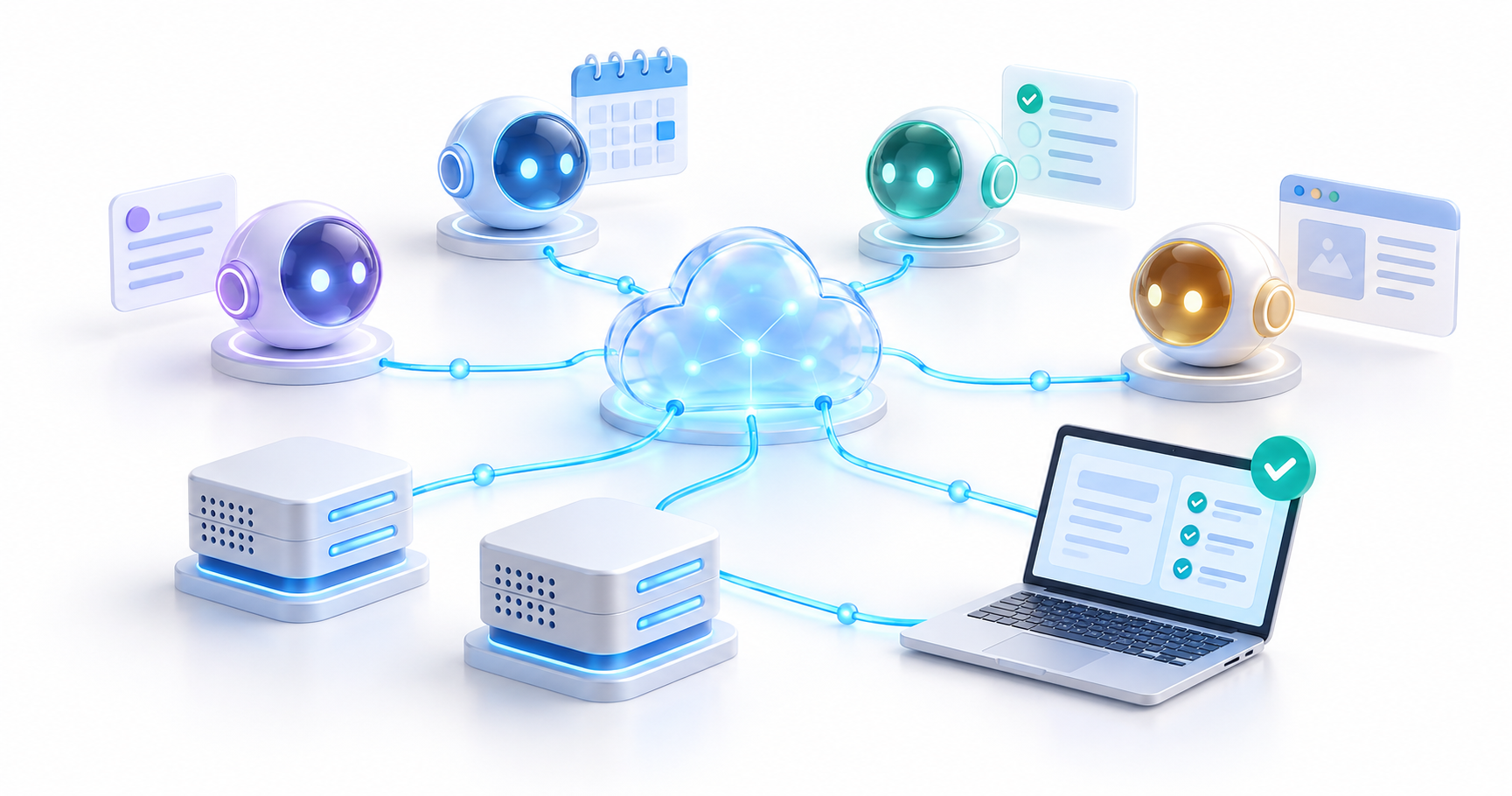
그록봇, 메타 뮤즈, 클로드 듀엣, ChatGPT dots는 대화가 끝난 뒤에도 일을 이어 가는 개인 AI 에이전트다. 시작 방법과 실제 업무 예시를 살펴보고, 직접 운영하는 OpenClaw·Hermes와 실행 환경, 연결 권한, 반복 작업, 비용을 기준으로 비교한다.
이 글은 2026년 10월 24일 공식 공개 문서를 기준으로 한다. 모든 제품을 같은 계정과 데이터로 실행한 성능 평가가 아니다. 아래 업무 예시와 선택 기준은 문서에서 확인한 기능을 바탕으로 구성한 활용 제안이며, 이용 국가·플랜·프리뷰 조건은 가입 시 다시 확인해야 한다.
1. 답변을 받는 것에서, 계속 맡겨 두는 일로
개인 에이전트가 주목받는 이유는 기억, 앱 연결, 브라우저 조작, 백그라운드 실행이 한 흐름으로 묶이기 때문이다. “회의 준비물을 알려 줘”에서 “다음 달 행사 준비를 계속 추적하고, 마감이 바뀌면 준비 문서를 고쳐 줘”로 요청의 단위가 넓어진다. 유용성은 대화의 길이보다 확인 가능한 결과가 얼마나 꾸준히 남는가로 판단하는 편이 좋다.
| 제품과 공식 사이트 | 주로 살펴볼 특징 | 적합한 출발점 |
|---|---|---|
| Grok Bot | 역할별 Bot, 공동 클라우드 컴퓨터, Skills·Routines | 조사·운영·보고 담당을 나눠 반복 업무 맡기기 |
| Meta Muse | 개인 목표, 생활·사업 앱 연결, Goals와 활동 기록 | 일정·자료·콘텐츠 준비를 하나의 목표로 관리 |
| Claude Duet | Claude 맥락을 이어받는 선제적 브리핑과 업무 처리 | 메일·캘린더 중심으로 오늘 결정할 일 정리 |
| ChatGPT dots | 지속적인 책임 추적, Work·Codex에 작업 위임 | 조사·문서·개발을 함께 조율 |
| OpenClaw | 직접 운영하는 Gateway, 메시징 채널과 도구 연결 | 자신의 서버와 메신저에 에이전트 구축 |
| Hermes Agent | 모델 선택, 메모리·Skills·예약 작업 | 반복 절차를 저장하고 도구·스크립트와 결합 |
앞의 네 가지는 제공사가 운영하는 제품 경험이 중심이고, 뒤의 두 가지는 사용자가 실행 환경을 구성하고 운영하는 오픈 소스 도구다. 기능은 겹치며, 위 표는 독점 기능이나 성능 순위가 아니다. 여기서 Muse는 개인 에이전트 서비스를 뜻하며 Muse 계열 모델이나 코딩 도구 Muse Code와 구분한다.
2. 설치보다 먼저 확인할 이용 조건
| 서비스 | 확인 시점의 이용 조건 | 독자가 확인할 것 |
|---|---|---|
| Grok Bot | 유료 개인 Cursor 및 Cursor Teams, 연결한 개인 SuperGrok 계열 구독, 셀프서비스 Grok Business 등 지원 경로 | 자신에게 해당하는 계정 연결과 사용량 한도 |
| Muse | 미국·캐나다 제공에 이어 10월 23일 일본 출시 발표 | 자신의 국가·계정에서 가입 가능한지, 해당 지역의 기능 범위 |
| Claude Duet | 미국 Pro·Max 이용자를 대상으로 대기 명단 초대 방식의 연구 프리뷰 | 초대 수신 여부. Team·Enterprise는 아직 지원하지 않음 |
| dots | Pro 100·200·500의 18세 초과 이용자 중 EEA·영국·스위스 외 지역에 점진 제공. Business Premium·Enterprise는 전 세계 순차 제공 | 계정에 메뉴가 열렸는지. Enterprise는 관리자 활성화 필요 |
근거는 Grok 시작 안내, Muse 미국·캐나다 안내, 일본 출시 공지, Duet 도움말, dots 접근 조건이다. 특히 Muse의 일본 출시는 한국 출시를 의미하지 않는다. 이 글에서 확인한 공식 발표에는 한국 제공 일정이 없다.
3. Grok Bot: 역할 하나를 정하고, 성공한 절차를 루틴으로
Grok Bot은 이름과 역할을 가진 Bot을 만들고 계속 대화하며 일을 맡기는 방식이다. 브라우저·파일·터미널이 있는 클라우드 컴퓨터에서 작업하므로 노트북을 닫아도 이어 갈 수 있다. 여러 Bot은 협업할 수 있지만, 같은 계정의 Bot들은 파일과 브라우저 로그인 상태를 공유한다. Bot을 나누는 것이 계정 권한을 격리하는 방법은 아니다. (공식 개요)
- 공식 사이트에서 자신의 운영체제용 앱을 설치하고 Cursor 계정으로 로그인한다. SuperGrok으로 이용한다면 앱의 계정 연결 안내를 따른다.
- 첫 Bot의 역할을 “주간 제품 업데이트 조사”처럼 좁게 정한다. 이후 역할을 나눌 필요가 생기면
New → Create new Bot을 사용한다. Connect apps에서 필요한 앱을 연결하거나, 요청받은 사이트 로그인만Take over로 직접 완료한다.- 한 번의 결과를 검토한 뒤 절차를 Skill로 저장하고 Routine 생성을 요청한다. Bot 상세의
Details → Routines에서 일정과 다음 실행을 확인하고Test로 점검한다.
첫 작업은 이렇게 작게 시작할 수 있다.
내가 지정한 제품 3개의 공식 변경 기록을 읽고 이번 주 변경을 표로 정리해 줘. 열은 제품, 변경일, 사용자 영향, 원문 링크로 해 줘. 날짜가 없는 항목은 확인 필요로 표시하고, 이 대화에만 결과를 남겨 줘.
결과가 맞으면 “이 절차를 Skill로 저장하고, 4주 동안 매주 월요일 오전 9시 Asia/Seoul에 실행해 줘. 소스를 읽지 못하면 실패를 알리고 오래된 정보로 채우지 마. 다음 실행 시각을 보여 줘”라고 이어 간다. Skill은 하는 방법, Routine은 실행 시점과 담당 Bot이다. 시연으로 가르치는 Teach a task는 점진 제공될 수 있으므로 메뉴가 없으면 검증한 절차를 문장으로 저장하면 된다. (Skills·Routines 안내)
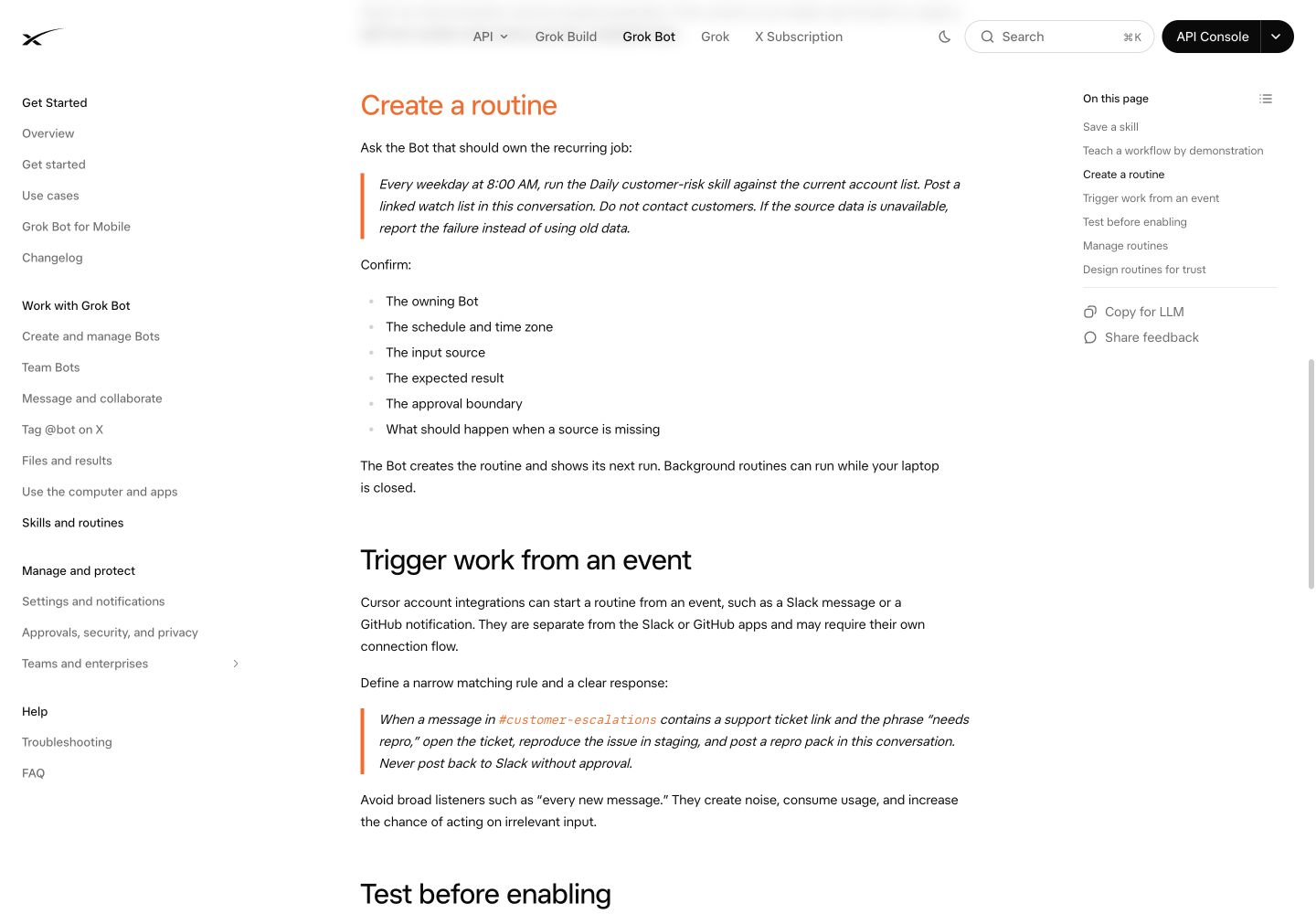
공식 공개 문서의 Routine 생성 안내. 담당 Bot·시간대·입력·결과·승인 범위를 함께 정하도록 설명한다. 2026-10-24 캡처. 출처 · 이미지 크게 보기.
4. Meta Muse: 하나의 목표에 일정과 자료를 모은다
Muse는 전용 클라우드 환경인 Muse Secure VM과 브라우저를 사용한다. 앱이나 WhatsApp에서 대화하고, 목표를 계획으로 나누어 진행할 수 있다. 사업용으로는 Instagram·Facebook 관련 자료와 여러 업무 도구의 연결도 제공한다. (제품 발표, 소규모 사업 활용 안내)
- 공식 다운로드 페이지 또는 Muse 웹에서 이용 가능 여부를 확인하고 온보딩을 완료한다.
- 앱 설정에서 실제로 필요한 연결만 추가한다. 처음에는 자료를 읽고 초안을 만드는 범위로 시작한다.
- 목표·기한·입력 자료·결과 형식을 함께 전달한다.
Goals에서 계획을 확인하고, 아바타를 눌러 활동 기록과 승인한 권한을 살펴본다.
예를 들어 개인 사업자의 콘텐츠 준비 업무라면 다음과 같다.
다음 달 제품 소개 콘텐츠를 준비해 줘. 내가 연결한 자료에서 최근 문의 주제와 기존 게시물 성과를 확인하고, 2주치 초안을 만들어 줘. 근거가 없는 성과 수치는 추정하지 마. 게시와 광고 집행은 하지 말고, 내가 선택할 주제 3개부터 보여 줘.
새 자료가 생기면 같은 목표에 이어 전달한다. 성공 여부는 “멋진 초안”보다 기존 브랜드 문구와의 일치, 실제 문의의 반영, 중복 주제 감소로 확인한다. 이는 이 글이 제안하는 업무 설계이며 측정된 생산성 사례는 아니다.
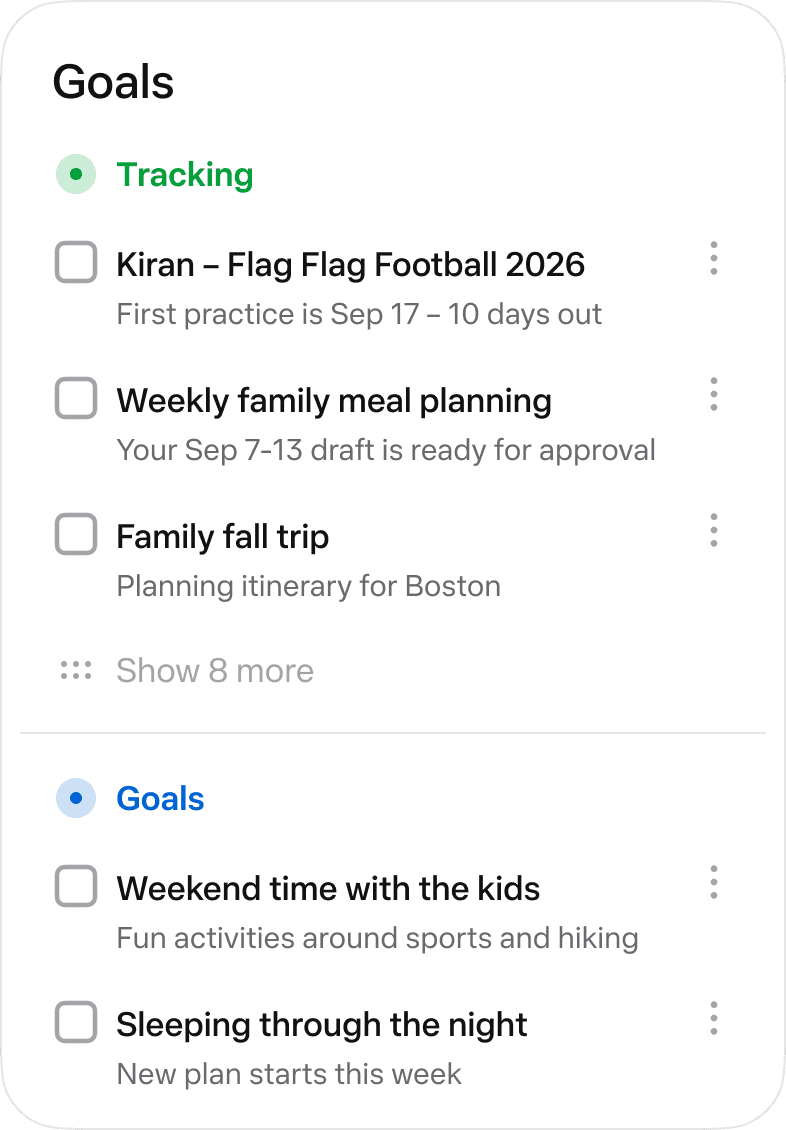
Meta가 공개한 Goals 화면 예시. 개인 계정을 캡처한 화면이 아니다. 출처: How We Designed Muse · 이미지 크게 보기.
Goals와 활동 기록은 “무엇을 부탁했는지”와 “무슨 일을 했는지”를 나누어 확인하는 데 유용하다. 연결된 앱의 실제 권한과 승인 카드를 함께 확인하고, 메일 발송·구매·게시를 허용하기 전에는 대상과 내용을 검토한다. 서비스의 보안 설계가 결과의 정확성을 보증하는 것은 아니다.
5. Claude Duet: 아침 브리핑과 처리할 일을 한 흐름으로
Duet은 기존 Claude의 메모리·Skills·연결 앱을 바탕으로 먼저 필요한 일을 알려 주는 개인 에이전트다. 아침 브리핑과 후속 작업에 초점을 두며, 자체 클라우드 컴퓨터에서 앱을 닫은 뒤에도 일한다. iOS·Android 독립 앱과 claude.ai를 통해 제공된다. (공식 소개)
- 제품 페이지의
Join the waitlist에 Claude 계정과 같은 이메일을 사용한다. 초대를 받으면 안내에 따라 설치하고 같은 계정으로 로그인한다. - Claude 설정에서 Gmail·Google Calendar 등 사용할 커넥터를 확인한다.
- 한 번에 확인할 범위를 지정한다. 예를 들어 “내일 회의 2개의 준비 자료와 미응답 질문을 정리하고 답장 초안만 작성해 줘”라고 요청한다.
Tasks에서 진행 중인 일과 입력 요청을,Make에서 완성된 파일을 확인한다. 완료 표시는 사용자가 직접 한다.
현재 프리뷰는 Opus 5.5를 사용하고 작업별 effort를 자동으로 판단하므로 Claude Code처럼 모델과 effort를 직접 조정하는 안내를 적용하면 안 된다. 브라우저 작업을 실시간으로 보거나 직접 넘겨받을 수 없고, 모든 프로젝트와 로컬 파일을 볼 수 있는 것도 아니다. Microsoft 365도 아직 지원하지 않는다. 따라서 지원 커넥터와 전달한 파일로 끝낼 수 있는 업무부터 맡기는 편이 현실적이다. (시작 방법과 제한)
6. ChatGPT의 유사 기능: dots가 Work와 Codex를 연결한다
ChatGPT에서는 dots, 화면상 Your dot이 가장 직접적인 비교 대상이다. 클라우드 컴퓨터와 브라우저를 가지고 지속적인 일을 추적하며, 필요하면 Work나 Codex에 작업을 나누어 맡긴다. 일회성 질문은 Chat, 명확한 산출물은 Work, 코드 구현·검토는 Codex, 여러 작업의 후속 진행은 dot에 맡기는 구성이 자연스럽다. (공식 역할 비교)
- 지원 계정의 최신 모바일 앱·데스크톱 앱·데스크톱 웹에서 dots를 열고 이름과 외형을 설정한다. 모바일 웹은 지원하지 않는다.
- 사용할 이메일·문서·코드 서비스의 플러그인을 연결한다. 로컬 파일이 필요할 때만 데스크톱에서 자신의 컴퓨터를 별도로 연결한다.
- “이번 출시 준비를 계속 추적해 줘”처럼 책임 범위를 정하고, 원문 자료와 알림 기준을 함께 준다.
- 데스크톱의 dot 프로필에서
Activity로 위임 작업을,Scheduled로 예약 작업을 확인한다. (시작 안내)
개발팀에서는 다음과 같이 요청할 수 있다.
출시 체크리스트와 연결된 피드백 채널을 확인해 줘. 문서 불일치는 Work 작업으로, 재현 가능한 버그는 Codex 작업으로 조사해서 검토할 결과를 준비해 줘. 원문 링크와 검증 결과를 남기고, 고객 회신·머지·배포 전에는 확인받아. 평상시 진행은 이 대화에 남기고 출시 일정에 영향이 있을 때 알려 줘.
클라우드 작업은 개인 기기를 꺼도 진행되지만, 연결한 로컬 컴퓨터를 쓰는 작업에는 그 컴퓨터의 온라인 상태와 열린 ChatGPT 앱이 필요하다. 메시징 채널 연결, 업무 앱 권한, 로컬 컴퓨터 연결은 별개다. Slack으로 대화할 수 있다는 사실만으로 전체 메일함이나 로컬 파일에 접근할 수 있는 것은 아니다.
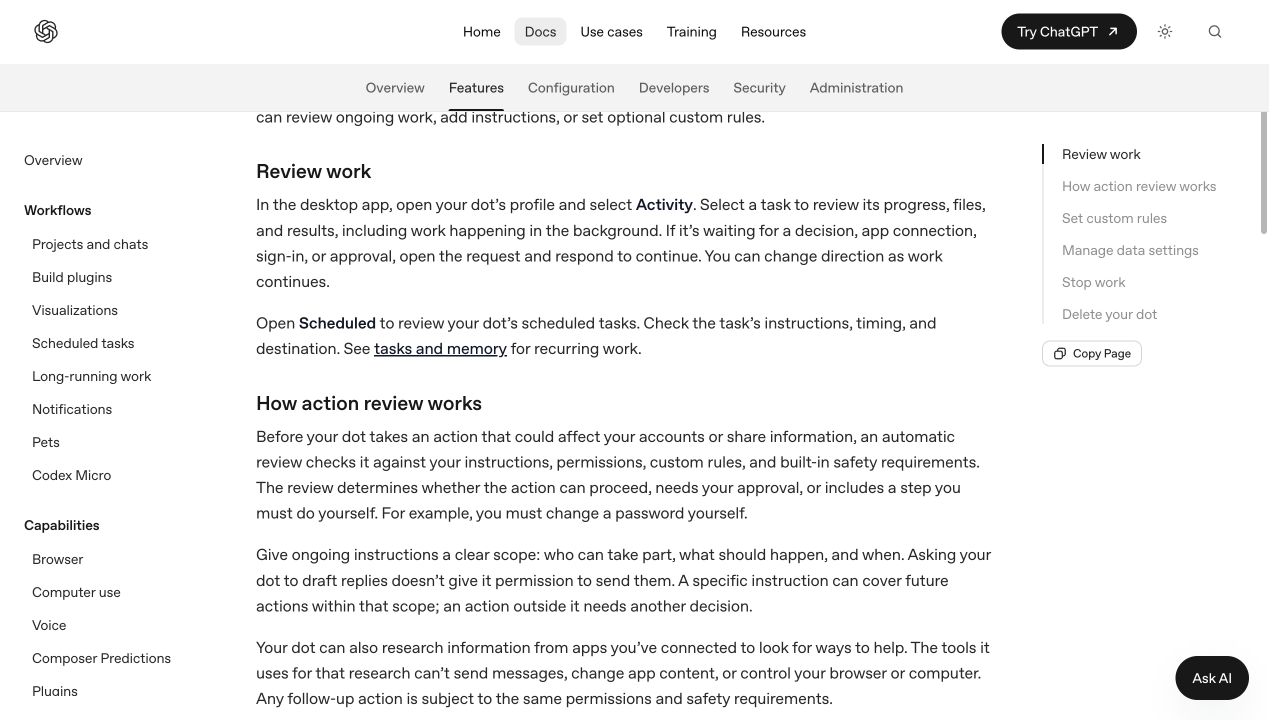
공식 공개 문서의 작업 검토 안내. 실제 계정의 작업 목록은 아니다. 2026-10-24 캡처. 출처: Control your dot · 이미지 크게 보기.
중단할 때도 구분이 필요하다. Pause는 dot의 현재 주 작업을 멈추며, 위임된 작업은 Activity, 반복 예약은 Scheduled에서 각각 중단해야 한다. (제어 안내) 프로젝트와 모드 선택은 Chat·Work·Codex 실전 가이드를 함께 참고하면 된다.
7. OpenClaw·Hermes와의 차이는 운영 주도권에 있다
OpenClaw와 Hermes에서도 기억, 브라우저, 메시징, 반복 실행을 구성할 수 있다. 차이는 사용자가 호스트, 모델 공급자, 도구, 인증, 업데이트와 장애 대응을 직접 정한다는 점이다. 자체 호스팅은 모델 추론까지 로컬이라는 뜻이 아니다. 외부 API를 연결하면 해당 요청의 내용은 외부 공급자에게 전송된다.
OpenClaw로 시작한다면
공식 Quickstart에 맞는 Node.js 환경과 모델 인증을 준비한다. 간단한 체험은 다음 명령으로 시작할 수 있다. 이 글에서는 설치 명령을 실행하거나 계정을 연결하지 않았다.
npx openclaw@latest온보딩에서 모델 접근을 확인하고 Control UI에서 응답을 시험한다. 이 방식의 Gateway는 해당 터미널에서 실행되므로 닫으면 계속 운영되지 않는다. 상시 사용은 정식 설치 후 Gateway 서비스 구성을 따르고, 메시징 채널 하나를 연결한 다음 허용된 사용자와 작업 범위를 정한다. 먼저 공개 변경 기록 요약을 한 번 실행하고, 안정된 뒤 예약으로 옮기면 된다.
Hermes로 시작한다면
공식 설치·Quickstart에 따라 설치한 뒤 모델과 도구를 설정한다.
hermes setup
hermes
일반 대화와 파일·웹 도구가 동작하는지 먼저 확인한다. 검증한 절차를 Skill로 남기고, 상시 운영이 필요하면 hermes gateway setup으로 메시징을 구성한 뒤 예약 작업을 추가한다. Blank Slate로 시작했다면 웹·메모리·Skills·예약 기능 등이 꺼져 있으므로 필요한 기능을 켜야 한다.
두 도구의 선택을 “OpenClaw는 메신저만, Hermes는 학습만”으로 나누면 실제 기능을 놓친다. 둘 다 넓은 범위를 지원한다. 자신에게 필요한 채널, 도구, 모델 인증과 운영 방식을 작은 작업으로 검증하는 것이 낫다. Hermes의 절차 재사용은 기반 모델이 자동으로 재훈련된다는 뜻이 아니다. 자세한 예시는 Hermes 자동화 활용 가이드에 정리했다.
8. 비용은 월 구독료와 반복 실행을 함께 본다
| 방식 | 사용량을 확인할 지점 | 실무에서 줄일 낭비 |
|---|---|---|
| Grok Bot | 연결한 플랜의 한도와 주간 사용량 | 역할이 겹치는 Bot과 불필요한 Routine |
| Muse | 무료 사용 한도와 추가 구독 조건 | 같은 목표를 여러 대화에서 중복 조사 |
| Duet | Claude의 5시간·주간 한도에 백그라운드 작업도 합산 | 범위가 넓은 점검과 과도한 확인 요청 |
| dots | dot 대화와 Work·Codex 위임 작업의 사용량을 구분 | 같은 자료를 읽는 중복 위임 작업 |
| OpenClaw·Hermes | 모델·도구 서비스 비용, 호스트 비용, 운영 시간 | 매번 전체 문서를 읽는 예약과 무한 재시도 |
Grok Bot은 공식 개요의 과금 안내, Muse는 공식 제품 FAQ, Duet은 사용량 설명을 확인한다. dots는 대화 자체가 ChatGPT 사용 한도에 산입되지 않더라도 위임한 Work·Codex 작업은 해당 제품 한도를 사용하며, 더 깊은 작업에 대한 플랜별 허용량이 있다. 무제한 무료 자동화로 해석하면 안 된다. (dots 접근·사용량)
서로 다른 서비스가 표시하는 토큰 수와 구독 한도는 그대로 비교하기 어렵다. 같은 작업을 일주일 맡기고, 완성된 결과 수·사람이 수정한 시간·실패 횟수·실제 추가 비용을 기록하자. 정해진 임계값 계산처럼 단순한 일은 스크립트로 처리하고, 의미 해석이나 글 작성이 필요한 부분에 모델을 쓰는 것이 자체 운영의 실질적인 장점이다.
9. 첫 주에는 한 가지 책임만 맡겨 본다
첫 실습으로는 “제품 3개의 변경 기록을 읽고 팀에 필요한 영향을 정리하기”가 좋다. 로그인 없이 확인할 수 있는 출처로 시작하고, 발송 대신 대화 안에 결과를 남기면 검토하기 쉽다. 다음 순서는 제품에 관계없이 적용할 수 있다.
- 원문 URL·대상 기간·결과 형식·담당 범위를 정한다.
- 일회성 결과에서 날짜와 링크를 직접 확인한다. 읽지 못한 자료는 실패로 표시하게 한다.
- 수정한 절차를 기억·Skill·지침 등 제품이 지원하는 방식으로 남긴다.
- 반복할 가치가 확인되면 시간대, 종료일, 알림 기준을 지정하고 등록된 일정과 다음 실행을 확인한다.
- 일주일 뒤 결과의 품질과 검토 시간을 보고 범위를 넓히거나 예약을 중단한다.
역할별 반복 업무를 나누고 싶다면 Grok Bot, 생활·사업 목표를 묶고 싶다면 Muse, Claude 맥락을 활용한 브리핑이 필요하면 Duet, 문서와 코드 작업을 조율하려면 dots부터 검토할 수 있다. 모델과 실행 환경을 직접 선택하고 유지할 준비가 있다면 OpenClaw·Hermes가 후보가 된다. 먼저 이용 가능한 서비스 하나로 작고 검증 가능한 업무를 끝내 보는 것이, 여섯 도구를 한꺼번에 연결하는 것보다 선택에 필요한 근거를 빨리 만든다.
Grok Bot, Meta Muse, Claude Duet and ChatGPT dots are personal AI agents that keep working between conversations. This guide explains how to start, suggests practical workflows, and compares their execution environments, permissions, recurring work and costs with self-hosted OpenClaw and Hermes.
This article uses official public documentation checked on October 24, 2026. It is not a benchmark run with identical accounts and data across all products. The examples and selection criteria are workflow suggestions based on documented capabilities. Check country, plan and preview eligibility again when signing up.
1. From getting answers to assigning ongoing work
Personal agents are attracting attention because memory, app connections, browser control and background execution now fit into one workflow. “What should I prepare for this meeting?” becomes “Keep next month's event preparations on track and update the documents when deadlines change.” Judge usefulness by reliable, inspectable results, rather than conversation length.
| Product and official site | Features to examine | A useful starting point |
|---|---|---|
| Grok Bot | Role-based Bots, a shared cloud computer, Skills and Routines | Split recurring research, operations and reporting duties |
| Meta Muse | Personal goals, life and business app connections, Goals and activity history | Organize schedules, material and content around one goal |
| Claude Duet | Proactive briefs and work using existing Claude context | Identify today's decisions from email and calendars |
| ChatGPT dots | Ongoing responsibilities and delegation to Work and Codex | Coordinate research, documents and development |
| OpenClaw | A self-managed Gateway connecting messaging channels and tools | Build an agent on your own server and messenger |
| Hermes Agent | Model choice, memory, Skills and scheduled tasks | Save repeatable procedures and combine tools with scripts |
The first four center on a provider-operated product experience. The other two are open-source tools whose runtime you configure and operate. Capabilities overlap; this table is neither an exclusive-feature list nor a ranking. Here, Muse means the personal agent service, distinct from Muse-family models and the Muse Code coding tool.
2. Check access before installing
| Service | Access at the time of checking | What to verify |
|---|---|---|
| Grok Bot | Supported routes include paid individual Cursor and Cursor Teams plans, linked individual SuperGrok subscriptions and self-serve Grok Business | Your account-linking route and usage allowance |
| Muse | US and Canadian availability, followed by a Japanese launch announced October 23 | Whether your country and account can sign up, and local feature availability |
| Claude Duet | Waitlist invitations for US Pro and Max users in a research preview | An invitation; Team and Enterprise are not supported yet |
| dots | Gradual rollout to Pro 100, 200 and 500 users over 18 outside the EEA, UK and Switzerland; worldwide rollout to Business Premium and Enterprise | Whether your account has access; Enterprise requires administrator enablement |
Sources: Grok setup, Muse US and Canada announcement, Japan launch, Duet help and dots access. Muse's Japanese launch does not imply availability in South Korea. The official announcements reviewed here give no Korean launch date.
3. Grok Bot: give it one role, then turn a proven process into a routine
Grok Bot lets you keep working with named Bots that have defined roles. They use a cloud computer with a browser, files and a terminal, so work can continue with your laptop closed. Multiple Bots can cooperate, but Bots under the same account share files and browser sign-ins. Creating separate Bots does not isolate account permissions. (Official overview)
- Install the appropriate app from the official site and sign in with Cursor. For SuperGrok access, follow the account-linking instructions.
- Give the first Bot a narrow role such as weekly product-update research. Add another through
New → Create new Botwhen duties need to split. - Connect necessary services through
Connect apps, or complete requested website sign-ins yourself usingTake over. - Review one result, save the procedure as a Skill and request a Routine. Check the schedule and next run under the Bot's
Details → Routines, then useTest.
Start with a small task:
Read the official changelogs for the three products I specify and summarize this week's changes in a table. Use product, change date, user impact and source link as columns. Mark undated items as needing verification. Keep the result in this conversation.
Once the result is correct, continue: “Save this procedure as a Skill and run it every Monday at 9 AM Asia/Seoul for four weeks. Report inaccessible sources instead of filling gaps with old information. Show the next run time.” A Skill describes how to work; a Routine specifies when and which Bot runs it. Teach a task may roll out gradually. If it is absent, save the verified procedure in writing. (Skills and Routines)
Public official documentation on creating a Routine, including the owner, time zone, inputs, output and approval scope. Captured October 24, 2026. Source · View larger image.
4. Meta Muse: organize schedules and material around a goal
Muse uses a dedicated cloud environment, Muse Secure VM, and a browser. You can talk through its app or WhatsApp and break goals into actionable plans. Business connections include Instagram and Facebook information alongside other work tools. (Product announcement, Small-business guide)
- Check access and complete onboarding through the official downloads or Muse web app.
- Add only the connections you need in app settings. Start with reading material and preparing drafts.
- Provide a goal, deadline, source material and output format. Review the plan in
Goals; tap the avatar to inspect activity and approved permissions.
For a small business preparing content:
Prepare next month's product-introduction content. Use the material I connected to identify recent customer questions and previous post performance, then draft two weeks of content. Do not estimate unsupported performance figures. Do not publish or run ads; first show me three themes to choose from.
Add new material to the same goal as it arrives. Check whether drafts match approved brand language, reflect actual questions and reduce repetitive topics. This is a suggested workflow, not a measured productivity case study.
A Goals example published by Meta, not a capture of a personal account. Source: How We Designed Muse · View larger image.
Goals and activity history help distinguish what you assigned from what happened. Review actual app permissions and approval cards, including recipients and content before allowing email, purchases or publishing. Security architecture does not guarantee accurate results.
5. Claude Duet: connect the morning brief to the work that follows
Duet is a personal agent that proactively surfaces work using existing Claude memory, Skills and connected apps. It focuses on briefs and follow-through, running on its own cloud computer after you close the app. It is offered through standalone iOS and Android apps and claude.ai. (Official introduction)
- Select
Join the waitliston the product page using your Claude email. Once invited, follow setup instructions and sign in with the same account. - Check relevant connectors, such as Gmail and Google Calendar, in Claude settings.
- Define one scope: “Prepare the material and unanswered questions for tomorrow's two meetings, and draft replies for review.”
- Check ongoing work and requests in
Tasks, and completed files inMake. You mark tasks completed yourself.
The preview uses Opus 5.5 and automatically determines effort. Instructions for manually choosing Claude Code models and effort do not apply. You cannot watch or take over its browser, it cannot see every project or local file, and Microsoft 365 is not available yet. Begin with work that supported connectors and explicitly supplied files can cover. (Setup and limitations)
6. ChatGPT's counterpart: dots connects Work and Codex
In ChatGPT, dots, shown as Your dot, is the closest comparison. It has a cloud computer and browser, tracks ongoing responsibilities and can delegate to Work or Codex. Use Chat for questions, Work for defined deliverables, Codex for implementation and code review, and your dot to coordinate follow-through. (Official role comparison)
- Open dots on an eligible account in the latest mobile app, desktop app or desktop browser, and choose a name and appearance. Mobile web is unsupported.
- Connect plugins for relevant email, document and code services. Separately connect your computer through the desktop app only when local files are needed.
- Assign a responsibility, such as keeping a launch on track, with source material and notification criteria.
- In the desktop dot profile, use
Activityfor delegated work andScheduledfor recurring tasks. (Getting started)
A development team might ask:
Review the launch checklist and connected feedback channel. Investigate documentation mismatches through Work and reproducible bugs through Codex, preparing results for review. Preserve source links and verification results, and ask before replying to customers, merging or deploying. Keep routine progress here and alert me when the launch schedule is affected.
Cloud work can continue with your devices off. Work on a connected local computer needs that computer online with the ChatGPT app open. Messaging channels, app permissions and local computer connections are separate. Talking through Slack does not automatically grant access to an entire inbox or local files.
Public official instructions for reviewing work, not a real account's task list. Captured October 24, 2026. Source: Control your dot · View larger image.
Stopping also has separate controls. Pause stops the dot's current main task; stop delegated tasks in Activity and recurring schedules in Scheduled. (Controls) For projects and mode selection, see the Chat, Work and Codex practical guide.
7. OpenClaw and Hermes give you control of operations
OpenClaw and Hermes can also combine memory, browsing, messaging and recurring execution. You choose the host, model provider, tools, authentication, updates and recovery process. Self-hosting does not mean local model inference. With an external API, request content is sent to that provider.
Starting with OpenClaw
Prepare a supported Node.js environment and model authentication as described in the official Quickstart. The following starts a quick trial. No installation or account connection was performed for this article.
npx openclaw@latest
Verify model access during onboarding and test a reply in the Control UI. This Gateway runs in the terminal and does not keep operating after it closes. For ongoing operation, follow the installed Gateway service setup, connect one messaging channel, and define allowed users and tasks. Run a public changelog summary once before scheduling it.
Starting with Hermes
Install using the official installation and Quickstart, then configure the model and tools.
hermes setup
hermes
First verify normal chat and file/web tools. Save the proven procedure as a Skill. For ongoing operation, configure messaging with hermes gateway setup, then add scheduled tasks. Blank Slate disables web, memory, Skills, scheduling and other capabilities; enable what you need.
Reducing the choice to “OpenClaw is only messaging; Hermes is only learning” misses their overlapping capabilities. Test your required channels, tools, model authentication and operating approach with a small task. Hermes reusing procedures does not mean automatic retraining of the underlying model. See the Hermes automation guide for worked examples.
8. Compare subscriptions alongside recurring execution
| Approach | Where to check usage | Waste to reduce |
|---|---|---|
| Grok Bot | Connected plan limits and weekly usage | Overlapping Bots and unnecessary Routines |
| Muse | Free allowance and paid-plan terms | Repeating the same goal's research in several chats |
| Duet | Background work also uses Claude's five-hour and weekly limits | Overly broad checks and excessive check-ins |
| dots | Distinguish dot conversations from delegated Work/Codex usage | Duplicate tasks reading the same material |
| OpenClaw and Hermes | Model/tool services, hosting and operating time | Schedules rereading entire documents and endless retries |
Check Grok Bot billing guidance, Muse's official FAQ and Duet usage. Although dot conversations do not count toward ChatGPT usage limits, delegated Work and Codex tasks use their respective allowances, and plans include an allowance for deeper work. This is not unlimited free automation. (dots access and usage)
Token counts and subscription limits across services are not directly comparable. Assign the same work for a week and record completed results, human correction time, failures and actual additional cost. Handling fixed-threshold calculations with scripts while reserving models for interpretation and writing is a practical benefit of managing your own runtime.
9. Assign one responsibility for the first week
A useful trial is monitoring three products' changelogs and explaining the impact on your team. Start with sources that need no login, and keep results in the conversation for review. The following process works across products.
- Specify source URLs, the period, output format and ownership.
- Check dates and links in a one-time result. Require inaccessible material to be reported as a failure.
- Save the corrected process through supported memory, Skills or instructions.
- Once repetition proves useful, specify the time zone, end date and notification criteria, then verify the saved schedule and next run.
- After a week, use output quality and review time to decide whether to expand the job or stop it.
Consider Grok Bot for role-based recurring work, Muse for life and business goals, Duet for briefs using Claude context, and dots for coordinating documents and code. OpenClaw and Hermes are candidates when you want to choose and maintain the model and runtime yourself. Finishing one small, verifiable job with an available service gives you useful evidence sooner than connecting all six at once.
Grok Bot、Meta Muse、Claude Duet 和 ChatGPT dots 都是能在对话结束后继续工作的个人 AI 智能体。本文介绍入门方法与实际工作示例,并从运行环境、连接权限、重复任务和成本方面,与自行部署的 OpenClaw、Hermes 进行比较。
本文依据截至 2026 年 10 月 24 日核实的官方公开文档,并非使用相同账号和数据进行的性能测试。下面的任务示例和选择标准,是根据已记录功能提出的应用建议。注册时仍需重新确认国家、套餐和预览资格。
1. 从获取回答,到委托持续的工作
个人智能体受到关注,是因为记忆、应用连接、浏览器操作和后台执行被整合到同一流程中。请求可以从“这次会议要准备什么”,扩展为“持续跟进下个月的活动筹备,并在截止日期变化时更新文件”。衡量价值时,应关注能否持续留下可核查的成果,而不是对话有多长。
| 产品与官方网站 | 主要关注点 | 合适的起点 |
|---|---|---|
| Grok Bot | 按角色分工的 Bot、共享云电脑、Skills 和 Routines | 分配研究、运营、报告等重复工作 |
| Meta Muse | 个人目标、生活与业务应用连接、Goals 和活动记录 | 围绕一个目标管理日程、资料和内容准备 |
| Claude Duet | 利用 Claude 上下文主动提供简报并处理任务 | 从邮件和日历中整理今天需要决定的事项 |
| ChatGPT dots | 持续跟进职责,将任务委托给 Work 和 Codex | 协调研究、文档与开发 |
| OpenClaw | 自行运营的 Gateway、消息渠道与工具连接 | 在自己的服务器和聊天工具中搭建智能体 |
| Hermes Agent | 模型选择、记忆、Skills 和定时任务 | 保存重复流程,并结合工具与脚本 |
前四种以服务商运营的产品体验为中心,后两种是由用户配置和维护运行环境的开源工具。功能存在重叠,表格不是独占功能清单或性能排名。这里的 Muse 指个人智能体服务,与 Muse 系列模型及编码工具 Muse Code 不同。
2. 安装前先检查使用资格
| 服务 | 核实时的使用条件 | 需要检查的事项 |
|---|---|---|
| Grok Bot | 支持付费个人 Cursor、Cursor Teams、关联的个人 SuperGrok 系列订阅、自助式 Grok Business 等途径 | 适用的账号关联方式与用量额度 |
| Muse | 已在美国、加拿大提供,并于 10 月 23 日宣布在日本推出 | 所在国家和账号能否注册,以及当地功能范围 |
| Claude Duet | 面向美国 Pro、Max 用户,通过候补名单邀请的研究预览 | 是否收到邀请;暂不支持 Team、Enterprise |
| dots | 逐步向 EEA、英国、瑞士以外地区、年龄超过 18 岁的 Pro 100、200、500 用户开放;Business Premium、Enterprise 在全球逐步推出 | 账号是否已有入口;Enterprise 需要管理员启用 |
依据:Grok 入门、Muse 美国与加拿大公告、日本上线公告、Duet 帮助、dots 使用资格。Muse 在日本上线不代表韩国也已开放。本文核实的官方公告没有给出韩国上线日期。
3. Grok Bot:先确定一个角色,再把可靠流程变成例行任务
Grok Bot 允许创建有名字和职责的 Bot,通过持续对话委托工作。任务在带有浏览器、文件系统和终端的云电脑中运行,合上笔记本也能继续。多个 Bot 可以协作,但同一账号的 Bot 共享文件和浏览器登录状态。拆分 Bot 不等于隔离账号权限。(官方概述)
- 从官网安装适合操作系统的应用,用 Cursor 账号登录。使用 SuperGrok 资格时,按应用指引关联账号。
- 给第一个 Bot 一个具体职责,例如“每周产品更新研究”。需要分工时,再使用
New → Create new Bot。 - 通过
Connect apps连接必要应用,或在网站要求登录时,用Take over自己完成登录。 - 检查一次结果后,将流程保存为 Skill,再请求创建 Routine。在 Bot 的
Details → Routines中核实日程和下次运行时间,用Test检查。
第一次任务可以很小:
阅读我指定的三个产品的官方更新记录,把本周变化整理成表格。列为产品、变更日期、用户影响、原文链接。没有日期的项目标记为待核实,只把结果留在此对话中。
结果正确后继续:“把这套流程保存为 Skill,在未来四周每周一 Asia/Seoul 上午 9 点运行。无法读取来源时报告失败,不要用旧资料填补。显示下次运行时间。”Skill 说明怎样做,Routine 规定何时运行、由哪个 Bot 负责。演示教学功能 Teach a task 可能逐步开放;没有入口时,可以用文字保存已验证的步骤。(Skills 与 Routines)
官方公开文档中的 Routine 创建说明,同时指定负责的 Bot、时区、输入、输出与审批范围。截图日期:2026-10-24。来源 · 查看大图。
4. Meta Muse:围绕目标集中日程与资料
Muse 使用专用云环境 Muse Secure VM 和浏览器。用户可通过应用或 WhatsApp 对话,把目标拆成计划并推进。业务连接也覆盖 Instagram、Facebook 相关资料以及多种办公工具。(产品公告、小型企业使用说明)
- 通过官方下载页面或 Muse 网页版检查资格并完成初始设置。
- 在应用设置中只添加必要连接。起初以读取资料、准备草稿为范围。
- 同时提供目标、期限、输入资料和输出格式。在
Goals中查看计划,点击头像查看活动记录和已批准权限。
例如,小型企业准备内容时可以这样请求:
帮我准备下个月的产品介绍内容。从我连接的资料中找出近期客户问题和历史帖文表现,制作两周的内容草稿。不要推测没有依据的效果数据。不要发布或投放广告,先给我三个可选择的主题。
有新资料时,继续补充到同一个目标。除了草稿是否好看,还要检查它是否符合已确认的品牌表达、反映真实咨询、减少重复主题。这是本文提出的工作设计,不是已测量的生产力案例。
Meta 发布的 Goals 界面示例,并非个人账号截图。来源:How We Designed Muse · 查看大图。
Goals 和活动记录便于区分“委托了什么”和“实际做了什么”。同时检查应用的实际权限与审批卡片,在允许发邮件、购买或发布之前核对对象和内容。安全架构并不保证结果准确。
5. Claude Duet:把晨间简报与后续工作连接起来
Duet 利用已有的 Claude 记忆、Skills 和连接应用,主动提醒用户需要处理的事项。它侧重简报和后续推进,在自己的云电脑中运行,关闭应用后仍能工作。提供独立的 iOS、Android 应用及 claude.ai 入口。(官方介绍)
- 在产品页选择
Join the waitlist,填写与 Claude 账号一致的邮箱。收到邀请后按指引安装,并使用同一账号登录。 - 在 Claude 设置中检查 Gmail、Google Calendar 等所需连接器。
- 限定一次处理范围,例如“整理明天两场会议的准备材料和待答问题,只生成回复草稿”。
- 在
Tasks中查看进行中的工作与输入请求,在Make中查看完成的文件。由用户亲自标记任务完成。
当前预览使用 Opus 5.5,并自动判断任务所需 effort,不能套用 Claude Code 中手动切换模型和 effort 的操作。用户暂时无法实时观看或接管其浏览器,它也不能看到所有项目和本地文件,Microsoft 365 尚未支持。因此,先委托能通过已支持连接器和明确提供的文件完成的任务更实际。(设置与限制)
6. ChatGPT 的对应功能:dots 连接 Work 与 Codex
ChatGPT 中最直接的比较对象是 dots,界面中显示为 Your dot。它拥有云电脑和浏览器,持续跟进职责,并可把部分工作委托给 Work 或 Codex。一次性提问用 Chat,明确的交付物用 Work,代码实现与检查用 Codex,跨任务的持续跟进交给 dot。(官方角色对比)
- 在符合条件账号的最新手机应用、桌面应用或桌面浏览器中打开 dots,设置名字与外观。不支持手机网页版。
- 连接需要的邮件、文档、代码服务插件。只有需要本地文件时,才在桌面应用中另行连接自己的电脑。
- 指定“持续跟进这次发布准备”等职责,同时提供原始资料与通知标准。
- 在桌面端 dot 资料页,用
Activity查看委托工作,用Scheduled查看定时任务。(入门指南)
开发团队可以这样请求:
检查发布清单和已连接的反馈频道。通过 Work 调查文档不一致,通过 Codex 调查可复现的缺陷,准备供我审核的结果。保留原文链接和验证结果;回复客户、合并、部署前先确认。普通进度留在此对话中,影响发布时间时通知我。
云端工作可在个人设备关闭后继续,但使用已连接本地电脑的工作,需要该电脑在线且 ChatGPT 应用保持打开。消息渠道、业务应用权限和本地电脑连接是独立的。能在 Slack 中对话,并不自动意味着能访问整个邮箱或本地文件。
官方公开文档的工作检查说明,并非真实账号的任务列表。截图日期:2026-10-24。来源:Control your dot · 查看大图。
停止工作时也要区分:Pause 停止 dot 当前的主要任务,委托任务需在 Activity 中停止,重复日程需在 Scheduled 中取消。(控制说明) 项目和模式选择可参考 Chat、Work、Codex 实用指南。
7. OpenClaw、Hermes 的差异在于运营控制权
OpenClaw 和 Hermes 同样能组合记忆、浏览器、消息与重复执行。不同之处在于用户自行选择主机、模型供应商、工具、认证、更新和故障处理方式。自行托管不代表模型推理也在本地进行。连接外部 API 时,请求内容仍会发送给外部供应商。
如果从 OpenClaw 开始
按照官方 Quickstart准备受支持的 Node.js 环境和模型认证。下面的命令可以开始简短试用。本文没有执行安装或连接账号。
npx openclaw@latest
在初始设置中确认模型访问,在 Control UI 中测试回复。此方式的 Gateway 运行在当前终端,终端关闭后不会继续运行。持续使用时,应按正式安装后的 Gateway 服务配置操作,连接一个消息渠道,再确定允许的用户和任务范围。先运行一次公开更新记录摘要,稳定后再设为定时任务。
如果从 Hermes 开始
按照官方安装与 Quickstart完成安装,再设置模型与工具。
hermes setup
hermes
先确认普通对话、文件和网页工具正常运行。把验证过的步骤保存为 Skill。需要持续运行时,用 hermes gateway setup 配置消息渠道,再添加定时任务。若选择 Blank Slate,网页、记忆、Skills、定时执行等功能默认关闭,需要启用必要功能。
把选择概括成“OpenClaw 只负责聊天,Hermes 只负责学习”会遗漏它们的共同能力。应通过小任务验证所需渠道、工具、模型认证与运营方式。Hermes 对流程的复用不等于底层模型自动重新训练。具体示例见 Hermes 自动化指南。
8. 成本要同时看订阅与重复执行
| 方式 | 用量检查点 | 应减少的浪费 |
|---|---|---|
| Grok Bot | 关联套餐的额度与每周用量 | 职责重叠的 Bot 和不必要的 Routine |
| Muse | 免费额度与付费订阅条件 | 在多个对话中重复研究同一目标 |
| Duet | 后台工作也计入 Claude 的五小时和每周额度 | 范围过大的检查与过于频繁的跟进 |
| dots | 区分 dot 对话与委托的 Work、Codex 用量 | 重复读取相同资料的委托任务 |
| OpenClaw、Hermes | 模型与工具服务费用、主机成本、维护时间 | 每次重读全文的定时任务和无限重试 |
请查看 Grok Bot 计费说明、Muse 官方 FAQ、Duet 用量说明。即使 dot 对话本身不计入 ChatGPT 使用上限,委托给 Work、Codex 的工作仍消耗对应产品额度,更深入的工作也有套餐允许量,不能理解为无限免费自动化。(dots 资格与用量)
不同服务的 token 数量与订阅额度不能直接对比。把同一工作交给它们一周,记录完成成果数、人工修改时间、失败次数和实际额外成本。固定阈值计算等简单步骤用脚本,语义分析与写作交给模型,是自行运营的一项实际优势。
9. 第一周只委托一项职责
适合首次试验的任务是“阅读三个产品的更新记录,整理对团队的影响”。先用无需登录的来源,把结果留在对话中,方便审核。以下步骤不依赖具体产品。
- 明确原文 URL、时间范围、输出格式和负责范围。
- 人工核实一次性结果的日期与链接。无法读取的资料必须标记失败。
- 用产品支持的记忆、Skill 或指令保存修正后的流程。
- 确认可重复价值后,指定时区、结束日期和通知标准,检查已保存的日程与下次运行时间。
- 一周后,根据成果质量和审核时间,扩大范围或停止任务。
需要按角色分配重复工作,可先看 Grok Bot;希望统筹生活与业务目标,可看 Muse;需要利用 Claude 上下文的简报,可看 Duet;要协调文档与代码,可看 dots。愿意自行选择并维护模型和运行环境时,OpenClaw、Hermes 是候选。用一个可用服务完成小而可验证的任务,比同时连接六种工具更快获得选择依据。
Grok Bot、Meta Muse、Claude Duet、ChatGPT dotsは、会話の後も作業を続けるパーソナルAIエージェントです。始め方と業務例を紹介し、自分で運用するOpenClaw・Hermesとの違いを、実行環境、接続権限、繰り返し処理、費用から比較します。
この記事は2026年10月24日に確認した公式公開ドキュメントに基づきます。全製品を同じアカウントとデータで実行した性能評価ではありません。業務例と選択基準は、確認できた機能を使った運用案です。利用国・プラン・プレビューの条件は登録時に改めて確認してください。
1. 回答をもらう使い方から、継続して任せる使い方へ
パーソナルエージェントが注目される理由は、記憶、アプリ接続、ブラウザー操作、バックグラウンド実行が一つの流れになったことです。「会議の準備物を教えて」から「来月のイベント準備を追跡し、締め切りが変わったら資料を更新して」へと、依頼の単位が広がります。会話の長さより、確認できる成果が継続して残るかで価値を判断するとよいでしょう。
| 製品と公式サイト | 注目する特徴 | 始めやすい用途 |
|---|---|---|
| Grok Bot | 役割別Bot、共有クラウドコンピューター、Skills・Routines | 調査・運用・報告を分担して繰り返す |
| Meta Muse | 個人目標、生活・業務アプリ接続、Goalsと活動記録 | 予定・資料・コンテンツ準備を目標単位で管理 |
| Claude Duet | Claudeの文脈を使った先回りのブリーフィングと作業 | メールと予定から今日の判断事項を整理 |
| ChatGPT dots | 継続的な責任の追跡、Work・Codexへの委任 | 調査・文書・開発をまとめて調整 |
| OpenClaw | 自分で運用するGateway、メッセージングとツール接続 | 自分のサーバーとメッセンジャーに構築 |
| Hermes Agent | モデル選択、メモリ・Skills・予約実行 | 手順を保存し、ツールやスクリプトと組み合わせる |
前の四つは提供会社が運営する製品体験が中心で、後の二つは利用者が実行環境を設定・運用するオープンソースツールです。機能は重なっており、表は独占機能の一覧や性能順位ではありません。ここでのMuseはパーソナルエージェントのサービスであり、Muse系モデルやコーディングツールのMuse Codeとは区別します。
2. インストール前に利用条件を確認する
| サービス | 確認時点の条件 | 確認すること |
|---|---|---|
| Grok Bot | 有料個人Cursor、Cursor Teams、連携した個人SuperGrok系契約、セルフサービスのGrok Businessなど | 自分に該当するアカウント連携と利用枠 |
| Muse | 米国・カナダに続き10月23日に日本提供開始を発表 | 居住国・アカウントで登録できるか、地域の機能範囲 |
| Claude Duet | 米国Pro・Max向け、ウェイトリストからの招待による研究プレビュー | 招待の有無。Team・Enterpriseは未対応 |
| dots | EEA・英国・スイス以外で18歳を超えるPro 100・200・500利用者に順次提供。Business Premium・Enterpriseは世界各地で順次展開 | アカウントに表示されるか。Enterpriseは管理者による有効化が必要 |
根拠はGrokの開始手順、Museの米国・カナダ案内、日本提供開始の発表、Duetヘルプ、dotsの利用条件です。Museの日本提供開始は韓国での提供を意味しません。確認した公式発表に韓国での開始日はありません。
3. Grok Bot:役割を一つ決め、成功した手順をルーティンにする
Grok Botでは、名前と役割を持つBotと継続して会話し、仕事を任せます。ブラウザー、ファイル、ターミナルがあるクラウドコンピューターで動くため、ノートパソコンを閉じても続行できます。複数のBotは協力できますが、同じアカウントのBotはファイルとブラウザーのログイン状態を共有します。Botを分けてもアカウント権限は隔離されません。(公式概要)
- 公式サイトからOSに合うアプリを入れ、Cursorアカウントでログインします。SuperGrok経由ならアプリの連携案内に従います。
- 最初の役割を「毎週の製品更新調査」などに絞ります。分担が必要になったら
New → Create new Botで追加します。 Connect appsで必要なサービスを接続するか、求められたサイトのログインをTake overで自分で行います。- 一度の結果を検証してからSkillに保存し、Routineの作成を依頼します。Botの
Details → Routinesで予定と次回実行を確認し、Testで点検します。
最初の依頼は小さくできます。
指定した3製品の公式変更履歴から、今週の変更を表にしてください。列は製品、変更日、利用者への影響、原文リンク。日付のない項目は要確認とし、この会話にだけ結果を残してください。
正しい結果が出たら、「この手順をSkillに保存し、4週間、毎週月曜の午前9時Asia/Seoulに実行してください。読めない出典は失敗として報告し、古い情報で補わないでください。次回の実行時刻を示してください」と続けます。Skillは実行方法、Routineは実行時点と担当Botです。実演で教える Teach a task は順次提供の可能性があり、表示されなければ検証済み手順を文章で保存できます。(Skills・Routines案内)
公開された公式ドキュメントのRoutine作成案内。担当Bot、タイムゾーン、入力、出力、承認範囲を指定する説明です。2026-10-24撮影。出典 · 画像を大きく見る。
4. Meta Muse:一つの目標に予定と資料を集める
Museは専用クラウド環境Muse Secure VMとブラウザーを使います。アプリやWhatsAppで話し、目標を計画に分けて進められます。事業向けにはInstagram・Facebook関連情報や各種業務ツールも接続できます。(製品発表、小規模事業向け案内)
- 公式ダウンロードまたはMuseのWeb版で利用条件を確認し、初期設定を終えます。
- アプリ設定から必要な接続だけを追加します。最初は資料の読み取りと下書き作成に範囲を絞ります。
- 目標、期限、入力資料、出力形式をまとめて伝えます。
Goalsで計画を確認し、アバターを押して活動記録と承認済み権限を見ます。
小規模事業のコンテンツ準備なら、次のように依頼できます。
来月の製品紹介コンテンツを準備してください。接続した資料から最近の問い合わせと過去の投稿実績を確認し、2週間分の下書きを作ってください。根拠のない実績数値は推測せず、投稿や広告配信はせずに、まず選べるテーマを3つ見せてください。
新しい資料は同じ目標に追加します。見栄えだけでなく、承認済みブランド表現との一致、実際の問い合わせの反映、テーマの重複減少を確認します。これは本記事の業務設計案であり、測定済みの生産性事例ではありません。
Metaが公開したGoalsの画面例。個人アカウントの撮影ではありません。出典:How We Designed Muse · 画像を大きく見る。
Goalsと活動記録を使うと、「頼んだこと」と「実際に行われたこと」を分けて確認できます。アプリの実権限と承認カードを確認し、メール送信、購入、公開を認める前に対象と内容を見直します。セキュリティ設計が成果の正確さを保証するわけではありません。
5. Claude Duet:朝のブリーフィングと次の作業をつなぐ
DuetはClaudeの既存メモリ、Skills、接続アプリを利用し、必要なことを先回りして知らせる個人エージェントです。ブリーフィングと後続作業を重視し、アプリを閉じても自分のクラウドコンピューターで動きます。独立したiOS・Androidアプリとclaude.aiで提供されます。(公式紹介)
- 製品ページの
Join the waitlistにClaudeと同じメールアドレスを入力します。招待後は案内に従って導入し、同じアカウントでログインします。 - Claude設定でGmail、Google Calendarなど必要なコネクターを確認します。
- 一度に扱う範囲を指定します。例えば「明日の2件の会議資料と未回答の質問を整理し、返信の下書きだけ作ってください」です。
Tasksで進行中の作業と入力依頼、Makeで完成ファイルを確認します。完了の印はユーザーが付けます。
現在のプレビューは Opus 5.5を使い、必要なeffortを自動判断します。Claude Codeのようにモデルやeffortを手動選択する手順は適用できません。ブラウザー作業をリアルタイムで見たり引き継いだりできず、全プロジェクトやローカルファイルが見えるわけでもありません。Microsoft 365も未対応です。対応コネクターと明示的に渡したファイルで完結する仕事から始めるのが現実的です。(開始手順と制限)
6. ChatGPTの類似機能:dotsがWorkとCodexをつなぐ
ChatGPTで最も近い比較対象は dots、画面上のYour dot です。クラウドコンピューターとブラウザーを持ち、継続的な責任を追跡し、必要に応じてWorkやCodexに仕事を委任します。単発の質問はChat、明確な成果物はWork、実装・コードレビューはCodex、複数作業の継続調整はdotに任せる構成が自然です。(公式の役割比較)
- 対応アカウントの最新モバイルアプリ、デスクトップアプリ、デスクトップWebでdotsを開き、名前と外見を設定します。モバイルWebは未対応です。
- メール、文書、コードなど必要なサービスのプラグインを接続します。ローカルファイルが必要な場合だけ、デスクトップから自分のコンピューターを別途接続します。
- 「今回のリリース準備を追い続けて」などの責任範囲と、資料・通知条件を渡します。
- デスクトップのdotプロフィールで、委任作業は
Activity、予約作業はScheduledを確認します。(開始案内)
開発チームなら次のように依頼できます。
リリースチェックリストと接続済みフィードバックチャンネルを確認してください。文書の不一致はWork、再現できるバグはCodexの作業として調査し、レビュー用の結果を準備してください。原文リンクと検証結果を残し、顧客への返信・マージ・デプロイ前には確認してください。通常の進捗はこの会話に残し、日程に影響するときに知らせてください。
クラウドの仕事は個人端末を切っても進みますが、接続したローカルコンピューターを使う仕事には、その端末がオンラインでChatGPTアプリを開いていることが必要です。メッセージング、業務アプリの権限、ローカル接続は別々です。Slackで話せるだけで、メールボックス全体やローカルファイルへのアクセスが付くわけではありません。
公開された公式ドキュメントの作業確認案内。実際のアカウントのタスク一覧ではありません。2026-10-24撮影。出典:Control your dot · 画像を大きく見る。
停止も区別します。Pause はdotの現在の主作業を止めます。委任された作業は Activity、繰り返し予約は Scheduled で個別に止めます。(制御案内) プロジェクトとモード選択はChat・Work・Codex実践ガイドも参照してください。
7. OpenClaw・Hermesとの違いは運用の主導権
OpenClawとHermesでも記憶、ブラウザー、メッセージング、繰り返し実行を組み合わせられます。ホスト、モデル提供元、ツール、認証、更新、障害対応をユーザーが決める点が違います。自前でホストしても、モデル推論までローカルになるわけではありません。外部APIを接続すれば、リクエストの内容はその提供元に送られます。
OpenClawで始めるなら
公式Quickstartに従って、対応するNode.js環境とモデル認証を用意します。簡単な試用は次のコマンドで始められます。本記事ではインストールやアカウント接続を実行していません。
npx openclaw@latest
初期設定でモデルへの接続を確認し、Control UIで応答を試します。この方式のGatewayはそのターミナルで動くため、閉じると継続運用されません。常時利用は正式インストール後のGatewayサービス設定に従い、メッセージングを一つ接続して、許可するユーザーと作業範囲を決めます。公開変更履歴の要約を一度実行し、安定後に予約に移します。
Hermesで始めるなら
公式インストール・Quickstartに従って導入し、モデルとツールを設定します。
hermes setup
hermes
まず通常の会話とファイル・Webツールを確認します。検証した手順をSkillに残し、常時運用には hermes gateway setup でメッセージングを構成して予約作業を追加します。Blank Slateで始めた場合、Web、メモリ、Skills、予約などが無効なので必要な機能を有効にします。
「OpenClawはメッセンジャーだけ、Hermesは学習だけ」と分けると、重なる機能を見落とします。必要なチャンネル、ツール、モデル認証、運用方法を小さな仕事で確かめるのがよいでしょう。Hermesの手順再利用は、基盤モデルの自動再学習を意味しません。具体例はHermes自動化ガイドにまとめています。
8. 費用は月額と繰り返し実行を一緒に見る
| 方式 | 利用量を確認する場所 | 減らしたい無駄 |
|---|---|---|
| Grok Bot | 接続プランの上限と週間利用量 | 役割が重なるBotと不要なRoutine |
| Muse | 無料利用枠と追加契約条件 | 同じ目標の調査を別会話で重複実行 |
| Duet | バックグラウンド作業もClaudeの5時間・週間枠に合算 | 広すぎる点検や過剰な確認 |
| dots | dotとの会話とWork・Codex委任作業を区別 | 同じ資料を読む重複した委任 |
| OpenClaw・Hermes | モデル・ツール料金、ホスト費用、運用時間 | 毎回全文を読む予約と無限再試行 |
Grok Botの課金案内、Muse公式FAQ、Duetの利用量説明を確認してください。dotsの会話自体はChatGPTの利用上限に算入されなくても、委任したWork・Codex作業は各製品の利用枠を使い、より深い作業にもプランごとの許容量があります。無制限の無料自動化ではありません。(dotsの利用条件と使用量)
異なるサービスのトークン数と契約上限は直接比較できません。同じ仕事を1週間任せ、完成した成果数、人が修正した時間、失敗回数、実際の追加費用を記録しましょう。固定しきい値の計算はスクリプト、意味の解釈や文章作成はモデルに分けることが、自前運用の実用的な利点です。
9. 最初の1週間は一つの責任を任せる
最初の実験には「3製品の変更履歴を読み、チームへの影響をまとめる」が適しています。ログイン不要の出典から始め、送信せず会話内に残せば確認しやすくなります。次の順序は製品を問わず使えます。
- 原文URL、対象期間、出力形式、担当範囲を決めます。
- 一度の結果で日付とリンクを人が確認し、読めない資料は失敗と表示させます。
- 修正した手順を、対応するメモリ、Skill、指示として残します。
- 繰り返す価値が確認できたら、タイムゾーン、終了日、通知条件を指定し、登録済み予定と次回実行を確認します。
- 1週間後、成果の質とレビュー時間を見て、範囲を広げるか停止します。
役割別の反復業務ならGrok Bot、生活と事業の目標ならMuse、Claudeの文脈を使うブリーフィングならDuet、文書とコードの調整ならdotsを検討できます。モデルと環境を自分で選び維持する準備があるなら、OpenClaw・Hermesも候補です。利用できる一つのサービスで小さく検証可能な仕事を終える方が、六つを同時に接続するより早く判断材料を得られます。
Grok Bot, Meta Muse, Claude Duet y ChatGPT dots son agentes personales de IA que siguen trabajando entre conversaciones. Esta guía explica cómo empezar, propone usos prácticos y compara entornos, permisos, tareas recurrentes y costes con OpenClaw y Hermes autogestionados.
El artículo se basa en documentación pública oficial consultada el 24 de octubre de 2026. No es una prueba de rendimiento con cuentas y datos idénticos. Los ejemplos y criterios son propuestas de trabajo basadas en capacidades documentadas. Comprueba de nuevo los países, planes y requisitos de acceso al registrarte.
1. De recibir respuestas a encargar trabajo continuo
Los agentes personales llaman la atención porque reúnen memoria, conexiones con aplicaciones, manejo del navegador y ejecución en segundo plano. «¿Qué preparo para esta reunión?» pasa a ser «Sigue los preparativos del evento del mes próximo y actualiza los documentos cuando cambien los plazos». Conviene evaluar resultados constantes que se puedan comprobar, más que la longitud de la conversación.
| Producto y sitio oficial | Características que conviene revisar | Un buen punto de partida |
|---|---|---|
| Grok Bot | Bots por función, ordenador compartido en la nube, Skills y Routines | Repartir investigación, operaciones e informes recurrentes |
| Meta Muse | Objetivos personales, aplicaciones de vida y negocio, Goals e historial de actividad | Organizar agenda, material y contenido alrededor de un objetivo |
| Claude Duet | Resúmenes proactivos y trabajo con el contexto de Claude | Identificar decisiones de hoy a partir de correo y calendario |
| ChatGPT dots | Responsabilidades continuas y delegación a Work y Codex | Coordinar investigación, documentos y desarrollo |
| OpenClaw | Gateway propio, canales de mensajería y herramientas | Crear un agente en tu servidor y mensajero |
| Hermes Agent | Elección de modelo, memoria, Skills y tareas programadas | Guardar procedimientos y combinar herramientas con scripts |
Los cuatro primeros ofrecen principalmente una experiencia operada por el proveedor. Los otros dos son herramientas de código abierto cuyo entorno configuras y mantienes. Sus capacidades se solapan: la tabla no enumera funciones exclusivas ni clasifica su rendimiento. Muse se refiere aquí al servicio de agente personal, distinto de los modelos de la familia Muse y de la herramienta de programación Muse Code.
2. Comprueba el acceso antes de instalar
| Servicio | Condiciones al comprobarlas | Qué revisar |
|---|---|---|
| Grok Bot | Entre las vías admitidas están Cursor individual de pago, Cursor Teams, suscripciones personales SuperGrok vinculadas y Grok Business de autoservicio | Vinculación correspondiente a tu cuenta y límites de uso |
| Muse | Disponible en EE. UU. y Canadá, con lanzamiento japonés anunciado el 23 de octubre | Si tu país y cuenta pueden registrarse y qué funciones hay en esa región |
| Claude Duet | Vista previa de investigación por invitación desde lista de espera para Pro y Max de EE. UU. | Haber recibido invitación; Team y Enterprise aún no están incluidos |
| dots | Despliegue gradual para Pro 100, 200 y 500 mayores de 18 años fuera del EEE, Reino Unido y Suiza; Business Premium y Enterprise se despliegan mundialmente | Si aparece en tu cuenta; Enterprise requiere activación del administrador |
Fuentes: inicio de Grok, anuncio de Muse en EE. UU. y Canadá, lanzamiento en Japón, ayuda de Duet y acceso a dots. La llegada de Muse a Japón no implica disponibilidad en Corea del Sur. Los anuncios oficiales consultados no dan una fecha para Corea.
3. Grok Bot: asigna una función y convierte un proceso probado en rutina
Grok Bot permite trabajar de forma continua con Bots que tienen nombre y función. Usan un ordenador en la nube con navegador, archivos y terminal, así que pueden continuar con el portátil cerrado. Varios Bots colaboran, pero los de una misma cuenta comparten archivos e inicios de sesión del navegador. Separarlos no aísla los permisos de la cuenta. (Descripción oficial)
- Instala la aplicación adecuada desde el sitio oficial e inicia sesión con Cursor. Para acceder mediante SuperGrok, sigue las instrucciones de vinculación.
- Define una función concreta, como investigar actualizaciones semanales de productos. Añade otro con
New → Create new Botcuando necesites separar responsabilidades. - Conecta servicios necesarios mediante
Connect apps, o completa personalmente el acceso solicitado a una web conTake over. - Revisa un resultado, guarda el procedimiento como Skill y solicita una Routine. Comprueba la programación y próxima ejecución en
Details → Routinesdel Bot y utilizaTest.
Empieza con algo pequeño:
Lee los registros oficiales de cambios de los tres productos que indique y resume las novedades de esta semana en una tabla. Usa producto, fecha, impacto para el usuario y enlace original como columnas. Marca las entradas sin fecha como pendientes de verificación. Deja el resultado solo en esta conversación.
Si funciona, continúa: «Guarda el procedimiento como Skill y ejecútalo cada lunes a las 9:00 Asia/Seoul durante cuatro semanas. Informa de fuentes inaccesibles en lugar de rellenar con datos antiguos. Muestra la próxima ejecución». La Skill describe cómo trabajar; la Routine determina cuándo y qué Bot lo hace. Teach a task puede habilitarse gradualmente. Si no aparece, guarda por escrito el procedimiento verificado. (Skills y Routines)
Documentación pública oficial sobre el Bot responsable, zona horaria, entradas, resultado y ámbito de aprobación. Captura del 24 de octubre de 2026. Fuente · Ver imagen ampliada.
4. Meta Muse: reúne agenda y material alrededor de un objetivo
Muse usa un entorno dedicado en la nube, Muse Secure VM, y un navegador. Puedes hablar desde su aplicación o WhatsApp y convertir objetivos en planes de acción. Las conexiones empresariales incluyen información de Instagram y Facebook, además de otras herramientas de trabajo. (Anuncio del producto, guía para pequeños negocios)
- Comprueba el acceso y completa la configuración desde las descargas oficiales o Muse en la web.
- Añade solo las conexiones necesarias en los ajustes. Empieza por leer material y preparar borradores.
- Indica objetivo, plazo, fuentes y formato. Revisa el plan en
Goalsy toca el avatar para consultar actividad y permisos aprobados.
Para preparar contenido de un pequeño negocio:
Prepara el contenido de presentación del producto para el mes próximo. Consulta las preguntas recientes de clientes y el rendimiento de publicaciones anteriores en el material conectado, y crea dos semanas de borradores. No estimes cifras sin respaldo. No publiques ni actives anuncios; primero muéstrame tres temas para elegir.
Añade el nuevo material al mismo objetivo. Comprueba la coherencia con el lenguaje aprobado de la marca, la presencia de preguntas reales y la reducción de temas repetidos. Es una propuesta de trabajo, no un caso con mejoras de productividad medidas.
Ejemplo de Goals publicado por Meta, no una captura de una cuenta personal. Fuente: How We Designed Muse · Ver imagen ampliada.
Goals y el historial permiten distinguir lo encargado de lo ejecutado. Revisa permisos reales y tarjetas de aprobación, incluidos destinatarios y contenido antes de permitir correos, compras o publicaciones. La arquitectura de seguridad no garantiza resultados correctos.
5. Claude Duet: conecta el resumen matinal con el trabajo posterior
Duet es un agente personal que detecta trabajo relevante usando memoria, Skills y aplicaciones conectadas de Claude. Se centra en resúmenes y seguimiento, y trabaja en su ordenador en la nube después de cerrar la aplicación. Se ofrece en aplicaciones independientes para iOS y Android y en claude.ai. (Presentación oficial)
- Selecciona
Join the waitlisten la página del producto con el correo de tu cuenta de Claude. Tras la invitación, sigue la instalación e inicia sesión con esa cuenta. - Comprueba conectores como Gmail y Google Calendar en los ajustes de Claude.
- Limita el encargo: «Prepara documentos y preguntas pendientes para las dos reuniones de mañana y redacta respuestas para revisar».
- Consulta trabajo e información pendiente en
Tasks, y archivos terminados enMake. Tú marcas las tareas como completadas.
La vista previa usa Opus 5.5 y decide automáticamente el effort. No se aplican las instrucciones de selección manual de modelo y effort de Claude Code. No puedes observar ni tomar el control de su navegador, no ve todos los proyectos o archivos locales y Microsoft 365 aún no está disponible. Empieza por tareas que puedan resolverse con conectores compatibles y archivos entregados expresamente. (Configuración y límites)
6. El equivalente de ChatGPT: dots conecta Work y Codex
En ChatGPT, dots, que aparece como Your dot, es la comparación más directa. Tiene ordenador y navegador en la nube, sigue responsabilidades continuas y puede delegar en Work o Codex. Usa Chat para preguntas, Work para entregables definidos, Codex para implementación y revisión de código, y tu dot para coordinar el seguimiento. (Comparación oficial de funciones)
- Abre dots con una cuenta admitida en la aplicación móvil actualizada, la de escritorio o un navegador de escritorio, y elige nombre y apariencia. La web móvil no es compatible.
- Conecta plugins de correo, documentos y código. Vincula por separado tu ordenador desde la aplicación de escritorio solo si necesitas archivos locales.
- Asigna una responsabilidad, como seguir un lanzamiento, con fuentes y criterios de notificación.
- En el perfil del dot en escritorio, consulta
Activitypara trabajo delegado yScheduledpara tareas recurrentes. (Primeros pasos)
Un equipo de desarrollo podría pedir:
Revisa la lista del lanzamiento y el canal de comentarios conectado. Investiga inconsistencias de documentación mediante Work y errores reproducibles mediante Codex, preparando resultados para revisar. Conserva enlaces y resultados de verificación, y pide confirmación antes de responder a clientes, fusionar o desplegar. Deja aquí el progreso rutinario y avísame si afecta al calendario del lanzamiento.
El trabajo en la nube continúa con los dispositivos apagados. Para usar un ordenador local conectado, este debe estar en línea con la aplicación ChatGPT abierta. Mensajería, permisos de aplicaciones y acceso local son conexiones separadas. Hablar por Slack no concede automáticamente acceso al buzón completo ni a archivos locales.
Instrucciones públicas oficiales para revisar trabajo, no la lista de tareas de una cuenta real. Captura del 24 de octubre de 2026. Fuente: Control your dot · Ver imagen ampliada.
También hay controles distintos para detenerlo. Pause detiene la tarea principal actual; las delegadas se paran en Activity y las programaciones recurrentes en Scheduled. (Controles) Para proyectos y modos, consulta la guía práctica de Chat, Work y Codex.
7. OpenClaw y Hermes dan control sobre la operación
OpenClaw y Hermes también combinan memoria, navegación, mensajería y ejecución recurrente. Tú eliges host, proveedor del modelo, herramientas, autenticación, actualizaciones y recuperación ante fallos. Autohospedar no significa ejecutar la inferencia localmente. Con una API externa, el contenido de las solicitudes se envía a ese proveedor.
Para empezar con OpenClaw
Prepara Node.js y la autenticación del modelo según el Quickstart oficial. El siguiente comando inicia una prueba rápida. No se instaló ni conectó ninguna cuenta para este artículo.
npx openclaw@latest
Verifica el acceso al modelo durante la configuración y prueba una respuesta en Control UI. Este Gateway funciona en la terminal y no continúa al cerrarla. Para operación continua, sigue la configuración del servicio tras una instalación formal, conecta un canal y define usuarios y tareas permitidos. Ejecuta una vez un resumen de cambios públicos antes de programarlo.
Para empezar con Hermes
Instala según la guía oficial y Quickstart y configura modelo y herramientas.
hermes setup
hermes
Comprueba primero conversación y herramientas de archivos y web. Guarda el procedimiento probado como Skill. Para funcionamiento continuo, configura mensajería con hermes gateway setup y añade tareas programadas. Blank Slate desactiva web, memoria, Skills, programación y otras capacidades; habilita las necesarias.
Reducir la elección a «OpenClaw solo es mensajería y Hermes solo aprende» ignora funciones compartidas. Prueba canales, herramientas, autenticación y operación con una tarea pequeña. Reutilizar procedimientos en Hermes no implica reentrenar automáticamente el modelo base. Hay ejemplos en la guía de automatización con Hermes.
8. Compara suscripciones y ejecución recurrente
| Enfoque | Dónde comprobar consumo | Desperdicio que reducir |
|---|---|---|
| Grok Bot | Límites del plan conectado y uso semanal | Bots solapados y Routines innecesarias |
| Muse | Cuota gratuita y condiciones de planes de pago | Investigar el mismo objetivo en varias conversaciones |
| Duet | El trabajo de fondo también consume límites de cinco horas y semanales de Claude | Revisiones demasiado amplias y seguimientos excesivos |
| dots | Separar conversación con el dot de Work y Codex delegados | Tareas duplicadas que leen el mismo material |
| OpenClaw y Hermes | Modelo, herramientas, alojamiento y tiempo de operación | Releer documentos enteros e intentos sin fin |
Consulta la facturación de Grok Bot, las preguntas oficiales de Muse y el uso de Duet. Aunque conversar con el dot no cuente para los límites de ChatGPT, las tareas delegadas a Work y Codex consumen sus respectivas cuotas, y los planes incluyen una asignación para trabajo más profundo. No es automatización gratuita ilimitada. (Acceso y uso de dots)
Los tokens y límites de distintas suscripciones no son directamente comparables. Encarga el mismo trabajo durante una semana y registra resultados terminados, tiempo de corrección humana, fallos y gasto adicional real. Usar scripts para cálculos con umbrales fijos y reservar modelos para interpretar y redactar es una ventaja práctica de operar tu propio entorno.
9. Asigna una sola responsabilidad la primera semana
Una buena prueba es seguir los cambios de tres productos y explicar su impacto en el equipo. Empieza con fuentes sin autenticación y conserva resultados en la conversación para revisarlos. El proceso sirve para cualquier producto.
- Define URL de origen, período, formato y responsabilidad.
- Comprueba fechas y enlaces del primer resultado. Exige indicar las fuentes inaccesibles como fallos.
- Guarda el procedimiento corregido mediante memoria, Skills o instrucciones compatibles.
- Cuando repetirlo aporte valor, define zona horaria, fecha final y avisos; verifica la programación guardada y la próxima ejecución.
- Tras una semana, decide si ampliar o detener el trabajo según calidad y tiempo de revisión.
Considera Grok Bot para repartir tareas recurrentes por función, Muse para objetivos de vida y negocio, Duet para resúmenes con contexto de Claude y dots para coordinar documentos y código. OpenClaw y Hermes son opciones si quieres elegir y mantener modelo y entorno. Completar una tarea pequeña y verificable con un servicio disponible aporta evidencia útil antes que conectar los seis a la vez.