Claude Code 에이전트와 서브에이전트: 개념부터 실전 활용까지
Claude Code의 에이전트와 서브에이전트는 무엇이 다를까요? 작업을 맡기고 결과를 검증하는 구조, Anthropic의 공개 플러그인 사례, 읽기 전용 검토자 설정과 실전 프롬프트를 통해 언제 어떻게 나눠 일하면 좋은지 설명합니다.
이 글은 2026년 10월 25일 공식 문서와 공개 소스를 기준으로 합니다. 공개 구현 사례와 직접 따라 해 볼 수 있는 설계 예제를 구분했으며, 아래 예제를 실행해 얻은 성과나 시간 단축 수치를 주장하지 않습니다.
1. 에이전트는 목표를 받아 도구로 일하는 실행 주체다
Claude Code 공식 웹사이트에서 소개하는 Claude Code는 파일을 읽고, 코드를 고치고, 명령을 실행하며 작업을 이어 가는 개발 도구입니다. 여기서 에이전트는 모델 하나의 이름이나 말투 설정을 뜻하지 않습니다. 목표와 현재 상황을 보고 다음 행동을 선택하는 실행 주체라고 이해하면 됩니다.
예를 들어 “모달을 닫으면 원래 버튼으로 키보드 초점이 돌아오게 고쳐 줘”라고 요청하면, 관련 파일 탐색 → 수정 → 동작 확인 → 필요하면 재수정을 이어 갑니다. 모델의 판단에 도구와 실행 환경이 붙어 이런 반복을 수행합니다. 공식 동작 원리도 맥락 수집, 행동, 검증의 반복으로 설명합니다.
우리가 대화하는 주 실행 흐름을 이 글에서는 메인 에이전트라고 부릅니다. 메인이 전체 목표를 유지하고, 무엇을 직접 처리하고 무엇을 맡길지 결정하며, 최종 결과를 통합합니다. 별도 설정 파일이 없어도 Claude Code를 사용하고 있다면 이미 이 실행 흐름을 이용하는 것입니다.
2. 서브에이전트는 일부 작업을 맡는 별도 실행 문맥이다
서브에이전트는 메인이 위임한 한정된 작업을 처리합니다. 보통 별도의 문맥에서 자료를 읽고 도구를 사용한 뒤 결과를 돌려줍니다. 따라서 메인은 모든 탐색 로그를 직접 쌓는 대신 필요한 결론을 받아 다음 결정을 내릴 수 있습니다.
| 구분 | 메인 에이전트 | 일반적인 서브에이전트 |
|---|---|---|
| 맡는 범위 | 사용자 요청 전체와 결과 통합 | 원인 조사, 코드 검토 같은 한정된 일 |
| 입력 | 사용자와의 대화와 작업 상태 | 위임된 목표, 전달받은 맥락, 자체 지침 |
| 결과 | 사용자에게 전달할 최종 산출물 | 호출자에게 돌려줄 조사·작업 결과 |
| 설정의 초점 | 전체 작업 순서와 완료 기준 | 전문 역할, 허용 도구, 결과 형식 |
서브에이전트가 “더 작은 모델”이라는 뜻은 아닙니다. 같은 모델도 쓸 수 있고 다른 모델도 선택할 수 있습니다. 차이는 위임 관계와 문맥의 범위에 있습니다.
일반적인 새 서브에이전트는 대화 전체를 자동으로 아는 것이 아닙니다. 필요한 파일, 제약, 완료 조건을 전달해야 합니다. 현재 문서의 fork 방식은 부모 대화를 물려받는 예외입니다. 또 문맥이 분리되어도 작업 파일이 자동으로 복사되는 것은 아닙니다. 같은 파일을 동시에 고치면 충돌할 수 있습니다. 서브에이전트 공식 문서
3. 나눠 맡기면 무엇이 좋아질까
효과가 큰 경우는 다음 세 가지입니다.
- 탐색량이 많을 때: 여러 파일이나 긴 실행 결과를 조사하고 핵심 파일과 근거만 전달하게 합니다. 메인 대화에서 다음 구현 판단에 집중하기 쉬워집니다.
- 판단 관점이 다를 때: 구현 담당과 검토 담당을 나눕니다. 검토자는 수정안을 그대로 정당화하기보다 재현 조건과 누락된 동작을 찾도록 지시합니다.
- 서로 독립적인 조사가 있을 때: UI의 키보드 동작과 데이터 저장 경로를 각각 조사하게 할 수 있습니다. 한쪽 결과가 있어야 다른 쪽이 시작되는 작업은 순서대로 진행합니다.
반대로 한 줄의 문구 수정이나 한 파일 안에서 앞뒤가 강하게 연결된 수정에는 설명과 결과 통합의 부담이 더 클 수 있습니다. 병렬 실행이 가능한지보다 작업을 나눈 뒤에도 각자 판단할 수 있는지가 먼저입니다.
4. 실제 공개 사례: 탐색·설계·검토를 나누는 feature-dev
Anthropic의 공개 저장소에는 feature-dev 플러그인이 있습니다. 사용자가 새로운 기능을 요청하면 전체 흐름을 이끄는 명령이 전문 에이전트를 활용하도록 작성되어 있습니다.
| 단계 | 공개 구현의 역할 분담 | 실무에 적용할 아이디어 |
|---|---|---|
| 기존 코드 파악 | code-explorer들이 관련 흐름 탐색 | 새 기능과 비슷한 코드부터 찾기 |
| 설계 비교 | code-architect들이 구현 접근법 제안 | 최소 변경과 구조 개선의 차이 비교 |
| 구현 후 검토 | code-reviewer들이 서로 다른 관점으로 검토 | 정확성·유지보수성·규칙 준수 확인 |
중간에는 요구사항 확인과 구현 전 승인 단계도 있습니다. 여러 에이전트를 처음부터 끝까지 무작정 동시에 돌리는 구성이 아니라, 단계의 의존성을 유지하면서 그 안의 독립된 판단을 나누는 구현입니다. 확인한 명령 소스
이 사례는 실제로 공개된 실행 지침입니다. 특정 회사가 이 플러그인으로 몇 시간을 절약했다는 도입 성과를 뜻하지는 않습니다.
5. 실제 공개 사례: 병렬 검토 후 다시 확인하는 code-review
같은 저장소의 code-review는 PR 검토를 나눕니다. 확인한 명령 소스에는 네 검토자를 병렬로 실행하고, 규칙 준수와 버그를 살핀 뒤 발견한 버그 후보를 추가 검증하는 흐름이 있습니다. 검증되지 않은 후보는 최종 결과에서 제외합니다.
여기서 배울 점은 검토자 수보다 후보 발견과 사실 확인을 나눈 것입니다. 같은 지적이 여러 번 나왔다고 사실이 되는 것은 아닙니다. 파일 위치와 재현 근거로 확인해야 합니다. 확인한 소스는 기본적으로 터미널에 결과를 출력하고, --comment를 지정했을 때 외부 댓글 게시 단계로 넘어갑니다.
두 사례를 직접 살펴보려면 Claude Code 세션 안에서 아래 명령으로 저장소의 마켓플레이스를 추가하고 설치 화면을 열 수 있습니다. 설치 범위와 추가 기능을 확인한 뒤 진행합니다. 공식 플러그인 설치 안내
/plugin marketplace add anthropics/claude-code
/plugin install feature-dev@claude-code-plugins
/plugin install code-review@claude-code-plugins
설치 후 / 목록에서 제공 명령을 확인합니다. 플러그인 명령은 /feature-dev:feature-dev처럼 이름 공간이 붙을 수 있습니다. 저장소 README와 명령 파일의 설명이 다르면 실제 설치 버전의 명령 파일도 확인하는 편이 좋습니다.
6. 첫 활용은 설정 없이, 반복할 때 파일로 남긴다
처음부터 여러 역할 파일을 만들 필요는 없습니다. 내장된 Explore 같은 탐색용 서브에이전트에 한정된 질문을 맡겨 봅니다.
탐색용 서브에이전트로 모달을 여는 버튼과 닫는 처리 흐름을 찾아 줘. 파일은 수정하지 말고, 관련 파일 경로와 초점 복귀 처리가 있는 위치만 근거와 함께 알려 줘. 프로젝트에서 반드시 지켜야 할 규칙도 위임할 때 전달해 줘.
같은 검토를 자주 반복한다면 프로젝트의 .claude/agents/에 정의를 둡니다. 개인적으로 모든 프로젝트에서 쓸 역할은 ~/.claude/agents/에 둘 수 있습니다.
공식 문서는 YAML 설정과 Markdown 지침을 결합한 파일을 보여 줍니다. 아래는 공식 예제이며, 다음 절의 접근성 검토자는 이 형식을 이용해 별도로 설계한 예제입니다.
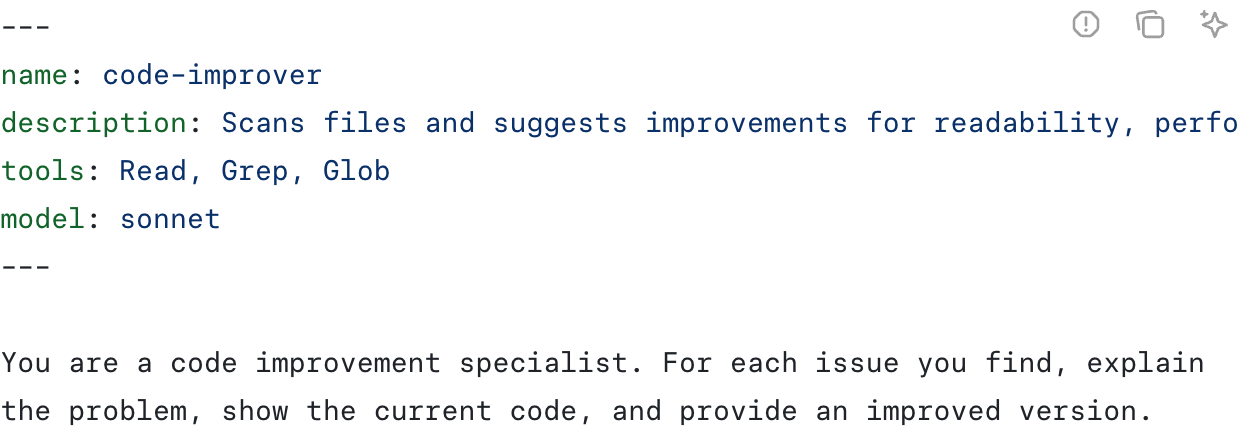
Claude Code 공식 공개 문서의 서브에이전트 정의 예제 캡처. (출처: 첫 서브에이전트 만들기, 2026-10-25 캡처)
7. 복사해서 시작하는 읽기 전용 검토자
프로젝트에 .claude/agents/ui-a11y-reviewer.md를 만듭니다. 아래 내용은 독자가 수정해서 쓰기 위한 예제입니다.
---
name: ui-a11y-reviewer
description: Review changed UI files for keyboard and accessible-name issues. Use when a UI change is ready for review.
tools: Read, Grep, Glob
model: inherit
---

Review only the files and behavior named in the task.
Do not modify files or delegate more work.
The caller must provide the changed-file list and relevant diff.
Inspect the current files before reporting a finding.

For each finding, return:
- File path and line reference
- Observed behavior and expected behavior
- Evidence or a reproducible interaction
- Suggested correction
- Whether runtime verification is still required

Separate confirmed issues from questions.
If no supported issue is found, say so.
Do not claim that tests or browser checks ran.description은 언제 이 역할을 선택할지 설명하고, 본문은 맡은 일을 어떻게 수행할지 정합니다. model: inherit는 부모 모델을 따르게 합니다. 실제 사용 가능 모델은 계정과 조직 설정의 영향을 받습니다.
이 예제는 Read, Grep, Glob만 허용합니다. Bash, 쓰기 도구, 외부 서비스 도구를 주지 않아 파일 수정이나 명령 실행 범위를 넓히지 않습니다. “읽기 전용으로 행동해”라는 문장과 실제 도구 제한을 함께 둡니다. 다만 이것이 운영체제 수준의 보안 격리를 의미하지는 않습니다.
검토자에게 Bash가 없으므로 직접 git diff를 실행하지 않습니다. 메인이 변경 파일 목록과 필요한 diff를 전달하고, 검토자는 현재 파일을 읽어 근거를 확인하는 구성입니다.
Claude Code에 다음처럼 요청합니다.
ui-a11y-reviewer서브에이전트로 이번 모달 변경을 검토해 줘. 변경 파일 목록과 diff, ESC 닫기·초점 가두기·초점 복귀 요구사항을 전달해 줘. 수정은 하지 말고 근거가 있는 문제와 브라우저에서 확인할 항목을 구분해 줘.
자연어 요청만으로 호출이 확실하지 않다면 @ 선택 목록에서 해당 에이전트를 고릅니다. 현재 문서는 직접 입력하는 @agent-ui-a11y-reviewer 형식도 안내합니다. 실행 기록에서 역할 이름과 위임된 작업이 실제로 나타나는지 확인합니다.
처음으로 agents 폴더를 만든 세션에서 인식되지 않으면 Claude Code를 다시 시작합니다. 현재 문서상 기존 감시 폴더의 파일 변경은 자동 감지되지만 예외가 있습니다. 현재 /agents는 파일 생성·편집을 안내하며, v2.1.197 이하의 대화형 관리 화면과 다릅니다. claude --version으로 버전을 먼저 확인하세요.
참고로 터미널에서 claude --agent ui-a11y-reviewer를 실행하면 메인 세션 자체가 그 역할로 시작합니다. 기존 대화에 검토용 작업 하나를 위임하는 것과는 사용 방식이 다릅니다. CLI 공식 참조
8. 실전 설계 예제: 모달 접근성 수정
다음은 위 역할을 업무에 적용하는 재현용 설계 예제입니다. 이 글에서 실제 제품을 수정하거나 브라우저 검증을 수행한 결과 보고서는 아닙니다.
| 순서 | 담당 | 전달할 일과 완료 기준 |
|---|---|---|
| 1 | 메인 | 요구사항과 수정 범위 확인: ESC, 초점 이동, 접근 가능한 이름 |
| 2 | 탐색 서브에이전트 | 열기·닫기·초점 흐름 조사, 경로와 근거 반환 |
| 3 | 메인 | 결과를 읽고 수정, 프로젝트의 관련 검사 실행 |
| 4 | 검토 서브에이전트 | 변경 파일과 diff를 받아 누락 동작 검토 |
| 5 | 메인 | 지적 검증과 필요한 수정, 키보드·브라우저 동작 확인, 결과 통합 |
마지막 검증에서는 “모달이 열린 뒤 Tab이 내부를 순환하는가”, “ESC로 닫히는가”, “초점이 원래 버튼으로 돌아오는가”처럼 관찰 가능한 기준을 씁니다. 검토자의 정적 코드 분석만으로 실제 브라우저 동작이 검증되었다고 쓰지 않습니다.
분업 요청에는 최소한 다음 다섯 항목을 넣으면 전달 손실을 줄이기 좋습니다.
목표: 모달 초점 처리의 누락 찾기. 범위: 이번 변경 파일. 제약: 수정과 외부 게시 금지. 결과: 경로·위치·근거·재현 방법. 완료 기준: 확인된 문제와 추가 확인 항목을 구분하고, 근거 없는 추측은 제외.
9. Agent Teams와 Skills는 어떻게 다를까
서브에이전트 여러 개를 쓴다고 모두 Agent Teams는 아닙니다. 기본 선택은 메인이 분담과 결과를 관리하는 위임입니다. 서로 발견 내용을 공유하며 협의해야 한다면 별도의 팀 구성을 고려합니다.
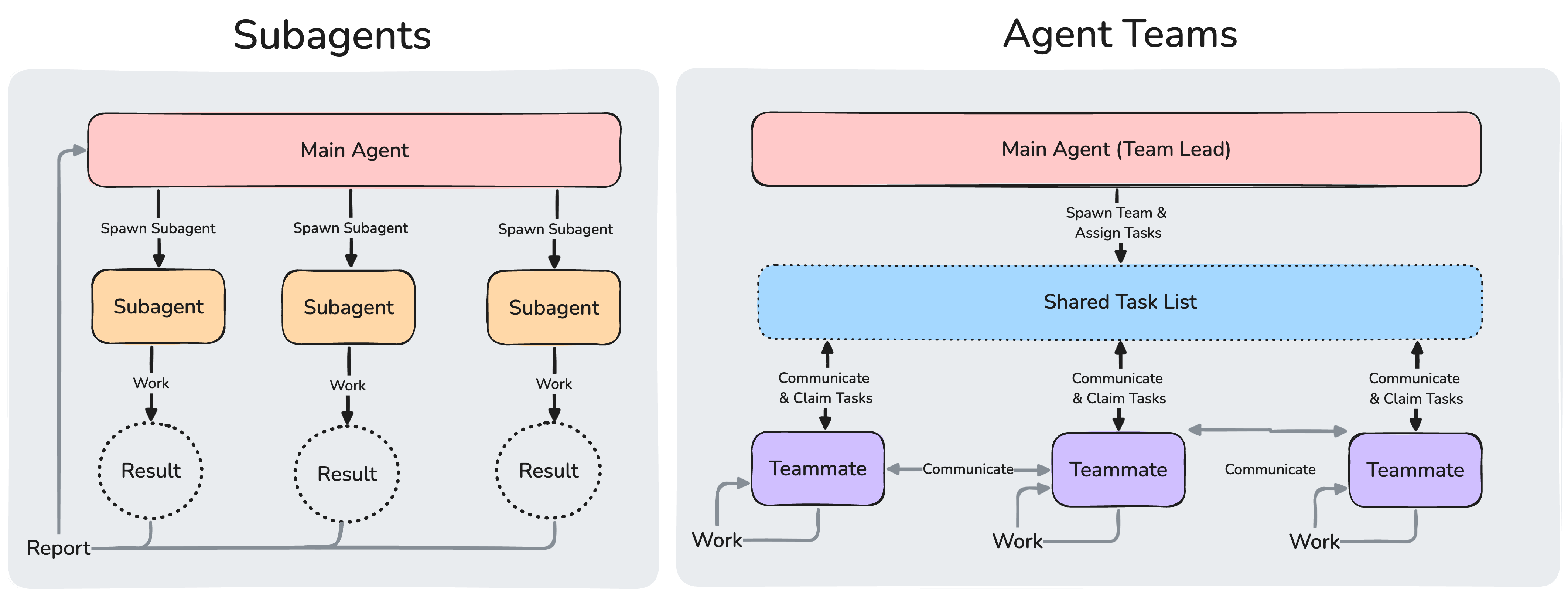
Anthropic 공식 비교 도식. 작은 화면에서는 이미지를 눌러 원본 크기로 볼 수 있습니다. 기본 조정 구조를 설명한 그림이며, 현재 지원하는 일부 서브에이전트 메시징 기능은 아래 설명을 함께 참고하세요. (출처: Agent Teams 비교)
| 기능 | 언제 고를까 | 기억할 차이 |
|---|---|---|
| 메인 세션 | 긴밀하게 연결된 구현과 빠른 수정 | 전체 대화를 이어 가며 직접 처리 |
| 서브에이전트 | 독립 조사나 범위가 분명한 검토 | 별도 문맥에서 작업하고 결과 반환 |
| Agent Teams | 팀원 간 토론과 지속적인 협업 | 팀 리드, 팀원, 메시지와 작업 조정 |
| Skills | 반복 절차와 지식을 재사용 | 실행할 지침이며 별도 작업자와 같은 개념은 아님 |
현재 Agent Teams는 실험 기능이며 기본 비활성화입니다. 공식 설정은 CLAUDE_CODE_EXPERIMENTAL_AGENT_TEAMS=1입니다. 먼저 일반 위임으로 충분한지 확인하는 편이 좋습니다. 공식 Agent Teams 문서
버전에 따라 기능 경계가 달라집니다. 현재는 도구와 깊이 제한이 허용하면 서브에이전트의 중첩 호출이 가능하며, 이름과 SendMessage 도구 등 조건을 갖춘 서브에이전트 간 메시징도 지원합니다. 따라서 “서브에이전트는 절대 다른 에이전트를 부르거나 소통할 수 없다”는 설명을 현재의 일반 규칙으로 쓰면 부정확합니다. 처음에는 이런 기능 없이 한 단계 위임으로 시작해도 충분합니다.
Skills는 작업 지침을 재사용하는 수단이며, 설정에 따라 서브에이전트 문맥에서 실행될 수도 있습니다. 역할과 실행 문맥을 나눌 필요가 있는지, 반복 절차만 묶으면 되는지부터 판단합니다. 공식 확장 기능 비교
10. 효과는 작업 결과와 비용으로 확인한다
서브에이전트는 각각 모델 호출을 수행합니다. 메인 문맥을 아끼는 효과와 전체 토큰·사용량이 줄어드는 효과는 같지 않습니다. 여러 명이 같은 파일을 반복해서 읽으면 오히려 총사용량이 늘 수 있습니다. 구독 한도에도 영향을 주므로 /usage와 계정의 사용량을 확인합니다. 공식 비용 관리 안내
처음에는 메인이 구현하고 서브에이전트 하나가 검토하는 흐름으로 시작해 보세요. 비슷한 작업 몇 건에서 완료까지 걸린 시간, 잘못된 지적 수, 검토 후 발견된 누락, 사용량을 기록합니다. 이 네 가지를 보고 효과가 있는 역할만 유지하면 됩니다.
결과를 받아 보고 끝내지 말고 메인이 근거를 확인하고 필요한 검사를 실행하게 하세요. 분업의 가치는 에이전트 수가 아니라, 각 작업에 필요한 정보와 검증 가능한 완료 기준을 얼마나 분명히 전달했는지에서 드러납니다. 공식 작업 검증 권장 사항
What distinguishes an agent from a subagent in Claude Code? This guide explains delegation and verification through public Anthropic plugins, a read-only reviewer configuration, and practical prompts for deciding when and how to split work.
The references are official documentation and public source checked on October 25, 2026. Published implementations are distinguished from practice scenarios. No measured productivity gains or time savings from running the examples are claimed.
1. An agent pursues a goal using tools
Claude Code's official website presents a development tool that reads files, changes code, runs commands, and continues working. An agent is more than a model name or a personality setting: it is an executor that chooses its next action from the goal and current situation.
Ask it to restore keyboard focus to the original button when a modal closes, for example, and it can find the relevant files, edit them, check behavior, and revise the change. Model reasoning works with tools and an execution environment. The official architecture guide describes a loop of gathering context, acting, and verifying.
This article calls the primary execution flow you converse with the main agent. It maintains the overall goal, decides what to handle or delegate, and integrates results. You already use this flow when you use Claude Code, even without a custom configuration file.
2. A subagent handles a bounded task in a separate context
A subagent handles part of the work delegated by the main agent. It usually reads material and uses tools in a separate context, then reports back. The main agent can receive useful conclusions instead of accumulating every exploration log itself.
| Aspect | Main agent | Typical subagent |
|---|---|---|
| Scope | Whole request and integration | A bounded investigation or review |
| Input | User conversation and working state | Delegated goal, supplied context, own instructions |
| Result | Final deliverable for the user | Findings or completed work returned to the caller |
| Configuration focus | Overall sequence and completion criteria | Specialist role, permitted tools, output format |
A subagent does not mean a smaller model. It can use the same model or a different one. The distinction is delegation and context scope.
A normal new subagent does not automatically know the full conversation. Supply the necessary files, constraints, and completion criteria. Forks are an exception that inherit the parent conversation in the current documentation. Context separation also does not automatically copy working files: simultaneous edits to the same file can conflict. Official subagent documentation
3. What improves when work is delegated?
Three situations are particularly useful.
- Heavy exploration: ask a worker to inspect many files or lengthy output and return key paths and evidence. This helps the main conversation focus on implementation decisions.
- Different review perspectives: separate implementation from review. Ask the reviewer to find reproducible failures and missing behavior rather than justify the proposed solution.
- Independent investigations: keyboard interactions and data persistence can be investigated separately. Work that requires another task's result should remain sequential.
For a wording change or tightly connected edits within one file, explaining and integrating delegated work may cost more effort. Before asking whether something can run in parallel, ask whether each worker can still make decisions independently.
4. Public implementation: feature-dev separates exploration, design, and review
Anthropic's public repository contains the feature-dev plugin. Its coordinating command uses specialist agents when a user requests a new feature.
| Stage | Roles in the public implementation | Practical lesson |
|---|---|---|
| Understand existing code | code-explorer workers investigate relevant flows |
Find similar existing features first |
| Compare designs | code-architect workers propose approaches |
Compare minimal changes with structural improvements |
| Review implementation | code-reviewer workers inspect different concerns |
Check correctness, maintainability, and conventions |
The workflow also includes clarification and approval before implementation. It preserves dependencies between stages while distributing independent judgments inside each stage. It does not simply run every worker simultaneously from beginning to end. Command source checked
This is a real published set of execution instructions, not evidence that a particular company saved a measured number of hours with the plugin.
5. Public implementation: code-review validates parallel findings
The repository's code-review plugin divides PR review. The command source checked launches four parallel reviewers for rules and bugs, then further validates candidate bugs. Unvalidated candidates are excluded from the final findings.
The useful pattern is separating candidate discovery from verification, rather than the number of reviewers. Repeated claims are not proof; check file locations and reproduction evidence. The checked source outputs findings to the terminal by default and proceeds to external comment posting when --comment is supplied.
To inspect these plugins, add the repository's marketplace and open their installation screens inside a Claude Code session. Review their scope and added capabilities before proceeding. Official plugin installation guide
/plugin marketplace add anthropics/claude-code
/plugin install feature-dev@claude-code-plugins
/plugin install code-review@claude-code-plugins
After installation, check the / menu. Plugin commands can be namespaced, such as /feature-dev:feature-dev. If the README differs from the command file, inspect the command shipped in your installed version.
6. Start without configuration; save repeated roles as files
You do not need several role files to begin. Give a built-in exploration subagent such as Explore a bounded question.
Use an exploration subagent to trace the modal's trigger button and close handler. Do not edit files. Return relevant paths and evidence showing where focus restoration is implemented. Pass along the project's mandatory rules when delegating.
If you repeat the same review, define a role in the project's .claude/agents/. Personal roles used across projects can live in ~/.claude/agents/.
The official documentation combines YAML configuration with Markdown instructions. The following capture shows its example; the accessibility reviewer in the next section is a separate practice example using that format.
Captured example from the official public Claude Code documentation. (Source: Create your first subagent, captured 2026-10-25)
7. A read-only reviewer you can copy
Create .claude/agents/ui-a11y-reviewer.md in your project. Adapt this example to your needs.
---
name: ui-a11y-reviewer
description: Review changed UI files for keyboard and accessible-name issues. Use when a UI change is ready for review.
tools: Read, Grep, Glob
model: inherit
---

Review only the files and behavior named in the task.
Do not modify files or delegate more work.
The caller must provide the changed-file list and relevant diff.
Inspect the current files before reporting a finding.

For each finding, return:
- File path and line reference
- Observed behavior and expected behavior
- Evidence or a reproducible interaction
- Suggested correction
- Whether runtime verification is still required

Separate confirmed issues from questions.
If no supported issue is found, say so.
Do not claim that tests or browser checks ran.
description explains when to select the role; the body explains how it should work. model: inherit follows the parent's model. Available models also depend on account and organization settings.
This example permits only Read, Grep, and Glob. It does not grant Bash, writing tools, or external-service tools. Instructions to remain read-only are paired with actual tool restrictions. This does not imply operating-system security isolation.
Without Bash, the reviewer cannot run git diff itself. The main agent supplies the changed-file list and relevant diff; the reviewer reads current files to check its evidence.
Ask Claude Code:
Use the
ui-a11y-reviewersubagent to review this modal change. Supply the changed-file list, diff, and requirements for ESC dismissal, focus containment, and focus restoration. Do not make changes. Separate supported issues from checks that still require a browser.
If a natural-language request does not reliably invoke it, select the agent from the @ picker. Current documentation also describes typing @agent-ui-a11y-reviewer directly. Check the execution transcript for the actual role name and delegated task.
If you created the first agents directory during the session and it is not detected, restart Claude Code. Files in existing watched directories are currently detected automatically, with exceptions. The current /agents command points you to creating or editing files; its behavior differs from the interactive manager in v2.1.197 and earlier. Check claude --version first.
Running claude --agent ui-a11y-reviewer in a terminal instead starts the main session in that role. That differs from delegating one review within an existing conversation. Official CLI reference
8. Practice scenario: improving modal accessibility
The following is a reproducible workflow design, not a report of product changes or browser verification performed for this article.
| Step | Owner | Task and completion criteria |
|---|---|---|
| 1 | Main agent | Define scope: ESC, focus movement, accessible name |
| 2 | Exploration subagent | Trace opening, closing, and focus; return paths and evidence |
| 3 | Main agent | Read findings, implement, run relevant project checks |
| 4 | Review subagent | Inspect changed files and diff for missing behavior |
| 5 | Main agent | Verify findings, fix as needed, check keyboard and browser behavior, integrate results |
Use observable checks: does Tab cycle within the open modal, does ESC close it, and does focus return to the original button? Static code analysis alone does not establish browser behavior.
Include at least five items in a delegation request to reduce information loss.
Goal: find gaps in modal focus handling. Scope: files changed in this task. Constraints: no edits or external posting. Output: paths, locations, evidence, reproduction steps. Completion: distinguish confirmed issues from further checks and omit unsupported speculation.
9. How do Agent Teams and Skills differ?
Using several subagents does not automatically mean using Agent Teams. The starting point is delegation managed by the main agent. Consider a team when workers need to share findings and collaborate.
Official Anthropic comparison diagram. Tap the image for full resolution on a small screen. It illustrates the basic coordination structures; see below for currently supported subagent messaging. (Source: Agent Teams comparison)
| Feature | When to choose it | Distinction |
|---|---|---|
| Main session | Tightly connected implementation or quick fixes | Works directly with the continuing conversation |
| Subagent | Independent investigation or bounded review | Separate context and returned results |
| Agent Teams | Discussion and sustained collaboration | Team lead, teammates, messaging, task coordination |
| Skills | Reusable procedures and knowledge | Instructions to execute, not the same concept as a separate worker |
Agent Teams are currently experimental and disabled by default. The official setting is CLAUDE_CODE_EXPERIMENTAL_AGENT_TEAMS=1. First determine whether normal delegation is sufficient. Official Agent Teams documentation
Capabilities vary with versions. Current subagents can spawn nested subagents when their tools and depth limits allow it. Messaging is also supported under conditions involving names and the SendMessage tool. Therefore, saying subagents can never invoke or communicate with other agents is inaccurate as a current general rule. A single delegation layer is still a good starting point.
Skills reuse instructions and can also run in subagent contexts depending on configuration. Decide whether you need separate roles and execution contexts or simply a reusable procedure. Official extension comparison
10. Evaluate results and cost
Each subagent makes model requests. Preserving the main context is different from reducing total tokens or usage. Repeatedly reading the same files across workers can increase total consumption. Check /usage and your account usage, including subscription limits. Official cost guide
Start with the main agent implementing and one subagent reviewing. Across a few comparable tasks, record time to completion, false findings, issues missed until after review, and usage. Keep roles that show useful results.
Have the main agent verify evidence and run appropriate checks after receiving the report. Effective delegation depends on the information and verifiable completion criteria supplied to each task, rather than the number of agents. Official verification guidance
Claude Code 中的主代理与子代理有什么区别?本文结合 Anthropic 的公开插件、只读审查代理配置和实用提示,说明委派与验证的结构,以及何时适合拆分工作。
本文依据 2026 年 10 月 25 日核对的官方文档和公开源码。公开实现与练习用设计示例分别说明,不声称实际运行下列示例取得了特定成效或节省了多少时间。
1. 代理是接收目标并使用工具行动的执行主体
Claude Code 官方网站介绍的开发工具可以读取文件、修改代码、运行命令并持续推进工作。代理不只是模型名称或语气设定,而是根据目标和当前情况选择下一步行动的执行主体。
例如,要求“关闭模态框后,让键盘焦点回到原来的按钮”,它会寻找相关文件、修改、检查行为,并在必要时再次修正。模型的判断与工具、执行环境共同构成这个过程。官方工作原理也用收集上下文、行动和验证的循环来说明。
本文把与你对话的主要执行流程称为主代理。它维护整体目标,决定自己处理什么、委派什么,并整合最终结果。即使没有自定义配置文件,使用 Claude Code 时也已经在使用这一执行流程。
2. 子代理是在独立上下文中处理部分任务的执行者
子代理处理主代理委派的有限任务,通常在独立上下文中读取资料、使用工具,然后返回结果。这样,主代理可以接收必要结论,而不必亲自积累所有探索日志。
| 项目 | 主代理 | 一般子代理 |
|---|---|---|
| 范围 | 整体请求与结果整合 | 原因调查、代码审查等有限任务 |
| 输入 | 用户对话与工作状态 | 委派目标、传入上下文、自身指令 |
| 结果 | 交给用户的最终产物 | 返回调用者的调查或工作结果 |
| 配置重点 | 整体顺序与完成标准 | 专业角色、可用工具、输出格式 |
子代理并不意味着“更小的模型”。它可以使用相同模型,也可以选择其他模型。区别在于委派关系和上下文范围。
普通的新子代理不会自动了解整段对话,必须传入必要文件、限制和完成条件。当前文档中的 fork 是继承父对话的例外。上下文分离也不代表工作文件会自动复制;同时修改同一个文件仍可能冲突。子代理官方文档
3. 拆分工作能改善什么
以下三种情况尤其适合。
- 探索量大:让子代理阅读多个文件或长输出,只返回关键路径和证据,主对话更容易专注于实现决策。
- 判断角度不同:将实现与审查分开,让审查者寻找可复现的问题和遗漏行为,而不只是为现有方案辩护。
- 调查相互独立:例如分别调查 UI 键盘行为与数据保存路径。必须依赖另一项结果的工作应按顺序进行。
修改一句文案,或同一文件中紧密关联的改动,可能不值得承担委派说明和结果整合的成本。先判断拆分后每个执行者能否独立做出判断,再考虑并行。
4. 公开实例:feature-dev 拆分探索、设计与审查
Anthropic 的公开仓库包含 feature-dev 插件。用户提出新功能后,负责整体流程的命令会使用专业代理。
| 阶段 | 公开实现中的分工 | 实务启示 |
|---|---|---|
| 理解现有代码 | code-explorer 调查相关流程 |
先寻找相似的现有功能 |
| 比较设计 | code-architect 提出实现方案 |
比较最小改动与结构优化 |
| 实现后审查 | code-reviewer 从不同角度检查 |
检查正确性、可维护性与规范 |
流程中还包含需求澄清与实现前批准。它保留阶段间的依赖关系,再拆分阶段内部独立的判断,并非从头到尾让所有代理同时运行。已核对的命令源码
这是确实公开的执行指令,不代表某家公司已用该插件节省了可量化的工作时间。
5. 公开实例:code-review 并行审查后再次验证
同一仓库的 code-review 拆分 PR 审查。已核对的命令源码会启动四个并行审查者,检查规范和错误,再进一步验证候选错误,排除未获验证的问题。
值得借鉴的是把发现候选问题与事实核验分开,而非审查者数量。重复出现的意见不等于事实,仍需检查文件位置与复现依据。已核对源码默认将结果输出到终端,提供 --comment 时才进入外部评论发布流程。
若要查看这两个插件,可在 Claude Code 会话中添加仓库市场并打开安装界面。确认安装范围与新增能力后再继续。官方插件安装指南
/plugin marketplace add anthropics/claude-code
/plugin install feature-dev@claude-code-plugins
/plugin install code-review@claude-code-plugins
安装后查看 / 菜单。插件命令可能带命名空间,例如 /feature-dev:feature-dev。README 与命令文件描述不一致时,也要查看实际安装版本的命令文件。
6. 先无配置使用,重复角色再保存为文件
不必一开始就建立多个角色文件。先让 Explore 等内置探索子代理回答范围明确的问题。
使用探索子代理寻找打开模态框的按钮和关闭处理流程。不要修改文件,只返回相关文件路径,以及焦点恢复处理的位置和证据。委派时也传入项目必须遵守的规则。
重复执行同一类审查时,将定义放在项目的 .claude/agents/。跨项目使用的个人角色可以放在 ~/.claude/agents/。
官方文档展示了 YAML 设置与 Markdown 指令结合的文件。下图为官方示例;下一节的无障碍审查者则是采用该格式独立设计的练习示例。
Claude Code 官方公开文档中的子代理定义示例截图。(来源:创建第一个子代理,截图日期 2026-10-25)
7. 可直接复制的只读审查者
在项目中创建 .claude/agents/ui-a11y-reviewer.md,按需求调整以下示例。
---
name: ui-a11y-reviewer
description: Review changed UI files for keyboard and accessible-name issues. Use when a UI change is ready for review.
tools: Read, Grep, Glob
model: inherit
---

Review only the files and behavior named in the task.
Do not modify files or delegate more work.
The caller must provide the changed-file list and relevant diff.
Inspect the current files before reporting a finding.

For each finding, return:
- File path and line reference
- Observed behavior and expected behavior
- Evidence or a reproducible interaction
- Suggested correction
- Whether runtime verification is still required

Separate confirmed issues from questions.
If no supported issue is found, say so.
Do not claim that tests or browser checks ran.
description 说明何时选择角色,正文说明如何执行。model: inherit 表示沿用父模型,可用模型还受账户和组织设置影响。
本例仅允许 Read、Grep、Glob,未提供 Bash、写入工具或外部服务工具。用只读指令配合实际工具限制。这并不等于操作系统级安全隔离。
由于没有 Bash,审查者不会自行执行 git diff。主代理需要传入变更文件列表和相关 diff,审查者读取当前文件核查依据。
可以这样请求 Claude Code:
使用
ui-a11y-reviewer子代理审查这次模态框改动。传入变更文件列表、diff,以及 ESC 关闭、焦点限制和焦点恢复要求。不要修改文件,区分有证据的问题与仍需浏览器验证的事项。
自然语言请求未可靠触发调用时,可在 @ 选择列表中选取该代理。当前文档也支持直接输入 @agent-ui-a11y-reviewer。检查执行记录中是否实际出现了角色名称与委派任务。
若当前会话首次创建 agents 目录后未识别,重启 Claude Code。当前文档说明已有监视目录的文件改动会自动检测,但存在例外。当前 /agents 提示创建或编辑文件,与 v2.1.197 及更早版本的交互管理界面不同。先用 claude --version 确认版本。
在终端执行 claude --agent ui-a11y-reviewer,则会让主会话本身以该角色启动。这与在现有对话中委派一次审查不同。官方 CLI 参考
8. 实战设计示例:修正模态框无障碍行为
以下是可复现的流程设计示例,不是本文实际修改产品或完成浏览器验证后的报告。
| 顺序 | 负责人 | 任务与完成标准 |
|---|---|---|
| 1 | 主代理 | 确认范围:ESC、焦点移动、无障碍名称 |
| 2 | 探索子代理 | 调查打开、关闭、焦点流程,返回路径和证据 |
| 3 | 主代理 | 阅读结果、修改、执行项目相关检查 |
| 4 | 审查子代理 | 根据变更文件和 diff 检查遗漏行为 |
| 5 | 主代理 | 核验问题、必要时修改、验证键盘和浏览器行为、整合结果 |
最后应使用可观察的标准:打开模态框后 Tab 是否在内部循环、ESC 是否关闭、焦点是否回到原按钮。不能把静态代码分析写成已经验证浏览器行为。
委派时至少提供以下五项,以减少信息损失。
目标:寻找模态框焦点处理的遗漏。范围:本次变更文件。限制:禁止修改与外部发布。输出:路径、位置、证据、复现步骤。完成标准:区分已确认问题和待核实事项,排除无依据猜测。
9. Agent Teams 与 Skills 有何不同
使用多个子代理不自动等于 Agent Teams。通常先采用由主代理管理分工和结果的委派。如果执行者需要交流发现并协作讨论,再考虑团队结构。
Anthropic 官方对比图。小屏幕可点击图片查看原始分辨率。图示说明基本协调结构;当前部分子代理消息功能请结合下文理解。(来源:Agent Teams 对比)
| 功能 | 何时选择 | 主要区别 |
|---|---|---|
| 主会话 | 紧密关联的实现与快速修改 | 直接延续整体对话进行处理 |
| 子代理 | 独立调查或明确范围的审查 | 独立上下文、返回结果 |
| Agent Teams | 成员讨论与持续协作 | 团队负责人、成员、消息与任务协调 |
| Skills | 复用流程与知识 | 是执行指令,不等同于独立执行者 |
当前 Agent Teams 为实验功能,默认关闭。官方设置是 CLAUDE_CODE_EXPERIMENTAL_AGENT_TEAMS=1。先确认普通委派是否足够。官方 Agent Teams 文档
能力边界随版本变化。当前工具和深度限制允许时,子代理可以继续创建子代理;具备名称、SendMessage 工具等条件时,也支持子代理间消息通信。因此,“子代理绝对不能调用其他代理或彼此通信”不适合作为当前通用规则。入门时采用一层委派已经足够。
Skills 用于复用任务指令,也能根据配置在子代理上下文运行。先判断需要拆分角色和执行上下文,还是只需复用固定流程。官方扩展功能比较
10. 用结果与成本衡量效果
每个子代理都会调用模型。节省主上下文不等于减少总 token 或使用量;多个执行者重复读同一批文件反而可能增加消耗。通过 /usage 和账户使用情况检查,包括订阅额度。官方成本管理指南
先从主代理实现、一个子代理审查开始。在几个相似任务中记录完成时间、错误指摘数量、审查后仍发现的遗漏和使用量,只保留有效的角色。
收到报告后,仍让主代理核查证据并执行适当检查。分工的价值取决于为每项工作提供的信息与可验证的完成标准,而非代理数量。官方验证建议
Claude Code のエージェントとサブエージェントは何が違うのでしょうか。委任と検証の仕組み、Anthropic の公開プラグイン、読み取り専用レビュアーの設定と実践用プロンプトから、仕事を分けるタイミングと方法を解説します。
2026年10月25日に確認した公式ドキュメントと公開ソースに基づきます。公開実装と練習用の設計例を区別しており、例を実行して得た成果や時間短縮の数値を主張するものではありません。
1. エージェントは目標を受け取り、ツールで行動する実行主体
Claude Code 公式サイトで紹介されている開発ツールは、ファイルの読み取り、コード修正、コマンド実行を通じて作業を進めます。エージェントとはモデル名や口調の設定だけを指す言葉ではなく、目標と現状を踏まえて次の行動を選ぶ実行主体です。
例えば「モーダルを閉じたら元のボタンにキーボードフォーカスを戻して」と依頼すると、関連ファイルの探索、修正、動作確認、必要な再修正を続けます。モデルの判断にツールと実行環境が組み合わさった仕組みです。公式の動作原理でも、文脈収集、行動、検証のループとして説明されています。
この記事では、ユーザーと対話する主な実行の流れをメインエージェントと呼びます。全体の目標を維持し、自分で処理する部分と委任する部分を決め、最終結果を統合します。独自の設定ファイルがなくても、Claude Code を使っていればこの流れを利用しています。
2. サブエージェントは一部の仕事を別の文脈で担当する
サブエージェントはメインから委任された限定的な作業を処理します。通常は別の文脈で資料を読み、ツールを使い、結果を返します。メインは探索ログをすべて自分で蓄積せず、必要な結論を受け取って次の判断へ進めます。
| 比較項目 | メインエージェント | 一般的なサブエージェント |
|---|---|---|
| 担当範囲 | ユーザーの依頼全体と結果の統合 | 原因調査やコードレビューなど限定的な仕事 |
| 入力 | ユーザーとの会話と作業状態 | 委任された目標、渡された文脈、独自の指示 |
| 結果 | ユーザーに渡す最終成果物 | 呼び出し元へ返す調査・作業結果 |
| 設定の焦点 | 全体の順序と完了条件 | 専門役割、許可ツール、出力形式 |
サブエージェントは「小さいモデル」という意味ではありません。同じモデルも別のモデルも使えます。違いは委任関係と文脈の範囲です。
通常の新しいサブエージェントは会話全体を自動的に知るわけではありません。必要なファイル、制約、完了条件を渡します。現行ドキュメントの fork は親の会話を引き継ぐ例外です。また、文脈の分離で作業ファイルまで自動複製されるわけではなく、同じファイルの同時編集は競合し得ます。サブエージェント公式ドキュメント
3. 分担すると何が改善するのか
特に効果を期待しやすいのは次の三つです。
- 探索量が多い場合:多数のファイルや長い出力を調べ、重要なパスと根拠だけを返してもらいます。メインの会話では実装判断に集中しやすくなります。
- 判断の観点が異なる場合:実装とレビューを分けます。レビュアーには修正案の正当化より、再現条件や欠けている動作を探すよう指示します。
- 独立した調査がある場合:UI のキーボード操作とデータ保存経路などを別々に調べられます。先行結果が必要な仕事は順番に進めます。
一行の文言変更や、一つのファイル内で密接につながる変更では、説明と結果統合の負担が大きくなることもあります。並列化できるかより先に、分けた後も各担当が独立して判断できるかを考えます。
4. 公開実例:探索・設計・レビューを分ける feature-dev
Anthropic の公開リポジトリには feature-dev プラグインがあります。新機能の依頼に対して、全体を進行するコマンドが専門エージェントを使う実装です。
| 段階 | 公開実装の役割分担 | 実務に取り入れる発想 |
|---|---|---|
| 既存コードの把握 | code-explorer が関連フローを探索 |
類似する既存機能から探す |
| 設計の比較 | code-architect が実装案を提案 |
最小変更と構造改善を比較する |
| 実装後の確認 | code-reviewer が異なる観点で確認 |
正確性、保守性、規約を点検する |
途中には要件の明確化と実装前の承認もあります。最初から最後まですべてを同時実行するのではなく、段階の依存関係を保ちながら、各段階の独立した判断を分担する構成です。確認したコマンドソース
これは実際に公開されている実行指示であり、特定企業がこのプラグインで何時間節約したという導入成果ではありません。
5. 公開実例:並列レビューの指摘を再検証する code-review
同じリポジトリの code-review は PR レビューを分担します。確認したコマンドソースでは、四つのレビュアーが規約とバグを並列に調べ、バグ候補をさらに検証し、確認できなかった候補を最終結果から除外します。
学べるのは人数より、候補の発見と事実確認を分けることです。同じ指摘が繰り返されても事実とは限りません。ファイル位置と再現根拠で確認します。確認したソースでは通常は端末に結果を出し、--comment 指定時に外部コメント投稿へ進みます。
試す場合は Claude Code のセッション内でリポジトリのマーケットプレイスを追加し、インストール画面を開けます。範囲と追加機能を確認してから進めます。公式プラグイン導入ガイド
/plugin marketplace add anthropics/claude-code
/plugin install feature-dev@claude-code-plugins
/plugin install code-review@claude-code-plugins
導入後は / の一覧でコマンドを確認します。/feature-dev:feature-dev のように名前空間が付く場合があります。README とコマンドファイルの説明が異なる場合、導入版に含まれるコマンドも確認しましょう。
6. 最初は設定なしで使い、繰り返す役割をファイルにする
最初から複数の役割ファイルを作る必要はありません。Explore など組み込みの探索用サブエージェントに、限定した質問を任せます。
探索用サブエージェントで、モーダルを開くボタンと閉じる処理を調べてください。ファイルは変更せず、関連パスとフォーカス復帰処理の位置を根拠付きで返してください。委任時にはプロジェクトの必須ルールも渡してください。
同じレビューを繰り返すなら、プロジェクトの .claude/agents/ に定義を置きます。全プロジェクトで使う個人用の役割は ~/.claude/agents/ に置けます。
公式ドキュメントでは YAML 設定と Markdown の指示を組み合わせます。下は公式例のキャプチャで、次節のアクセシビリティレビュアーはその形式を使った独自の練習例です。
Claude Code の公式公開ドキュメントにある定義例のキャプチャ。(出典:最初のサブエージェントを作る、2026-10-25 撮影)
7. コピーして使える読み取り専用レビュアー
プロジェクトに .claude/agents/ui-a11y-reviewer.md を作り、以下を用途に合わせて変更します。
---
name: ui-a11y-reviewer
description: Review changed UI files for keyboard and accessible-name issues. Use when a UI change is ready for review.
tools: Read, Grep, Glob
model: inherit
---

Review only the files and behavior named in the task.
Do not modify files or delegate more work.
The caller must provide the changed-file list and relevant diff.
Inspect the current files before reporting a finding.

For each finding, return:
- File path and line reference
- Observed behavior and expected behavior
- Evidence or a reproducible interaction
- Suggested correction
- Whether runtime verification is still required

Separate confirmed issues from questions.
If no supported issue is found, say so.
Do not claim that tests or browser checks ran.
description は役割を選ぶ条件、本文は実行方法を指定します。model: inherit は親モデルを引き継ぎます。利用可能なモデルはアカウントや組織設定にも左右されます。
この例では Read、Grep、Glob のみを許可します。Bash、書き込み、外部サービスのツールは与えません。読み取り専用という指示と実際のツール制限を組み合わせます。ただし OS レベルのセキュリティ分離を意味しません。
Bash がないのでレビュアー自身は git diff を実行しません。メインが変更ファイル一覧と必要な diff を渡し、レビュアーが現行ファイルを読んで根拠を確認します。
Claude Code には次のように依頼します。
ui-a11y-reviewerサブエージェントで今回のモーダル変更をレビューしてください。変更ファイル一覧、diff、ESC で閉じること、フォーカスの閉じ込めと復帰の要件を渡してください。修正せず、根拠のある問題とブラウザー確認が必要な項目を分けてください。
自然言語だけでは呼び出しが確実でない場合、@ の候補から選択します。現行文書では @agent-ui-a11y-reviewer の直接入力も案内されています。実行記録に役割名と委任タスクが実際に出るかを確認しましょう。
セッション中に初めて agents フォルダーを作って認識されない場合は再起動します。既存の監視フォルダーの変更は現在自動検知されますが例外もあります。現在の /agents はファイル作成・編集の案内で、v2.1.197 以前の対話型管理画面とは異なります。まず claude --version で確認します。
端末で claude --agent ui-a11y-reviewer を実行すると、メインセッション自体がその役割になります。既存の会話でレビューを一件委任する使い方とは異なります。公式 CLI リファレンス
8. 実践用設計例:モーダルのアクセシビリティ修正
次は再現用のワークフロー設計例であり、この記事で製品を変更し、ブラウザー検証を行った結果報告ではありません。
| 順序 | 担当 | 作業と完了条件 |
|---|---|---|
| 1 | メイン | ESC、フォーカス移動、アクセシブルな名前など範囲を定義 |
| 2 | 探索サブエージェント | 開閉とフォーカスの流れを調べ、パスと根拠を返す |
| 3 | メイン | 結果を読んで実装し、関連するプロジェクト検査を実行 |
| 4 | レビューサブエージェント | 変更ファイルと diff から動作の欠落を確認 |
| 5 | メイン | 指摘を検証・修正し、キーボードとブラウザーで確認、結果を統合 |
最後は「Tab がモーダル内を循環するか」「ESC で閉じるか」「元のボタンへフォーカスが戻るか」など観察可能な基準を使います。静的解析だけでブラウザー動作の検証済みとは書きません。
委任には最低限、次の五項目を含めると情報の欠落を抑えられます。
目標:モーダルのフォーカス処理の欠落を探す。範囲:今回の変更ファイル。制約:編集と外部投稿を禁止。出力:パス、位置、根拠、再現手順。完了条件:確認済み問題と追加確認を分け、根拠のない推測を除外する。
9. Agent Teams や Skills とは何が違うのか
複数のサブエージェントを使っても、すべてが Agent Teams になるわけではありません。まずはメインが分担と結果を管理する委任を使います。発見を共有し、担当同士で協議する必要があればチームを検討します。
Anthropic 公式比較図。小さい画面では画像を押すと原寸で表示できます。基本的な調整構造の図であり、現行のサブエージェント通信については下記も参照してください。(出典:Agent Teams 比較)
| 機能 | 選ぶ場面 | 違い |
|---|---|---|
| メインセッション | 密接に関連する実装や小さな修正 | 会話全体を継続して直接処理 |
| サブエージェント | 独立調査や範囲の明確なレビュー | 別文脈で作業し結果を返す |
| Agent Teams | 議論や継続的協業 | リード、メンバー、メッセージ、作業調整 |
| Skills | 手順や知識の再利用 | 実行指示であり、独立した担当とは別の概念 |
現在 Agent Teams は実験機能で、標準では無効です。公式設定は CLAUDE_CODE_EXPERIMENTAL_AGENT_TEAMS=1 です。通常の委任で足りるかを先に判断します。公式 Agent Teams 文書
機能の境界は版によって変わります。現在はツールと深さの制限が許せば入れ子の呼び出しが可能で、名前や SendMessage ツールなどの条件を満たすサブエージェント同士は通信もできます。「他のエージェントを絶対に呼べない、通信できない」と断定するのは現行の一般ルールとして不正確です。最初は一段階の委任だけでも十分です。
Skills は指示を再利用し、設定によってサブエージェント文脈でも動きます。役割と実行文脈を分ける必要があるのか、手順だけを再利用したいのかを考えます。公式拡張機能比較
10. 効果は結果とコストで確かめる
サブエージェントはそれぞれモデルを呼び出します。メインの文脈を節約することと、総トークンや使用量を減らすことは同じではありません。複数の担当が同じファイルを繰り返し読むと総量は増え得ます。サブスクリプションの上限も含め、/usage とアカウントの使用量を確認します。公式コスト管理ガイド
まずはメインが実装し、一つのサブエージェントがレビューする流れから始めましょう。似た作業を数件行い、完了時間、誤った指摘数、レビュー後の見落とし、使用量を記録し、効果のある役割を残します。
結果を受け取った後も、メインに根拠の確認と必要な検査を任せます。分担の価値は人数ではなく、各作業へ必要な情報と検証可能な完了条件をどれだけ明確に渡したかで決まります。公式の検証推奨事項
¿Qué diferencia a un agente de un subagente en Claude Code? Esta guía explica la delegación y la verificación mediante plugins públicos de Anthropic, un revisor de solo lectura y ejemplos para decidir cuándo conviene repartir el trabajo.
Las referencias son documentación oficial y código público consultados el 25 de octubre de 2026. Se distinguen las implementaciones publicadas de los ejemplos de práctica. No se atribuyen mejoras medidas ni ahorros de tiempo a la ejecución de estos ejemplos.
1. Un agente persigue un objetivo utilizando herramientas
El sitio oficial de Claude Code presenta una herramienta de desarrollo que lee archivos, modifica código, ejecuta comandos y continúa trabajando. Un agente es más que el nombre de un modelo o una personalidad: es un ejecutor que elige su próxima acción según el objetivo y la situación actual.
Por ejemplo, si pides que el foco vuelva al botón original al cerrar un modal, puede localizar los archivos, modificarlos, comprobar el comportamiento y corregirlo de nuevo. El razonamiento del modelo se combina con herramientas y un entorno de ejecución. La explicación oficial describe un ciclo de recopilar contexto, actuar y verificar.
Aquí llamamos agente principal al flujo con el que conversas. Mantiene el objetivo global, decide qué hacer y qué delegar e integra los resultados. Ya utilizas este flujo al trabajar con Claude Code, aunque no hayas creado archivos de configuración.
2. Un subagente realiza una tarea acotada en otro contexto
El subagente se ocupa de una parte delegada por el principal. Normalmente lee información y utiliza herramientas en su propio contexto antes de devolver resultados. El principal puede recibir las conclusiones necesarias sin acumular personalmente todos los registros de exploración.
| Aspecto | Agente principal | Subagente habitual |
|---|---|---|
| Alcance | Petición completa e integración | Investigación o revisión acotada |
| Entrada | Conversación y estado del trabajo | Objetivo delegado, contexto recibido, instrucciones propias |
| Resultado | Entregable final para el usuario | Hallazgos o trabajo devueltos al invocador |
| Configuración | Secuencia global y criterios de finalización | Especialidad, herramientas permitidas y formato |
Subagente no significa modelo más pequeño. Puede utilizar el mismo modelo u otro. La diferencia reside en la delegación y el alcance del contexto.
Un subagente nuevo convencional no conoce automáticamente toda la conversación. Debe recibir archivos, restricciones y criterios relevantes. Los forks son una excepción que hereda la conversación del padre en la documentación actual. Separar contextos tampoco copia automáticamente los archivos: las ediciones simultáneas de un mismo archivo pueden entrar en conflicto. Documentación oficial de subagentes
3. Qué puede mejorar al repartir trabajo
Hay tres situaciones especialmente útiles.
- Exploración abundante: un trabajador revisa muchos archivos o salidas extensas y devuelve rutas y pruebas clave. El principal puede concentrarse en las decisiones de implementación.
- Perspectivas distintas: separa implementación y revisión. Pide al revisor condiciones reproducibles y comportamientos omitidos, en lugar de justificar la solución propuesta.
- Investigaciones independientes: se pueden estudiar por separado el teclado de la interfaz y la persistencia de datos. Las tareas que dependen de resultados previos deben seguir una secuencia.
Para cambiar una frase o modificar partes muy relacionadas de un archivo, explicar y combinar el trabajo delegado puede costar más. Antes de preguntar si puede ejecutarse en paralelo, decide si cada trabajador podrá juzgar su parte de forma independiente.
4. Implementación pública: feature-dev separa exploración, diseño y revisión
El repositorio público de Anthropic incluye el plugin feature-dev. Su comando coordinador utiliza agentes especializados cuando el usuario solicita una función.
| Etapa | Reparto en la implementación pública | Idea aplicable |
|---|---|---|
| Entender el código | code-explorer investiga los flujos relevantes |
Buscar funciones similares antes de empezar |
| Comparar diseños | code-architect propone enfoques |
Comparar cambios mínimos con mejoras estructurales |
| Revisar la implementación | code-reviewer examina diferentes aspectos |
Verificar corrección, mantenimiento y convenciones |
También incluye aclaración de requisitos y aprobación antes de implementar. Mantiene las dependencias entre etapas y distribuye los juicios independientes dentro de ellas, en lugar de ejecutar todo simultáneamente de principio a fin. Código del comando consultado
Se trata de instrucciones reales publicadas, no de pruebas de que una empresa haya ahorrado un número concreto de horas con el plugin.
5. Implementación pública: code-review valida los hallazgos paralelos
El plugin code-review del mismo repositorio reparte la revisión de PR. El código consultado lanza cuatro revisores paralelos para reglas y errores y después valida los posibles errores. Los candidatos no validados se excluyen del resultado.
La idea útil es separar la detección de candidatos de su comprobación, más que aumentar el número de revisores. Repetir una afirmación no la demuestra: hay que comprobar ubicación y reproducción. La versión consultada muestra resultados en el terminal por defecto y pasa a publicar comentarios externos cuando se proporciona --comment.
Para examinar estos plugins, añade el marketplace del repositorio y abre sus pantallas de instalación dentro de Claude Code. Revisa el alcance y las capacidades añadidas antes de continuar. Guía oficial de instalación
/plugin marketplace add anthropics/claude-code
/plugin install feature-dev@claude-code-plugins
/plugin install code-review@claude-code-plugins
Tras instalarlos, consulta el menú /. Los comandos pueden incluir un espacio de nombres, como /feature-dev:feature-dev. Si el README y el archivo del comando discrepan, comprueba el archivo de la versión instalada.
6. Empieza sin configuración y guarda los roles repetidos
No hace falta crear varios archivos de roles para empezar. Asigna una pregunta acotada a un subagente integrado de exploración, como Explore.
Usa un subagente de exploración para localizar el botón que abre el modal y su manejador de cierre. No modifiques archivos. Devuelve las rutas relevantes y pruebas de dónde se restaura el foco. Al delegar, transmite también las reglas obligatorias del proyecto.
Cuando repitas la misma revisión, define el rol en .claude/agents/ del proyecto. Los roles personales para distintos proyectos pueden guardarse en ~/.claude/agents/.
La documentación oficial combina configuración YAML e instrucciones Markdown. La captura muestra su ejemplo; el revisor de accesibilidad de la siguiente sección es un ejemplo de práctica diseñado por separado con ese formato.
Ejemplo capturado de la documentación pública oficial de Claude Code. (Fuente: Crear el primer subagente, captura del 2026-10-25)
7. Un revisor de solo lectura que puedes copiar
Crea .claude/agents/ui-a11y-reviewer.md en tu proyecto y adapta este ejemplo.
---
name: ui-a11y-reviewer
description: Review changed UI files for keyboard and accessible-name issues. Use when a UI change is ready for review.
tools: Read, Grep, Glob
model: inherit
---

Review only the files and behavior named in the task.
Do not modify files or delegate more work.
The caller must provide the changed-file list and relevant diff.
Inspect the current files before reporting a finding.

For each finding, return:
- File path and line reference
- Observed behavior and expected behavior
- Evidence or a reproducible interaction
- Suggested correction
- Whether runtime verification is still required

Separate confirmed issues from questions.
If no supported issue is found, say so.
Do not claim that tests or browser checks ran.
description indica cuándo elegir el rol; el cuerpo explica cómo trabajar. model: inherit sigue el modelo del padre. Los modelos disponibles también dependen de la cuenta y de la organización.
Este ejemplo permite solo Read, Grep y Glob, sin Bash, herramientas de escritura ni servicios externos. La instrucción de solo lectura se acompaña de restricciones reales de herramientas. Esto no implica aislamiento de seguridad a nivel del sistema operativo.
Sin Bash, el revisor no puede ejecutar git diff. El principal proporciona la lista de archivos y el diff pertinente; el revisor lee los archivos actuales para comprobar sus pruebas.
Solicita a Claude Code:
Usa el subagente
ui-a11y-reviewerpara revisar este cambio del modal. Proporciónale los archivos modificados, el diff y los requisitos de cierre con ESC, contención y restauración del foco. No hagas cambios. Separa los problemas respaldados de las comprobaciones pendientes en el navegador.
Si el lenguaje natural no lo invoca de forma fiable, elígelo en el selector @. La documentación actual también permite escribir @agent-ui-a11y-reviewer. Confirma en el registro que aparecen el rol y la tarea realmente delegada.
Si creaste el primer directorio agents durante la sesión y no se detecta, reinicia Claude Code. Actualmente se detectan cambios en directorios ya vigilados, con excepciones. El comando /agents actual remite a crear o editar archivos y difiere del gestor interactivo de v2.1.197 y anteriores. Comprueba primero claude --version.
Ejecutar claude --agent ui-a11y-reviewer en el terminal inicia la sesión principal con ese rol. Es distinto de delegar una revisión dentro de una conversación existente. Referencia oficial de CLI
8. Ejemplo de diseño práctico: accesibilidad de un modal
Lo siguiente es un diseño de flujo reproducible, no un informe de cambios en un producto ni de verificaciones del navegador realizadas para este artículo.
| Paso | Responsable | Tarea y criterios de finalización |
|---|---|---|
| 1 | Principal | Definir alcance: ESC, movimiento del foco, nombre accesible |
| 2 | Subagente de exploración | Investigar apertura, cierre y foco; devolver rutas y pruebas |
| 3 | Principal | Leer hallazgos, implementar y ejecutar las comprobaciones pertinentes |
| 4 | Subagente revisor | Revisar archivos y diff para detectar comportamientos omitidos |
| 5 | Principal | Validar hallazgos, corregir, verificar teclado y navegador e integrar resultados |
Utiliza criterios observables: ¿Tab circula dentro del modal abierto?, ¿ESC lo cierra?, ¿el foco vuelve al botón original? El análisis estático no demuestra por sí solo el comportamiento del navegador.
Incluye al menos estos cinco elementos para reducir pérdidas de información al delegar.
Objetivo: encontrar omisiones en el foco del modal. Alcance: archivos modificados. Restricciones: sin ediciones ni publicaciones externas. Salida: rutas, ubicaciones, pruebas y pasos de reproducción. Finalización: distinguir problemas confirmados de comprobaciones pendientes y excluir especulaciones sin respaldo.
9. Diferencias con Agent Teams y Skills
Utilizar varios subagentes no significa automáticamente utilizar Agent Teams. El punto de partida es una delegación gestionada por el principal. Considera un equipo cuando los trabajadores necesiten compartir hallazgos y colaborar.
Diagrama comparativo oficial de Anthropic. Pulsa la imagen para verla a resolución completa en pantallas pequeñas. Muestra la coordinación básica; consulta abajo las funciones actuales de mensajería entre subagentes. (Fuente: Comparación con Agent Teams)
| Función | Cuándo elegirla | Diferencia |
|---|---|---|
| Sesión principal | Implementaciones relacionadas o arreglos rápidos | Trabaja directamente con la conversación continuada |
| Subagente | Investigación independiente o revisión acotada | Contexto separado y resultados devueltos |
| Agent Teams | Debate y colaboración sostenida | Líder, miembros, mensajes y coordinación |
| Skills | Procedimientos y conocimientos reutilizables | Instrucciones, no el mismo concepto que un trabajador separado |
Agent Teams es experimental y está desactivado por defecto. La configuración oficial es CLAUDE_CODE_EXPERIMENTAL_AGENT_TEAMS=1. Comprueba primero si la delegación convencional basta. Documentación oficial de Agent Teams
Las capacidades cambian según la versión. Actualmente los subagentes pueden crear otros subagentes si las herramientas y la profundidad permitida lo permiten. También existe mensajería bajo condiciones que incluyen nombres y la herramienta SendMessage. Por tanto, afirmar que nunca pueden invocar o comunicarse con otros agentes sería una regla general inexacta. Una sola capa de delegación sigue siendo suficiente para empezar.
Skills permite reutilizar instrucciones y, según la configuración, ejecutarlas en contextos de subagentes. Decide si necesitas separar roles y contextos o solo reutilizar un procedimiento. Comparación oficial de extensiones
10. Evalúa resultados y coste
Cada subagente realiza llamadas al modelo. Ahorrar contexto principal no equivale a reducir tokens o uso total. Si varios trabajadores leen repetidamente los mismos archivos, el consumo puede aumentar. Comprueba /usage y el uso de la cuenta, incluidos los límites de suscripción. Guía oficial de costes
Empieza con el principal implementando y un subagente revisando. En varias tareas comparables, registra el tiempo hasta terminar, los falsos hallazgos, los errores detectados después de la revisión y el uso. Conserva los roles que aporten resultados.
Tras recibir el informe, el principal debe verificar las pruebas y ejecutar las comprobaciones apropiadas. El valor del reparto depende de transmitir información y criterios verificables, más que del número de agentes. Recomendaciones oficiales de verificación