Claude Code API vs. Subscription: Costs, Limits, and How to Choose

A Claude Code subscription can offer excellent value for regular coding. API billing can be cheaper for occasional work and easier to budget by project. The useful comparison is the total cost of completing your work, including limits and interruptions.
This guide checks official documentation on 2026-10-26. Prices are USD before tax for direct web purchases; regional and mobile-store prices can differ. CLI commands and options were checked against locally installed Claude Code 2.1.310. The calculations below are examples, not measured bills or promised subscription capacity.
1. The same coding tool, three ways to pay
Claude Code is the coding tool. Your active credential determines which billing route it uses.
| Route | What pays for the work | What to watch |
|---|---|---|
| Subscription allowance | Included usage in Pro or Max | Session and weekly limits |
| Subscription usage credits | Separately funded overage after included usage runs out | Credit balance and monthly spending limit |
| API billing | Token usage charged to a Claude Console organization or configured provider | Model rates, spend limits, and API rate limits |
For individual web subscriptions, Pro is $20/month, Max 5x is $100/month, and Max 20x is $200/month. Pro’s annual option is $200 paid upfront; the website rounds its monthly equivalent to $17. (Official pricing, Max tiers)
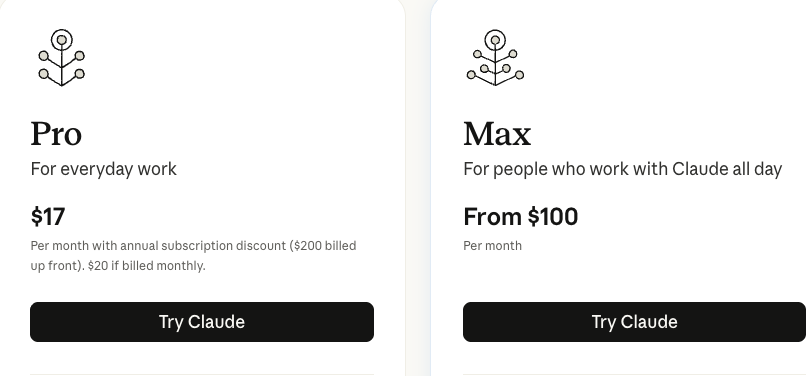
Anthropic’s public subscription price cards. Read the billing-period text beneath the headline price. (Source: Claude pricing, captured 2026-10-26)
Select any documentation image in this guide to open it at full size.
Max’s 5x and 20x refer to per-session capacity relative to Pro. They do not promise that many monthly tokens or completed tasks. Session limits reset every five hours, and weekly limits also apply. Claude chat and Claude Code draw on shared plan usage. Check your own reset times and remaining allowance in Settings > Usage. (Max limits, Shared usage limits)
2. Five assumptions that change the comparison
| Common assumption | More accurate guidance |
|---|---|
| The API never stops you | API request, token-throughput, and spending limits can pause work |
| A subscription permits only one terminal | Parallel sessions are supported; their consumption still adds up |
| Subscriptions cannot run in CI | Anthropic’s GitHub Action supports subscription OAuth tokens |
| Caching cuts the whole bill by 90% | Discounts apply to eligible cached input; writes and output have their own prices |
| Every account change loses the conversation | Configuration directories can isolate work/personal subscription logins and their histories; plan the handoff explicitly |
These distinctions are documented in API limits, parallel worktrees, GitHub Actions authentication, prompt caching, and multiple-account authentication.
A subscription is a capped allowance for a recurring fee. An API account gives you a metered budget and a throughput allocation. Neither arrangement guarantees an uninterrupted afternoon.
3. Estimate an API bill without guessing
A token is a unit of text processed by the model. In an agent loop, instructions, file contents, previous messages, and tool results can become input; generated text and tool calls contribute output. A short request can therefore lead to substantial usage.
Use four separate billing buckets: ordinary input, cache writes, cache reads, and output. Do not charge the same input tokens as both ordinary input and a cache write.
The following standard, global-routing rates were listed in the official API pricing table when checked. Amounts are per million tokens. This table is limited to two models; availability and other model prices differ.
| Model | Ordinary input | 5-minute cache write | Cache read | Output |
|---|---|---|---|---|
| Sonnet 5.5 | $2 | $2.50 | $0.10 | $10 |
| Opus 5.5 | $4 | $5 | $0.20 | $20 |
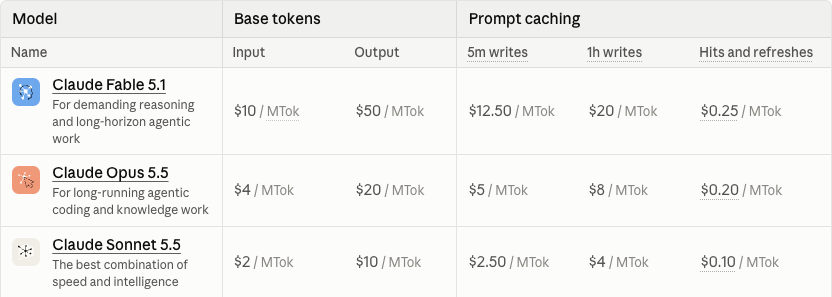
Anthropic’s public API pricing table, cropped to its column headings and first model rows. Match the exact model and cache category before calculating. (Source: API pricing, captured 2026-10-26)
For Sonnet 5.5 with five-minute writes:
USD = input_M × 2
    + cache_write_M × 2.50
    + cache_read_M × 0.10
    + output_M × 10
Here, _M means millions of tokens in that billing bucket. These hypothetical monthly workloads illustrate why a single universal estimate is unhelpful:
| Example | Input M | Write M | Read M | Output M | API total |
|---|---|---|---|---|---|
| Occasional | 0.5 | 0.5 | 8 | 0.1 | $4.05 |
| Regular | 2 | 2 | 40 | 1 | $23 |
| Heavy | 10 | 10 | 200 | 8 | $145 |
| Very heavy | 20 | 20 | 400 | 20 | $330 |
For the heavy example: $20 input + $25 writes + $20 reads + $80 output = $145. These are arithmetic scenarios, not typical-user benchmarks. They exclude taxes, paid server-side tools, other models, and any special pricing options. A subscription may cover a workload for less money, but this table cannot tell you whether that workload fits its limits.
What prompt caching actually saves
Claude Code manages prompt caching automatically. Reuse depends on a matching request prefix and an unexpired cache. A stable repository alone does not guarantee a hit; the actual request context matters. (Caching behavior)
At the Sonnet 5.5 rates above, cache reads cost 95% less than ordinary input. Older models can have a different discount. That percentage applies to the read tokens only.
For example, writing a 100,000-token prefix once costs $0.25. Reading it nine more times while the cache remains valid costs $0.09. The combined prefix cost is $0.34, compared with $2 for ten uncached reads: an 83% reduction for this input example, before output or other charges. One-hour writes have a different price. (Cache pricing)
4. Set up your billing route and verify it
Install Claude Code using the official quickstart if needed. You can use a subscription without creating an API key.
Start with your subscription
In your terminal:
claude auth login
claude
Choose your Claude subscription account in the login flow. Inside the Claude Code conversation, run these commands one at a time:
/status
/usage
/model
/status identifies the active authentication route. /usage shows plan usage and session information; a displayed API-equivalent session estimate is not an additional invoice for included subscription usage. /model checks the exact model. (Authentication, Usage display)
An existing ANTHROPIC_API_KEY can change the route. Current interactive Claude Code asks whether to use it and remembers that choice; in -p mode, a present API key is used automatically. For a personal setup, unset ANTHROPIC_API_KEY removes it from the current shell. Also review other configured credentials or helpers if /status still shows an unexpected route. Follow your administrator’s settings on a managed machine. (Credential precedence)
Try API billing with a small budget
Create an organization and API key in the Claude Console. Configure its spending limit before running a job. In Bash or Zsh, this example reads the key without putting the value in shell history and confines the exported variable to a subshell:
(
  printf 'Anthropic API key: ' >&2
  IFS= read -r -s ANTHROPIC_API_KEY
  printf '\n' >&2
  export ANTHROPIC_API_KEY
  claude --model sonnet
)
Confirm the API route with /status before working. The sonnet alias can change as models are updated; use /model to check which model your account actually selected. Higher-priority provider or gateway credentials can also affect routing.
For a scripted trial, supply the API key through your secret manager or job environment, then run:
claude -p "Summarize this repository. Do not modify files." \
  --model sonnet \
  --max-budget-usd 2 \
  --max-turns 4 \
  --output-format json > claude-report.json
The budget option applies to print mode, uses a client-side estimate, and can overshoot. It is not an organization-wide billing ceiling. Use Console spend controls as well, and inspect job errors if a turn or budget limit stops the run. The report can contain repository information, so keep it out of public artifacts. These examples were checked for command syntax and documented options; no paid generation was run for this article. (CLI budget and turn options)
5. Continue a subscription session with usage credits
For occasional overflow, you can keep the same subscription login and enable Usage credits in Claude Settings > Usage, or open the settings with /usage-credits. Set a monthly cap and fund the balance; review auto-reload before enabling it. Beyond included limits, eligible requests use separately charged, standard API-rate overage. (Usage credit setup and billing)
This makes a useful middle option. For example, Pro at $20 plus an illustrative $15 of overage is $35 for that month. Whether Max is preferable depends on how much of your work its included allowance would cover and how often you are interrupted.
Monthly API credits included with Max are a separate benefit. The current program lists $100 for Max 5x and $200 for Max 20x, after claiming them through a linked Console organization. Its exclusions include Claude Code and extra usage in the Claude apps; unused credits also expire without rollover. Do not subtract their face value from a Claude Code bill. Check the API credit program if you also build eligible API applications.
6. Parallel terminals share capacity
Opening three Claude Code sessions can be useful for independent tasks. Use separate repositories or Git worktrees for simultaneous edits. Subscription consumption still draws from the account’s allowance; multiple windows do not multiply it.
With API billing, workers share organization or workspace limits. Watch requests per minute, input tokens per minute, and output tokens per minute. More API keys do not automatically create more organizational throughput. Queue work and handle rate-limit responses; when a 429 response includes retry-after, wait as directed. Spend-limit failures need a budget or account change rather than endless retries. (API limits and errors)
Start with one worker, measure cost and throughput, then add another. This is easier to evaluate than launching several expensive loops at once.
7. Automation is available through both routes
GitHub Actions can run Anthropic’s official Claude Code Action. Its documented authentication options include:
| Credential | GitHub secret | Action input | Billing route |
|---|---|---|---|
| API key | ANTHROPIC_API_KEY | anthropic_api_key | Console/API |
| Subscription OAuth token | CLAUDE_CODE_OAUTH_TOKEN | claude_code_oauth_token | The token owner’s subscription |
For the subscription token, run this locally and complete the authorization flow:
claude setup-token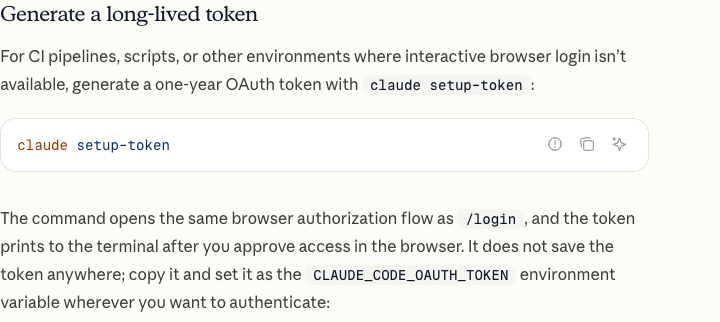
Anthropic’s public long-lived-token instructions. Authorization happens during token creation; the job later reads the token from its secret store. (Source: Authentication, captured 2026-10-26)
Store the generated token as a repository secret, not in a committed workflow file. Follow the complete GitHub Action setup for the GitHub App, workflow, and permissions. OAuth runs still consume the subscriber’s allowance. For shared organizational automation, an organization-managed API credential or supported workload identity can be easier to govern than a person’s subscription token. Add workflow timeouts and concurrency controls whichever route you choose.
Supported subscription authentication in Claude Code does not make a personal subscription a general-purpose credential for every third-party application. For tools or products you build for others, follow Anthropic’s developer authentication guidance.
8. Keep account separation and terms clear
Work and personal Claude subscription accounts can have separate CLAUDE_CONFIG_DIR directories, with separate settings and session histories. That supports legitimate separation; it should not be presented as a guaranteed way to pool subscription limits. (Multiple-account setup)
Anthropic’s Consumer Terms prohibit sharing account credentials and bypassing protective systems. That supports avoiding limit-evasion schemes. It does not establish a public rule that every person with two accounts will be banned, nor prove claims about card or device fingerprinting. For an account arrangement you depend on, ask Anthropic about that specific setup.
Personal Pro/Max and API use also fall under different agreements; check your organization’s requirements before sending work code. Anthropic’s Claude Code legal guide maps the applicable consumer and commercial terms.
9. Choose from a week of your own work
| Your situation | A sensible starting point |
|---|---|
| Learning or occasional short jobs | A small API budget, or Pro if you also value Claude chat |
| Regular interactive development | Pro, then measure whether limits interrupt important work |
| Frequent included-usage exhaustion | Compare Max with your measured subscription overage cost |
| CI or scheduled personal jobs | Either documented route; account for shared quota and credential ownership |
| Shared automation or a product for others | Organization-managed API/provider access and spend controls |
For seven days, record the active billing route, exact model, useful tasks completed, interruptions, and spend. For API work, include all workers and cache categories; for subscriptions, record the five-hour and weekly usage bars. Use /usage for inspection and the relevant billing dashboard for the actual charges.
Compare subscription fee + usage-credit charges + separately billed API work, then consider the time lost to interruptions. Start with the smallest plan that covers your work, keep overflow spending bounded, and upgrade when your own records justify it. A fixed monthly price is useful when its allowance fits your workload; metered billing is useful when you need granular budgets and controlled automation.
매일 코딩한다면 Claude Code 구독의 비용 대비 효과가 클 수 있다. 가끔 사용하는 경우에는 API 과금이 더 저렴할 수 있고, 프로젝트별 예산도 관리하기 쉽다. 내 작업을 끝내는 데 드는 총비용을 한도와 중단 시간까지 포함해 비교하는 것이 중요하다.
공식 문서는 2026-10-26에 확인했다. 가격은 웹에서 직접 구매할 때의 세전 미국 달러 기준이며, 지역과 모바일 앱 스토어에 따라 다를 수 있다. 명령과 옵션은 로컬에 설치된 Claude Code 2.1.310을 기준으로 확인했다. 아래 계산은 예시이며 실제 청구 내역이나 구독으로 보장되는 처리량이 아니다.
1. 같은 코딩 도구, 세 가지 결제 경로
Claude Code는 코딩 도구다. 실제로 어떤 방식으로 과금되는지는 활성 인증 정보가 결정한다.
| 경로 | 작업 비용을 충당하는 것 | 확인할 항목 |
|---|---|---|
| 구독 포함 사용량 | Pro 또는 Max에 포함된 사용량 | 세션·주간 한도 |
| 구독 추가 사용 크레딧 | 포함 사용량 소진 후 별도로 충전한 크레딧 | 잔액·월 지출 한도 |
| API 과금 | Claude Console 조직 또는 설정한 제공자에 청구되는 토큰 사용량 | 모델 단가·지출 한도·API 속도 제한 |
개인용 웹 구독은 Pro 월 $20, Max 5x 월 $100, Max 20x 월 $200다. Pro 연간 옵션은 $200를 선결제하며, 웹사이트는 월 환산 금액을 반올림해 $17로 표시한다. (공식 가격, Max 요금제)
Anthropic이 공개한 구독 요금 카드. 대표 가격 아래의 결제 주기 설명을 함께 읽어야 한다. (출처: Claude 가격, 2026-10-26 캡처)
이 글의 문서 이미지를 선택하면 원본 크기로 열 수 있다.
Max의 5x·20x는 Pro 대비 세션별 사용 가능량을 뜻한다. 월간 토큰 수나 완료할 작업 수를 보장하지 않는다. 세션 한도는 5시간마다 초기화되고 주간 한도도 적용된다. Claude 채팅과 Claude Code는 요금제 사용량을 공유한다. 내 초기화 시각과 잔여량은 Settings > Usage에서 확인한다. (Max 한도, 공유 사용량 한도)
2. 비교 결과를 바꾸는 다섯 가지 오해
| 흔한 생각 | 더 정확한 설명 |
|---|---|
| API는 절대 작업을 멈추지 않는다 | 요청 수·토큰 처리량·지출 한도 때문에 중단될 수 있다 |
| 구독은 터미널 하나만 허용한다 | 병렬 세션을 지원하지만 소비한 사용량은 합산된다 |
| 구독으로 CI를 실행할 수 없다 | Anthropic의 GitHub Action은 구독 OAuth 토큰을 지원한다 |
| 캐싱으로 전체 요금이 90% 줄어든다 | 재사용 가능한 캐시 입력에 할인되며 쓰기·출력은 각각 다른 단가다 |
| 계정을 바꾸면 항상 대화가 사라진다 | 설정 디렉터리로 회사·개인 구독 로그인과 기록을 분리할 수 있으며 작업 인계는 명시적으로 계획해야 한다 |
관련 내용은 API 한도, 병렬 worktree, GitHub Actions 인증, 프롬프트 캐싱, 다중 계정 인증에 문서화되어 있다.
구독은 정기 요금으로 한도가 있는 사용량을 제공한다. API 계정은 사용량 기반 예산과 처리량 한도를 제공한다. 어느 방식도 오후 내내 중단 없이 일할 수 있음을 보장하지 않는다.
3. 추측 대신 계산으로 API 비용 예상하기
토큰은 모델이 처리하는 텍스트의 단위다. 에이전트가 반복 작업을 할 때 지시, 파일 내용, 이전 메시지, 도구 결과가 입력이 되고 생성한 텍스트와 도구 호출이 출력에 포함될 수 있다. 짧은 요청 하나가 상당한 사용량으로 이어질 수 있는 이유다.
일반 입력, 캐시 쓰기, 캐시 읽기, 출력이라는 네 항목을 나눠 계산한다. 같은 입력 토큰을 일반 입력과 캐시 쓰기에 중복 계산하면 안 된다.
아래는 확인 당시 공식 API 가격표에 게시된 글로벌 라우팅의 표준 단가다. 금액은 100만 토큰당 가격이다. 두 모델만 발췌했으며 모델별 이용 가능 여부와 다른 모델의 단가는 다르다.
| 모델 | 일반 입력 | 5분 캐시 쓰기 | 캐시 읽기 | 출력 |
|---|---|---|---|---|
| Sonnet 5.5 | $2 | $2.50 | $0.10 | $10 |
| Opus 5.5 | $4 | $5 | $0.20 | $20 |
Anthropic의 공개 API 가격표에서 열 제목과 앞부분 모델 행을 캡처했다. 계산 전 정확한 모델과 캐시 항목을 맞춰야 한다. (출처: API 가격, 2026-10-26 캡처)
Sonnet 5.5의 5분 캐시 쓰기를 사용한다면 다음과 같다.
USD = input_M × 2
    + cache_write_M × 2.50
    + cache_read_M × 0.10
    + output_M × 10
_M은 각 과금 항목의 토큰 수를 100만 단위로 나타낸 것이다. 다음의 가상 월간 작업량을 보면 모두에게 하나의 예상 금액을 적용하기 어려운 이유를 알 수 있다.
| 예시 | 입력 M | 쓰기 M | 읽기 M | 출력 M | API 총액 |
|---|---|---|---|---|---|
| 가끔 사용 | 0.5 | 0.5 | 8 | 0.1 | $4.05 |
| 꾸준히 사용 | 2 | 2 | 40 | 1 | $23 |
| 많이 사용 | 10 | 10 | 200 | 8 | $145 |
| 매우 많이 사용 | 20 | 20 | 400 | 20 | $330 |
많이 사용하는 예시는 입력 $20 + 쓰기 $25 + 읽기 $20 + 출력 $80 = $145다. 산술 예시이며 일반 사용자 벤치마크가 아니다. 세금, 유료 서버 측 도구, 다른 모델, 특별 가격 옵션은 제외했다. 구독이 같은 작업을 더 저렴하게 충당할 수 있지만, 이 표만으로 해당 작업량이 구독 한도에 들어가는지는 알 수 없다.
프롬프트 캐싱은 무엇을 줄여 주나
Claude Code는 프롬프트 캐싱을 자동 관리한다. 재사용하려면 요청 앞부분이 일치하고 캐시가 유효해야 한다. 저장소 구조가 유지된다는 사실만으로 적중이 보장되지는 않는다. 실제 요청 컨텍스트가 중요하다. (캐싱 동작)
위 Sonnet 5.5 단가에서 캐시 읽기는 일반 입력보다 95% 저렴하다. 이전 모델은 할인율이 다를 수 있다. 이 비율은 캐시로 읽은 토큰에만 적용된다.
예를 들어 100,000토큰의 앞부분을 한 번 쓰면 $0.25다. 캐시가 유효한 동안 아홉 번 더 읽으면 $0.09다. 이 앞부분의 총비용은 $0.34로, 캐시 없이 열 번 읽는 $2와 비교하면 이 입력 예시에서 83% 절감된다. 출력과 기타 비용은 별도다. 1시간 캐시 쓰기의 단가도 다르다. (캐시 가격)
4. 결제 경로를 설정하고 실제 인증 확인하기
설치가 필요하다면 공식 빠른 시작을 따른다. 구독을 쓸 때 API 키를 만들 필요는 없다.
구독으로 시작하기
터미널에서 실행한다.
claude auth login
claude
로그인 과정에서 Claude 구독 계정을 고른다. Claude Code 대화 안에서는 아래 명령을 하나씩 실행한다.
/status
/usage
/model
/status는 활성 인증 경로를 보여 준다. /usage는 요금제 사용량과 세션 정보를 표시한다. API 단가로 환산한 세션 비용이 보이더라도 구독 포함 사용량에 추가 청구되는 금액은 아니다. /model로 정확한 모델을 확인한다. (인증, 사용량 표시)
기존 ANTHROPIC_API_KEY가 경로를 바꿀 수 있다. 현재 대화형 Claude Code는 해당 키를 사용할지 묻고 선택을 기억한다. -p 모드에서는 API 키가 설정돼 있으면 자동으로 사용한다. 개인 환경에서 unset ANTHROPIC_API_KEY를 실행하면 현재 셸에서 그 변수를 제거한다. /status가 여전히 예상 밖의 경로를 표시한다면 다른 인증 정보나 도우미 설정도 확인한다. 관리 대상 기기에서는 관리자의 설정을 따른다. (인증 우선순위)
적은 예산으로 API 과금 시험하기
Claude Console에서 조직과 API 키를 만들고 작업 전에 지출 한도를 설정한다. Bash나 Zsh에서는 다음 예시로 키 값을 셸 기록에 남기지 않고 입력할 수 있다. 내보낸 환경 변수는 하위 셸에만 적용된다.
(
  printf 'Anthropic API key: ' >&2
  IFS= read -r -s ANTHROPIC_API_KEY
  printf '\n' >&2
  export ANTHROPIC_API_KEY
  claude --model sonnet
)
작업 전에 /status로 API 경로를 확인한다. sonnet 별칭은 모델 업데이트에 따라 바뀔 수 있으므로 /model에서 내 계정에 실제로 선택된 모델을 확인한다. 우선순위가 높은 제공자·게이트웨이 인증 정보도 경로에 영향을 줄 수 있다.
스크립트로 시험하려면 비밀 관리 도구나 작업 환경에서 API 키를 제공한 뒤 실행한다.
claude -p "Summarize this repository. Do not modify files." \
  --model sonnet \
  --max-budget-usd 2 \
  --max-turns 4 \
  --output-format json > claude-report.json
예산 옵션은 print 모드에 적용되고 클라이언트 측 추정값을 사용하므로 초과할 수 있다. 조직 전체의 정확한 청구 상한이 아니다. Console 지출 통제도 함께 사용하고, 턴·예산 제한으로 작업이 끝났다면 오류를 확인한다. 보고서에 저장소 정보가 들어갈 수 있으므로 공개 산출물에 포함하지 않는다. 예시의 명령 문법과 문서화된 옵션을 확인했으며 이 글을 위해 유료 생성을 실행하지는 않았다. (CLI 예산·턴 옵션)
5. 추가 사용 크레딧으로 구독 세션 이어 가기
가끔 사용량이 넘친다면 같은 구독 로그인을 유지하며 Claude Settings > Usage에서 Usage credits를 켤 수 있다. /usage-credits로 설정을 열 수도 있다. 월 한도를 정하고 잔액을 충전하며 자동 충전은 설정을 검토한 뒤 켠다. 포함 한도 이후의 대상 요청은 표준 API 단가로 별도 과금된다. (사용 크레딧 설정과 청구)
유용한 중간 선택지다. 예를 들어 Pro $20에 가정한 추가 사용료 $15를 더하면 그달 총액은 $35다. Max가 더 나은지는 실제 작업 중 얼마가 포함 사용량으로 처리될지, 중요한 순간에 얼마나 자주 중단되는지에 달려 있다.
Max에 포함된 월간 API 크레딧은 별개 혜택이다. 현재 프로그램은 Console 조직에 연결해 신청하면 Max 5x에 $100, Max 20x에 $200를 제공한다고 안내한다. 하지만 제외 대상에 Claude Code와 Claude 앱의 추가 사용이 포함되며 미사용 크레딧은 이월되지 않고 만료된다. 액면 금액을 Claude Code 청구서에서 빼서 계산하지 말자. 별도로 대상 API 애플리케이션을 개발한다면 API 크레딧 프로그램을 확인한다.
6. 병렬 터미널은 처리량을 공유한다
독립 작업을 위해 Claude Code 세션 세 개를 여는 것은 유용할 수 있다. 동시에 수정할 때는 별도 저장소나 Git worktree를 사용한다. 구독 사용량은 여전히 같은 계정의 한도에서 차감되며 창을 늘린다고 한도가 배로 늘어나지 않는다.
API 과금에서는 작업자들이 조직·워크스페이스 한도를 공유한다. 분당 요청 수, 분당 입력 토큰, 분당 출력 토큰을 확인한다. API 키를 늘린다고 조직 처리량이 자동으로 늘지는 않는다. 작업을 대기열에 넣고 속도 제한 응답을 처리한다. 429에 retry-after가 있다면 그 시간만큼 기다린다. 지출 한도 오류는 끝없는 재시도보다 예산이나 계정 설정을 해결해야 한다. (API 한도와 오류)
작업자 하나로 시작해 비용과 처리량을 측정한 뒤 하나를 더 늘린다. 비싼 반복 작업 여러 개를 한꺼번에 시작하는 것보다 결과를 평가하기 쉽다.
7. 두 경로 모두 자동화를 지원한다
GitHub Actions에서 Anthropic의 공식 Claude Code Action을 실행할 수 있다. 문서화된 인증 방법은 다음과 같다.
| 인증 정보 | GitHub secret | Action 입력 | 과금 경로 |
|---|---|---|---|
| API 키 | ANTHROPIC_API_KEY |
anthropic_api_key |
Console/API |
| 구독 OAuth 토큰 | CLAUDE_CODE_OAUTH_TOKEN |
claude_code_oauth_token |
토큰 소유자의 구독 |
구독 토큰은 로컬에서 다음 명령을 실행한 뒤 인증 과정을 완료해 만든다.
claude setup-token
Anthropic의 공개 장기 토큰 안내. 토큰 생성 시 인증하고, 나중에 작업이 비밀 저장소에서 토큰을 읽는다. (출처: 인증, 2026-10-26 캡처)
생성된 토큰은 커밋하는 workflow 파일이 아니라 저장소 secret에 저장한다. GitHub App, workflow, 권한 설정은 GitHub Action 전체 설정을 따른다. OAuth로 실행한 작업도 구독자의 한도를 소비한다. 조직이 공유하는 자동화에는 개인 구독 토큰보다 조직 관리 API 인증이나 지원되는 워크로드 ID가 관리하기 쉬울 수 있다. 어느 경로든 workflow 시간 제한과 동시 실행 통제를 둔다.
Claude Code에서 지원하는 구독 인증이 모든 외부 애플리케이션에 사용할 수 있는 범용 개인 구독 인증을 뜻하지는 않는다. 다른 사람을 위한 도구나 제품을 만든다면 Anthropic의 개발자 인증 안내를 따른다.
8. 계정 분리와 약관을 구분해서 이해하기
회사·개인 Claude 구독 계정에 각각 CLAUDE_CONFIG_DIR를 두면 설정과 세션 기록을 분리할 수 있다. 정당한 계정 분리에 유용하지만 구독 한도를 합칠 수 있는 보장된 방법으로 소개해서는 안 된다. (다중 계정 설정)
Anthropic의 소비자 약관은 인증 정보 공유와 보호 시스템 우회를 금지한다. 한도 회피 방식을 피할 근거가 된다. 그렇다고 계정 두 개를 가진 모든 사람이 차단된다는 공개 규칙이나 카드·기기 지문 추적에 대한 주장이 입증되는 것은 아니다. 업무가 의존하는 계정 구성이라면 그 구체적인 방식에 대해 Anthropic에 확인한다.
개인 Pro/Max와 API 사용에는 서로 다른 계약도 적용된다. 업무 코드를 보내기 전에 조직의 요구사항을 확인한다. Anthropic의 Claude Code 법률 안내에서 소비자·상업 약관의 적용 범위를 정리한다.
9. 일주일간 내 작업을 기록해서 선택하기
| 내 상황 | 합리적인 출발점 |
|---|---|
| 학습·가끔 짧은 작업 | 소액 API 예산, Claude 채팅도 유용하다면 Pro |
| 꾸준한 대화형 개발 | Pro로 시작하고 중요한 작업이 한도로 중단되는지 측정 |
| 포함 사용량을 자주 소진 | Max와 실제 구독 추가 사용 비용 비교 |
| 개인 CI·예약 작업 | 문서화된 두 경로 중 선택하되 공유 한도·인증 소유자 확인 |
| 공동 자동화·다른 사람용 제품 | 조직 관리 API·제공자 접근과 지출 통제 |
7일 동안 활성 과금 경로, 정확한 모델, 완료한 유용한 작업, 중단 횟수, 지출을 기록한다. API 작업은 모든 작업자와 캐시 항목을 합산하고, 구독은 5시간·주간 사용량 막대를 기록한다. /usage로 상태를 점검하고 실제 청구 금액은 해당 결제 대시보드에서 확인한다.
구독료 + 사용 크레딧 요금 + 별도 청구 API 작업을 비교한 뒤 중단으로 잃은 시간도 고려한다. 작업을 감당하는 가장 작은 요금제로 시작하고 추가 지출에 한도를 두며, 내 기록이 뒷받침할 때 올린다. 정액 요금은 포함 사용량이 내 작업에 맞을 때 유용하고, 종량제는 세부 예산과 통제 가능한 자동화가 필요할 때 유용하다.
经常编程时,Claude Code 订阅可能很划算。偶尔使用时,API 按量计费可能更便宜,也更方便按项目管理预算。真正有用的比较,是完成工作所需的总成本,包括限额和中断时间。
本文于 2026-10-26 核对官方文档。价格为通过网页直接购买时的税前美元金额;地区和移动应用商店价格可能不同。命令和选项依据本地安装的 Claude Code 2.1.310 检查。以下计算是示例,不是实测账单,也不是订阅保证提供的处理量。
1. 同一个编程工具,三条付费路径
Claude Code 是编程工具。当前生效的认证凭据决定它采用哪条计费路径。
| 路径 | 工作费用来自哪里 | 需要关注什么 |
|---|---|---|
| 订阅内额度 | Pro 或 Max 包含的使用量 | 会话及每周限额 |
| 订阅额外使用积分 | 订阅额度用完后另行充值的积分 | 积分余额和每月消费上限 |
| API 计费 | 向 Claude Console 组织或配置的服务商收取 token 费用 | 模型单价、消费上限和 API 速率限制 |
个人网页订阅价格为 Pro 每月 $20、Max 5x 每月 $100、Max 20x 每月 $200。Pro 年付选项一次支付 $200;网站将折合月价取整显示为 $17。(官方价格、Max 档位)
Anthropic 公开的订阅价格卡片。应同时阅读主价格下方的付款周期说明。(来源:Claude 价格,2026-10-26 截取)
点击本文中的文档图片,可打开原尺寸版本。
Max 的 5x、20x 指相对于 Pro 的每会话容量。它们不保证对应倍数的每月 token 或完成任务数。会话限额每五小时重置,同时还存在每周限额。Claude 聊天与 Claude Code 共用方案使用量。请在 Settings > Usage 查看自己的重置时间和剩余额度。(Max 限额、共享使用限额)
2. 会改变比较结果的五个误区
| 常见想法 | 更准确的说明 |
|---|---|
| API 永远不会让工作停止 | 请求数、token 吞吐量及消费上限都可能暂停工作 |
| 订阅只允许一个终端 | 支持并行会话,但使用量仍然累计 |
| 订阅不能运行 CI | Anthropic 的 GitHub Action 支持订阅 OAuth token |
| 缓存能让整张账单便宜 90% | 折扣针对符合条件的缓存输入;写入与输出分别计价 |
| 切换账户必然丢失对话 | 配置目录可隔离工作、个人订阅登录及历史记录;工作交接应明确安排 |
这些区别见于 API 限制、并行 worktree、GitHub Actions 认证、提示词缓存及多账户认证。
订阅以固定周期费用提供有上限的额度。API 账户提供按量预算和吞吐量配额。两种方式都不能保证整个下午毫无中断。
3. 用计算估算 API 账单
Token 是模型处理文本的单位。在代理循环中,指令、文件内容、先前消息和工具结果都可能成为输入;生成的文字及工具调用构成输出。因此,一条简短请求也可能带来大量消耗。
将费用分为四项:普通输入、缓存写入、缓存读取和输出。同一批输入 token 不应同时计为普通输入与缓存写入。
下表是核对时官方 API 价格表列出的全球路由标准价格,金额为每百万 token。这里只选取两个模型;其他模型的价格及可用性不同。
| 模型 | 普通输入 | 5 分钟缓存写入 | 缓存读取 | 输出 |
|---|---|---|---|---|
| Sonnet 5.5 | $2 | $2.50 | $0.10 | $10 |
| Opus 5.5 | $4 | $5 | $0.20 | $20 |
Anthropic 公开 API 价格表的列标题和前几行模型。计算前应核对准确模型及缓存类别。(来源:API 价格,2026-10-26 截取)
以 Sonnet 5.5、五分钟缓存写入为例:
USD = input_M × 2
    + cache_write_M × 2.50
    + cache_read_M × 0.10
    + output_M × 10
_M 表示该计费类别的百万 token 数量。以下假设的月度工作量说明,统一套用一个估算金额并不可靠:
| 示例 | 输入 M | 写入 M | 读取 M | 输出 M | API 合计 |
|---|---|---|---|---|---|
| 偶尔使用 | 0.5 | 0.5 | 8 | 0.1 | $4.05 |
| 经常使用 | 2 | 2 | 40 | 1 | $23 |
| 大量使用 | 10 | 10 | 200 | 8 | $145 |
| 极大量使用 | 20 | 20 | 400 | 20 | $330 |
大量使用的示例为:输入 $20 + 写入 $25 + 读取 $20 + 输出 $80 = $145。这些只是算术场景,不是典型用户基准。未包含税费、付费服务器端工具、其他模型和特殊价格选项。订阅可能以更低价格覆盖某项工作,但此表无法判断该工作量是否在订阅限额之内。
提示词缓存究竟节省什么
Claude Code 自动管理提示词缓存。复用要求请求前缀匹配且缓存尚未过期。仅仅保持仓库结构不变,不能保证缓存命中;实际请求上下文才是关键。(缓存机制)
按上面的 Sonnet 5.5 价格,缓存读取比普通输入便宜 95%。旧模型可能采用不同折扣。该百分比只针对从缓存读取的 token。
例如,将 100,000-token 的前缀写入一次需 $0.25。在缓存有效期间再读取九次需 $0.09。前缀总费用为 $0.34,而十次无缓存读取需 $2:本输入示例节省 83%,尚未计算输出或其他费用。一小时缓存写入的价格也不同。(缓存价格)
4. 设置付费路径,并验证实际认证
尚未安装时,按照官方快速入门操作。使用订阅不需要创建 API key。
从订阅开始
在终端运行:
claude auth login
claude
在登录流程中选择 Claude 订阅账户。在 Claude Code 对话中逐条运行:
/status
/usage
/model
/status 显示当前认证路径。/usage 显示方案额度和会话信息;其中按 API 单价估算的会话费用,不是订阅内使用的额外账单。/model 用于确认准确模型。(认证、使用量显示)
已存在的 ANTHROPIC_API_KEY 可能改变路径。当前交互式 Claude Code 会询问是否使用该 key,并记住选择;-p 模式下,只要设置了 API key 就会自动使用。在个人环境中,unset ANTHROPIC_API_KEY 会从当前 shell 移除该变量。如果 /status 仍显示意外路径,请检查其他凭据或辅助脚本设置。受管理设备应遵守管理员配置。(凭据优先级)
用小预算试用 API 计费
在 Claude Console 创建组织及 API key,运行任务前设置消费上限。以下 Bash 或 Zsh 示例读取 key 时不会把值写进 shell 历史,导出的变量也仅存在于子 shell:
(
  printf 'Anthropic API key: ' >&2
  IFS= read -r -s ANTHROPIC_API_KEY
  printf '\n' >&2
  export ANTHROPIC_API_KEY
  claude --model sonnet
)
开始工作前通过 /status 确认 API 路径。sonnet 别名会随模型更新而变化,应使用 /model 检查账户实际选中的模型。优先级更高的服务商或网关凭据也可能影响路由。
若要试运行脚本,通过密钥管理器或任务环境提供 API key,然后运行:
claude -p "Summarize this repository. Do not modify files." \
  --model sonnet \
  --max-budget-usd 2 \
  --max-turns 4 \
  --output-format json > claude-report.json
预算选项用于 print 模式,依据客户端估算,因此可能超额。它不是整个组织的精确账单上限。还应设置 Console 消费控制;任务因轮次或预算限制停止时,检查错误信息。报告可能包含仓库信息,不要放入公开产物。本文检查了命令语法和文档列出的选项,没有执行付费生成。(CLI 预算及轮次选项)
5. 使用额外积分继续订阅会话
偶尔超额时,可以保留同一个订阅登录,在 Claude Settings > Usage 开启 Usage credits,也可用 /usage-credits 打开设置。设置月度上限并充值,开启自动充值前先核对配置。超过订阅额度后,符合条件的请求会按标准 API 单价另行计费。(使用积分设置与计费)
这是一个实用的折中选项。例如 Pro $20 加上假设的 $15 超额使用费,当月总计 $35。是否改用 Max,取决于它的额度能覆盖多少实际工作,以及你多频繁地遇到中断。
Max 包含的每月 API credits 是另一项权益。 当前计划说明,关联 Console 组织并领取后,Max 5x 可获得 $100,Max 20x 可获得 $200。但其排除项目包含 Claude Code 及 Claude 应用内额外使用;未用积分到期后也不结转。因此,不能直接从 Claude Code 账单中减去这些积分的面值。如果还开发符合条件的 API 应用,请查看 API 积分计划。
6. 并行终端共享容量
为独立任务打开三个 Claude Code 会话可能很有用。并行修改文件时,应使用不同仓库或 Git worktree。订阅消耗仍来自同一账户额度;多开窗口不会让额度倍增。
API 模式下,worker 共享组织或工作区限制。关注每分钟请求数、每分钟输入 token 和每分钟输出 token。增加 API key 不会自动增加组织吞吐量。应排队执行工作并处理速率限制响应;429 带有 retry-after 时,按指定时间等待。消费上限错误需要调整预算或账户配置,而不是无限重试。(API 限制与错误)
先运行一个 worker,测量费用和吞吐量,再增加一个。这比同时启动多个昂贵循环更容易评估。
7. 两条路径都能自动化
GitHub Actions 可运行 Anthropic 的官方 Claude Code Action。其文档列出了以下认证方式:
| 凭据 | GitHub secret | Action 输入 | 计费路径 |
|---|---|---|---|
| API key | ANTHROPIC_API_KEY |
anthropic_api_key |
Console/API |
| 订阅 OAuth token | CLAUDE_CODE_OAUTH_TOKEN |
claude_code_oauth_token |
token 所有者的订阅 |
要生成订阅 token,在本地运行以下命令并完成授权:
claude setup-token
Anthropic 公开的长期 token 使用说明。创建 token 时完成授权,后续任务从密钥存储读取 token。(来源:认证,2026-10-26 截取)
将生成的 token 保存为仓库 secret,不要写入提交的 workflow 文件。GitHub App、workflow 及权限配置请遵循完整 GitHub Action 设置。OAuth 任务仍消耗订阅者额度。组织共享自动化使用组织管理的 API 凭据或受支持的工作负载身份,可能比依赖某个人的订阅 token 更方便治理。无论选哪条路径,都应设置 workflow 超时和并发控制。
Claude Code 支持订阅认证,并不代表个人订阅能作为所有第三方应用的通用凭据。为他人开发工具或产品时,请遵循 Anthropic 的开发者认证指南。
8. 分清账户隔离与服务条款
工作和个人 Claude 订阅账户可使用各自的 CLAUDE_CONFIG_DIR,分离设置与会话历史。这有助于正常账户隔离,但不应宣传为保证可以合并订阅额度的方法。(多账户设置)
Anthropic 的消费者条款禁止共享账户凭据及绕过保护系统。因此,应避免规避限制的做法。但这并不能证明存在“拥有两个账户就一定封禁”的公开规则,也无法证实有关支付卡或设备指纹追踪的说法。若某种账户安排对工作很重要,应就具体情况向 Anthropic 确认。
个人 Pro/Max 与 API 使用也适用不同协议。发送工作代码前,请核对组织要求。Anthropic 的 Claude Code 法律指南说明了消费者和商业条款的适用范围。
9. 根据自己一周的工作来选择
| 你的情况 | 合理起点 |
|---|---|
| 学习或偶尔运行短任务 | 小额 API 预算;也需要 Claude 聊天时可选 Pro |
| 日常交互式开发 | 从 Pro 开始,记录限额是否中断重要工作 |
| 经常耗尽订阅额度 | 将 Max 与实测订阅超额费用比较 |
| 个人 CI 或定时任务 | 选择文档支持的任一路径,考虑共享额度和凭据归属 |
| 共享自动化或为他人提供产品 | 组织管理的 API/服务商访问和消费控制 |
连续七天记录当前计费路径、准确模型、完成的有效任务、中断情况和费用。API 工作应涵盖所有 worker 及缓存类别;订阅则记录五小时与每周额度进度。通过 /usage 检查使用情况,在相应账单面板核对实际收费。
比较订阅费 + 使用积分费用 + 单独计费的 API 工作,再考虑中断损失的时间。从能覆盖工作的最小方案开始,限制额外支出,在自己的记录支持时升级。固定月费适合额度能覆盖工作量的情况;按量计费则适合需要细分预算及可控自动化的情况。
Claude Codeを継続的に使うなら、サブスクリプションは費用に見合う価値を得やすい選択肢です。たまに使う場合はAPI課金のほうが安く、プロジェクト別の予算も管理しやすいことがあります。比較したいのは、利用上限や中断時間も含めた、仕事を終えるための総費用です。
公式ドキュメントは 2026-10-26 に確認しました。料金はWebから直接購入する場合の税抜米ドル表記で、地域やモバイルアプリストアによって異なることがあります。コマンドとオプションはローカルにインストールされた Claude Code 2.1.310 を基準に確認しています。以下の計算は例であり、実測の請求額やサブスクが保証する処理量ではありません。
1. 同じコーディングツール、3つの支払い経路
Claude Codeはコーディングツールです。実際に使われる課金経路は、有効な認証情報で決まります。
| 経路 | 作業費用をまかなうもの | 確認すること |
|---|---|---|
| サブスク内の利用枠 | ProまたはMaxに含まれる利用量 | セッション・週次の上限 |
| サブスクの追加利用クレジット | 利用枠を使い切った後に別途入金するクレジット | 残高と月間支出上限 |
| API課金 | Claude Consoleの組織、または設定したプロバイダーに請求されるトークン使用量 | モデル単価、支出上限、APIレート制限 |
個人向けWebサブスクは Proが月額$20、Max 5xが月額$100、Max 20xが月額$200 です。Proの年払いは$200を一括で支払い、Webサイトでは月額換算を丸めて$17と表示しています。(公式料金、Maxのプラン)
Anthropicが公開しているサブスク料金カード。大きく表示された価格の下にある支払い周期も確認します。(出典:Claudeの料金、2026-10-26撮影)
本記事のドキュメント画像を選ぶと、原寸で開けます。
Maxの 5x・20xは、Proに対するセッションごとの利用容量 を指します。月間トークン数や完了できるタスク数を保証するものではありません。セッション上限は5時間ごとにリセットされ、週次上限も適用されます。ClaudeのチャットとClaude Codeはプランの利用量を共有します。自分のリセット時刻と残量はSettings > Usageで確認してください。(Maxの上限、共有される利用上限)
2. 比較結果を変える5つの思い込み
| よくある思い込み | より正確な説明 |
|---|---|
| APIなら作業が止まらない | リクエスト数、トークン処理量、支出上限で停止することがある |
| サブスクで使える端末は1つだけ | 並列セッションを利用できるが、消費量は合算される |
| サブスクはCIで使えない | AnthropicのGitHub ActionはサブスクのOAuthトークンに対応している |
| キャッシュで請求全体が90%安くなる | 割引対象は条件を満たすキャッシュ入力。書き込みと出力は別単価 |
| アカウントを変えると必ず会話を失う | 設定ディレクトリで仕事・個人のサブスクのログインと履歴を分離できる。作業の引き継ぎは明示的に計画する |
これらはAPIの制限、並列worktree、GitHub Actionsの認証、プロンプトキャッシュ、複数アカウントの認証に記載されています。
サブスクは定期料金で上限のある利用枠を提供します。APIアカウントは従量予算と処理量の割り当てを提供します。どちらも、午後いっぱい中断なく働けることを保証する仕組みではありません。
3. 推測ではなく計算でAPI費用を見積もる
トークン はモデルがテキストを処理する単位です。エージェントの反復処理では、指示、ファイル内容、過去のメッセージ、ツール結果が入力となり、生成テキストやツール呼び出しが出力になります。そのため、短い依頼から大きな使用量が発生することもあります。
通常入力、キャッシュ書き込み、キャッシュ読み込み、出力の4区分で計算します。同じ入力トークンを通常入力とキャッシュ書き込みの両方に計上しないでください。
以下は確認時点で公式API料金表に掲載されていた、グローバルルーティングの標準料金です。金額は 100万トークン当たり です。2モデルだけを抜粋しており、ほかのモデルの価格や利用可否は異なります。
| モデル | 通常入力 | 5分キャッシュ書き込み | キャッシュ読み込み | 出力 |
|---|---|---|---|---|
| Sonnet 5.5 | $2 | $2.50 | $0.10 | $10 |
| Opus 5.5 | $4 | $5 | $0.20 | $20 |
Anthropicの公開API料金表から、列見出しと先頭のモデル行を撮影。計算前に正確なモデルとキャッシュ区分を合わせます。(出典:API料金、2026-10-26撮影)
Sonnet 5.5で5分キャッシュ書き込みを使う場合は、次の計算になります。
USD = input_M × 2
    + cache_write_M × 2.50
    + cache_read_M × 0.10
    + output_M × 10
_Mは各課金区分のトークン数を100万単位で示します。以下の仮想的な月間作業量を見ると、全員に同じ費用目安を当てはめにくいことがわかります。
| 例 | 入力 M | 書き込み M | 読み込み M | 出力 M | API合計 |
|---|---|---|---|---|---|
| ときどき利用 | 0.5 | 0.5 | 8 | 0.1 | $4.05 |
| 継続的に利用 | 2 | 2 | 40 | 1 | $23 |
| 大量に利用 | 10 | 10 | 200 | 8 | $145 |
| 非常に大量に利用 | 20 | 20 | 400 | 20 | $330 |
大量利用の例は、入力$20 + 書き込み$25 + 読み込み$20 + 出力$80 = $145 です。これは算術例であり、一般ユーザーのベンチマークではありません。税金、有料のサーバー側ツール、ほかのモデル、特別料金のオプションは含みません。サブスクで同じ作業を安くまかなえる可能性はありますが、この表から利用枠に収まるかどうかは判断できません。
プロンプトキャッシュが節約するもの
Claude Codeはプロンプトキャッシュを自動管理します。再利用には、リクエスト先頭部分の一致と、有効期限内のキャッシュが必要です。リポジトリ構成が変わらないだけでヒットが保証されるわけではなく、実際のリクエストコンテキストが重要です。(キャッシュの動作)
上記のSonnet 5.5料金では、キャッシュ読み込みは 通常入力より95%安い 価格です。旧モデルでは割引率が異なる場合があります。この割合が適用されるのは、キャッシュから読んだトークンだけです。
たとえば100,000トークンの先頭部分を1回書き込むと$0.25です。キャッシュが有効な間に9回追加で読み込むと$0.09。先頭部分の合計は $0.34 で、キャッシュなしで10回読む$2と比べて この入力例では83%削減 できます。出力やその他の料金は別です。1時間キャッシュの書き込み単価も異なります。(キャッシュ料金)
4. 課金経路を設定し、実際の認証を確認する
未インストールなら公式クイックスタートに従ってください。サブスクの利用にAPIキーの作成は不要です。
サブスクから始める
端末で実行します。
claude auth login
claude
ログイン画面でClaudeのサブスクアカウントを選びます。Claude Codeの会話内では、次を1つずつ実行してください。
/status
/usage
/model
/statusは有効な認証経路を示します。/usageはプラン使用量とセッション情報を表示します。API単価換算のセッション費用が表示されても、サブスク内利用への追加請求ではありません。/modelで正確なモデルを確認します。(認証、使用量表示)
既存のANTHROPIC_API_KEYが経路を変えることがあります。現在の対話型Claude Codeはキーを使うか確認し、選択を記憶します。-pモードではAPIキーが設定されていれば自動的に使います。個人環境ではunset ANTHROPIC_API_KEYで現在のシェルから変数を削除できます。/statusがまだ想定外の経路を示す場合は、ほかの認証情報やヘルパー設定も確認します。管理対象端末では管理者の設定に従ってください。(認証の優先順位)
少額予算でAPI課金を試す
Claude Consoleで組織とAPIキーを作成し、ジョブ実行前に支出上限を設定します。BashまたはZshでは、次の例でキーの値をシェル履歴に残さず入力でき、エクスポートした変数をサブシェル内に限定できます。
(
  printf 'Anthropic API key: ' >&2
  IFS= read -r -s ANTHROPIC_API_KEY
  printf '\n' >&2
  export ANTHROPIC_API_KEY
  claude --model sonnet
)
作業前に/statusでAPI経路を確認します。sonnetエイリアスはモデル更新に伴って変わるため、/modelでアカウントが実際に選択したモデルを確認してください。優先順位の高いプロバイダーやゲートウェイの認証情報も経路に影響します。
スクリプトで試す場合は、シークレット管理ツールやジョブ環境からAPIキーを渡して実行します。
claude -p "Summarize this repository. Do not modify files." \
  --model sonnet \
  --max-budget-usd 2 \
  --max-turns 4 \
  --output-format json > claude-report.json
予算オプションは printモード 用で、クライアント側の推定を使うため超過する場合があります。組織全体の厳密な請求上限ではありません。Consoleの支出制御も併用し、ターン数や予算制限でジョブが止まった場合はエラーを確認します。レポートにはリポジトリ情報が含まれる可能性があるため、公開成果物に入れないでください。本記事ではコマンド構文と文書化されたオプションを確認し、有料生成は実行していません。(CLIの予算・ターン数オプション)
5. 追加利用クレジットでセッションを続ける
ときどき利用枠を超える場合は、同じサブスクのログインを保ち、Claude Settings > Usageで Usage credits を有効にできます。/usage-creditsから設定を開くこともできます。月間上限と残高を設定し、自動入金を有効にする前に内容を確認します。利用枠を超えた対象リクエストは標準API単価で別途課金されます。(利用クレジットの設定と請求)
これは実用的な中間案です。たとえばProの$20に、仮に$15の超過利用を加えると、その月は$35になります。Maxのほうがよいかは、実際の作業のどれだけを利用枠でまかなえるか、重要な作業がどの程度中断されるかによります。
Maxに含まれる月間APIクレジットは別の特典です。 現在のプログラムでは、Console組織をリンクして申請するとMax 5xは$100、Max 20xは$200を受け取れます。ただし対象外には Claude CodeとClaudeアプリの追加利用 が含まれ、未使用分は繰り越されず期限切れになります。額面をそのままClaude Codeの請求から差し引かないでください。対象となるAPIアプリも開発している場合は、APIクレジットプログラムを確認しましょう。
6. 並列ターミナルは容量を共有する
独立したタスクにClaude Codeを3セッション開くことは有用です。同時編集には別リポジトリやGit worktreeを使います。サブスクの消費は同じアカウントの利用枠から差し引かれ、ウィンドウを増やしても枠は増えません。
API課金ではワーカーが組織・ワークスペースの上限を共有します。毎分リクエスト数、毎分入力トークン、毎分出力トークン を確認してください。APIキーを増やしても組織の処理量が自動的に増えるわけではありません。作業をキューに入れ、レート制限の応答を処理します。429にretry-afterが付いていれば指定時間を待ちます。支出上限のエラーは、再試行を続けるのではなく予算やアカウント設定の対応が必要です。(API上限とエラー)
まず1ワーカーで費用と処理量を測り、その後で増やします。高価な反復処理を複数同時に起動するより評価しやすい方法です。
7. どちらの経路でも自動化できる
GitHub ActionsでAnthropicの公式Claude Code Actionを実行できます。文書化された認証方法は次のとおりです。
| 認証情報 | GitHub secret | Action入力 | 課金経路 |
|---|---|---|---|
| APIキー | ANTHROPIC_API_KEY |
anthropic_api_key |
Console/API |
| サブスクOAuthトークン | CLAUDE_CODE_OAUTH_TOKEN |
claude_code_oauth_token |
トークン所有者のサブスク |
サブスクのトークンはローカルで次を実行し、認可フローを完了して作成します。
claude setup-token
Anthropicが公開している長期トークンの手順。作成時に認可し、その後のジョブはシークレットストアからトークンを読みます。(出典:認証、2026-10-26撮影)
生成されたトークンは、コミットするworkflowファイルではなくリポジトリのsecretに保存します。GitHub App、workflow、権限の設定はGitHub Actionの完全な手順に従います。OAuthで動くジョブも契約者の利用枠を消費します。組織で共有する自動化なら、個人のサブスクトークンより、組織管理のAPI認証や対応するワークロードIDのほうが管理しやすい場合があります。どちらでもworkflowのタイムアウトと同時実行制御を設定してください。
Claude Codeでサブスク認証が使えることは、個人サブスクがすべての外部アプリの汎用認証情報になることを意味しません。他者向けのツールや製品を作る場合は、Anthropicの開発者認証ガイドに従います。
8. アカウント分離と利用規約を整理する
仕事と個人のClaudeサブスクアカウントに別々のCLAUDE_CONFIG_DIRを使えば、設定とセッション履歴を分けられます。正当なアカウント分離に役立ちますが、サブスク上限を合算できる保証された手段として紹介すべきではありません。(複数アカウントの設定)
Anthropicの消費者向け規約は、認証情報の共有や保護システムの回避を禁止しています。そのため、上限回避を目的とした仕組みは避けるべきです。ただし、これは「2アカウントを持つ全員が停止される」という公開規則や、カード・端末の指紋追跡についての主張を裏付けるものではありません。仕事で依存するアカウント構成なら、具体的な運用についてAnthropicに確認してください。
個人のPro/MaxとAPI利用では適用契約も異なります。仕事のコードを送る前に組織の要件を確認しましょう。AnthropicのClaude Code法務ガイドで、消費者向け・商用規約の適用範囲が整理されています。
9. 自分の1週間の作業記録で選ぶ
| 状況 | 妥当な出発点 |
|---|---|
| 学習や、ときどきの短い作業 | 少額API予算。Claudeチャットも使うならPro |
| 日常的な対話型開発 | Proから始め、上限が重要な作業を中断するか測る |
| 利用枠を頻繁に使い切る | Maxと実測のサブスク超過費用を比較 |
| 個人のCIや定期ジョブ | 文書化されたどちらかの経路。共有枠と認証所有者を考慮 |
| 共有自動化や他者向け製品 | 組織管理のAPI・プロバイダーアクセスと支出制御 |
7日間、有効な課金経路、正確なモデル、完了した有用なタスク、中断、支出を記録します。API作業では全ワーカーとキャッシュ区分を含め、サブスクでは5時間・週次の使用量バーを記録してください。/usageで状況を点検し、実際の請求は対応する課金ダッシュボードで確認します。
サブスク料金 + 利用クレジットの費用 + 別途課金のAPI作業 を比べ、中断で失う時間も考えます。仕事をまかなえる最小のプランから始め、追加支出に上限を置き、自分の記録が裏付けるときにアップグレードしましょう。月額固定料金は利用枠が仕事に合うときに、従量課金は細かな予算と制御された自動化が必要なときに役立ちます。
Una suscripción a Claude Code puede resultar muy rentable si programas con frecuencia. La facturación API puede salir más barata para trabajos ocasionales y facilitar los presupuestos por proyecto. Conviene comparar el coste total de terminar el trabajo, incluidos los límites y las interrupciones.
Esta guía contrasta la documentación oficial el 2026-10-26. Los precios están en USD antes de impuestos para compras directas en la web; pueden variar según la región y la tienda móvil. Los comandos y las opciones se comprobaron con Claude Code 2.1.310 instalado localmente. Los cálculos son ejemplos, no facturas medidas ni capacidad garantizada por una suscripción.
1. La misma herramienta, tres formas de pagar
Claude Code es la herramienta de programación. La credencial activa determina la vía de facturación.
| Vía | Qué paga el trabajo | Qué debes vigilar |
|---|---|---|
| Cuota de la suscripción | Uso incluido en Pro o Max | Límites por sesión y semanales |
| Créditos de uso de la suscripción | Saldo financiado aparte al agotar la cuota incluida | Saldo y límite mensual de gasto |
| Facturación API | Tokens cobrados a una organización de Claude Console o al proveedor configurado | Tarifas del modelo, topes de gasto y límites de velocidad API |
En suscripciones individuales contratadas en la web, Pro cuesta $20/mes, Max 5x cuesta $100/mes y Max 20x cuesta $200/mes. La opción anual de Pro exige pagar $200 por adelantado; la web redondea su equivalente mensual a $17. (Precios oficiales, Niveles Max)
Tarjetas públicas de precios de Anthropic. Lee el periodo de facturación indicado debajo del precio principal. (Fuente: precios de Claude, captura del 2026-10-26)
Selecciona cualquier imagen de documentación de esta guía para abrirla a tamaño completo.
Los 5x y 20x de Max se refieren a la capacidad por sesión respecto a Pro. No garantizan ese múltiplo de tokens mensuales ni de tareas terminadas. El límite de sesión se restablece cada cinco horas y también hay límites semanales. El chat de Claude y Claude Code comparten el uso del plan. Consulta tus horas de reinicio y cuota restante en Settings > Usage. (Límites Max, Límites compartidos)
2. Cinco suposiciones que cambian la comparación
| Suposición habitual | Orientación más precisa |
|---|---|
| La API nunca te detiene | Los límites de solicitudes, tokens y gasto pueden pausar el trabajo |
| La suscripción admite un solo terminal | Se permiten sesiones paralelas, pero su consumo se suma |
| Las suscripciones no funcionan en CI | La GitHub Action de Anthropic admite tokens OAuth de suscripción |
| La caché reduce toda la factura un 90% | El descuento afecta a la entrada cacheada elegible; escritura y salida tienen precios propios |
| Cambiar de cuenta siempre borra la conversación | Los directorios de configuración separan accesos e historiales de suscripción personales y de trabajo; hay que planificar el traspaso |
Estas diferencias figuran en los límites API, los worktrees paralelos, la autenticación de GitHub Actions, la caché de prompts y la autenticación con varias cuentas.
La suscripción ofrece una cuota limitada por un pago periódico. La cuenta API ofrece un presupuesto por consumo y una asignación de capacidad. Ninguna garantiza una tarde sin interrupciones.
3. Calcula una factura API sin adivinar
Un token es una unidad de texto procesada por el modelo. En un bucle de agente, las instrucciones, archivos, mensajes anteriores y resultados de herramientas pueden convertirse en entrada; el texto generado y las llamadas a herramientas forman parte de la salida. Por eso una petición breve puede desencadenar bastante consumo.
Separa cuatro categorías: entrada normal, escritura en caché, lectura de caché y salida. No contabilices los mismos tokens como entrada normal y escritura en caché a la vez.
Estas son las tarifas estándar con enrutamiento global que aparecían en la tabla oficial de precios API al comprobarla. Los importes son por millón de tokens. Solo se incluyen dos modelos; la disponibilidad y los precios de otros modelos varían.
| Modelo | Entrada normal | Escritura de caché de 5 minutos | Lectura de caché | Salida |
|---|---|---|---|---|
| Sonnet 5.5 | $2 | $2.50 | $0.10 | $10 |
| Opus 5.5 | $4 | $5 | $0.20 | $20 |
Tabla pública de Anthropic recortada a sus encabezados y primeras filas de modelos. Comprueba el modelo exacto y la categoría de caché antes de calcular. (Fuente: precios API, captura del 2026-10-26)
Para Sonnet 5.5 con escrituras de cinco minutos:
USD = input_M × 2
    + cache_write_M × 2.50
    + cache_read_M × 0.10
    + output_M × 10
_M significa millones de tokens de esa categoría. Estas cargas mensuales hipotéticas muestran por qué una estimación universal resulta poco útil:
| Ejemplo | Entrada M | Escritura M | Lectura M | Salida M | Total API |
|---|---|---|---|---|---|
| Ocasional | 0.5 | 0.5 | 8 | 0.1 | $4.05 |
| Regular | 2 | 2 | 40 | 1 | $23 |
| Intensivo | 10 | 10 | 200 | 8 | $145 |
| Muy intensivo | 20 | 20 | 400 | 20 | $330 |
En el ejemplo intensivo: $20 de entrada + $25 de escritura + $20 de lectura + $80 de salida = $145. Son escenarios aritméticos, no mediciones de usuarios típicos. Excluyen impuestos, herramientas de servidor de pago, otros modelos y opciones de precios especiales. Una suscripción podría cubrir un trabajo por menos dinero, pero esta tabla no permite saber si cabe dentro de sus límites.
Qué ahorra realmente la caché de prompts
Claude Code gestiona la caché automáticamente. La reutilización exige un prefijo de solicitud coincidente y una caché vigente. Mantener estable el repositorio no garantiza un acierto; importa el contexto real de la solicitud. (Funcionamiento de la caché)
Con las tarifas de Sonnet 5.5 anteriores, leer de caché cuesta un 95% menos que la entrada normal. Los modelos anteriores pueden tener otro descuento. Ese porcentaje solo afecta a los tokens leídos de caché.
Por ejemplo, escribir una vez un prefijo de 100.000 tokens cuesta $0.25. Leerlo nueve veces más mientras siga vigente cuesta $0.09. El coste conjunto del prefijo es $0.34, frente a $2 por diez lecturas sin caché: un ahorro del 83% en este ejemplo de entrada, antes de salida u otros cargos. Las escrituras de una hora tienen otra tarifa. (Precios de caché)
4. Configura y verifica tu vía de facturación
Si hace falta instalar Claude Code, sigue el inicio rápido oficial. Puedes usar la suscripción sin crear una API key.
Empieza con la suscripción
En el terminal:
claude auth login
claude
Elige tu cuenta de suscripción de Claude al iniciar sesión. Dentro de la conversación de Claude Code, ejecuta estos comandos uno por uno:
/status
/usage
/model
/status identifica la autenticación activa. /usage muestra el uso del plan e información de la sesión; un coste estimado equivalente a la API no es una factura adicional por consumo incluido. /model permite comprobar el modelo exacto. (Autenticación, Visualización del uso)
Un ANTHROPIC_API_KEY existente puede cambiar la ruta. Claude Code interactivo pregunta si debe usarlo y recuerda la elección; en modo -p, una API key presente se usa automáticamente. En una configuración personal, unset ANTHROPIC_API_KEY elimina la variable del shell actual. Si /status sigue mostrando una vía inesperada, revisa otras credenciales o ayudantes configurados. En un equipo administrado, sigue la configuración de tu organización. (Prioridad de credenciales)
Prueba la API con un presupuesto pequeño
Crea una organización y una API key en Claude Console. Configura su límite de gasto antes de ejecutar un trabajo. Este ejemplo para Bash o Zsh lee la clave sin incluir su valor en el historial del shell y limita la variable exportada a un subshell:
(
  printf 'Anthropic API key: ' >&2
  IFS= read -r -s ANTHROPIC_API_KEY
  printf '\n' >&2
  export ANTHROPIC_API_KEY
  claude --model sonnet
)
Confirma la vía API con /status antes de trabajar. El alias sonnet puede cambiar al actualizarse los modelos; comprueba con /model cuál ha seleccionado tu cuenta. Las credenciales de un proveedor o gateway con mayor prioridad también pueden afectar al enrutamiento.
Para una prueba con script, proporciona la API key mediante tu gestor de secretos o el entorno del trabajo y ejecuta:
claude -p "Summarize this repository. Do not modify files." \
  --model sonnet \
  --max-budget-usd 2 \
  --max-turns 4 \
  --output-format json > claude-report.json
La opción de presupuesto se aplica al modo print, utiliza una estimación del cliente y puede sobrepasarse. No es un tope exacto de facturación para toda la organización. Usa también los controles de gasto de Console y revisa los errores si un límite de turnos o presupuesto detiene el trabajo. El informe puede contener información del repositorio: no lo incluyas entre los artefactos públicos. Se comprobaron la sintaxis y las opciones documentadas; no se ejecutó generación de pago para este artículo. (Opciones CLI de presupuesto y turnos)
5. Continúa la sesión con créditos de uso
Para excesos ocasionales, puedes mantener la misma sesión de suscripción y activar Usage credits en Claude Settings > Usage, o abrir los ajustes con /usage-credits. Establece un tope mensual y añade saldo; revisa la recarga automática antes de activarla. Al superar la cuota incluida, las solicitudes elegibles generan cargos separados con las tarifas API estándar. (Configuración y facturación de créditos de uso)
Es una opción intermedia útil. Por ejemplo, Pro a $20 más unos $15 hipotéticos de exceso suma $35 ese mes. Que Max convenga más depende de cuánto trabajo cubriría su cuota y de la frecuencia de las interrupciones.
Los créditos API mensuales incluidos con Max son una ventaja distinta. El programa actual anuncia $100 para Max 5x y $200 para Max 20x, tras reclamarlos vinculando una organización de Console. Sus exclusiones incluyen Claude Code y el uso adicional en las aplicaciones de Claude; los créditos no gastados también caducan sin acumularse. No restes su valor nominal de una factura de Claude Code. Consulta el programa de créditos API si también desarrollas aplicaciones API elegibles.
6. Los terminales paralelos comparten capacidad
Abrir tres sesiones de Claude Code puede servir para tareas independientes. Usa repositorios distintos o Git worktrees para editar en paralelo. El consumo de la suscripción sigue saliendo de la cuota de la cuenta; más ventanas no la multiplican.
Con API, los workers comparten límites de organización o workspace. Vigila las solicitudes por minuto, los tokens de entrada por minuto y los tokens de salida por minuto. Crear más API keys no aumenta automáticamente la capacidad organizativa. Encola el trabajo y gestiona las respuestas de limitación; si un 429 incluye retry-after, espera lo indicado. Los errores por límites de gasto necesitan cambios de presupuesto o cuenta, no reintentos infinitos. (Límites y errores API)
Empieza con un worker, mide coste y capacidad y añade otro después. Así podrás evaluar mejor el resultado que lanzando varios bucles costosos a la vez.
7. Ambas vías permiten automatizar
GitHub Actions puede ejecutar la Claude Code Action oficial de Anthropic. Entre sus opciones documentadas de autenticación están:
| Credencial | Secreto de GitHub | Entrada de la Action | Facturación |
|---|---|---|---|
| API key | ANTHROPIC_API_KEY |
anthropic_api_key |
Console/API |
| Token OAuth de suscripción | CLAUDE_CODE_OAUTH_TOKEN |
claude_code_oauth_token |
Suscripción del propietario del token |
Para generar el token de suscripción, ejecuta esto localmente y completa la autorización:
claude setup-token
Instrucciones públicas de Anthropic para tokens de larga duración. La autorización ocurre al crearlos; después el trabajo lee el token del almacén de secretos. (Fuente: autenticación, captura del 2026-10-26)
Guarda el token como secreto del repositorio, no en un archivo de workflow versionado. Sigue la configuración completa de GitHub Action para la GitHub App, el workflow y los permisos. Las ejecuciones OAuth siguen consumiendo la cuota del suscriptor. Para automatización compartida de una organización, una credencial API administrada o una identidad de carga de trabajo compatible puede ser más fácil de gobernar que el token personal de alguien. Añade tiempos máximos de ejecución y controles de concurrencia en ambas vías.
Que Claude Code admita autenticación por suscripción no convierte una suscripción personal en una credencial universal para cualquier aplicación de terceros. Para herramientas o productos destinados a otras personas, sigue la orientación de autenticación para desarrolladores de Anthropic.
8. Distingue la separación de cuentas de las condiciones
Las cuentas de suscripción de Claude personal y de trabajo pueden tener directorios CLAUDE_CONFIG_DIR distintos, con ajustes e historiales separados. Eso facilita una separación legítima; no debe presentarse como una forma garantizada de combinar límites de suscripción. (Configuración de varias cuentas)
Las condiciones para consumidores de Anthropic prohíben compartir credenciales y eludir sistemas de protección. Eso respalda evitar esquemas para evadir límites. No establece una regla pública según la cual toda persona con dos cuentas será bloqueada, ni demuestra afirmaciones sobre rastreo de tarjetas o huellas de dispositivos. Si tu trabajo depende de una configuración de cuentas, consulta ese caso concreto con Anthropic.
El uso personal de Pro/Max y el de la API también se rigen por acuerdos distintos; revisa los requisitos de tu organización antes de enviar código de trabajo. La guía legal de Claude Code indica qué condiciones de consumo y comerciales se aplican.
9. Decide con una semana de tu propio trabajo
| Tu situación | Un punto de partida razonable |
|---|---|
| Aprendizaje o trabajos cortos ocasionales | Un presupuesto API pequeño, o Pro si también valoras el chat de Claude |
| Desarrollo interactivo habitual | Pro; después mide si los límites interrumpen trabajo importante |
| Agotas a menudo la cuota incluida | Compara Max con el exceso de suscripción que hayas medido |
| CI o tareas programadas personales | Cualquiera de las vías documentadas; considera la cuota compartida y la propiedad de las credenciales |
| Automatización compartida o un producto para otros | Acceso API/proveedor y controles de gasto administrados por la organización |
Durante siete días registra la vía de facturación activa, el modelo exacto, las tareas útiles terminadas, las interrupciones y el gasto. Para API, incluye todos los workers y las categorías de caché; para suscripciones, anota las barras de uso de cinco horas y semanales. Consulta /usage para inspeccionar el consumo y el panel de facturación correspondiente para los cargos reales.
Compara cuota de suscripción + cargos de créditos de uso + trabajo API facturado aparte y considera el tiempo perdido por interrupciones. Empieza con el plan más pequeño que cubra tu trabajo, limita el gasto adicional y amplía cuando tus propios registros lo justifiquen. El precio mensual fijo resulta útil cuando su cuota encaja con tu carga; el pago por consumo, cuando necesitas presupuestos detallados y automatización controlada.