Ponytail로 Claude Code 토큰 줄이기: 불필요한 코드 생성을 줄이는 실전 가이드

Ponytail은 Claude Code가 기존 코드와 플랫폼 기능을 먼저 활용하도록 돕는 플러그인입니다. 무엇을 줄이는 도구인지, 토큰 절감 수치를 어떻게 읽어야 하는지, 설치부터 실제 작업 비교와 검증까지 쉽게 안내합니다.
이 글에서 다루는 프로젝트의 정확한 이름은 Ponytail입니다. 공식 웹사이트와 개발자의 공식 저장소를 기준으로 2026년 10월 25일 확인했습니다. Claude Code는 Anthropic의 개발 도구이며, Ponytail은 별도 개발자가 제공하는 플러그인입니다. 아래는 문서와 소스를 대조한 활용 안내로, 직접 유료 세션을 반복 실행해 절감률을 측정한 후기는 아닙니다.
1. Ponytail은 무슨 도구일까
“날짜를 고르는 입력을 넣어 줘”라고 했는데 달력 컴포넌트와 설정 파일이 여러 개 생기는 경우를 생각해 보세요. 필요한 기능에 비해 구현 범위가 커지면 생성할 코드뿐 아니라 읽고 검토하고 고칠 내용도 늘어납니다.
Ponytail은 모델에게 현재 요구를 완전히 만족하는 가장 작은 변경부터 찾도록 지시하는 규칙 묶음입니다. Claude Code에서는 Skill과 생명주기 훅을 포함한 플러그인으로 제공됩니다. 기존 구현이나 기본 기능을 재사용하고, 아직 요구하지 않은 확장 구조를 먼저 만들지 않도록 판단을 유도합니다.
즉, 대화 기록을 마법처럼 압축하거나 모델의 요금표를 바꾸는 도구는 아닙니다. 결과를 만들기 위해 선택하는 작업과 코드의 양을 줄여 토큰·시간·비용을 아낄 가능성을 만드는 방식입니다. 공개된 핵심 지침 소스
2. 어떤 토큰을 줄이는지부터 구분하자
| 구분 | 의미 | Ponytail과의 관계 |
|---|---|---|
| 입력 토큰 | 모델이 읽는 지침·대화·파일·도구 결과 | 플러그인 지침 자체도 입력에 추가됨 |
| 출력 토큰 | 모델이 생성하는 답변과 코드 등 | 불필요한 코드 생성 감소가 영향을 줄 수 있음 |
| 캐시 사용 | 이전 입력 일부를 재사용하는 처리 | 입력을 읽는 양과 실제 과금은 다를 수 있음 |
| 총비용·사용량 | 모델, 입력·출력·캐시, 반복 횟수 등의 결과 | 짧은 답변만 보고 절감됐다고 판단할 수 없음 |
코드를 적게 썼더라도 기존 구조를 오래 조사하거나 수정 요청이 늘어나면 총사용량은 늘 수 있습니다. 출력 토큰 감소와 전체 토큰 감소, 청구 비용 감소는 서로 다른 지표입니다. 구독 한도의 변화도 API 비용 추정치와 같은 것으로 보면 안 됩니다. Claude Code 공식 비용 관리 안내
3. 공개된 절감 수치는 어떻게 읽어야 할까
개발자가 공개한 2026-10-07 벤치마크는 같은 모델의 무설정 실행과 Ponytail을 비교합니다. 아래는 Ponytail 5와 Skill 없는 기준 실행의 비교이며, 현재 설치할 5.3 전체 기능을 따로 측정한 수치라는 뜻은 아닙니다.
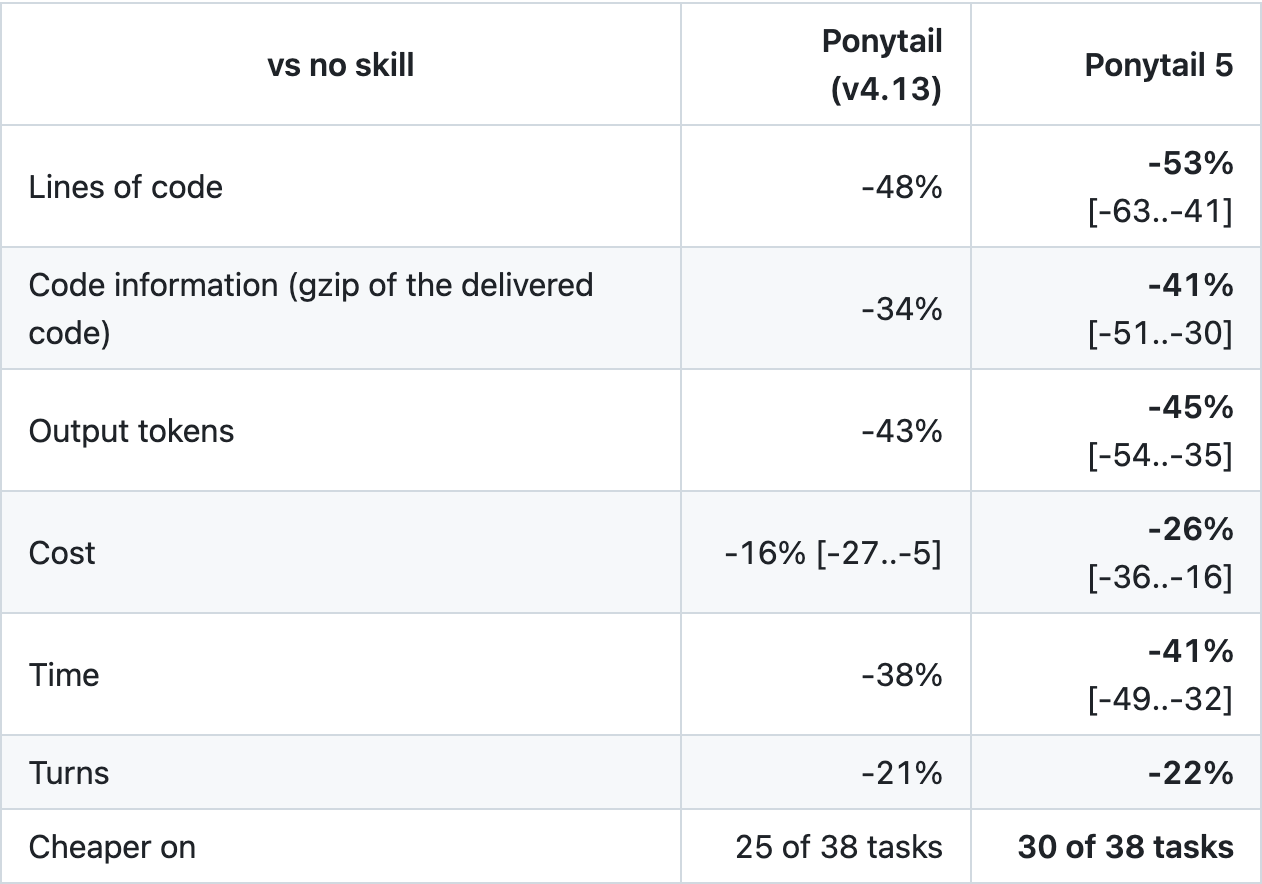
개발자 공개 벤치마크 결과 표를 캡처했습니다. 자체 실험 결과이며, 작은 화면에서는 이미지를 눌러 원본으로 볼 수 있습니다. (출처: 실행 조건과 결과, 2026-10-25 캡처)
| 지표 | 개발자가 보고한 변화 | 해석 |
|---|---|---|
| 코드 줄 수 | 약 53% 감소 | 기능 요구 충족 여부는 별도 확인 |
| 출력 토큰 | 약 45% 감소 | 전체 토큰 45% 감소라는 뜻은 아님 |
| 비용 | 약 26% 감소 | 특정 실험 조건의 상대 비교 |
| 시간 | 약 41% 감소 | 내 저장소에서도 같은 속도라는 보장은 없음 |
실험은 Opus 5.5, Claude Code CLI 2.1.288, 39개 과제와 과제별 5회 실행을 사용했습니다. 과제별 중앙값의 비율을 기하평균으로 집계했습니다. 모든 비교군에서 Bash가 꺼져 있어 일반적인 터미널 디버깅 전체와는 조건이 다릅니다. 숨겨진 검사를 수행한 과제도 일부입니다. 이 결과를 근거로 모든 업무에서 같은 비율을 아끼거나 정확성이 보장된다고 말할 수는 없습니다.
4. 실제로는 기존 기능을 먼저 찾게 한다
Ponytail의 접근을 일상적인 작업 순서로 풀면 다음과 같습니다. 먼저 관련 코드를 이해하고, 기존 코드와 표준 기능으로 요구를 충족할 수 있는지 확인한 뒤 필요한 변경을 만듭니다.
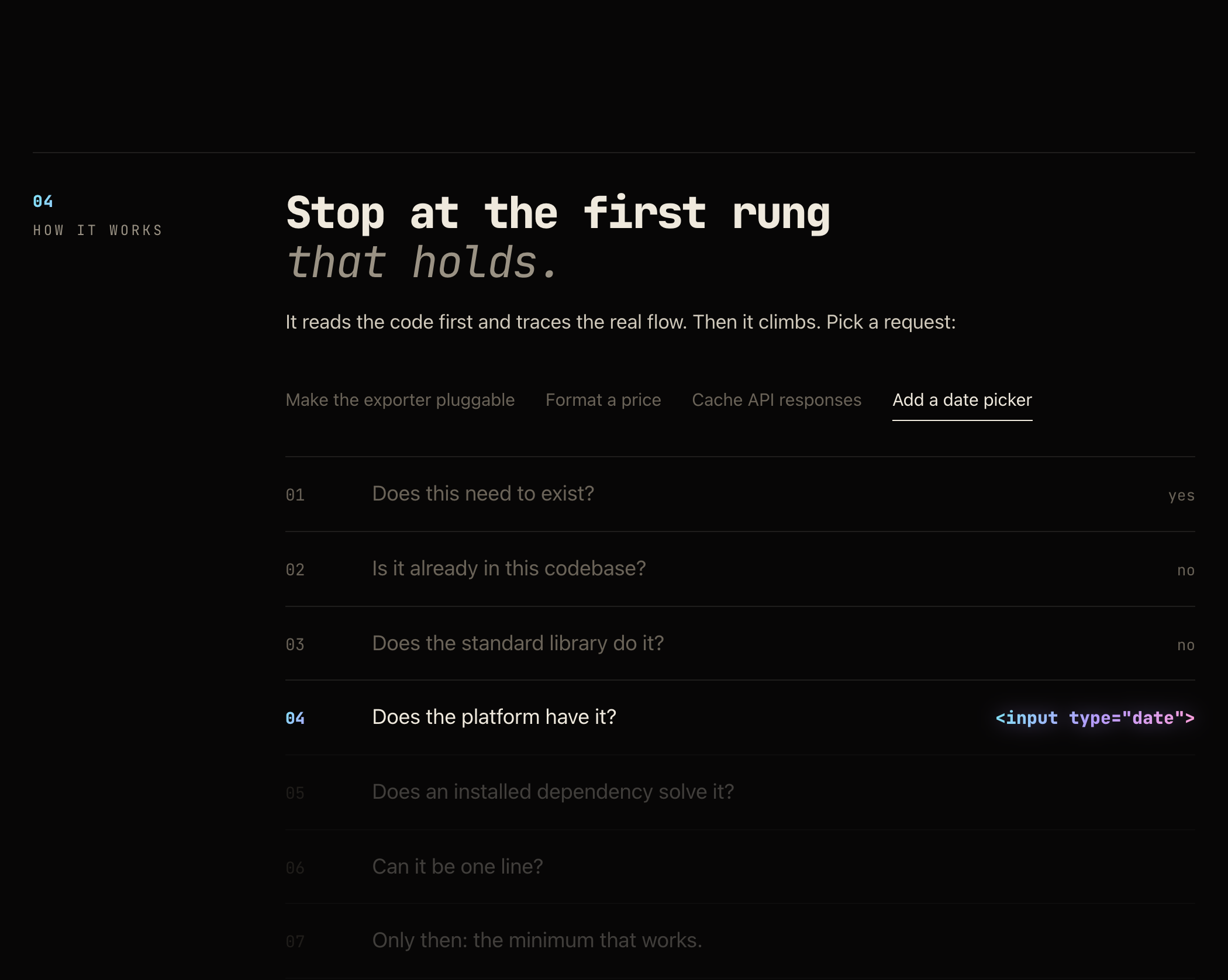
공식 공개 사이트의 재사용 판단 흐름 캡처. 선택된 예제의 화면이며 작은 화면에서는 눌러 확대할 수 있습니다. (출처: Ponytail 동작 설명, 2026-10-25 캡처)
날짜 입력이라면 기존 입력 컴포넌트와 브라우저의 날짜 선택 기능을 함께 쓸 수 있는지부터 봅니다. 하지만 기간 선택, 특정 날짜 표시, 모든 브라우저에서 동일한 UI 같은 요구가 있다면 기본 입력만으로 부족할 수 있습니다.
작게 만드는 기준은 줄 수가 아니라 요구 충족입니다. 입력 검증, 데이터 손실을 막는 오류 처리, 보안, 접근성, 명시된 기능을 빼서 짧게 만들면 실패입니다. 사용자의 요구와 저장소의 실제 제약을 먼저 전달해야 합니다.
5. Claude Code에 설치하고 적용 범위를 확인하기
터미널에서 버전과 Node 실행 가능 여부를 확인합니다. 공식 설치 안내상 훅 실행에 Node가 필요하며, 비대화형 실행 경로에서도 찾아야 합니다.
claude --version
node --version
그다음 Claude Code 대화창에서 아래 두 명령을 각각 별도의 입력으로 보냅니다. 첫 번째는 목록을 추가하고, 두 번째가 설치 화면을 엽니다.
/plugin marketplace add DietrichGebert/ponytail/plugin install ponytail@ponytail처음 비교할 때는 해당 프로젝트에서 자신만 쓰는 범위를 선택하면 영향 범위를 좁히기 좋습니다. 설치 화면에서 추가되는 Skills와 훅, 적용 범위를 확인하고 새 세션에서 시작합니다. 프로젝트의 기존 AGENTS.md나 CLAUDE.md를 Ponytail 파일로 통째로 바꿀 필요는 없습니다. 개발자의 설치 안내
새 세션에서 현재 모드와 명령을 확인합니다.
/ponytail
/ponytail-help
명령이 보이지 않으면 /plugin의 활성화 상태와 / 목록을 확인합니다. 호스트에 따라 /ponytail:ponytail처럼 이름 공간이 표시될 수 있습니다. 설치한 출처와 버전도 확인하세요.
6. 처음에는 lite 또는 full로 작은 작업을 맡기기
| 모드 | 용도 | 사용할 때의 판단 |
|---|---|---|
lite | 요청을 구현하며 더 작은 대안도 제안 | 기존 요구를 유지하며 비교하기 좋음 |
full | 기본 재사용·최소 변경 규칙 적용 | 일반적인 작은 구현부터 시험 |
ultra | 요청의 필요성 자체도 더 적극적으로 질문 | 요구를 다시 검토할 여유가 있을 때 |
off | 규칙 적용 끄기 | 효과 비교 또는 기존 방식으로 복귀 |
/ponytail lite이후 작은 작업 하나를 구체적으로 요청합니다.
설정 화면에 날짜 입력을 추가해 줘. 관련 코드와 기존 입력 컴포넌트를 먼저 확인하고 재사용 가능한 방식을 선택해 줘. 키보드 조작과 레이블, 필수 입력 검증은 유지해 줘. 새 라이브러리가 꼭 필요하면 이유를 설명하고, 요청하지 않은 달력 기능은 추가하지 마. 완료 후 확인한 동작과 미검증 항목을 알려 줘.
결과를 받아서는 날짜 값 처리, 기존 데이터와의 호환, 접근 가능한 이름, 실제 사용 브라우저의 동작을 확인합니다. 예쁘게 짧아진 diff만으로 작업을 완료 처리하지 않습니다.
7. 검토 명령과 사용량 표시를 구분하기
| 기능 | 하는 일 | 사용 팁 |
|---|---|---|
/ponytail-review | 현재 변경과 관련 코드를 검토 | 작은 변경부터 범위를 정해서 실행 |
/ponytail-audit | 저장소 전체를 조사·검토 | 읽을 양과 비용이 커질 수 있어 필요할 때 사용 |
/ponytail-debt | 의도적으로 미룬 shortcut: 항목 정리 | 나중에 고칠 조건과 우선순위 확인 |
/ponytail-gain | 공개 벤치마크의 효과 표 확인 | 내 세션에서 측정된 절감액과 혼동 금지 |
5.3의 Band는 현재 작업의 비용·토큰·시간 등을 보여 주는 UI입니다. 공식 안내상 Claude Code 2.1.290 이상 터미널·Desktop 환경에서 지원하며, VS Code 채팅 패널·클라우드 세션·claude -p에는 표시되지 않습니다. 플러그인 규칙 적용과 Band 표시 여부는 별개입니다.
/ponytail band
/ponytail off
첫 명령은 Band 표시를 전환하고, 두 번째는 규칙을 끕니다. Board는 로컬 기록을 모아 보는 페이지이며 과거 세션 가져오기는 별도 기능입니다. 공식 저장소가 안내하는 지원 환경과 기록 위치를 확인한 뒤 사용하세요. 공식 Band 설명
8. 내 작업에서도 효과가 있는지 비교하는 방법
일단 비슷한 난도의 작은 과제 몇 개를 고릅니다. 같은 코드 상태에서 시작하는 별도 작업 공간이나 브랜치를 쓰고, 각각 새 세션으로 비교합니다. 앞선 결과를 그대로 본 상태에서 두 번째 작업을 시키면 공정한 비교가 되기 어렵습니다.
- 모델·effort·권한·입력·다른 지침을 맞춥니다.
- Ponytail을 끈 조건과
lite또는full조건을 비교합니다. - 같은 완료 기준을 적용하고 테스트·실제 동작을 확인합니다.
- 출력뿐 아니라 입력·캐시·총사용량, 시간, 재수정 횟수도 기록합니다.
- 여러 과제와 반복 결과를 보고 효과가 있는 작업에만 유지합니다.
짧게 끝났어도 요구가 빠졌다면 절감 성공이 아닙니다. 검토와 재작업까지 포함해 비교하세요. 규칙이 오히려 필요한 구현을 망설이게 하면 필수 요구를 다시 명시하거나 끄고 진행하면 됩니다.
또한 Ponytail이 불필요한 생성을 줄이더라도 과도한 서브에이전트 호출이나 긴 로그 읽기까지 자동 해결하는 것은 아닙니다. Claude Code 분업 가이드와 함께 작업 범위와 검증 기준을 좁혀 쓰면, 무엇이 비용을 줄였는지 더 분명하게 파악할 수 있습니다.
Ponytail helps Claude Code use existing code and platform features first. This guide explains what it reduces, how to read its token-saving claims, and how to install, try, and evaluate it.
The project's name is Ponytail. References are its official website and developer's repository, checked on October 25, 2026. Claude Code is Anthropic's development tool; Ponytail is a third-party plugin. This is guidance checked against documentation and source, not a paid-session benchmark conducted for this article.
1. What is Ponytail?
Imagine requesting a date input and receiving a calendar component plus several configuration files. When the implementation grows beyond the need, there is more code to generate, read, review, and fix.
Ponytail is a ruleset directing the model to find the smallest change that completely satisfies the task. In Claude Code it is packaged with Skills and lifecycle hooks. It encourages existing implementations and native features, and discourages building extensions that were not requested.
It does not magically compress conversation history or change model prices. It can save tokens, time, and cost by changing the amount of work and code chosen to produce the result. Published core instructions
2. Distinguish the token metrics
| Metric | Meaning | Relationship to Ponytail |
|---|---|---|
| Input tokens | Instructions, conversation, files, and tool results read | Plugin instructions also add input |
| Output tokens | Generated responses and code | Avoiding unnecessary code can reduce these |
| Cache usage | Reusing some previous input | Input volume and billing may differ |
| Total cost and usage | Model, input, output, cache, and repeated calls | Shorter replies alone do not establish savings |
Even with less code, lengthy exploration or extra corrections can increase total usage. Lower output tokens, lower total tokens, and lower billed cost are different outcomes. Subscription limits also differ from estimated API cost. Official Claude Code cost guide
3. How to interpret the published numbers
The developer's October 7, 2026 benchmark compares the same model with and without Ponytail. These are Ponytail 5 versus a no-skill baseline, not a separate evaluation of every feature in the current 5.3 release.
Captured table from the developer's public benchmark. These are self-reported experiment results. Tap for full resolution. (Source: Conditions and results, captured 2026-10-25)
| Metric | Reported change | Interpretation |
|---|---|---|
| Code lines | About 53% fewer | Completeness still needs checking |
| Output tokens | About 45% fewer | Not a 45% reduction in all tokens |
| Cost | About 26% lower | Relative result under specific conditions |
| Time | About 41% shorter | Not a guarantee for your repository |
The experiment used Opus 5.5, Claude Code CLI 2.1.288, 39 tasks, and five runs per task. It aggregates ratios of per-task medians using a geometric mean. Bash was disabled for every arm, unlike a full terminal debugging workflow. Only some tasks had hidden correctness checks. The results do not guarantee the same savings or correctness in every job.
4. It looks for existing capabilities first
In practical terms, first understand the relevant code, check existing implementations and standard capabilities, then make the necessary change.
Public official-site capture of the reuse decision flow for the selected example. Tap to enlarge. (Source: How Ponytail works, captured 2026-10-25)
For a date input, check whether an existing input component and the browser's date picker are enough. A date range, marked dates, or an identical interface across browsers may require more.
The standard for small is requirement completeness, not line count. Removing validation, data-loss prevention, security, accessibility, or requested behavior is a failure. Supply the real requirements and repository constraints first.
5. Install it in Claude Code and check scope
Check the CLI and Node in your terminal. The installation guide requires Node for hooks, including on the non-interactive shell's PATH.
claude --version
node --version
Inside Claude Code, submit these two commands as separate messages. The first adds a marketplace; the second opens installation.
/plugin marketplace add DietrichGebert/ponytail
/plugin install ponytail@ponytail
For an initial comparison, a scope restricted to your use in the current project keeps the impact limited. Review the Skills, hooks, and scope, then start a new session. You do not need to replace the project's existing AGENTS.md or CLAUDE.md wholesale. Developer's installation guide
Check the mode and commands in the new session.
/ponytail
/ponytail-help
If commands are missing, check activation in /plugin and the / menu. A host may show a namespace such as /ponytail:ponytail. Check the installed source and version too.
6. Try a small task with lite or full
| Mode | Behavior | When to use it |
|---|---|---|
lite |
Implements the request and suggests a smaller option | Compare while preserving the original request |
full |
Default reuse and minimal-change rules | Start with ordinary small implementations |
ultra |
More actively questions the need itself | When requirements can be reconsidered |
off |
Disables the rules | Comparison or returning to normal behavior |
/ponytail lite
Then make a specific small request.
Add a date input to Settings. Read the relevant code and existing input component first, then choose a reusable approach. Preserve keyboard operation, labeling, and required-field validation. Explain any genuinely necessary new library, and do not add unrequested calendar features. Report checked behavior and unverified items.
Check date handling, compatibility with existing data, accessible naming, and behavior in your actual browsers. A neatly shortened diff is not enough to mark the work complete.
7. Separate review commands from usage displays
| Feature | Purpose | Tip |
|---|---|---|
/ponytail-review |
Reviews changes and related code | Start with a bounded small change |
/ponytail-audit |
Investigates the whole repository | Larger reads can add cost; use when needed |
/ponytail-debt |
Collects deferred shortcut: items |
Check revisit conditions and priority |
/ponytail-gain |
Shows the published benchmark scoreboard | Not savings measured for your current session |
Band in 5.3 displays task cost, tokens, and agent time. The official guide requires Claude Code 2.1.290 or later in terminal or Desktop; it is absent from VS Code chat, cloud sessions, and claude -p. Rule activation and Band visibility are separate.
/ponytail band
/ponytail off
The first command toggles Band; the second disables the rules. Board presents local records, and importing previous sessions is a separate feature. Check supported environments and storage locations in the repository before using it. Official Band explanation
8. Measure whether it helps your work
Choose a few small tasks of comparable difficulty. Start from the same code in separate workspaces or branches and use new sessions. Letting the second attempt see the first answer makes comparison less meaningful.
- Match model, effort, permissions, input, and other instructions.
- Compare disabled rules with
liteorfull. - Apply identical completion criteria and verify tests and actual behavior.
- Record input, output, cache, total usage, time, and corrections.
- Keep it for tasks that benefit across several examples and repetitions.
A quick answer that omits requirements is not a successful saving. Include review and rework. If the rules discourage necessary implementation, restate mandatory requirements or turn them off.
Reducing unnecessary generation does not automatically fix excessive subagent calls or long log reads. Use the Claude Code delegation guide to keep scope and verification criteria clear, so you can identify what actually reduced cost.
Ponytail 帮助 Claude Code 优先使用现有代码与平台功能。本文说明它究竟减少什么、如何理解 token 节省数据,以及从安装到实际任务对比和验证的方法。
项目准确名称是 Ponytail。本文于 2026 年 10 月 25 日核对了官方网站与开发者仓库。Claude Code 是 Anthropic 的开发工具,Ponytail 则是第三方插件。以下为文档与源码核对后的实践指南,并非本文重复运行付费会话得出的测量报告。
1. Ponytail 是什么
设想只是要求增加日期输入,却得到日历组件和多个配置文件。实现超出需求时,生成、阅读、审查和修复的代码都会增加。
Ponytail 是引导模型寻找完整满足任务的最小改动的规则集。在 Claude Code 中,它打包了 Skills 与生命周期 hooks,鼓励复用现有实现或原生功能,避免提前建立未要求的扩展结构。
它不会神奇压缩对话历史,也不修改模型价格,而是通过影响所选工作与代码量,创造减少 token、时间和成本的机会。公开核心指令
2. 先区分 token 指标
| 项目 | 含义 | 与 Ponytail 的关系 |
|---|---|---|
| 输入 token | 读取的指令、对话、文件、工具结果 | 插件指令自身也增加输入 |
| 输出 token | 生成的回答与代码等 | 减少冗余代码可能降低该项 |
| 缓存使用 | 复用部分先前输入 | 读取量与实际计费可能不同 |
| 总成本与使用量 | 模型、输入、输出、缓存及调用次数的结果 | 不能只凭短回答判断节省 |
代码少了,但调查更久或返工更多,总使用量仍可能增加。输出 token 减少、总 token 减少、账单降低是不同结果。订阅额度也不等同于 API 成本估计。Claude Code 官方成本指南
3. 如何理解公开节省数据
开发者的 2026-10-07 基准比较同一模型启用和不启用 Ponytail 的情况。以下是 Ponytail 5 对比无 Skill 基线,不代表单独测试了当前 5.3 的全部功能。
开发者公开实验结果表截图,属于作者自测。小屏可点击查看原图。(来源:实验条件与结果,截图日期 2026-10-25)
| 指标 | 开发者报告的变化 | 应如何解读 |
|---|---|---|
| 代码行数 | 约减少 53% | 仍需检查需求是否完整 |
| 输出 token | 约减少 45% | 不是全部 token 减少 45% |
| 成本 | 约降低 26% | 特定条件下的相对比较 |
| 时间 | 约缩短 41% | 不保证适用于你的仓库 |
实验使用 Opus 5.5、Claude Code CLI 2.1.288、39 项任务,每项运行五次,以每任务中位数比值的几何平均汇总。所有组均禁用 Bash,与完整终端调试不同;只有部分任务有隐藏正确性检查。不能据此保证所有工作都同样节省或一定正确。
4. 先寻找已有能力
实际顺序是先理解相关代码,检查现有实现和标准能力,再做必要修改。
官方公开站点中当前所选示例的复用判断流程截图,可点击放大。(来源:Ponytail 工作方式,截图日期 2026-10-25)
日期输入可先考虑已有输入组件与浏览器原生选择器。若需要日期范围、特殊日期标记或跨浏览器完全一致的界面,基本输入可能不足。
“小”的标准是满足需求,而非行数。删掉验证、防止数据丢失的错误处理、安全、无障碍或明确功能,都算失败。先传达实际需求和仓库限制。
5. 安装并确认作用范围
在终端确认 CLI 与 Node。官方安装说明要求 hooks 能在非交互 shell 的 PATH 中找到 Node。
claude --version
node --version
在 Claude Code 对话中,把以下两条命令分别作为独立消息提交。第一条添加市场,第二条打开安装界面。
/plugin marketplace add DietrichGebert/ponytail
/plugin install ponytail@ponytail
首次比较可选择仅当前项目、仅自己使用的范围,减少影响。检查 Skills、hooks 与安装范围,再开新会话。不必用 Ponytail 文件整体替换项目原有 AGENTS.md 或 CLAUDE.md。开发者安装指南
新会话确认模式和命令。
/ponytail
/ponytail-help
找不到命令时,检查 /plugin 的启用状态和 / 菜单。宿主可能显示 /ponytail:ponytail 等命名空间形式,同时确认安装来源和版本。
6. 用 lite 或 full 试一个小任务
| 模式 | 行为 | 适用判断 |
|---|---|---|
lite |
实现请求并提出更小替代方案 | 保留原需求进行比较 |
full |
默认复用与最小改动规则 | 从普通小型实现开始 |
ultra |
更积极质疑需求本身 | 可以重新考虑需求时 |
off |
关闭规则 | 对比或恢复原方式 |
/ponytail lite
然后提出明确的小任务。
在设置页面增加日期输入。先阅读相关代码和已有输入组件,选择可复用方案。保留键盘操作、标签和必填验证。确实需要新库时说明原因,不添加未要求的日历功能。完成后报告已验证行为和未验证事项。
检查日期值处理、与现有数据的兼容、无障碍名称及实际浏览器行为,不能只因 diff 简短就宣告完成。
7. 区分审查命令与使用量显示
| 功能 | 用途 | 建议 |
|---|---|---|
/ponytail-review |
审查变更及相关代码 | 从范围明确的小变更开始 |
/ponytail-audit |
调查整个仓库 | 读取量与成本可能增加,按需使用 |
/ponytail-debt |
汇总延期的 shortcut: 项 |
检查回访条件和优先级 |
/ponytail-gain |
展示公开基准效果表 | 不是当前会话测出的节省额 |
5.3 的 Band 显示任务成本、token、代理时间等。官方要求 Claude Code 2.1.290 及以上的终端或 Desktop 环境;VS Code 聊天、云会话和 claude -p 不显示。规则是否启用与 Band 是否显示是两回事。
/ponytail band
/ponytail off
第一条切换 Band 显示,第二条关闭规则。Board 汇总本地记录,导入历史会话是单独功能。使用前确认官方仓库中的支持环境和存储位置。官方 Band 说明
8. 如何测量对自己的任务是否有效
选择几个难度相近的小任务,从同一代码状态的独立工作区或分支开始,每次使用新会话。让第二次执行看到第一次答案,会影响公平比较。
- 保持模型、effort、权限、输入和其他指令一致。
- 比较关闭规则与
lite或full。 - 使用相同完成标准,检查测试与真实行为。
- 记录输入、输出、缓存、总使用量、时间和返工次数。
- 根据多个任务和重复结果,只在有效的工作中保留。
快速结束但遗漏需求,不算成功节省。把审阅与返工也计入。如果规则妨碍必要实现,重申必需要求或关闭它。
Ponytail 不会自动解决过多子代理调用或长日志读取。结合 Claude Code 分工指南限定范围与验证标准,才能更清楚判断成本究竟因何降低。
Ponytail は Claude Code に既存コードとプラットフォーム機能の活用を促すプラグインです。何を減らすのか、削減数値の読み方、導入から実務での比較と検証まで解説します。
正式名称は Ponytail です。2026年10月25日に公式サイトと開発者のリポジトリを確認しました。Claude Code は Anthropic の開発ツール、Ponytail は別の開発者によるプラグインです。文書とソースに基づく案内であり、有料セッションを繰り返し実行して測定した記事ではありません。
1. Ponytail はどんなツールか
日付入力を頼んだだけで、カレンダー部品や複数の設定ファイルが作られる場面を考えてください。必要以上に実装が大きくなると、生成、読解、レビュー、修正するコードも増えます。
Ponytail は依頼を完全に満たす最小の変更を探すようモデルに指示するルール集です。Claude Code では Skills とライフサイクルフックを含むプラグインとして提供されます。既存実装や標準機能を再利用し、未要求の拡張構造を先に作らない判断を促します。
会話履歴を魔法のように圧縮したり、モデルの価格を変えたりはしません。選ぶ作業とコードの量を抑えることで、トークン、時間、費用を節約できる可能性を作ります。公開された中核指示
2. トークンの指標を区別する
| 指標 | 意味 | Ponytail との関係 |
|---|---|---|
| 入力トークン | 指示、会話、ファイル、ツール結果 | プラグイン自身の指示も入力に加わる |
| 出力トークン | 生成する返答やコード | 不要なコードの減少が影響し得る |
| キャッシュ | 過去入力の一部を再利用 | 読む量と実際の課金は異なり得る |
| 総費用・使用量 | モデル、入出力、キャッシュ、呼び出しの結果 | 短い返答だけでは節約を判断できない |
コードが減っても、長い調査や修正依頼が増えれば総使用量は増え得ます。出力トークン削減、総トークン削減、請求額削減は異なる結果です。サブスクリプションの上限も API 費用推定とは別です。Claude Code 公式コスト案内
3. 公開数値をどう読むか
開発者の 2026-10-07 ベンチマークは同じモデルで有無を比較しています。以下は Ponytail 5 と Skill なしの比較であり、現在の 5.3 の全機能を個別測定した値ではありません。
開発者が公開した自己測定の結果表です。小さい画面では押すと原寸で表示できます。(出典:条件と結果、2026-10-25 撮影)
| 指標 | 開発者の報告 | 解釈 |
|---|---|---|
| コード行数 | 約53%減 | 要件充足は別途確認 |
| 出力トークン | 約45%減 | 全トークン45%減ではない |
| 費用 | 約26%減 | 特定条件下の相対比較 |
| 時間 | 約41%減 | 自分のリポジトリでの保証ではない |
Opus 5.5、Claude Code CLI 2.1.288、39課題、各5回を使用し、課題ごとの中央値の比率を幾何平均で集計しています。全群で Bash が無効なため、端末でのデバッグ全体とは異なります。隠れた正解検査がある課題も一部です。すべての業務で同じ削減や正しさを保証する結果ではありません。
4. 既存機能を先に探す
実務では、関連コードを理解し、既存実装と標準機能で要件を満たせるか確かめ、必要な変更を作る順番です。
公式公開サイトで選択中の例に関する再利用判断フローです。押すと拡大できます。(出典:Ponytail の仕組み、2026-10-25 撮影)
日付入力なら、既存の入力部品とブラウザー標準の選択機能を組み合わせられるか確認します。ただし期間選択、特定日の表示、全ブラウザーで同一の UI などが必要なら基本入力では足りません。
小ささの基準は行数ではなく要件充足です。検証、データ損失を防ぐエラー処理、セキュリティ、アクセシビリティ、明示された機能を削れば失敗です。実際の要求と制約を先に渡しましょう。
5. 導入して適用範囲を確認する
端末で CLI と Node を確認します。フックには Node が必要で、非対話シェルの PATH でも見つかる必要があります。
claude --version
node --version
Claude Code 内で二つのコマンドを別々のメッセージとして送ります。最初はマーケットプレイス追加、次は導入画面です。
/plugin marketplace add DietrichGebert/ponytail
/plugin install ponytail@ponytail
最初の比較は現在のプロジェクトで自分だけに適用する範囲にすると影響を絞れます。Skills、フック、適用範囲を確認し、新しいセッションで始めます。既存の AGENTS.md や CLAUDE.md 全体を置き換える必要はありません。開発者の導入ガイド
新しいセッションでモードとコマンドを確認します。
/ponytail
/ponytail-help
表示されなければ /plugin の有効化状態と / 一覧を確認します。/ponytail:ponytail のような名前空間が付く場合もあります。導入元と版も確認しましょう。
6. lite または full で小さな仕事を試す
| モード | 動作 | 判断 |
|---|---|---|
lite |
要求を実装し、小さな代案も提示 | 元の要件を維持して比較 |
full |
標準の再利用・最小変更ルール | 通常の小規模実装から試す |
ultra |
必要性そのものを積極的に問う | 要求を再検討できる場合 |
off |
ルールを無効化 | 比較や通常動作への復帰 |
/ponytail lite
次に具体的な小さな依頼を出します。
設定画面に日付入力を追加してください。関連コードと既存部品を先に読み、再利用できる方法を選んでください。キーボード操作、ラベル、必須入力検証を維持してください。新ライブラリが必要なら理由を示し、未要求のカレンダー機能は追加しないでください。確認済み動作と未確認項目を報告してください。
日付値、既存データとの互換、アクセシブルな名前、実際のブラウザーで確認します。短い diff だけで完了にしません。
7. レビュー命令と使用量表示を分ける
| 機能 | 用途 | ヒント |
|---|---|---|
/ponytail-review |
変更と関連コードの確認 | 小さい範囲から使う |
/ponytail-audit |
リポジトリ全体の調査 | 読む量と費用が増え得るので必要時に |
/ponytail-debt |
延期した shortcut: を集約 |
再検討条件と優先度を確認 |
/ponytail-gain |
公開ベンチマークの効果表 | 今のセッションの実測節約額ではない |
5.3 の Band は費用、トークン、時間などの UI です。公式には Claude Code 2.1.290 以上の端末・Desktop で対応し、VS Code チャット、クラウド、claude -p には出ません。ルール適用と Band 表示は別です。
/ponytail band
/ponytail off
最初は表示切替、二番目はルール無効化です。Board はローカル記録を集め、過去セッションの取り込みは別機能です。対応環境と保存先を確認して使ってください。公式 Band 説明
8. 自分の仕事で効果を測る
同程度の小課題を選び、同じコード状態から別作業空間やブランチで始め、各々新しいセッションを使います。先の回答を見た後の二回目では公平な比較になりにくいためです。
- モデル、effort、権限、入力、他の指示をそろえます。
- 無効状態と
liteまたはfullを比較します。 - 同じ完了条件でテストと動作を確認します。
- 入出力、キャッシュ、総使用量、時間、再修正を記録します。
- 複数課題と反復結果で効果のある仕事に残します。
短時間でも要求が欠ければ節約成功ではありません。レビューと手戻りも含めます。必要な実装をためらわせるなら、必須要求を再提示するか無効化します。
過剰なサブエージェント呼び出しや長いログまで自動で解決するわけではありません。Claude Code 分担ガイドと合わせて範囲と検証基準を明確にすれば、何が費用を下げたかを把握しやすくなります。
Ponytail ayuda a Claude Code a utilizar primero código existente y funciones de la plataforma. Esta guía explica qué reduce, cómo interpretar sus cifras y cómo instalarlo, probarlo y evaluarlo.
El nombre del proyecto es Ponytail. Se consultaron su web oficial y el repositorio del desarrollador el 25 de octubre de 2026. Claude Code es una herramienta de Anthropic; Ponytail es un plugin de terceros. Es una guía contrastada con documentación y código, no una medición propia mediante sesiones de pago.
1. Qué es Ponytail
Imagina pedir un campo de fecha y recibir un calendario completo con varios archivos de configuración. Si la implementación supera la necesidad, aumenta el código que generar, leer, revisar y corregir.
Ponytail es un conjunto de reglas que orienta al modelo hacia el cambio más pequeño que cumple toda la tarea. En Claude Code incluye Skills y hooks del ciclo de vida. Favorece implementaciones existentes y capacidades nativas, evitando construir extensiones que nadie pidió.
No comprime mágicamente el historial ni cambia las tarifas del modelo. Puede ahorrar tokens, tiempo y coste al influir en el trabajo y código elegidos para producir el resultado. Instrucciones centrales publicadas
2. Distingue las métricas de tokens
| Métrica | Significado | Relación con Ponytail |
|---|---|---|
| Entrada | Instrucciones, conversación, archivos y resultados leídos | El plugin también añade instrucciones |
| Salida | Respuestas y código generados | Evitar código innecesario puede reducirla |
| Caché | Reutilizar parte de entradas anteriores | Volumen leído y facturación pueden diferir |
| Coste y uso total | Modelo, entrada, salida, caché y llamadas | Una respuesta corta no demuestra ahorro |
Menos código no impide que una investigación larga o más correcciones aumenten el consumo. Menos tokens de salida, menos tokens totales y menor factura son resultados distintos. Los límites de suscripción tampoco equivalen al coste API estimado. Guía oficial de costes
3. Cómo interpretar las cifras publicadas
El benchmark del desarrollador, del 2026-10-07, compara el mismo modelo con y sin Ponytail. Son cifras de Ponytail 5 frente a una base sin Skill, no una evaluación independiente de todas las funciones actuales de 5.3.
Tabla capturada del experimento publicado por el desarrollador. Son resultados propios del autor; pulsa para ampliar. (Fuente: Condiciones y resultados, captura del 2026-10-25)
| Métrica | Cambio informado | Interpretación |
|---|---|---|
| Líneas de código | Un 53% menos aproximadamente | Hay que comprobar los requisitos |
| Tokens de salida | Un 45% menos | No equivale al 45% de todos los tokens |
| Coste | Un 26% menos | Comparación relativa en ciertas condiciones |
| Tiempo | Un 41% menos | No garantiza ese resultado en tu repositorio |
Se utilizó Opus 5.5, Claude Code CLI 2.1.288, 39 tareas y cinco ejecuciones por tarea, agregando la media geométrica de los cocientes de medianas. Bash estaba desactivado para todos los grupos, a diferencia de un proceso completo de depuración. Solo algunas tareas tenían comprobaciones ocultas de corrección. No garantiza los mismos ahorros ni exactitud en todos los trabajos.
4. Buscar capacidades existentes antes de construir
En la práctica: entiende el código relevante, comprueba implementaciones y capacidades estándar y después realiza el cambio necesario.
Flujo de reutilización de la web oficial para el ejemplo seleccionado. Pulsa para ampliar. (Fuente: Cómo funciona Ponytail, captura del 2026-10-25)
Para una fecha, un componente de entrada existente y el selector del navegador pueden bastar. Rangos, fechas señaladas o una interfaz idéntica entre navegadores pueden exigir más.
Pequeño significa cumplir requisitos, no minimizar líneas. Quitar validación, errores que evitan pérdida de datos, seguridad, accesibilidad o funciones solicitadas es un fallo. Facilita primero requisitos y límites reales del repositorio.
5. Instalación y alcance en Claude Code
Comprueba CLI y Node. Según la guía, los hooks necesitan encontrar Node también en el PATH del shell no interactivo.
claude --version
node --version
Envía estos comandos dentro de Claude Code en dos mensajes separados. El primero añade el marketplace y el segundo abre la instalación.
/plugin marketplace add DietrichGebert/ponytail
/plugin install ponytail@ponytail
Para comparar por primera vez, un alcance limitado a tu uso en el proyecto actual reduce el impacto. Revisa Skills, hooks y alcance y abre una sesión nueva. No necesitas sustituir íntegramente AGENTS.md ni CLAUDE.md. Guía del desarrollador
Consulta modo y comandos en la nueva sesión.
/ponytail
/ponytail-help
Si faltan comandos, revisa /plugin y el menú /. El host puede mostrar /ponytail:ponytail. Comprueba también origen y versión.
6. Prueba una tarea pequeña con lite o full
| Modo | Comportamiento | Cuándo elegirlo |
|---|---|---|
lite |
Implementa lo pedido y propone una alternativa menor | Comparar conservando los requisitos |
full |
Reutilización y cambios mínimos predeterminados | Implementaciones pequeñas habituales |
ultra |
Cuestiona más activamente la necesidad | Cuando se pueden reconsiderar requisitos |
off |
Desactiva las reglas | Comparar o volver al comportamiento normal |
/ponytail lite
Después solicita una tarea concreta.
Añade una entrada de fecha a Ajustes. Lee primero el código relevante y el componente existente y elige una opción reutilizable. Conserva teclado, etiquetas y validación obligatoria. Justifica cualquier biblioteca nueva imprescindible y no añadas funciones de calendario no solicitadas. Indica qué comportamiento comprobaste y qué falta verificar.
Comprueba fechas, compatibilidad con datos existentes, nombre accesible y navegadores reales. Un diff corto no basta para declarar terminado el trabajo.
7. Separa revisión y visualización de uso
| Función | Propósito | Consejo |
|---|---|---|
/ponytail-review |
Revisa cambios y código relacionado | Empieza con un alcance pequeño |
/ponytail-audit |
Investiga todo el repositorio | Puede aumentar lecturas y coste |
/ponytail-debt |
Recoge pendientes shortcut: |
Revisa condiciones y prioridades |
/ponytail-gain |
Muestra el benchmark publicado | No es el ahorro de tu sesión actual |
Band, en 5.3, muestra coste, tokens y tiempo. La guía requiere Claude Code 2.1.290 o posterior en terminal o Desktop; no aparece en el chat de VS Code, la nube ni claude -p. Las reglas y la visibilidad de Band son independientes.
/ponytail band
/ponytail off
El primer comando alterna Band; el segundo desactiva las reglas. Board reúne registros locales, e importar sesiones anteriores es otra función. Comprueba entornos y almacenamiento en el repositorio. Explicación oficial de Band
8. Mide si ayuda en tus tareas
Elige varias tareas pequeñas comparables y parte del mismo código en espacios o ramas separados, utilizando sesiones nuevas. Mostrar al segundo intento el primer resultado dificulta una comparación justa.
- Iguala modelo, effort, permisos, entrada y otras instrucciones.
- Compara reglas desactivadas con
liteofull. - Aplica los mismos criterios y verifica pruebas y comportamiento.
- Registra entrada, salida, caché, uso total, tiempo y correcciones.
- Conserva el plugin donde funcione en varias tareas y repeticiones.
Una respuesta rápida con requisitos omitidos no es ahorro exitoso. Incluye revisión y retrabajo. Si las reglas frenan implementación necesaria, aclara lo obligatorio o desactívalas.
Ponytail tampoco resuelve automáticamente llamadas excesivas a subagentes o lecturas de registros largos. La guía de delegación de Claude Code ayuda a acotar trabajo y verificación para identificar qué redujo realmente el coste.