Effect란? 타입스크립트에서 비동기 작업과 오류를 다루는 방법

API 요청은 성공할 수도 있고, 네트워크 오류나 예상과 다른 응답 때문에 실패할 수도 있습니다. 일반적인 Promise<Product>는 성공 결과의 타입을 알려주지만, 어떤 예외가 발생할 수 있는지는 타입에 나타내지 않습니다. 작업이 많아질수록 오류 처리와 의존성 관리가 여러 곳에 흩어지기 쉽습니다.
Effect 공식 웹사이트에서 소개하는 Effect는 이런 작업을 조합할 수 있도록 설계된 TypeScript 라이브러리입니다.[1] 이 글에서는 Effect의 기본 개념을 알아보고, API에서 상품을 가져와 가격을 계산하는 예제를 직접 실행합니다.
Effect는 무엇을 표현하나요?
Effect의 핵심 타입은 Effect<Success, Error, Requirements>입니다. 성공하면 무엇을 반환하는지, 예상 가능한 오류가 무엇인지, 실행에 어떤 서비스가 필요한지를 표현합니다.[3]
Success: 성공 시 값의 타입입니다.Error: 명시적으로 모델링한 예상 오류의 타입입니다. 모든 런타임 예외가 자동으로 여기에 들어가는 것은 아닙니다.Requirements: 실행 전에 제공해야 하는 서비스 의존성입니다.never는 해당 타입 채널에 값이나 요구사항이 없다는 뜻입니다.
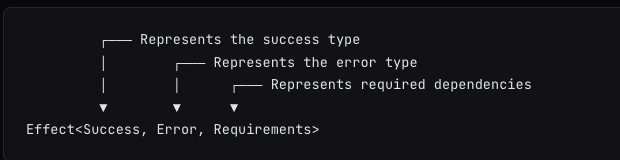
Effect 공식 문서의 타입 설명. 세 매개변수의 순서를 확인할 수 있습니다. (출처: Effect, 2026-11-20 캡처)
Effect 값은 작업의 설명이며 생성하는 순간 자동 실행되지 않습니다. Effect.runPromise 같은 실행 함수를 호출할 때 작업이 수행됩니다.[3] 이 성질 덕분에 작업을 먼저 조합한 뒤 애플리케이션 경계에서 실행할 수 있습니다.
설치와 실행 준비
다음 예제는 Effect 4.1.4, TypeScript의 strict 검사, Node.js 26에서 실행했습니다. Effect v4 공식 문서는 TypeScript 5.9 이상을 요구합니다.[2] 다른 주요 버전의 문서나 예제는 API가 다를 수 있으므로 버전을 확인하세요.
mkdir effect-example && cd effect-example
npm init -y
npm pkg set type=module
npm install effect@4.1.4
npm install --save-dev typescript tsx
다음 코드를 main.ts에 저장합니다. 예제의 상품 데이터는 테스트용 공개 API인 DummyJSON에서 가져옵니다.[7] 네트워크 연결이 필요하며 실제 가격과 상품 데이터는 바뀔 수 있습니다.
import { Data, Effect } from "effect"

class InvalidPrice extends Data.TaggedError("InvalidPrice")<{ readonly price: number }> {}
class ApiError extends Data.TaggedError("ApiError")<{ readonly message: string }> {}

type Product = { id: number; title: string; price: number }

const parseProduct = (input: unknown): Effect.Effect<Product, ApiError> => {
  if (typeof input !== "object" || input === null) return Effect.fail(new ApiError({ message: "Invalid response" }))
  const item = input as Record<string, unknown>
  if (typeof item.id !== "number" || typeof item.title !== "string" || typeof item.price !== "number") {
    return Effect.fail(new ApiError({ message: "Invalid response" }))
  }
  return Effect.succeed({ id: item.id, title: item.title, price: item.price })
}

const loadProduct = (id: number) => Effect.tryPromise({
  try: async () => {
    const response = await fetch(`https://dummyjson.com/products/${id}`)
    if (!response.ok) throw new Error(`HTTP ${response.status}`)
    return response.json() as Promise<unknown>
  },
  catch: (error) => new ApiError({ message: String(error) })
}).pipe(Effect.flatMap(parseProduct))

const applyDiscount = (price: number): Effect.Effect<number, InvalidPrice> =>
  price < 0 ? Effect.fail(new InvalidPrice({ price })) : Effect.succeed(price * 0.9)

const productSummary = (id: number) => Effect.gen(function* () {
  const product = yield* loadProduct(id)
  const discounted = yield* applyDiscount(product.price)
  return `${product.title}: $${discounted.toFixed(2)}`
})

const program = productSummary(1).pipe(
  Effect.catch((error) => Effect.succeed(`Unable to calculate price: ${error._tag}`))
)

console.log(await Effect.runPromise(program))
console.log(await Effect.runPromise(applyDiscount(-1).pipe(Effect.catch((error) => Effect.succeed(error._tag)))))
console.log(await Effect.runPromise(parseProduct({ id: 1 }).pipe(Effect.catch((error) => Effect.succeed(error._tag)))))
타입을 검사한 뒤 실행합니다.
npx tsc --strict --noEmit --skipLibCheck --target ES2022 --module NodeNext --moduleResolution NodeNext main.ts
npx tsx main.ts
검증 시 출력은 다음과 같았습니다. 첫 줄은 API 데이터나 네트워크 상태에 따라 달라집니다.
Essence Mascara Lash Princess: $8.99
InvalidPrice
ApiError
코드의 흐름 살펴보기
Effect.tryPromise는 실패할 수 있는 비동기 요청을 감싸고, 네트워크·HTTP·JSON 처리 오류를ApiError로 변환합니다.[6]fetch는 404 같은 HTTP 상태만으로는 일반적으로 reject하지 않으므로response.ok를 별도로 검사합니다.parseProduct는 외부 응답을unknown으로 받아 필요한 필드의 타입을 확인합니다. TypeScript 타입 선언만으로 서버 응답이 검증되지는 않습니다. 이 예제의 검사는 간단한 데모이며, 범위·정밀도 등 더 엄격한 비즈니스 검증은 별도로 필요합니다.applyDiscount는 음수 가격을InvalidPrice로 표현합니다. 금액 계산은 이해를 돕기 위한 예시입니다. 실제 결제에서는 통화의 최소 단위나 적절한 십진 계산 및 반올림 정책이 필요합니다.Effect.gen안에서yield*로 각 작업을 순서대로 연결합니다. 앞 작업이 예상 오류로 실패하면 뒤 작업은 실행되지 않습니다.[4]productSummary의 오류 타입에는ApiError | InvalidPrice가 추론됩니다.Effect.catch는 이 예제의 예상 오류를 복구하고Effect.runPromise가 실행합니다. 예상 오류 외의 결함이나 중단까지 모두 안전하게 처리한다는 뜻은 아닙니다.[5] 마지막 두 줄은 각각 음수 가격과 잘못된 응답을 직접 확인합니다.
어디에 활용할 수 있나요?
- API 연동: 네트워크 실패, 응답 검증 실패, 도메인 오류를 구분해 상위 작업으로 전달할 수 있습니다.
- 여러 단계의 비즈니스 로직: 검증, 외부 호출, 결과 변환을 한 흐름으로 조합하고 각 단계의 실패를 추적할 수 있습니다.
- 의존성 관리와 테스트: 외부 서비스 같은 요구사항을 타입으로 표현하고 실행 시 구현을 제공할 수 있습니다. 테스트에서는 같은 인터페이스의 대체 구현을 사용할 수 있습니다.[8]
- 비동기 작업 운영: 재시도, 동시성 제어, 리소스 정리, 로깅 같은 기능을 하나의 생태계에서 살펴볼 수 있습니다.[1] 재시도는 중복 실행해도 안전한 작업인지 먼저 확인해야 합니다.
기존 프로젝트를 한 번에 다시 작성할 필요는 없습니다. 외부 API 호출 한 곳을 Effect.tryPromise로 감싸고, 경계에서 Effect.runPromise로 기존 Promise 기반 코드와 연결하는 작은 실험부터 시작할 수 있습니다.[1]
도입 전에 고려할 점
Effect가 모든 프로젝트에 필요한 것은 아닙니다. 단순한 스크립트라면 async/await와 명시적인 try/catch가 더 읽기 쉽고 의존성도 적을 수 있습니다. 반면 오류 종류와 비동기 흐름이 많고 여러 서비스의 의존성이 얽혀 있다면 일관된 모델을 검토할 가치가 있습니다.
Effect.gen, yield*, 오류 채널, 서비스와 런타임을 팀이 함께 배워야 하고, 기존 코드와의 경계도 설계해야 합니다. 타입이 오류를 표현하더라도 외부 데이터 검증이나 운영 중 관찰이 불필요해지는 것은 아닙니다. 우선 작은 기능에서 팀의 이해도와 유지보수 비용을 확인한 뒤 범위를 넓히는 편이 좋습니다.
Sources
[2] https://effect.website/docs/v4/getting-started/installation
[3] https://effect.website/docs/v4/getting-started/the-effect-type
[4] https://effect.website/docs/v4/getting-started/using-generators
[5] https://effect.website/docs/v4/error-management/expected-errors
[6] https://effect.website/docs/v4/getting-started/creating-effects
[7] https://dummyjson.com/docs/products
[8] https://effect.website/docs/v4/requirements-management/services
An API call can succeed, or it can fail because of a network problem or an unexpected response. Promise<Product> tells us the type of the successful result, but not which exceptions may occur. As an application grows, error handling and dependencies can become scattered.
Effect is a TypeScript library designed to compose these kinds of operations.[1] This guide introduces the core ideas and runs an example that fetches a product and calculates a price.
What does Effect represent?
The central type is Effect<Success, Error, Requirements>. It describes the successful value, expected errors, and services needed to run the operation.[3]
Successis the value produced on success.Erroris the explicitly modeled expected error. It does not automatically contain every runtime exception.Requirementslists services that must be supplied before execution.nevermeans the corresponding channel has no values or requirements.
The official Effect type reference shows the order of the three parameters. (Source: Effect, captured 2026-11-20)
An Effect value describes work without executing it immediately. Calling a runner such as Effect.runPromise executes it.[3] This allows operations to be composed before they are run at the application boundary.
Installation and setup
The example was checked with Effect 4.1.4, TypeScript strict checking, and Node.js 26. The Effect v4 documentation requires TypeScript 5.9 or later.[2] APIs may differ across major versions, so check which version a tutorial targets.
mkdir effect-example && cd effect-example
npm init -y
npm pkg set type=module
npm install effect@4.1.4
npm install --save-dev typescript tsx
Save the following as main.ts. Product data comes from DummyJSON, a public test API.[7] An internet connection is required; product data and prices can change.
import { Data, Effect } from "effect"

class InvalidPrice extends Data.TaggedError("InvalidPrice")<{ readonly price: number }> {}
class ApiError extends Data.TaggedError("ApiError")<{ readonly message: string }> {}

type Product = { id: number; title: string; price: number }

const parseProduct = (input: unknown): Effect.Effect<Product, ApiError> => {
  if (typeof input !== "object" || input === null) return Effect.fail(new ApiError({ message: "Invalid response" }))
  const item = input as Record<string, unknown>
  if (typeof item.id !== "number" || typeof item.title !== "string" || typeof item.price !== "number") {
    return Effect.fail(new ApiError({ message: "Invalid response" }))
  }
  return Effect.succeed({ id: item.id, title: item.title, price: item.price })
}

const loadProduct = (id: number) => Effect.tryPromise({
  try: async () => {
    const response = await fetch(`https://dummyjson.com/products/${id}`)
    if (!response.ok) throw new Error(`HTTP ${response.status}`)
    return response.json() as Promise<unknown>
  },
  catch: (error) => new ApiError({ message: String(error) })
}).pipe(Effect.flatMap(parseProduct))

const applyDiscount = (price: number): Effect.Effect<number, InvalidPrice> =>
  price < 0 ? Effect.fail(new InvalidPrice({ price })) : Effect.succeed(price * 0.9)

const productSummary = (id: number) => Effect.gen(function* () {
  const product = yield* loadProduct(id)
  const discounted = yield* applyDiscount(product.price)
  return `${product.title}: $${discounted.toFixed(2)}`
})

const program = productSummary(1).pipe(
  Effect.catch((error) => Effect.succeed(`Unable to calculate price: ${error._tag}`))
)

console.log(await Effect.runPromise(program))
console.log(await Effect.runPromise(applyDiscount(-1).pipe(Effect.catch((error) => Effect.succeed(error._tag)))))
console.log(await Effect.runPromise(parseProduct({ id: 1 }).pipe(Effect.catch((error) => Effect.succeed(error._tag)))))
Type-check and run the example:
npx tsc --strict --noEmit --skipLibCheck --target ES2022 --module NodeNext --moduleResolution NodeNext main.ts
npx tsx main.ts
The verification run produced the following output. The first line depends on the API data and network availability:
Essence Mascara Lash Princess: $8.99
InvalidPrice
ApiError
Understanding the flow
Effect.tryPromisewraps an asynchronous request and maps network, HTTP, and JSON errors toApiError.[6] Becausefetchdoes not normally reject on HTTP status alone, the example checksresponse.ok.parseProductreceives the response asunknownand validates the required field types. A TypeScript annotation does not validate a server response. This is a small demonstration; production rules may need stricter range and precision checks.applyDiscountrepresents a negative price asInvalidPrice. The arithmetic is illustrative: real payments need an appropriate rounding policy and minor currency units or suitable decimal arithmetic.Effect.gensequences work withyield*. If a step fails with an expected error, subsequent steps do not execute.[4] Type inference givesproductSummaryan error channel ofApiError | InvalidPrice.Effect.catchrecovers from the modeled errors andEffect.runPromiseexecutes the program. This does not mean every defect or interruption is handled.[5] The last two lines explicitly check a negative price and an invalid response.
Where can you use it?
- API integrations: distinguish network, response-validation, and domain failures and pass them to a caller.
- Multi-step business logic: compose validation, external calls, and transformations while tracking failures.
- Dependencies and tests: express required services in types and provide implementations at runtime; tests can provide alternatives with the same interface.[8]
- Async operations: explore retries, concurrency controls, resource cleanup, and logging in one ecosystem.[1] Before retrying, check whether the operation is safe to repeat.
You do not need to rewrite an existing application at once. Try wrapping one API call in Effect.tryPromise and connect it to Promise-based code at the boundary with Effect.runPromise.[1]
Before adopting Effect
Effect is not necessary for every project. For a small script, async/await and explicit try/catch may be easier to read and require fewer dependencies. It is more worth evaluating when many failure types, asynchronous flows, and service dependencies interact.
The team must learn Effect.gen, yield*, error channels, services, and the runtime, and define boundaries with existing code. Typed errors do not eliminate the need to validate external data or observe production behavior. Start with a small feature and assess comprehension and maintenance costs before expanding.
Sources
[2] https://effect.website/docs/v4/getting-started/installation
[3] https://effect.website/docs/v4/getting-started/the-effect-type
[4] https://effect.website/docs/v4/getting-started/using-generators
[5] https://effect.website/docs/v4/error-management/expected-errors
[6] https://effect.website/docs/v4/getting-started/creating-effects
[7] https://dummyjson.com/docs/products
[8] https://effect.website/docs/v4/requirements-management/services
API 请求可能成功,也可能因为网络问题或响应不符合预期而失败。Promise<Product>能说明成功结果的类型,却不会列出可能抛出的异常。随着应用变大,错误处理和依赖管理容易分散。
Effect 官网介绍的 Effect 是一个用于组合此类操作的 TypeScript 库。[1] 本文介绍核心概念,并运行一个获取商品和计算价格的例子。
Effect 表达什么?
核心类型是 Effect<Success, Error, Requirements>,分别描述成功值、预期错误和运行所需的服务。[3]
Success:成功时的值类型。Error:明确建模的预期错误;并非所有运行时异常都会自动进入这里。Requirements:运行前需要提供的服务。never表示对应通道没有值或依赖要求。
Effect 官方文档中的类型说明,展示了三个参数的顺序。(来源:Effect,截取于 2026-11-20)
Effect 值描述一项任务,创建时不会立即运行。调用 Effect.runPromise 等执行函数时才会执行。[3] 因此可以先组合操作,再在应用边界运行。
安装与准备
本例使用 Effect 4.1.4、TypeScript 严格类型检查和 Node.js 26 验证。Effect v4 官方文档要求 TypeScript 5.9 或更新版本。[2] 不同主版本的 API 可能不同,阅读示例时请核对版本。
mkdir effect-example && cd effect-example
npm init -y
npm pkg set type=module
npm install effect@4.1.4
npm install --save-dev typescript tsx
将以下代码保存为 main.ts。商品数据来自公开测试 API DummyJSON。[7] 运行需要网络连接,商品数据和价格可能变化。
import { Data, Effect } from "effect"

class InvalidPrice extends Data.TaggedError("InvalidPrice")<{ readonly price: number }> {}
class ApiError extends Data.TaggedError("ApiError")<{ readonly message: string }> {}

type Product = { id: number; title: string; price: number }

const parseProduct = (input: unknown): Effect.Effect<Product, ApiError> => {
  if (typeof input !== "object" || input === null) return Effect.fail(new ApiError({ message: "Invalid response" }))
  const item = input as Record<string, unknown>
  if (typeof item.id !== "number" || typeof item.title !== "string" || typeof item.price !== "number") {
    return Effect.fail(new ApiError({ message: "Invalid response" }))
  }
  return Effect.succeed({ id: item.id, title: item.title, price: item.price })
}

const loadProduct = (id: number) => Effect.tryPromise({
  try: async () => {
    const response = await fetch(`https://dummyjson.com/products/${id}`)
    if (!response.ok) throw new Error(`HTTP ${response.status}`)
    return response.json() as Promise<unknown>
  },
  catch: (error) => new ApiError({ message: String(error) })
}).pipe(Effect.flatMap(parseProduct))

const applyDiscount = (price: number): Effect.Effect<number, InvalidPrice> =>
  price < 0 ? Effect.fail(new InvalidPrice({ price })) : Effect.succeed(price * 0.9)

const productSummary = (id: number) => Effect.gen(function* () {
  const product = yield* loadProduct(id)
  const discounted = yield* applyDiscount(product.price)
  return `${product.title}: $${discounted.toFixed(2)}`
})

const program = productSummary(1).pipe(
  Effect.catch((error) => Effect.succeed(`Unable to calculate price: ${error._tag}`))
)

console.log(await Effect.runPromise(program))
console.log(await Effect.runPromise(applyDiscount(-1).pipe(Effect.catch((error) => Effect.succeed(error._tag)))))
console.log(await Effect.runPromise(parseProduct({ id: 1 }).pipe(Effect.catch((error) => Effect.succeed(error._tag)))))
进行类型检查并运行:
npx tsc --strict --noEmit --skipLibCheck --target ES2022 --module NodeNext --moduleResolution NodeNext main.ts
npx tsx main.ts
验证时得到以下输出。第一行会随 API 数据和网络状态变化:
Essence Mascara Lash Princess: $8.99
InvalidPrice
ApiError
理解代码流程
Effect.tryPromise包装异步请求,将网络、HTTP 和 JSON 处理错误转换为ApiError。[6]fetch通常不会仅因为 HTTP 状态码而 reject,因此还需检查response.ok。parseProduct将外部响应作为unknown接收,并检查所需字段的类型。TypeScript 类型声明本身不会验证服务器响应。这只是简单示例,生产环境可能还需验证数值范围和精度。applyDiscount用InvalidPrice表达负价格。金额计算仅用于说明;实际支付需要货币最小单位或合适的十进制运算及舍入规则。Effect.gen通过yield*按顺序组合任务。如果某一步出现预期错误,后续步骤不会执行。[4] TypeScript 将productSummary的错误类型推断为ApiError | InvalidPrice。Effect.catch处理示例中的预期错误,Effect.runPromise执行任务。这并不意味着所有缺陷或中断都会得到处理。[5] 最后两行分别检查负价格和无效响应。
可以用在哪里?
- API 集成:区分网络、响应验证和领域错误,并将它们传给调用方。
- 多步骤业务逻辑:组合验证、外部请求和结果转换,同时跟踪失败。
- 依赖与测试:在类型中表达所需服务,并在运行时提供实现;测试也可提供相同接口的替代实现。[8]
- 异步操作:在同一生态中了解重试、并发控制、资源清理和日志。[1] 重试前应确认操作可以安全重复。
不必一次性重写现有应用。可以先用 Effect.tryPromise 包装一个 API 调用,再在边界用 Effect.runPromise 与现有 Promise 代码连接。[1]
采用前需要考虑什么
Effect 并非每个项目都需要。对于简单脚本,async/await 配合明确的 try/catch 可能更易读,也需要更少依赖。当错误种类、异步流程和服务依赖逐渐增多时,值得评估统一模型。
团队需要学习 Effect.gen、yield*、错误通道、服务和运行时,也需要设计与现有代码的边界。类型化错误不能替代外部数据验证或生产环境监控。建议先从小功能入手,再评估理解成本和维护成本。
Sources
[2] https://effect.website/docs/v4/getting-started/installation
[3] https://effect.website/docs/v4/getting-started/the-effect-type
[4] https://effect.website/docs/v4/getting-started/using-generators
[5] https://effect.website/docs/v4/error-management/expected-errors
[6] https://effect.website/docs/v4/getting-started/creating-effects
[7] https://dummyjson.com/docs/products
[8] https://effect.website/docs/v4/requirements-management/services
APIリクエストは成功することもあれば、ネットワーク障害や想定外のレスポンスで失敗することもあります。Promise<Product>から成功値の型は分かりますが、どの例外が発生するかは分かりません。処理が増えるとエラー処理や依存関係が分散しがちです。
Effect公式サイトで紹介されているEffectは、こうした処理を組み合わせるためのTypeScriptライブラリです。[1] 基本を確認し、商品APIから価格を計算する例を実行します。
Effectは何を表すのか
中心となる型はEffect<Success, Error, Requirements>です。成功時の値、想定されるエラー、実行に必要なサービスを表します。[3]
Success:成功時の値の型。Error:明示的にモデル化した想定エラーの型。すべての実行時例外が自動的に入るわけではありません。Requirements:実行前に提供するサービス。neverは該当チャネルに値や要求がないことを示します。
Effect公式ドキュメントの型説明。3つの引数の順序を示しています。(出典:Effect、2026-11-20撮影)
Effectの値は処理の記述であり、作成時には実行されません。Effect.runPromiseなどの実行関数を呼ぶと処理されます。[3] 先に処理を組み立て、アプリケーションの境界で実行できます。
インストールと準備
この例はEffect 4.1.4、TypeScriptのstrict検査、Node.js 26で確認しました。Effect v4の公式ドキュメントはTypeScript 5.9以降を要件としています。[2] メジャーバージョンによってAPIが異なる場合があります。
mkdir effect-example && cd effect-example
npm init -y
npm pkg set type=module
npm install effect@4.1.4
npm install --save-dev typescript tsx
次のコードをmain.tsとして保存します。商品データは公開テストAPIのDummyJSONから取得します。[7] ネット接続が必要で、商品や価格は変更される場合があります。
import { Data, Effect } from "effect"

class InvalidPrice extends Data.TaggedError("InvalidPrice")<{ readonly price: number }> {}
class ApiError extends Data.TaggedError("ApiError")<{ readonly message: string }> {}

type Product = { id: number; title: string; price: number }

const parseProduct = (input: unknown): Effect.Effect<Product, ApiError> => {
  if (typeof input !== "object" || input === null) return Effect.fail(new ApiError({ message: "Invalid response" }))
  const item = input as Record<string, unknown>
  if (typeof item.id !== "number" || typeof item.title !== "string" || typeof item.price !== "number") {
    return Effect.fail(new ApiError({ message: "Invalid response" }))
  }
  return Effect.succeed({ id: item.id, title: item.title, price: item.price })
}

const loadProduct = (id: number) => Effect.tryPromise({
  try: async () => {
    const response = await fetch(`https://dummyjson.com/products/${id}`)
    if (!response.ok) throw new Error(`HTTP ${response.status}`)
    return response.json() as Promise<unknown>
  },
  catch: (error) => new ApiError({ message: String(error) })
}).pipe(Effect.flatMap(parseProduct))

const applyDiscount = (price: number): Effect.Effect<number, InvalidPrice> =>
  price < 0 ? Effect.fail(new InvalidPrice({ price })) : Effect.succeed(price * 0.9)

const productSummary = (id: number) => Effect.gen(function* () {
  const product = yield* loadProduct(id)
  const discounted = yield* applyDiscount(product.price)
  return `${product.title}: $${discounted.toFixed(2)}`
})

const program = productSummary(1).pipe(
  Effect.catch((error) => Effect.succeed(`Unable to calculate price: ${error._tag}`))
)

console.log(await Effect.runPromise(program))
console.log(await Effect.runPromise(applyDiscount(-1).pipe(Effect.catch((error) => Effect.succeed(error._tag)))))
console.log(await Effect.runPromise(parseProduct({ id: 1 }).pipe(Effect.catch((error) => Effect.succeed(error._tag)))))
型を検査して実行します。
npx tsc --strict --noEmit --skipLibCheck --target ES2022 --module NodeNext --moduleResolution NodeNext main.ts
npx tsx main.ts
確認時の出力は次のとおりです。1行目はAPIのデータやネットワーク状況に左右されます。
Essence Mascara Lash Princess: $8.99
InvalidPrice
ApiError
コードの流れ
Effect.tryPromiseで非同期リクエストを包み、ネットワーク・HTTP・JSON処理のエラーをApiErrorに変換します。[6]fetchはHTTPステータスだけでは通常rejectしないため、response.okも確認します。parseProductはレスポンスをunknownとして受け取り、必要なフィールドの型を確認します。TypeScriptの型宣言だけではサーバー応答を検証できません。これは簡単な例であり、本番では値の範囲や精度などをさらに検証する必要があります。applyDiscountは負の価格をInvalidPriceで表します。金額計算は説明用です。実際の決済には最小通貨単位や適切な十進計算、丸め方針が必要です。Effect.gen内でyield*を使い、処理を順番につなぎます。途中で想定エラーが起きると後続処理は実行されません。[4]productSummaryのエラー型はApiError | InvalidPriceと推論されます。Effect.catchが想定エラーから回復し、Effect.runPromiseが実行します。予期しない欠陥や中断まですべて処理するわけではありません。[5] 最後の2行で負の価格と不正な応答を確認します。
どこで活用できるか
- API連携:ネットワーク、応答検証、ドメインの失敗を区別して呼び出し元に渡せます。
- 複数段階の業務ロジック:検証、外部呼び出し、変換をつなぎ、失敗を追跡できます。
- 依存関係とテスト:必要なサービスを型で表し、実行時に実装を提供します。テスト用の代替実装も使えます。[8]
- 非同期処理:再試行、並行数の制御、リソース解放、ログを同じエコシステムで検討できます。[1] 再試行前には処理を繰り返しても安全か確認してください。
既存システムを一度に書き換える必要はありません。API呼び出しを1か所だけEffect.tryPromiseで包み、境界でEffect.runPromiseを使って既存のPromiseコードにつなぐところから試せます。[1]
導入前に考えたいこと
Effectはすべてのプロジェクトに必要なわけではありません。小さなスクリプトならasync/awaitと明示的なtry/catchの方が読みやすく、依存関係も少なく済む場合があります。エラーの種類や非同期処理、サービス依存が増えた場合に検討する価値があります。
チームでEffect.gen、yield*、エラーチャネル、サービス、ランタイムを学び、既存コードとの境界を設計する必要があります。型があっても外部データの検証や本番環境の監視は必要です。まず小さな機能で理解度と保守コストを確かめましょう。
Sources
[2] https://effect.website/docs/v4/getting-started/installation
[3] https://effect.website/docs/v4/getting-started/the-effect-type
[4] https://effect.website/docs/v4/getting-started/using-generators
[5] https://effect.website/docs/v4/error-management/expected-errors
[6] https://effect.website/docs/v4/getting-started/creating-effects
[7] https://dummyjson.com/docs/products
[8] https://effect.website/docs/v4/requirements-management/services
Una llamada a una API puede tener éxito o fallar por problemas de red o por una respuesta inesperada. Promise<Product> indica el tipo del resultado correcto, pero no qué excepciones pueden producirse. A medida que crece la aplicación, el manejo de errores y las dependencias pueden quedar dispersos.
Effect es una biblioteca de TypeScript diseñada para componer este tipo de operaciones.[1] Esta guía presenta sus conceptos y ejecuta un ejemplo que obtiene un producto y calcula su precio.
¿Qué representa Effect?
El tipo central es Effect<Success, Error, Requirements>. Describe el valor correcto, los errores esperados y los servicios necesarios para ejecutar la operación.[3]
Success: tipo del valor obtenido al tener éxito.Error: tipo de los errores esperados modelados explícitamente. No incluye automáticamente todas las excepciones de ejecución.Requirements: servicios que deben proporcionarse antes de ejecutar.neverindica que el canal correspondiente no tiene valores ni requisitos.
Referencia oficial del tipo Effect, con el orden de sus tres parámetros. (Fuente: Effect, captura del 2026-11-20)
Un valor Effect describe una tarea sin ejecutarla al crearse. La tarea se ejecuta al llamar a una función como Effect.runPromise.[3] Así se pueden componer operaciones antes de ejecutarlas en el límite de la aplicación.
Instalación y preparación
El ejemplo se verificó con Effect 4.1.4, la comprobación estricta de TypeScript y Node.js 26. La documentación de Effect v4 exige TypeScript 5.9 o posterior.[2] Las API pueden variar entre versiones principales, así que comprueba la versión de cada guía.
mkdir effect-example && cd effect-example
npm init -y
npm pkg set type=module
npm install effect@4.1.4
npm install --save-dev typescript tsx
Guarda el siguiente código como main.ts. Los datos proceden de DummyJSON, una API pública de prueba.[7] Se necesita conexión a internet y los productos o precios pueden cambiar.
import { Data, Effect } from "effect"

class InvalidPrice extends Data.TaggedError("InvalidPrice")<{ readonly price: number }> {}
class ApiError extends Data.TaggedError("ApiError")<{ readonly message: string }> {}

type Product = { id: number; title: string; price: number }

const parseProduct = (input: unknown): Effect.Effect<Product, ApiError> => {
  if (typeof input !== "object" || input === null) return Effect.fail(new ApiError({ message: "Invalid response" }))
  const item = input as Record<string, unknown>
  if (typeof item.id !== "number" || typeof item.title !== "string" || typeof item.price !== "number") {
    return Effect.fail(new ApiError({ message: "Invalid response" }))
  }
  return Effect.succeed({ id: item.id, title: item.title, price: item.price })
}

const loadProduct = (id: number) => Effect.tryPromise({
  try: async () => {
    const response = await fetch(`https://dummyjson.com/products/${id}`)
    if (!response.ok) throw new Error(`HTTP ${response.status}`)
    return response.json() as Promise<unknown>
  },
  catch: (error) => new ApiError({ message: String(error) })
}).pipe(Effect.flatMap(parseProduct))

const applyDiscount = (price: number): Effect.Effect<number, InvalidPrice> =>
  price < 0 ? Effect.fail(new InvalidPrice({ price })) : Effect.succeed(price * 0.9)

const productSummary = (id: number) => Effect.gen(function* () {
  const product = yield* loadProduct(id)
  const discounted = yield* applyDiscount(product.price)
  return `${product.title}: $${discounted.toFixed(2)}`
})

const program = productSummary(1).pipe(
  Effect.catch((error) => Effect.succeed(`Unable to calculate price: ${error._tag}`))
)

console.log(await Effect.runPromise(program))
console.log(await Effect.runPromise(applyDiscount(-1).pipe(Effect.catch((error) => Effect.succeed(error._tag)))))
console.log(await Effect.runPromise(parseProduct({ id: 1 }).pipe(Effect.catch((error) => Effect.succeed(error._tag)))))
Comprueba los tipos y ejecuta el ejemplo:
npx tsc --strict --noEmit --skipLibCheck --target ES2022 --module NodeNext --moduleResolution NodeNext main.ts
npx tsx main.ts
La ejecución de verificación produjo esta salida. La primera línea depende de los datos de la API y del estado de la red:
Essence Mascara Lash Princess: $8.99
InvalidPrice
ApiError
El flujo del código
Effect.tryPromiseenvuelve la petición asíncrona y convierte los errores de red, HTTP y procesamiento JSON enApiError.[6] Comofetchnormalmente no rechaza solo por el estado HTTP, también se compruebaresponse.ok.parseProductrecibe la respuesta comounknowny valida los tipos de los campos necesarios. Una declaración de TypeScript no valida por sí sola una respuesta del servidor. Es una demostración sencilla; en producción podrían hacer falta comprobaciones de rango y precisión.applyDiscountrepresenta un precio negativo conInvalidPrice. El cálculo es ilustrativo: los pagos reales requieren unidades monetarias mínimas o aritmética decimal adecuada y una política de redondeo.Effect.genencadena las operaciones conyield*. Si una falla con un error esperado, las siguientes no se ejecutan.[4] TypeScript infiere el canal de error deproductSummarycomoApiError | InvalidPrice.Effect.catchrecupera los errores esperados yEffect.runPromiseejecuta el programa. Esto no significa que se manejen todos los defectos o interrupciones.[5] Las dos últimas líneas comprueban un precio negativo y una respuesta inválida.
¿Dónde se puede utilizar?
- Integraciones con API: distinguir fallos de red, validación y dominio y comunicarlos a quien llama.
- Lógica de negocio con varias etapas: componer validación, llamadas externas y transformaciones mientras se rastrean errores.
- Dependencias y pruebas: expresar los servicios requeridos en los tipos y proporcionar implementaciones al ejecutar; las pruebas pueden usar alternativas con la misma interfaz.[8]
- Operaciones asíncronas: explorar reintentos, control de concurrencia, liberación de recursos y registros dentro del mismo ecosistema.[1] Antes de reintentar, comprueba que la operación sea segura de repetir.
No es necesario reescribir toda una aplicación existente. Puedes empezar envolviendo una llamada a una API con Effect.tryPromise y conectarla al código basado en Promise mediante Effect.runPromise en el límite.[1]
Qué considerar antes de adoptarlo
Effect no es necesario en todos los proyectos. En un script pequeño, async/await y un try/catch explícito pueden ser más legibles y requerir menos dependencias. Merece evaluarse cuando se acumulan tipos de error, flujos asíncronos y dependencias entre servicios.
El equipo debe aprender Effect.gen, yield*, canales de error, servicios y el entorno de ejecución, además de definir los límites con el código existente. Los errores tipados no eliminan la validación de datos externos ni la observación en producción. Empieza por una función pequeña y evalúa la comprensión y el coste de mantenimiento antes de ampliar su uso.
Sources
[2] https://effect.website/docs/v4/getting-started/installation
[3] https://effect.website/docs/v4/getting-started/the-effect-type
[4] https://effect.website/docs/v4/getting-started/using-generators
[5] https://effect.website/docs/v4/error-management/expected-errors
[6] https://effect.website/docs/v4/getting-started/creating-effects
[7] https://dummyjson.com/docs/products
[8] https://effect.website/docs/v4/requirements-management/services